Google Home Scripting

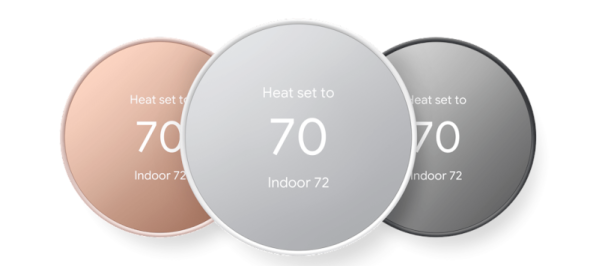
It is always controversial to have home assistants like the ones from Google or Amazon. There are privacy concerns, of course. Plus they maddeningly don’t always do what you intend for them to do. However, if you do have one, you’ve probably thought about something you wanted to do that would require programming. Sure, you can usually do a simple list, but really writing code wasn’t on the menu. But now, Google Home will allow you to write code. Well, at least script using a YAML file.

The script language is available in the web app and if you opt in on the mobile app as well. There’s a variety of ways you can trigger scripts and many examples you can start with.

Continue reading “Google Home Scripting”

Moving The Snail Mail To WiFi

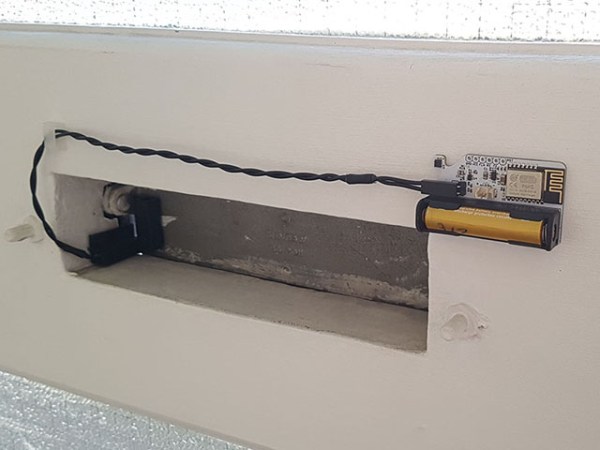
[Zak] loves getting a notification on his phone when he gets physical mail. Enough to wire his mailbox slot with an ESP8285 to send him alerts. Previously, [Zak] used a cellular-based solution as the mailbox slot was not within WiFi range. However, the network provider for the A9G GPRS module decided to move to different towers, and suddenly the module didn’t work. Unable to find a provider that had sensible pricing, he got to work redesigning the module.

The mailbox was now in a WiFi network range, meaning he no longer had to use cellular. This dramatically simplifies the design and uses an ESP-M2 module (think ESP8266 but with embedded flash). To maximize battery life, the ESP is entirely off most of the time. A reed switch triggers a 74LVC1G98 NAND gate with an inverted input. This enables the 3.3 voltage regulator. A 4uF capacitor holds the voltage regulator on for 716ms, giving the ESP8266 time to boot and drive the second pin of the logic gate so it can stay on. Once the web request completes (a call to a PHP server that takes 4-5 seconds, including WiFi association), it pulls the pin low, and the system powers off. With a custom server, [Zak] can include a few goodies, such as temperature and humidity from the SHT32-DIS sensor.

So far, the system has been chugging along for seven months and over 110 mail notifications and has only dropped 0.3v, suggesting that the battery should hold out for another year or two before recharging. The code and schematics are up on GitHub. We love the low-power focus and the handy circuit explanation that makes it easy to use in other projects.

Reverse Engineering A Better Night’s Sleep

All you want is a decent night’s sleep, so you decide to invest in one of those fancy adjustable beds. At first, it’s fine — being able to adjust the mattress to your needs on the fly is a joy, and yet…something isn’t quite right. Something nags at you every night, thwarting your slumber and turning your dreams of peaceful sleep into a nightmare once you realize your bed has locked you into a vertically integrated software ecosystem from which there’s no escape.

Or is there? That’s what [Chris Laplante] wanted to know, and why he reverse-engineered his Tempur-Pedic remote control. As many products these days do, his bed was touted as having an Android application for smartphone adjustability, but alas, the app hasn’t been updated since 2014 (!) and doesn’t appear to work on modern phones. [Chris] decided to take matters into his own hands and build a gateway to talk to the bed using its native RF protocol.

Most good reverse engineering stories start with research, and this one is no exception. Digging into the FCC database revealed a wealth of clues, such as the frequency — 433-MHz ISM band, no surprise — and even spectrum analyzer screenshots of the remote’s signals. A HackRF One revealed more about the signals, but it turned out that sniffing in on the SPI bus between the microcontroller and the Si4431 RF transceiver with a Salae logic analyzer was more fruitful, allowing him to dig into the packet structure.

The engineers at Tempur-Pedic threw quite a few challenges at [Chris], like an application-level CRC in addition to the CRC used by the Si4431, and interesting complications to control the massage features of the bed. In the end, [Chris] managed to get a pretty complete snapshot of the conversation between the bed and the remote, and is now in the process of building a gateway that’ll actually connect to his phone, plus integrate into his home automation system. We’re looking forward to updates on that.

A Lightweight Smart Home Server

Working towards automating a few things in a home often seems simple on the surface, but it’s easy for these projects to snowball into dozens of sensors and various servos, switches, and cameras strewn about one’s living space. The same sort of feature creep sneaks into some of the more popular self-hosted home server platforms as well, with things like openHAB requiring so much computing power that they barely function on something like a Raspberry Pi. [Paulo] thought there should be a more lightweight way of tackling a project like this, and set about building his own smart home server with help from some interesting software.

The project is based around the Dirigera hub from Ikea, partially because [Paulo] is planning to use other smart home devices from Ikea as he can easily find them where he is, and also because these devices tend to use Zigbee, a non-proprietary communications standard. This means that if he ever wants to swap out the hub for another one in the future, it won’t be difficult to do. From here the major hurdle is that using the default software from these devices is fairly limiting, so [Paulo] reached for a Raspbee 2 Zigbee gateway for use with a Raspberry Pi and an extremely lightweight and customizable web server called Mako to make this happen. Using Lua as the high-level language to tie everything together he was able to easily deploy the server to control the Ikea hub and devices and automate them in any way he sees fit.

While it is true that software like openHAB and others already exists to do virtually any home automation task that could be imagined, if you’re looking to do something with a bare minimum of computing power something like [Paulo]’s solution is likely going to be the fastest and most reliable method of getting a few things automated around the home. If you’re looking for something completely open source and built from the ground up, though, we have seen a few alternative smart home solutions like this one which don’t rely on any proprietary hardware or software, but do take a little bit more effort on the user’s part.

It Turns Out Parrots Love Videoconferencing

A recent experiment showed that parrots seem considerably enriched by the ability to video call other parrots. It’s important that the activity be done in a healthy and ethical way, so researchers do not recommend bird caretakers immediately slap a spare tablet in front of every bird — but the results are as heartwarming as they are encouraging.

Parrots are intelligent creatures known to require and benefit from intellectual and emotional stimulation, and their eyesight is such that they are able to use a display like a tablet screen much like a human would. They are also social creatures, and that led to researchers designing a pilot study to explore a parrot-to-parrot videoconferencing system.

The three-month study showed that when given the opportunity to initiate and receive video calls, every single parrot in the test group did so and all bird caretakers reported perceived benefits. Birds made friends, seemed highly motivated, and even learned behaviors by watching others.

Curious about the details? The published results (a PDF and two brief videos) covers all the bases. Parrot pals may also remember another time that technology enriched a feathered friend with a motorized buggy complete with beak-compatible joystick for steering.

Ultimate Garage Door Control Does The Job Brilliantly

[Stephen Carey] had previously relied on an Insteon garage door controller, only to have it perform poorly and fail at integrating with Alexa properly. Thus, he did what any good hacker would do, and built his own system instead.

The garage door was first outfitted with a pair of reed switches to sense when it was fully open or fully closed. The drive sprocket of the garage door was also set up to be monitored with magnets and Hall effect sensors, essentially creating a rotary encoder. This allows a ESP32 to monitor the door’s direction of travel, it’s position, and when it has hit the end stop in either direction. Using Micropython, [Stephen] whipped up some code to tie the garage door controls in with Home Assistant, complete with a neat visual display of the current door position.

There are millions of home automation products out there, many of which make annoying compromises that frustrate the end user. Sometimes, doing it your own way is the only way to get satisfaction!

DIY 3D Printed Rain Gauge Connects To Home Assistant

Measuring local rainfall has real practical uses, especially in agriculture, but most of us will have to admit that it’s at least partly about drawing cool graphs on a screen. Whatever your motivation, you can build this open source electronic rain gauge designed by [Sebastian] of Smart Solutions for Home, and integrate it with Home Assistant.

This 3D printed rain gauge is of the ubiquitous tipping bucket type and uses a magnet and hall effect sensor to detect every time the bucket tips out. The sensor is soldered to a custom PCB with ESP32 configured using ESP Home. By keeping it in deep sleep most of the time and only waking up when the tip of the bucket, [Sebastian] estimates it can run about a year on four AA batteries, depending on rainfall. The hinge mechanism is adjustable to ensure that both buckets will tip with the same volume of water.

FDM 3D printed enclosures are not known for being waterproof, so [Sebastian] coated the PCB with varnish to protect it from moisture. This worked well enough that he could leave it running in a bowl of water for a few hours without any ill effects. The end result looks good and should be able to handle the outdoors for a long time.

Building a weather station is a popular DIY project. Some of the interesting varieties we’ve seen are powered by supercapacitors, show readings on antique analog dials and convert parking distance sensor kit into a wind gauge.

Continue reading “DIY 3D Printed Rain Gauge Connects To Home Assistant”