Microcontrollers2332 Articles
Jump In When The Water Is Just Right With A Wireless Swimming Pool Thermometer
[David]’s family acquired a swimming pool. While it’s not his favorite activity in the world, every now and then he’ll indulge in the blue plastic bin full of water occupying previously pristine land in his backyard.
As he says, cool beer is pleasant, but cool water tends to put a damper on the experience. Rather than do something pedestrian like touch the water himself to discover its temperature; he saw an opportunity for a fun little project in a wireless temperature monitor.
The heart of the device is a Telecom Design TD1208 which runs on the French SigFox network. For a small fee any device on the network can send up to 140 12byte packets of data a day. Not a lot, but certainly acceptable for the Microchip MCP9700 temperature sensor it uses. He got the board up and running, and even made his own custom helical coil antenna.
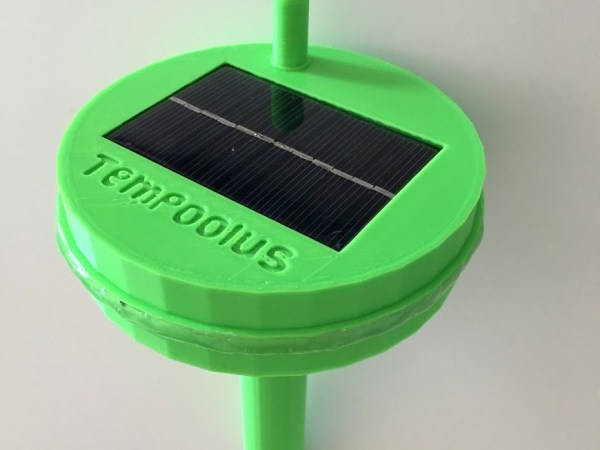
The case was 3D printed out of PLA. It’s a tiered cylindrical bobber. The wider top section floats on the water and the base acts as a ballast, holding the battery and sensor. The bobber is powered by a combination of a questionable Chinese lithium battery, charging circuit, and solar panel. [Dave] was keen to point out that the battery is, technically, water cooled.
He wrapped up the code for the bobber and used SigFox’s SDK to build a nice web interface. Now, when the rare mood strikes him, he can remain inside if the conditions aren’t right for a swim.
Animated Progress Bar Shows LCD New Tricks
When You Need A Scope, You Need A Scope
Sometimes there’s just no substitute for the right diagnostic tool. [Ankit] was trying to port some I2C code from an Arduino platform to an ARM chip. When the latter code wasn’t working, he got clever and wrote a small sketch for the Arduino which would echo each byte that came across I2C out to the serial line. The bytes all looked right, yet the OLED still wasn’t working.
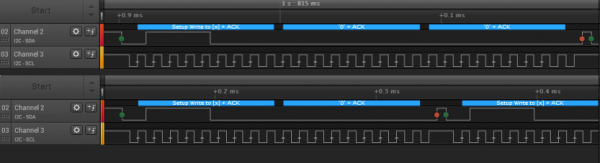
Time to bring out the right tool for the job: a logic analyzer or oscilloscope. Once he did that, the problem was obvious (see banner image — Arduino on top, ARM on bottom): he misunderstood what the ARM code was doing and was accidentally sending an I2C stop/start signal between two bytes. With that figured, he was on the right track in no time.
We just ran an epic post on troubleshooting I2C, and we’ll absolutely attest to the utility of having a scope or logic analyzer on hand when debugging communications. If you suspect that the bits aren’t going where they’re supposed to, there’s one way to find out. It’s conceivable that [Ankit] could have dug his way through the AVR’s hardware I2C peripheral documentation and managed to find the status codes that would have also given him the same insight, but it’s often the case that putting a scope on it is the quick and easy way out.
New Part Day: ATtiny102 And 104
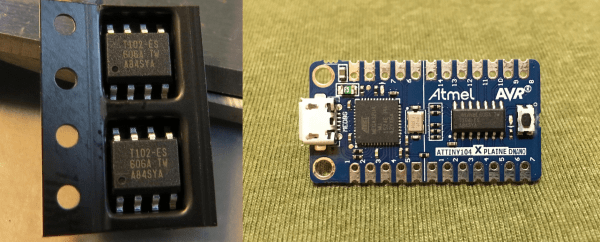
Atmel put out some new, small microcontroller chips early this year, and we’re just now starting to think about how we’d use them. The ATtiny102 and ATtiny104 (datasheet) sell for about a buck (US) and come in manageable SOIC packages with eight and fourteen pins respectively. It’s a strange chip though, with capabilities that fit somewhere between the grain-of-rice-sized ATtiny10 and the hacker-staple ATtiny25-45-85 series.
The ATtiny104 has a bunch of pins for not much money. It’s got a real hardware USART, which none of the other low-end AVRs do, and it’s capable of SPI in master mode. It has only one counter, but it’s a 16-bit counter, and it’s got the full AVR 10-bit ADC instead of the ATtiny10’s limited 8-bit ADC. The biggest limitation, that it shares with the ATtiny10, is that it has only 1 KB of program flash memory and 32 bytes (!) of RAM. You’re probably going to want to program this beast in assembler.
Read on for more reviews, and check out [kodera2t]’s video review at the end.
4-Bit Audio Output Via Voltage Reference
[Bruce Land] switched his microprocessor programming class over from Atmel parts to Microchip’s PIC32 series, and that means that he’s got a slightly different set of peripherals to play with. One thing that both chips lack, however is a digital-to-analog converter (DAC). Or do they? (Dun-dun-dun-duuuuhnnnn!)
The PIC part has a programmable, sixteen-level voltage reference. And what is a Vref if not a calibrated DAC? With that in mind, [Bruce] took to documenting its performance and starting to push it far beyond the manufacturer’s intentions. Turns out that the Vref has around 200 kHz of bandwidth. (Who would update a voltage reference 200,000 times per second?)
Anyway, [Bruce] being [Bruce], he noticed that the bits weren’t changing very often in anything more than the least significant bit: audio waveforms, sampled fast enough, are fairly continuous. This suggests using a differential PCM encoding, which knocks the bitrate down by 50% and saves a lot on storage. (Links to all the code for this experiment is inline with his writeup.)
The audio hacks that come out of [Bruce]’s Cornell ECE classes are always a treat. From the lock that you have to sing to open, to chiptunes programmed into an FPGA, there’s something for music fans of all inclinations.
3-Phase BLDC Motor Controller Will Run You $20 In Parts
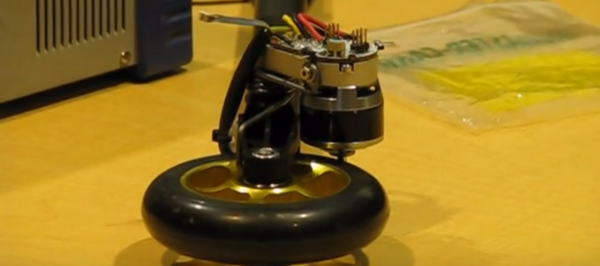
If you’re an active shopper on RC websites, you’ll find tiny motors spec’ed at hundreds of watts while weighing just a few grams, like this one. Sadly, their complementary motor controllers are designed to drive them at a high speed, which means we can only hit that “520-watt” power spec by operating in a max-speed-minimum-torque configuration. Sure, that configuration is just fine for rc plane and multicopter enthusiasts, but for roboticists looking to drive these bldc motors in a low-speed-high-torque configuration, the searches come up blank.
The days in the dust are coming to an end though! [Cameron] has been hard at work at a low cost, closed-loop controller for the robotics community that will take a conventional BLDC airplane motor and transform it into a high end servo motor. Best of all, the entire package will only run you about $20 in parts–including the position sensor!
“Another BLDC motor controller?” you might think. “Surely, I’ve seen this before“. Fear not, faithful readers; [Cameron’s] solution will get even the grumpiest of engineers to crack a smile. For starters, he’s closing the loop with a Melexis MLX90363 hall effect sensor to locate the rotor position. Simply glue a small magnet to the shaft, calibrate the magnetic field with one revolution, and–poof–a wild 14-bit encoder has appeared! Best of all, this solution costs a mere $5 to $10 in parts.
Next off, [Cameron] uncovered a little-known secret of the ATMEGA32u4, better known as the chip inside the Arduino Leonardo. It turns out that this chip’s TIMER4 peripheral contains a feature designed exclusively for 3-phase brushless motor control. Complementary PWM outputs are built into 3 pairs of pins with configurable dead time built into the chip hardware. Finally, [Cameron] is pulsing the FETs at a clean 32-Khz — well beyond the audible range, which means we won’t hear that piercing 8-Khz whine that’s so characteristic of cheap BLDC motor controllers.
Curious? Check out [Cameron’s] firmware and driver design on the Githubs.
Of course, there are caveats. [Cameron’s] magnetic encoder solution has a few milliseconds of lag that needs to be characterized. We also need to glue a magnet to the shaft of our motor, which won’t fly in all of our projects that have major space constraints. Finally, there’s just plain old physics. In the real world, motor torque is directly proportional to current, so stalling an off-the-shelf bldc motor at max torque will burn them out since no propeller is pushing air through them to cool them off. Nevertheless, [Cameron’s] closed loop controller, at long last, can give the homebrew robotics community the chance to explore these limits.