Ride DIY Or Die This Badge-Less Suzuki

A few years ago, [Charles] picked up a sweet Suzuki motorcycle that checked all the boxen: it was in good shape, bore a few useful upgrades and a box of spare parts, plus the price was right. Though he assumed that he had pored over every picture on the classified site before buying, it wasn’t until later that [Charles] realized that something was indeed missing from the bike — a piece of chrome that does little more than to cover the tee in the brake line and bear the Suzuki brand. Once he saw the problem, he couldn’t un-see it, you know? And at that point, he just had to have that little piece, even if he had to make it himself.

That wasn’t the original plan, of course, but bike parts are expensive to begin with and only get worse as size, condition, and rarity increase. [Charles]’ quest to find this piece was halfway successful; he found a reasonable-but-rusty facsimile of the right part, although the emblem portion was long gone. Then he remembered the wife’s vinyl cutter.

Now, let’s stop right there. If you know anything at all about these vinyl cutters, you know that they are basically glorified 2D plotters with a knife attached where a pen would be. Send it any 2D file and you’re good? No, no; of course not. These things are locked down by the manufacturers.

Fortunately, [Charles] found inkscape-silhouette, which makes light work of sending SVGs to the machine. After much back and forth and maybe a bit of coin-flipping, [Charles] settled on the classy, stylized ‘S’ version rather than the full-on Suzuki badge. We think it looks great, and we’ll never tell anyone.

While this isn’t quite the type of badge we’d normally talk about, it’s a great project nonetheless, and it’s always nice to hear about projects that open up otherwise closed-source hardware.

Designing A LoRa Gateway During A Part Shortage

It’s fair to say that right now is probably the worst possible time you could choose to design a new piece of hardware. Of course the reality is that, even in the middle of a parts shortage that’s driving the cost of many components through the roof (if you can even find them), we can’t just stop building new devices. In practice, that means you’ll need to be a bit more flexible when embarking on a new design — it’s like the Stones said: “You can’t always get what you want / But if you try sometime you’ll find / You get what you need”

For [Ryan Walmsley], that meant basing his new outdoor LoRa gateway on the ubiquitous Raspberry Pi was a non-starter. So what could he use in its place? The software situation for the Nano Pi Duo looked pretty poor, and while the Onion Omega 2+ was initially compelling, a bug in the hardware SPI seemed to take it out of the running. But after more research, he found there was a software implementation that would fit the bill. Continue reading “Designing A LoRa Gateway During A Part Shortage”

This Custom Workbench Will Make You Flip

In a recent video, [SomeSkillStudio] created a tidy tool storage system for their slim garage workbench. We have seen the “five knuckle” 270 degree hinges used here before and knew they’d enable some cool hacks. Here you’ll see how he puts this unique type of hardware to work building a densely packed work surface. For anyone who’s set up shop in a garage that’s somehow also supposed to still regularly host vehicles, you’ll know how important it is to have a place to put everything away and make it easy to do so.

The video has several great tips on making sure everything fits together, something key for anyone reproducing this with their own tool collection. If you have even less space, we have some great past workshop builds from portable, to tiny, to elaborate. Even if you’ve already established a place to work, we have tips on organizing your shop, giving each tool a home in a shadow board or across an infinite grid. Clearly, making a work space is one of our favorite kinds of projects.

Continue reading “This Custom Workbench Will Make You Flip”

An In-Depth Look At The Haptic Smart Knob

At Hackaday, we love those times when we get a chance to follow up on a project that we’ve already featured. Generally, it’s because the project has advanced in some significant way, which is always great to see. Sometimes, though, new details on the original project are available, and that’s where we find ourselves with [Scott Bez] and his haptic smart knob project.

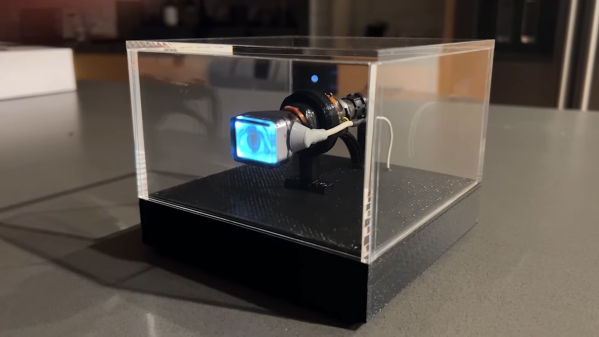
Alert readers may recall [Scott]’s announcement of this project back in March. It made quite a splash, with favorable comments and a general “Why didn’t I think of that?” vibe. And with good reason; the build quality is excellent, and the idea is simple yet powerful. By attaching a knob to the shaft of a brushless DC motor and mounting a small circular LCD screen in the middle, [Scott] came up with an input device that could be reprogrammed on the fly. The BLDC can provide virtual detents at any interval while generating haptic feedback for button pushes, and the LCD screen can provide user feedback.

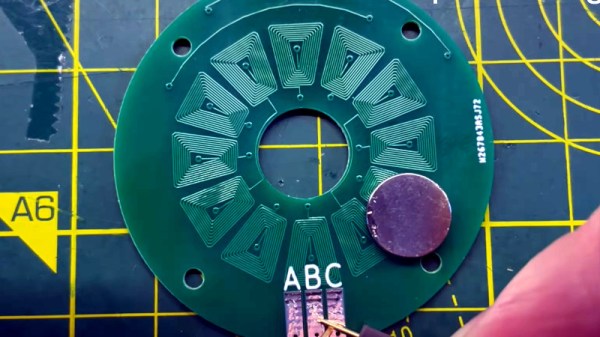
But how is such a thing built? That’s the subject of the current video, which has a ton of neat design details and build insights. The big challenge for [Scott] was supporting the LCD screen in the middle of the knob while still allowing the knob — and the motor — to rotate. Part of the solution was, sadly, a hollow-shaft motor that was out of stock soon after he released this project; hopefully a suitable replacement will be available soon. Another neat feature is the way [Scott] built tiny strain gauges into the PCB itself, which pick up the knob presses that act as an input button. We also found the way button press haptics are provided by a quick jerk of the motor shaft very clever.

This is one of those projects that seems like a solution waiting for a problem, and something that you’d build just for the coolness factor. Hats off to [Scott] for following up a sweet build with equally juicy details.

Continue reading “An In-Depth Look At The Haptic Smart Knob”

Working With BGAs: Design And Layout

The Ball Grid Array, or BGA package is no longer the exclusive preserve of large, complex chips on computer motherboards: today even simple microcontrollers are available with those little solder balls. Still, many hobbyists prefer to stay with QFP and QFN packages because they’re easier to solder. While that is a fair point, BGA packages can offer significant space savings, and are sometimes the only choice: with the ongoing chip shortage, some other package versions might simply be unavailable. Even soldering doesn’t have to be complicated: if you’re already comfortable with solder paste and reflow profiles, adding a BGA or two into the mix is pretty easy.

In this article we’ll show that working with BGA chips is not as difficult as it may seem. The focus will be on printed circuit board design: how to draw proper footprints, how to route lots of signals and what capabilities your PCB manufacturer should have. We’ll cover soldering and rework techniques in a future article, but first let’s take a look at why BGAs are used at all.

Continue reading “Working With BGAs: Design And Layout”

Simple Snap Action Mechanism Is 100% 3D Printed

Plastics are wonderous materials, much loved for their ability to elastically deform and spring back to their original shape. They’re a category of materials perfect for creating things like living hinges and similar mechanisms, and this 3D printed snap action device shows that off admirably.

The device consists of an outer housing, into which two printed springs are inserted. These leaf springs are curved and protrude towards the center of the housing. A slide is then inserted into the housing with a cam in its middle. The cam allows the slide to push past the springs when actuated, while also holding it in place at rest.

As demonstrated the mechanism reliably snaps back and forth between its two positions in a satisfying manner. It’s shown with one side of the housing removed so we get a good idea of how it works. It’s 100% 3D printed, as well. Anyone looking to replicate the design should note the importance of printing orientation, particularly in the case of the spring pieces, which won’t work if layered up in the wrong way.

Overall, it’s a neat design that could prove useful for those eager to build printed switches or other mechanical devices. It’s also simply a great way to learn about 3D printed springs and working with deformable plastic structures. Video after the break.

Continue reading “Simple Snap Action Mechanism Is 100% 3D Printed”

Swapped ROM Revives Ailing HP-48S Calculator

Buying broken gear for cheap is time honored hacker tradition, and while we might not always be successful in reviving it, rarely do we come away empty handed. There’s always parts to salvage, and you can’t put a price on the knowledge to be gained when poking around inside an interesting piece of hardware. So we’re not surprised at all to hear that [Tomas Pavlovic] jumped at the chance to grab this faulty HP-48S calculator for a couple bucks.

Luckily for us, the story doesn’t end at the bottom of his parts bin. When he got the HP-48S back home, he immediately set out to see if it could be repaired. After changing out a few choice components and not seeing any result in the device’s behavior, he became suspicious that the problem may be with the firmware; specifically, the soldered-on chip that holds it.

Dumping the original ROM.

After carefully lifting the NEC uPD23C2000GC from its resting place for the last 30 years or so, he wired up an adapter that let him connect the chip to his programmer so its contents could be dumped. Rather than trying to find another ROM chip, he decided to wire in a socket and found a re-writable SST39SF040 that could stand in as a replacement. Flashing a fresh copy of the firmware to the new socketed chip got the calculator up and running again, with the added bonus of allowing [Tomas] to pull the chip and flash a different firmware version should he care to experiment a bit.

Now, we know what you’re thinking. Where was the fix? What exactly brought this piece of 1990s gear back to life? That part, unfortunately, isn’t very clear. You’d think if the original ROM chip was somehow faulty, [Tomas] wouldn’t have been able to so easily pull a valid firmware image from it. That leaves us with some pretty mundane possibilities, such as a bad solder joint on the chip’s pins. If that was indeed the case, this fix could have been as simple as running a hot iron over the pins…but of course, where’s the fun in that?

Update: We heard back from [Tomas], and it turns out that when compared to a known good copy, the dumped firmware did have a few swapped bits. His theory is that the NEC chip is in some weird failure mode where the calculator wouldn’t run, but it was still functional enough to get most of the content off of it. What do you think? Let us know in the comments.