Illustrated Kristina with an IBM Model M keyboard floating between her hands.

Keebin’ With Kristina: The One With The (Mc)Cool Typewriter

A hand and wrist with a gesture detection ring and a control box on the wrist.
Image by [ambrush] via Hackaday.IO
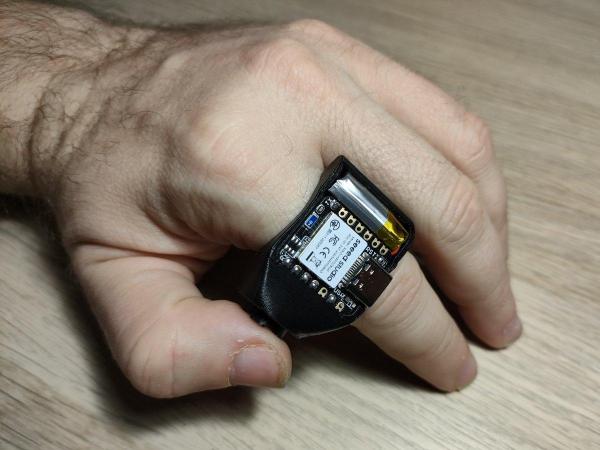
Okay, so this isn’t a traditional keyboard, but you can probably figure out why the RuneRing is here. Because it’s awesome! Now, let me give you the finer points.

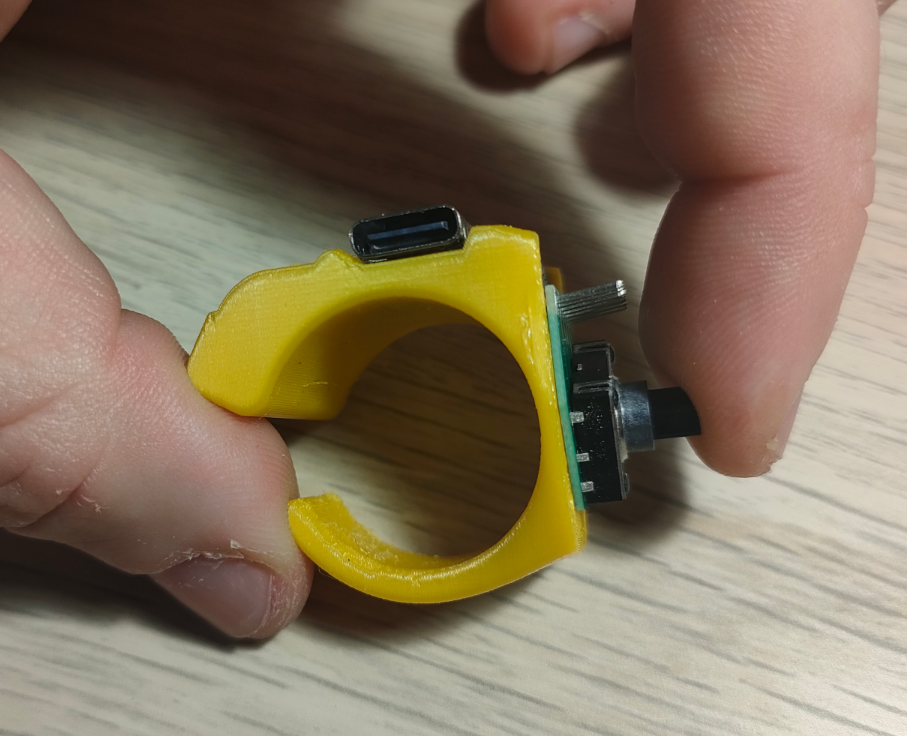
Hugely inspired by both ErgO and Somatic, RuneRing is a machine learning-equipped wearable mouse-keyboard that has a configurable, onboard ML database that can be set up to detect any gesture.

Inside the ring is a BMI160 6-axis IMU that sends gesture data to the Seeed Studio nRF52840 mounted on the wrist. Everything is powered with an 80mAh Li-Po lifted from a broken pair of earbuds.

Instead of using a classifier neural network, RuneRing converts IMU data to points in 24-dimensional space. Detecting shapes is done with a statistical check. The result is a fast and highly versatile system that can detect a new shape with as few as five samples.

Continue reading “Keebin’ With Kristina: The One With The (Mc)Cool Typewriter”

Microsoft Sculpt Keyboard Lives Again With RP2040

Hackaday readers are likely the kind of folks that have a favorite keyboard, so you can probably imagine how devastating it would be to find out that the board you’ve sworn by for years is going out of production. Even worse, the board has some internal gremlins that show up after a few years of use, so functional ones in the second-hand market are becoming increasingly rare. So what do you do?

This is the position [TechBeret] recently found himself in with his beloved Sculpt keyboard. When Microsoft decided to step back from the peripheral market last year, he started looking at alternatives. Finding none of them appealing, he decided instead to breathe new life into the ergonomic keyboard with the RP2040. Every aspect of the resurrection is covered in a phenomenally detailed write-up on his blog, making this a valuable case study in modernizing peripherals with the popular microcontroller.

Continue reading “Microsoft Sculpt Keyboard Lives Again With RP2040”

I2C For Hackers: Digging Deeper

Last time, I gave you an overview of what you get from I2C, basics like addressing, interface speeds, and a breakdown of pullups. Today, let’s continue looking into I2C capabilities and requirements – level shifting, transfer types, and quirks like combined transfers or clock stretching.

Level Shifting

Continue reading “I2C For Hackers: Digging Deeper”

A keyboard built into a commercial foot rest.

Floorboard Is A Keyboard For Your Feet

Whether you have full use of your hands or not, a foot-operated keyboard is a great addition to any setup. Of course, it has to be a lot more robust than your average finger-operated keyboard, so building a keyboard into an existing footstool is a great idea.

When [Wingletang]’s regular plastic footrest finally gave up the ghost and split in twain, they ordered a stronger replacement with a little rear compartment meant to hold the foot switches used by those typing from dictation. Settling upon modifiers like Ctrl, Alt, and Shift, they went about designing a keyboard based on the ATmega32U4, which does HID communication natively.

For the switches, [Wingletang] used the stomp switches typically found in guitar pedals, along with toppers to make them more comfortable and increase the surface area. Rather than drilling through the top of the compartment to accommodate the switches, [Wingletang] decided to 3D print a new one so they could include circuit board mounting pillars and a bit of wire management. Honestly, it looks great with the black side rails.

If you want to build something a little different, try using one of those folding stools.

Illustrated Kristina with an IBM Model M keyboard floating between her hands.

Keebin’ With Kristina: The One With The Folding Typewriter

Have you built yourself a macro pad yet? They’re all sorts of programmable fun, whether you game, stream, or just plain work, and there are tons of ideas out there.

A DIY macro pad with key switches, dual linear pots, a rotary encoder, a screen, and a speaker.
Image by [CiferTech] via Hackaday.IO
But if you don’t want to re-invent the wheel, [CiferTech]’s MicroClick (or MacroClick — the jury is still out) might be just what you need to get started straight down the keyboard rabbit hole.

This baby runs on an ATmega32U4, which known for its Human Interface Device (HID) capabilities. [CiferTech] went with my own personal favorite, blue switches, but of course, the choice is yours.

There are not one but two linear potentiometers for volume, and these are integrated with WS2812 LEDs to show where you are, loudness-wise. For everything else, there’s an SSD1306 OLED display.

But that’s not all — there’s a secondary microcontroller, an ESP8266-07 module that in the current build serves as a packet monitor. There’s also a rotary encoder for navigating menus and such. Make it yours, and show us!

Continue reading “Keebin’ With Kristina: The One With The Folding Typewriter”

A Simple 6DOF Hall Effect ‘Space’ Mouse

The 3DConnexion Space mouse is an interesting device but heavily patent-protected, of course. This seems to just egg people on to reproduce it using other technologies than the optical pickup system the original device uses. [John Crombie] had a crack at building one using linear Hall effect sensors and magnets as the detection mechanism to good — well — effect.

Using the SS49E linear Hall effect sensor in pairs on four sides of a square, the setup proves quite straightforward. Above the fixed sensor plate is a moveable magnet plate centred by a set of springs.  The magnets are aligned equidistant between each sensor pair such that each sensor will report an equal mid-range signal with zero mechanical displacement. With some simple maths, inputs due to displacements in-plane (i.e., left-right or up-down) can be resolved by looking at how pairs compare to each other. Rotations around the vertical axis are also determined in this manner.

Tilting inputs or vertical movements are resolved by looking at the absolute values of groups or all sensors. You can read more about this by looking at the project’s GitHub page, which also shows how the to assemble the device, with all the CAD sources for those who want to modify it. There’s also a detour to using 3D-printed flexures instead of springs, although that has yet to prove functional.

On the electronics and interfacing side of things, [John] utilises the Arduino pro micro for its copious analog inputs and USB functionality. A nice feature of this board is that it’s based on the ATMega32U4, which can quickly implement USB client devices, such as game controllers, keyboards, and mice. The USB controller has been tweaked by adjusting the USB PID and VID values to identify it as a SpaceMouse Pro Wireless operating in cabled mode. This tricks the 3DConnexion drivers, allowing all the integrations into CAD tools to work out of the box.

We do like Space Mouse projects. Here’s a fun one from last year, an interesting one using PCB coils and flexures, and a simple hack to interface an old serial-connected unit.


Using A 2D Scanner To Make 3D Things

[Chuck Hellebuyck] wanted to clone some model car raceway track and realised that by scanning the profile section of the track with a flatbed scanner and post-processing in Tinkercad, a useable cross-section model could be created. This was then extruded into 3D to make a pretty accurate-looking clone of the original part. Of course, using a flatbed paper scanner to create things other than images is nothing new, if you can remember to do it. A common example around here is scanning PCBs to capture mechanical details.

The goal was to construct a complex raceway for the grandkids, so he needed numerous pieces, some of which were curved and joined at different angles to allow the cars to race downhill. After printing a small test section using Ninjaflex, he found a way to join rigid track sections in curved areas. It was nice to see that modern 3D printers can handle printing tall, thin sections of this track vertically without making too much of a mess. This fun project demonstrates that you can easily combine 3D-printed custom parts with off-the-shelf items to achieve the desired result with minimal effort.

Flatbed scanner hacks are so plentiful it’s hard to choose a few! Here’s using a scanner to recreate a really sad-looking PCB, hacking a scanner to scan things way too big for it, and finally just using a scanner as a linear motion stage to create a UV exposure unit for DIY PCBs.

Continue reading “Using A 2D Scanner To Make 3D Things”