Illustrated Kristina with an IBM Model M keyboard floating between her hands.

Keebin’ With Kristina: The One With The Pumpkin Keyboard

Oh, the places plastic has taken us. One of the arguably better inventions might be the fake carve-able pumpkin, which is more or less guaranteed not to shrivel up and rot on your porch, though it might get smashed by wily teenagers along with its organic brethren next door.

Though they will be around much longer, the fake kind lend themselves to all kinds of creations, including this one from [BunkEbear] which was “a nightmare” to build. Yeah, we bet it was along the lines of [Aaron Rasmussen]’s spherical keyboard, except inside out, since that one’s concave.

This tasty keyboard is modeled after the Malling-Hansen writing ball, which is arguably the first commercial typewriter and dates to 1865. [BunkEbear]’s pumpkin version features the 54-key layout, plus two additional for Shift and Escape to suit modern needs. Since the inside of the pumpkin is pretty small, [BunkEbear] wired all the connections close together on the protoboard, and used JST extension cables between the Glorious Panda switches themselves and the Arduino Pro Micro.

Continue reading “Keebin’ With Kristina: The One With The Pumpkin Keyboard”

Keyboard One Is An Ear Of Corne

There are all kinds of avenues into the mechanical keyboarding hobby, and one of the more well-traveled ones runs between coworkers. [crsayen] aka [DrJamesOIncandenza] has one such relationship, and was turned on to the CRKBD a while back by an office mate. For the uninitiated, that’s short for Corne keyboard, which is a column-staggered 3×6 split keyboard with three thumb keys per hand.

While [JOI] liked the Corne well enough, especially with chocs, he got the occasional craving to slap (that’s what we’re calling typing on linears from now on — slapping vs. clacking) on some silent MX switches and so built this Corne-derivative monoblock split called Keyboard One. Aside from the more obvious differences,

We think this looks rather spanking for a first keyboard, sort of like a slightly smaller Alice or something. But you don’t have to go to great lengths to obtain [JOI]’s knowledge, for everything is on GitHub. [JOI] says they sort of regret going 3×6, but are already planning another build with more keys. See, that’s the spirit.

Via KBD #101

Three Computers, One Keyboard With USB Triplexer

Many of us will have the problem of several computers on the same desk, and to avoid clutter we’ll use a KVM switch to share the peripherals. [The Turbanned Engineer] has an interesting solution to this problem in the form of a USB triplexer. It’s a device that routes USB data lines depending upon which of its connections is powered up.

The circuit is simple enough: a CMOS analogue multiplexer does the routing, and a set of opto-couplers do the selecting based on the power inputs. A set of USB A sockets connect to the computer, and a USB B socket connects to the peripheral.

We’re not entirely sure whether an analogue multiplexer chip would be good for the higher-speed USB data rates, but since keyboards and mice talk at the slowest data rates, we think he’ll get away with it. Either way making a USB switch however basic with such mundane components has something of the hack about it. What he does with the display we’re not so sure about, but at least his keyboard and mouse woes are dealt with.

Other similar switches we’ve featured have been somewhat more basic.

DeltaPen: Drawing, Painting And Taking Notes Without The Drawing Tablet

Over the decades, a lot of attempts have been made to try and make pens and pencils “smart”. Whether it’s to enable a pen to also digitally record what we’re writing down on paper, to create fully digital drawings with the haptics of inks and paints, or to jot down some notes on a touch screen, past and present uses are legion.

DeltaPen internal components and their function. (Credit: SIP, Guy Luethy et al.)

Where SIP Lab’s DeltaPen comes in as an attempt at a smart pen that acts more like the pen of a drawing tablet, just minus the tablet.

This project is related to the decidedly more clumsy Flashpen which we featured previously. Due to the use of new flow sensors, the underlying surface (e.g. a desk) can be tracked without needing to be level with it, which allowed for the addition of a pressure-sensitive tip.

In addition the relative motion of the pen is measured, and there is haptic feedback, which allow for it to be used even for more delicate applications such as drawing. The results of trials with volunteers across a range of tasks is described in their presented paper (PDF).

Continue reading “DeltaPen: Drawing, Painting And Taking Notes Without The Drawing Tablet”

One Of The Worst Keyboards Ever, Now An Arduino Peripheral

For British kids of a certain age, their first experience of a computer was very likely to have been in front of a Sinclair ZX81. The lesser-known predecessor to the wildly-successful ZX Spectrum, it came in at under £100 and sported a Z80 processor and a whopping 1k of memory. In the long tradition of Sinclair products it had a few compromises to achieve that price point, the most obvious of which was a 40-key membrane keyboard. Those who learned to code on its frustrating lack of tactile feedback may be surprised to see an Arduino project presenting it as the perfect way to easily hook up a keyboard to an Arduino.

Like many retrocomputing parts, the ZX81 ‘board has been re-manufactured, to the joy of many a Sinclair enthusiast. It’s thus readily available and relatively cheap (we think they can be found for less than the stated 20 euros!), so surprisingly it’s a reasonable choice for an Arduino project. The task of trying to define by touch the imperceptible difference in thickness of a ZX81 key will bring a true retrocomputing experience to a new generation. Perhaps if it can be done on an Mbed then someone might even make a ZX81 emulator on the Arduino.

We’re great fans of the ZX81 here at Hackaday, for some of us it was that first computer. Long may it continue to delight its fans!

Hackaday Prize 2022: A Cheap And Effective Mouth Joystick Mouse

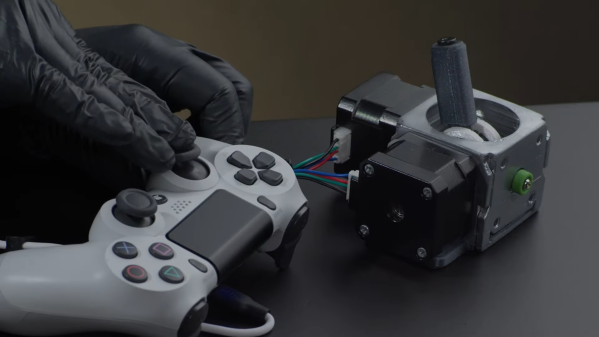
Some people have issues using regular computer mice, and need alternative input devices that suit their needs. [Olman Orozco] designed an affordable mouth-joystick intended to work as a mouse to suit that very use case.

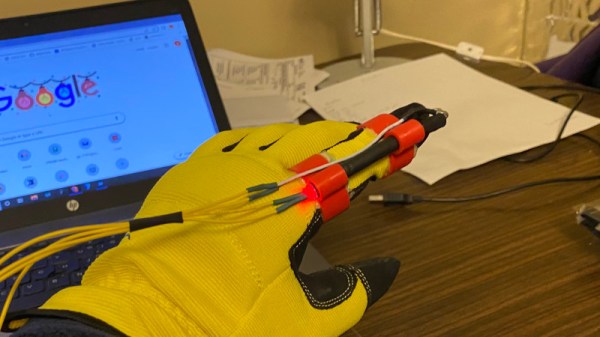
A simple frame allows the controller to be held near the mouth for use.

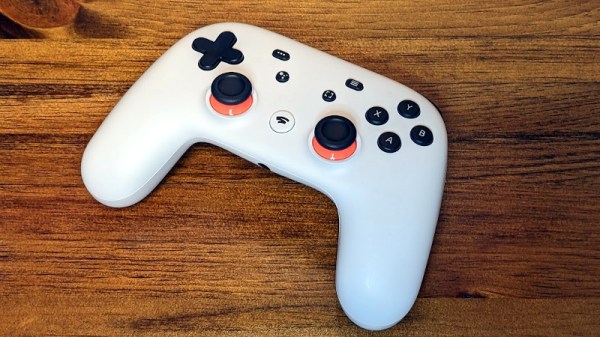
The build is based on a simple USB gamepad. A mouse emulator program is used to turn the thumbstick movements into mouse movements, and button presses into mouse clicks.

The trick is that the thumbstick is turned into a mouth-activated joystick, making the device perfect for those with limited-to-no movement in their arms. This is achieved with a pen body used to extend the joystick so it can be readily actuated with the mouth. A custom puff-switch is also integrated into the mouth-joystick, built out of a balloon, bottle caps, and a micro switch. This enables the user to click on things without the need for another button.

Overall, it’s a great hack that turns cheap, everyday components into a useful piece of accessibility hardware. As a bonus, it can be built using only simple tools. [Olman] notes there’s no need for a 3D printer or other advanced parts or tools to build the device.

Game controllers are often important devices when it comes to accessibility hacking, as we’ve seen before. Continue reading “Hackaday Prize 2022: A Cheap And Effective Mouth Joystick Mouse”

A left-hand side unit of a split keyboard. The keys are black with RGB lighting and the key legends are displayed on small OLED screens in each key.

Poly Keyboard Has Screens In Every Key

Aspiring polyglots can be stymied by differing keyboard layouts and character sets when switching between languages. [Thomas Pollak]’s Poly Keyboard circumvents this problem by putting a screen in every key of the keyboard.

In his extensive build logs, [Pollak] details the different challenges he’s faced while bringing this amazing keyboard to life. For example, the OLED screens need glyph rendering to handle the legends on the keys. Since the goal is true universal language support, he used the Adafruit-GFX Library as a beginning and was able to extend support to Japanese, Korean, and Arabic so far in his custom fork of QMK.

The attention to detail on this build is really impressive. Beside the dedication to full glyph support, [Pollak] has measured the amount of extra force the flex cables from the OLEDs add to the actuation of the keyswitches. For the Gateron yellow switch he tested, the difference was about 62.2 g versus the initial 49.7 g.

In case you’re thinking you’ve seen other screen keyboard projects, [Pollak] includes a roundup of similar projects in his logs as well. This isn’t the first keyboard we’ve seen here at Hackaday with an OLED on top of a keyswitch, although [Voidstar Lab]’s MiRage only has three screen keys that were removed in a later iteration. If you’d like a more conventional fixed display in your keyboard, check out [Peng Zhihui]’s modular board with an e-ink display and haptic feedback knob.

Continue reading “Poly Keyboard Has Screens In Every Key”