A Pico-Based ZX Spectrum Emulator

The ZX Spectrum was a popular computer of the 8-bit era. Now, it’s possible to emulate this machine on a microcontroller so cheap that it’s literally been given away on the front cover of magazines. Yes, we’re talking about the Pico ZX Spectrum project.

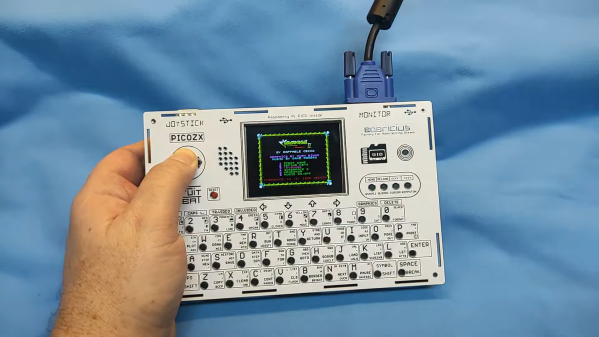
The project consists of all the necessary code to emulate a ZX Spectrum upon the hardware of the RP2040 microcontroller that makes up the Raspberry Pi Pico. The community has then taken this code and run with it, using it as the basis for all manner of different ZX Spectrum builds. If so desired, you can go barebones and use the Pico to run a ZX Spectrum off a breadboard with HDMI video output. Alternatively, you can build something like the PicoZX from [Bobricius]. The handheld computer features a PCB-based housing, along with an LCD and an integrated keyboard. Other configurations support features like USB keyboards, VGA outputs, and working sound output.

It’s great to see a classic 8-bit computer reimagined in all kinds of new tribute form factors. The Spectrum was always beloved for its neat all-in-one design, and there are several modern remixes that riff on that theme. The fact that they can all be powered by a cheap single-board microcontroller is all the more astounding. Video after the break.
Continue reading “A Pico-Based ZX Spectrum Emulator”

An HP9863C partially disassembled on a workbench

Repairing A $25,000 HP Workstation To Run Pac-Man

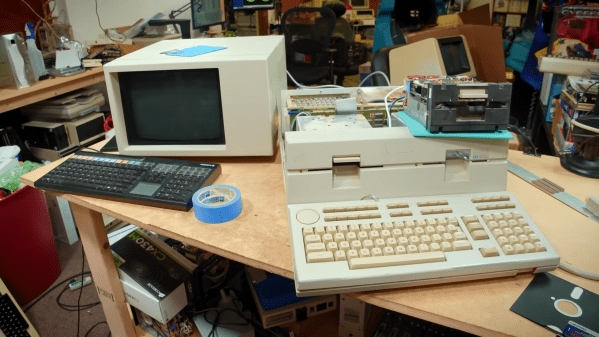
The microcomputer revolution of the 1970s and 1980s turned computers from expensive machines aimed at professionals into consumer products found in the average household. But there always remained a market for professional users, who bought equipment that was so far ahead of consumer gear it seemed to belong in a different decade. While a home computer enthusiast in 1981 might fork out a few hundred dollars for an 8-bit machine with 64 KB of memory, a professional could already buy a 32-bit workstation with 2.8 megabytes of RAM for the price of a brand-new sports car. [Tech Tangents] got his hands on one of those machines, an HP Series 200 9863C from 1981, and managed to get it up and running.

The machine came in more-or-less working condition. The display cable turned out to be dodgy, but since it was just a straight-through sub-D cable it was easily replaced. Similarly, the two 5.25″ floppy drives were standard Tandon TM100-2As which [Tech Tangents] had some experience in repairing, although these specific units merely needed a thorough cleaning to remove forty years’ worth of dust. Continue reading “Repairing A $25,000 HP Workstation To Run Pac-Man

If Not Ethernet…

It is hard to imagine today, but there was a time when there were several competing network technologies. There was Ethernet, of course. But you could also find token ring, DEC Net, EcoNet, and ARCNet. If you’ve never dug into ARCNet, [Retrobytes] has a comprehensive history you can watch that will explain it all.

Like token ring, ARCNet used a token-passing scheme to allow each station on the network to take turns sending data. Unlike token ring and Ethernet, the hardware setup was much less expensive. Along the way, you get a brief history of the Intel 8008 CPU, which, arguably, started the personal computer revolution.

Like most networking products of the day, ARCNet was proprietary. However, by the late 1980s, open standards were the rage, and Ethernet took advantage. Up until Ethernet was able to ride on twisted pairs, however, it was more expensive and less flexible than ARCNet.

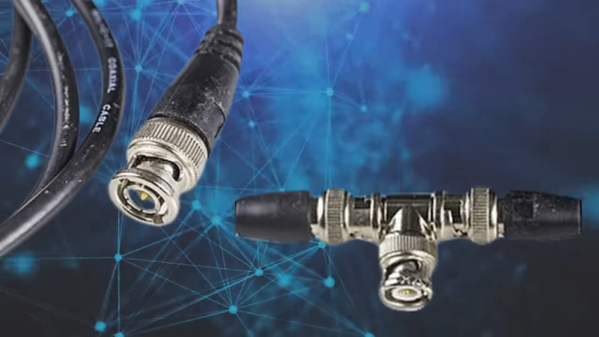
The standard used RG-62/U coax and either passive or active hubs in a star configuration. The coax could be up to 2,000 feet away, so very large networks were feasible. It was also possible to share the coax with analog videoconferencing.

Looking back, ARCNet had a lot to recommend it, but we know that Ethernet would win the day. But [Retrobytes] explains what happened and why.

If you missed “old-style Ethernet,” we can show you how it worked. Or, check out EcoNet, which was popular in British schools.

Persistence Pays In TI-99/4A Cassette Tape Data Recovery

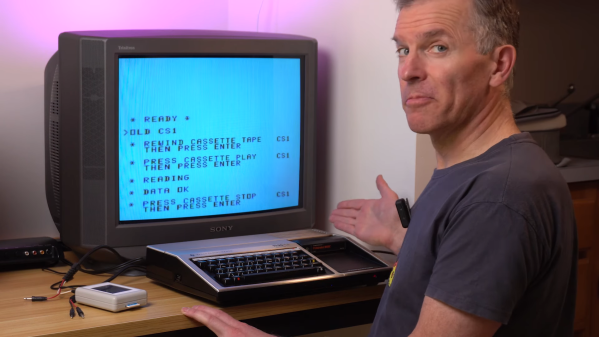
In the three or four decades since storing programs on audio cassettes has been relevant, a lot of irreplaceable personal computing history has been lost to the ravages of time and the sub-optimal conditions in the attics and basements where tapes have been stored. Luckily, over that time we’ve developed a lot of tools and techniques that might make it possible to recover some of these ancient treasures. But as [Noel] shows us, recovering data from cassette tapes is a tricky business.

His case study for the video below is a tape from a TI-99/4A that won’t load. A quick look in Audacity at the audio waveform seems to show the problem — an area of severely attenuated signal. Unfortunately, no amount of boosting and filtering did the trick, so [Noel] had to dig a bit deeper. It turns out that the TI tape interface standard, with its redundant data structure, was somewhat to blame for the inability to read this particular tape. As [Noel] explains, each 64-bit data record is recorded to tape twice, along with a header and a checksum. If neither record decodes correctly, then tape playback just stops.

Luckily, someone who had already run into this problem spun up a Windows program to help. CS1er — our guess would be “Ceaser” — takes WAV file input and loads each record, simply flagging the bad ones instead of just bailing out. [Noel] used the program to analyze multiple recordings of the same data and eventually got enough good records to reassemble the original program, a game called Dogfight — or was it Gogfight? Either way, he managed to get most of the data off the tape, and since it was a BASIC program, it was pretty easy to figure out the missing bytes by inspection.

[Noel]’s experience will no doubt be music to the ears of the TI aficionados out there. Of which we’ve seen plenty, from the TI-99 demoscene to running Java on one, and whatever this magnificent thing is.

Continue reading “Persistence Pays In TI-99/4A Cassette Tape Data Recovery”

It’s Never Too Late To Upgrade Your ZX81 Keyboard

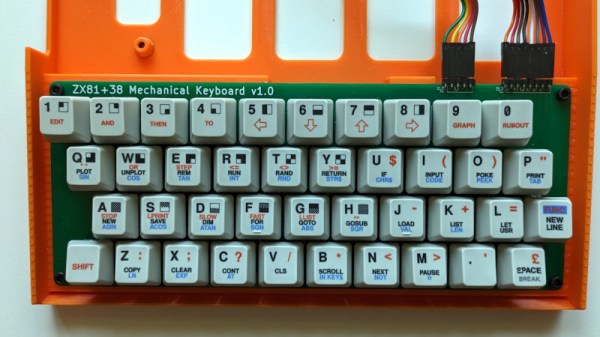
Sir Clive Sinclair’s ZX81 was a phenomenal sales success as one of the cheapest machines available in the early 1980s, but even its most fervent admirers will admit that it suffered heavily from the Sinclair economy drive. In particular that membrane keyboard was notorious for its lack of feedback, and a popular upgrade back in the day was a replacement keyboard. Now we can bring you what might be the ultimate in ZX replacement keyboards, in the form of [Brian Swetland]’s mechanical ZX81 keyboard.

The familiar 40-key layout is all there, using Cherry MX key switches and a beautiful set of custom-printed keycaps. There’s little more to a ZX keyboard than the matrix wiring, and in this case it’s all incorporated on a PCB. None of these techniques were readily available to individuals back in the ’80s, so a large piece of perfboard, key switches from an old terminal keyboard, and Letraset would have had to suffice.

We have to admit liking this project a lot, in fact we’re even tempted by a set of these keycaps for a regular keyboard just for old time’s sake. If you’re interested in the ZX81 then take a look at how we used one to help us through the pandemic.

This Rohde & Schwarz Computer Is A Commodore PET

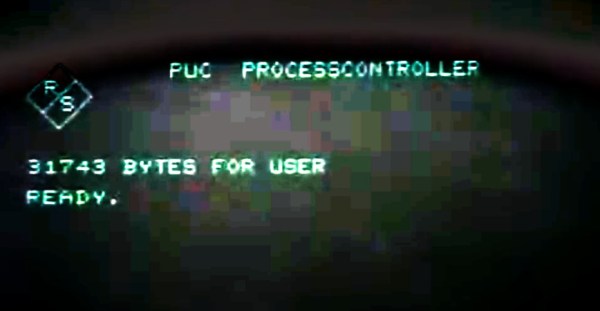
The IEE-488 or GPIB bus for controlling instruments by computer has existed now for many decades. It’s often implemented over USB or Ethernet here in 2023, but the familiar connector can still be found on the backs of pricey instruments. In the earlier days of GPIB when a powerhouse Linux laptop was decades away, what computer did the would-be GPIB user reach for? If they were a Rohde and Schwarz customer in the late 1970s the chances are it would have been the R&S PUC process controller, an 8-bit microcomputer that under its smart exterior turns out to be an enhanced Commodore PET. [NatureAndTech] has one for teardown, and you can see it in the video below the break.

Readers with long memories will remember that the PET had an IE-488 bus on a card edge connector, and it’s possible that’s why R&S took it as the basis for their machine. But this isn’t merely a PET in a fancy box, instead it’s a fully new PET-compatible computer, and it has some interesting features. There’s more memory than the original, a set of disk drives, and an expansion bus complete with a high-res graphics card allowing pixel graphics rather than text. Surprisingly though it has a BASIC interpreter it’s a hardware clone of the PET only, the ROM is unique to Rohde & Schwarz.

We think this machine is probably rare enough that we’re unlikely to see one in the flesh, but it’s been a fascinating thing to examine. You can join in with the video below the break, or you can look at the PET’s impact on a more recent scene.

Continue reading “This Rohde & Schwarz Computer Is A Commodore PET”

Closeup of an Apple ][ terminal program. The background is blue and the text white. The prompt says, "how are you today?" and the ChatGPT response says, "As an AI language model, I don't have feelings, but I am functioning optimally. Thank you for asking. How may I assist you?"

Apple II – Now With ChatGPT

Hackers are finding no shortage of new things to teach old retrocomputers, and [Evan Michael] has taught his Apple II how to communicate with ChatGPT.

Written in Python, iiAI lets an Apple II access everyone’s favorite large language model (LLM) through the terminal. The program lives on a more modern computer and is accessed over a serial connection. OpenAI API credentials are stored in a file invoked by iiAI when you launch it by typing python3 openai_apple.py. The program should work on any device that supports TTY serial, but so far testing has only happened on [Michael]’s Apple IIGS.

For a really clean setup, you might try running iiAI internally on an Apple II Pi. ChatGPT has also found its way onto Commodore 64 and MS-DOS, and look here if you’d like some more info on how these AI chat bots work anyway.

Continue reading “Apple II – Now With ChatGPT”