PicoMite Gives Your Pico A Deluxe BASIC

What makes developing a microcontroller project quick and easy? Tops on our list are an interactive shell and comprehensive libraries that handle all the low-level peripheral stuff. You think we’re talking MicroPython? Not today! MMBasic has just been ported to the Raspberry Pi Pico dev board, and it has all the batteries included.

Just to give you a taste, it has built-in support for SD cards, all sorts of displays, touch screens, real-time clocks, IR remotes, numerous sensors, and of course WS2812 LED strips. And because all of this is baked into the BASIC, writing code to use any of these peripherals is straightforward.

Now, there’s BASIC and there’s BASIC. This is a modern BASIC: it has loops, functions, arrays, floating point, and a built-in full-screen editor. You connect to the Pico via UART, and you’re off to the races. If you’ve got a Pico sitting around, flash it and give it a try. Or check out the GitHub repository if you want to poke around in the internals.

This is a port of the BASIC that’s used on the Maximite virtual retrocomputer platform, which means that there are many working examples out there for you to crib from, and even a forum. Add in the incredibly nice user manual and tutorial (PDF), and you’ve got the perfect weekend afternoon.

Think MicroPython killed BASIC? Think again. BASIC is small enough that it can run where Python can’t, but that’s of course a more minimal experience. In contrast, MMBasic looks like it’s got all the toppings. The whole enchilada. It’s like BASIC Deluxe.

Build Your Own HP41C

There was a time when engineers carried slide rules. Then there was a time when we all carried calculators. Sure, calculators are still around, but you are more likely to use your phone. If you really need serious number crunching, you’ll turn to a full computer. But there was that awkward time when calculators were very important and computers were very expensive that calculators tried to be what we needed from full-blown computers. The HP41C was probably the pinnacle of that trend. If you’ve ever had one, you know that is a marvel of the day’s technology with alphanumeric capabilities and four plug in ports for more memory or ROMs. It really was a little hand-held computer. Didn’t have one? Don’t worry, you can now build your own. In fact, the HP emulator will also act like an HP15C or 16C, if you prefer.

You can see the device in action in the video below. As you might expect, this version uses a through-hole ATMEGA328 and even at 8 MHz, the emulation is faster than the original calculator. The machine also has over double the memory the original calculator had along with a real-time clock built-in. The display is also backlit, something we all wanted in the original.

Continue reading “Build Your Own HP41C”

Retrotechtacular: Office Equipment From The 1940s

If you can’t imagine writing a letter on a typewriter and putting it in a mailbox, then you take computers for granted. But that’s just the tip of the iceberg. More niche applications begat niche machines, and a number of them are on display in this film that the Computer History Archives Project released last month. Aside from the File-o-matic Desk, the Addressograph, or the Sound Scriber, there a number of other devices that give us a peek into a bygone era.

One machine that’s still around, although in a much computerized form, is the stenograph. Not so popular these days is the convenient stenograph carrier, allowing a patient’s statement to be recorded bedside in the hospital immediately after a car accident. Wire recorders were all the rage in 1947, as were floppy disks (for audio, not data). Both media were used to time-shift dictation. Typing champions like Stella Pajunas could transcribe your letters and memos at 140 WPM using an electric typewriter, outpacing dot matrix printers but a snail’s pace compared to a laser jet.

Continue reading “Retrotechtacular: Office Equipment From The 1940s”

A PDP 11 By Any Other Name: Heathkit H11 Teardown And Repair

[Lee Adamson] is no stranger to classic computers. He recently picked up a Heathkit H11A which, as you might remember, is actually a PDP-11 from DEC. Well, technically, it is an LSI-11 but still. Like a proper LSI-11, the computer uses the DEC QBus. Unlike a lot of computers of its day, the H11 didn’t have a lot of switches and lights, but it did have an amazing software library for its day.

[Lee] takes us through a tour of all the different cards inside the thing. It is amazing when you think of today’s laptop motherboards that pack way more into a much smaller space. He also had to fix the power supply.

Continue reading “A PDP 11 By Any Other Name: Heathkit H11 Teardown And Repair”

Video Gaming Like It’s 1983: New Game Cartridges From Atari

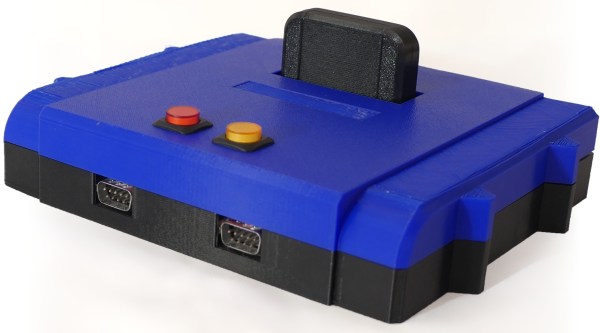
If you remember anything from 1983, it’s likely to be some of the year’s popular culture highlights, maybe Return of the Jedi, or Michael Jackson’s Thriller. For anyone connected with the video gaming industry though, it’s likely that year will stick in the mind for a completely different reason, as the year of the infamous Great Video Games Crash. Overcapacity in the console market coupled with a slew of low quality titles caused sales to crash and a number of companies to go out of business, and the console gaming world would only recover later in the decade with the arrival of the Japanese 8-bit consoles from Nintendo and Sega. You might expect Atari to shy away from such a painful period of their history, but instead they are embracing it as part of their 50th anniversary and launching three never-released titles on cartridges for their 8-bit 2600 console.

Game footage from Aquaventure.

The three games, Yars’ Return, Aquaventure, and Saboteur, are all unreleased titles from back in the day that never saw publication because of the crash, and are being released as limited edition specials through AtariXP, a new venture that the company says will offer “previously unreleased titles from Atari’s expansive library, rare-and-hard-to-find Atari IP physical media, and improved versions of classic games“. It’s fairly obviously an exercise in satisfying the collector’s market rather than one of video game publishing, but it will be interesting to see what emerges. In particular we hope someone will tear down one of these cartridges; will they find a set of old-school EPROMs inside or an EPROM emulator sporting a microcontroller and other 2020s trickery?

This is not of course the first time we’ve reported on collectable 2600 cartridges, but these ones haven’t spent 30 years in a landfill site.

Header image: Evan-Amos, Public domain.

Three-Dimensional Design Yields Compact Seven-Segment Hex Displays

Computers, from the simplest to the most complex, aren’t very useful if they can’t provide feedback to a user. Whether that interface takes the form of a monitor, a speaker, or a simple LED, there’s almost always some kind of output. One of the most ubiquitous is the ever-present seven-segment display. They’re small, they’re easy to use, and, perhaps most important, they’re cheap.

While the displays themselves are relatively compact, they often require some sort of driver circuitry — something that translates a digit into voltage at the correct pins. These drivers can take up valuable space, especially on a breadboard, and can sometimes make using seven-segment displays cumbersome. Thankfully, [John Lonergan] has a great solution: driver boards that sit completely beneath the displays. His dual seven-segment hex display project was born out of necessity — he needed it for the breadboard CPU SPAM-1, which was getting a bit too bulky. Each module is two seven-segment displays atop a small PCB. Beneath the displays lives an 8-bit PIC microcontroller, which acts as a driver for both of the displays.

It’s so easy to restrict ourselves to thinking in two dimensions when working on electronic design — even designing multilayer PCBs often feels like working on several, distinct two-dimensional areas rather than one three-dimensional one. The concept of stacking components to save space, while fairly straightforward to implement, is a great example of the kind of problem-solving we love to see here at Hackaday. Of course, if you like the idea of 3D circuit design, you have to check out some of these incredible circuit sculptures we’ve featured in the past.

Continue reading “Three-Dimensional Design Yields Compact Seven-Segment Hex Displays”

Pumpkin OS running on x86

Palm OS: Reincarnate

[pmig96] loves PalmOS and has set about on the arduous task of reimplementing PalmOS from scratch, dubbing it Pumpkin OS. Pumpkin OS can run on x86 and ARM at native speed as it is not an emulator. System calls are trapped and intercepted by Pumpkin OS. Because it doesn’t emulate, Palm apps currently need to be recompiled for x86, though it’s hoped to support apps that use ARMlets soon. Since there are over 800 different system traps in PalmOS, he hasn’t implemented them all yet.

Generally speaking, his saving grace is that 80% of the apps only use 20% of the API. His starting point was a script that took the headers from the PalmOS SDK and converted them into functions with just a debug message letting him know that it isn’t implemented yet and a default return value. Additionally, [pmig96] is taking away some of the restrictions on the old PalmOS, such as being limited to only one running app at a time.

As if an x86 desktop version wasn’t enough, [pmig96] recompiled Pumpkin OS to a Raspberry Pi 4 with a ubiquitous 3.5″ 320×480 TFT SPI touch screen. Linux maps the TFT screen to a frame buffer (dev/fb0 or dev/fb1). He added a quick optimization to only draw areas that have changed so that the SPI writes could be kept small to keep the frame rate performance.

[pmig96] isn’t the only one trying to breathe some new life into PalmOS, and we hope to see more progress on PumpkinOS in the future.