There are very few things that are so far reaching across many different disciplines, ranging from biology to engineering, as is the relation of the surface area to the volume of a body. This is not a law, as Newton’s second one, or a theory as Darwin’s evolution theory. But it has consequences in a diverse set of situations. It explains why cells are the size they are, why some animals have a strange morphology, why flour explodes while wheat grains don’t and many other phenomena that we will explore in this article.
[Alex Rissato] proudly reports that he now holds the record for highest benchmark score on HWBOT (machine translation); something he sees not only as a personal achievement but admirably, of national pride. Overclocking a Raspberry Pi is not as simple as achieving the highest operational clock rate. A record constitutes just the right combination of CPU clock, memory clock, GPU clock and finally the CPU core voltage. If you’ve managed to produce that special sauce, the combination must be satisfactorily cooled and most importantly be stable enough to pass an actual performance benchmark.
More POWAAA to the CPU!
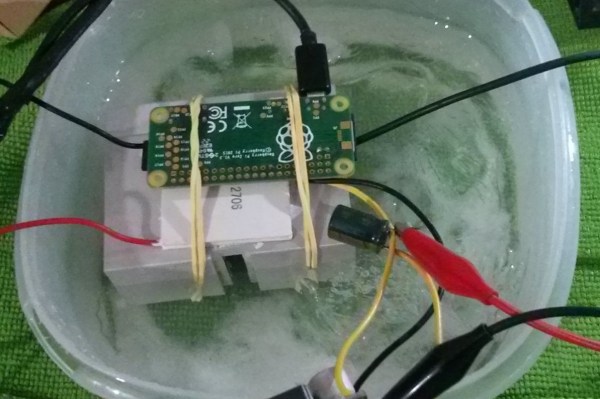
[Alex] realized that the main hurdle to achieving the desired CPU clock was the internally generated and hence restricted, CPU core voltage; This is externally LC filtered and routed back to the CPU on a stock Pi. [Alex] de-soldered the filter on the PCB and provided the CPU with an externally generated core voltage.
Next, the cooling had to be tended to. Air cooling simply wouldn’t cut it, so a Peltier based heatsink interface had to be devised with the hot side immersed in a bucket of salt water. All of this translated to a comfy 16C at a clock speed of 1600 MHz.
Was all the effort justified? We certainly think it was! Despite falling short of the Pi zero CPU clock rate record, currently set at 1620MHz, [Alex] earned the top spot in the HWBOT Prime overclocking benchmark. Brazil can now certainly add this to its trophy cabinet, arguably overshadowing the 129 Olympic medals.
The Internet is everywhere. The latest anecdotal evidence of this is a story of prison inmates that build their own computer and connected it to the internet. Back in 2015, prisoners at the Marion Correctional Institution in Ohio built two computers from discarded parts which they transported 1,100 feet through prison grounds (even passing a security checkpoint) before hiding them in the ceiling of a training room. The information has just been made public after the release of the Inspector General’s report (PDF). This report is fascinating and worth your time to read.
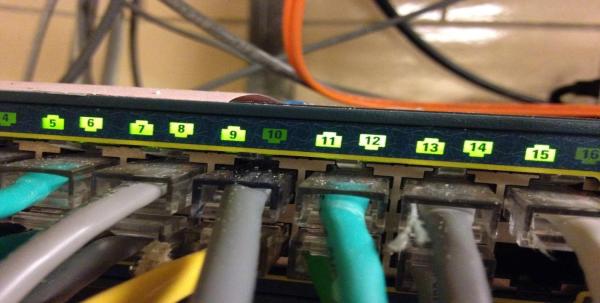
This Ethernet router was located in a training room in the prison. Physical access is everything in computer security.
Prisoners managed to access the Ohio Department of Rehabilitation and Corrections network using login credentials of a retired prison employee who is currently working as a contract employee. The inmates plotted to steal the identity of another inmate and file tax returns under their name. They also gained access to internal records of other prisoners and checked out websites on how to manufacture drugs and DIY weapons, before prison officers were able to find the hidden computers. From the report:
The ODAS OIT analysis also revealed that malicious activity had been occurring within the ODRC inmate network. ODAS OIT reported, “…inmates appeared to have been conducting attacks against the ODRC network using proxy machines that were connected to the inmate and department networks.” Additionally, ODAS OIT reported, “It appears the Departmental Offender Tracking System (DOTS) portal was attacked and inmate passes were created. Findings of bitcoin wallets, stripe accounts, bank accounts, and credit card accounts point toward possible identity fraud, along with other possible cyber-crimes.”
The prisoners involved knew what they were doing. From the interview with the inmate it seems the computers were set up as a remote desktop bridge between internal computers they were allowed to use and the wider internet. They would use a computer on the inmate network and use a remote desktop to access the illicit computers. These were running Kali Linux and there’s a list of “malicious tools” found on the machines. It’s pretty much what you’d expect to find on a Kali install but the most amusing one listed in the report is “Hand-Crafted Software”.
This seems crazy, but prisoners have always been coming up with new ideas to get one over on the guards — like building DIY tattoo guns, When you have a lot of time on your hands and little responsibility, crazy ideas don’t seem so crazy after all.
It was a dark and stormy afternoon, the kind you get on the east side of the country. I was drinking a coffee, sitting in a camping chair in front of my door, and watching like a hawk for the treacherous cable man to show up. This day there would be no escape. There would be no gently rapping the door with a supple sheepskin leather glove before scurrying away for another union mandated coffee break. I was waiting, I was kind of grumpy, and by God today would be the day. Today would be the day that after hours on hold, after three missed appointments, after they lost my records twice; I would get an answer on whether or not they could actually service internet to my apartment. If I was lucky, and the answer was yes, then approximately two to three thousand years later they would run a cable from the telephone pole to my house and I could stop commandeering WiFi from the pizza shop across from me.
It’s important to note that I was in the middle of the city. I wasn’t out in the boonies. Every house on the block but mine had cable. While this is dumb, it begins to make more sense when you dive into the history. Louisville, Kentucky is a strange place. It used to be the gateway to the west. Ships would crawl up its river until they reached the falls. Then porters would charge an exorbitant fee to carry all those goods down to the bottom of the falls where they would be loaded on a ship and be sent ever westward. Resulting in every rich merchant, captain, and manufacturer in the region having a nice house there. Ever wonder why the Derby is in Louisville and the Queen comes to visit sometimes? It probably has something to do with it having the highest concentration of Victorian buildings and mansions outside of New York City.
[RoyTecTips] shows us an ingenious hack which turns a single-SIM-slot phone into a fully functioning dual-SIM phone. All that’s needed for this hack is a heat-gun, solvent, micro SD card, nano SIM and some glue. The trick is that the phone has a SIM reader on the backside of an SD-card slot. Through some detailed dissection and reconstruction work, you can piggy-back the SIM on the SD card and have them both work at the same time.
Making the SD/SIM Franken-card is no picnic. First you start by filing away the raised bottom edge of the micro SD card and file down the side until the writing is no longer visible. Next get a heat gun and blast your nano SIM card until the plastic melts away. Then mark where the SIM card’s brains go and glue it on. Turn the phone on then, hey presto, you now have a dual SIM phone while keeping your SD storage.
This hack is reported to work on many Samsung phones that end in “7” and some that end in “5”, along with some 8-series phones from Huawei and Oppo clones of the Samsungs. Since you’re only modifying the SIM card, it’s a fairly low-risk hack for a phone. Combining two cards into one is certainly a neat trick, almost as neat as shoe-horning a microcontroller into an SD card. We wonder how long it will be before we see commercial dual SIM/SD cards on the market.
[Update] I got a little confused on this one as we only have the single sim variants of these phones where I live. this hack is for dual sim phones that either accept 2 sim cards or 1 sim + 1 SD card. This hack solves this problem and allows 2 sims plus 1 SD card in these phones. Sorry for the confusion and thanks to all who pointed this out in the comments.
Python is the Arduino of software projects. It has a critical mass of libraries for anything from facial recognition and neural networks to robotics and remote sensing. And just like Arduino, I have yet to find the killer IDE for Python. Perhaps I just haven’t tried the right one yet, but it could be that I’m just doing Python wrong.
For Years I’ve Been IDLE
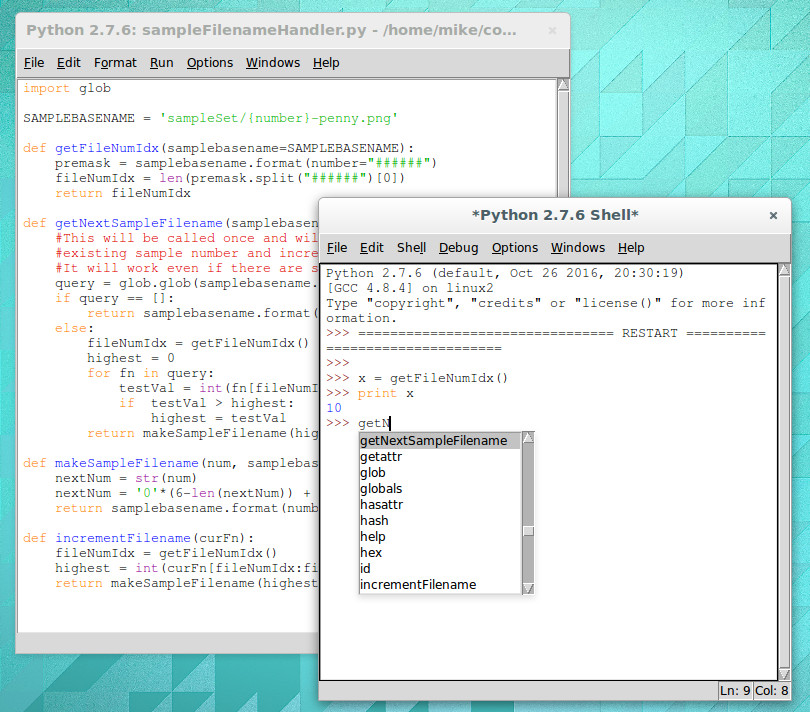
IDLE with interactive shell that has highlighting and code completion
I’m a Linux-only type of a guy so using IDLE for Python is a natural fit. It’s in the repositories for super quick and easy install and there’s basically zero configuration to be done. Generally speaking my preferred development environment is text editor and command line compiler. IDLE is just one step above that. You get a separate window for the shell and each Python file you’re working on. Have IDLE run your code and it saves the file, then launches it in the shell window.
For me, there are two important features of IDLE’s shell. The first is that it keeps an interactive session open after you run your Python code. This means that any globals that your script uses are still available, and that you can experiment with your code by calling functions (and classes, etc) in real time. The second desirable feature is that while using this interactive shell, IDLE supports code completion and docstring support (it gives you hints for what parameters a function accepts/requires).
But simplicity has a tough time scaling. I’m working on larger and larger projects spread over many files and the individual nature of IDLE editor windows and lack of robust navigation has me looking to move forward.
The Contenders
I’ve tried perhaps a half-dozen different Python IDEs now, spending the most time on two of them: Geany and Atom. Both are easy to install on Linux and provide the more advanced features I want for larger projects: better navigation, cross-file code completion (and warnings), variable type and scope indication.
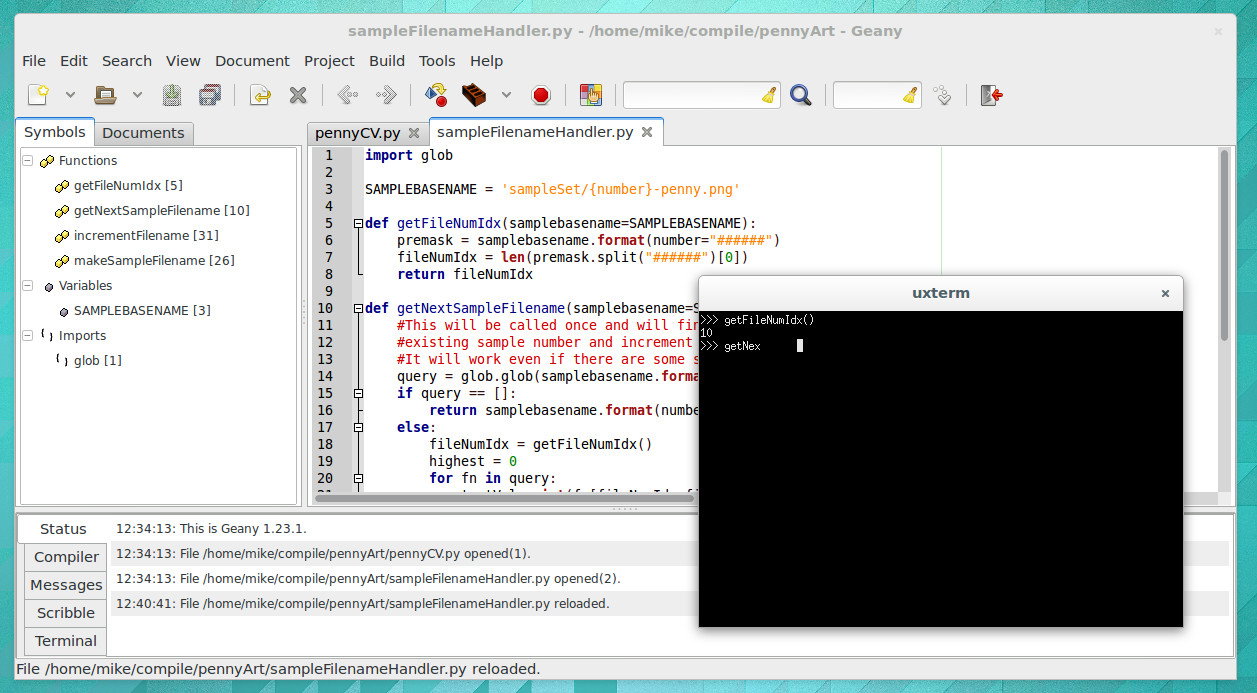
The look of Geany brings to mind an “IDE 1.0” layout style and theme. It’s the familiar three-pane layout that places symbols to the left, code to the right, and status along the bottom. When you run your program it launches in an interactive terminal, which I like, but you lose all IDE features at this point, which I despise. There is no code completion, and no syntax highlighting.
I have been using Atom much more than Geany and have grown to like it enough to stick with it for now. I’d call Atom the “IDE 2.0” layout. It launches with a dark theme and everything is a tab.
Atom has symbol view that isn’t shown all the time. CTRL-R brings it up and it uses a search style but you can also scroll through all symbols
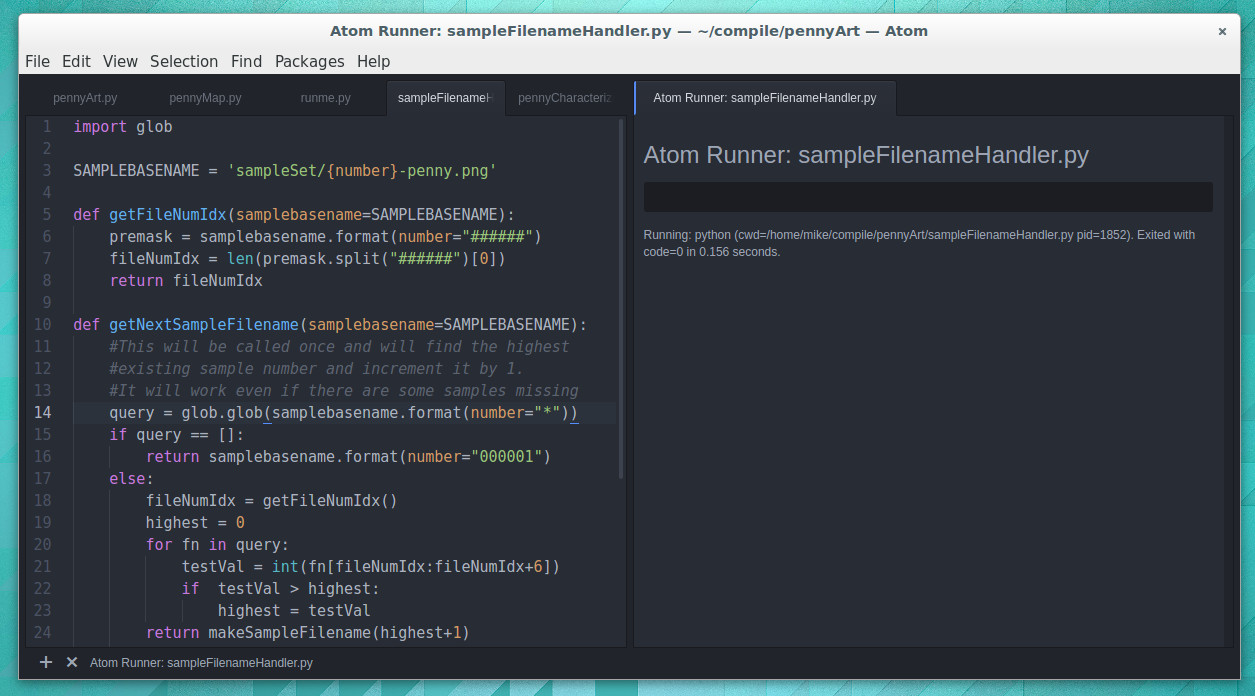
Atom depends heavily on packages (plugins that anyone may write). The package management is good, and the packages I’ve tried have been superb. I’m using autocomplete-python and tabs-to-spaces, but again I come up short when it comes to running Python files. I’ve tried platformio-ide-terminal, script, and runner plugins. The first brings up a terminal as a bottom pane but doesn’t automatically run the file in that terminal. Script also uses a bottom pane but I can’t get it to run interactively. I’m currently using runner which has an okay display but is not interactive. I’ve resorted to using a “fake” python file in my projects as a workaround for commands and tests I would normally run in the interactive shell.
Tell Us How You Python
It’s entirely possible I’ve just been using Python wrong all these years and that tinkering with your code in an interactive shell is a poor choose of development processes.
What do you prefer for your Python development? Does an interactive shell matter to you? Did you start with IDLE and move to a more mature IDE. Which IDE did you end up with and what kind of compromises did you make during that change. Let us know in the comments below.
There’s a lot to be said in favor of getting kids involved in hacking as young as possible, but there is one thing about working in electronics that I believe is best left as a mystery until at least the teenage years — hide the shrink tube. Teach them to breadboard, have them learn resistor color codes and Ohm’s Law, and even teach them to solder. But don’t you dare let them near the heat shrink tubing. Foolishly reveal that magical stuff to kids, and if there’s a heat source anywhere nearby I guarantee they’ll blow through your entire stock of the expensive stuff the minute you turn your back. Ask me how I know.
I jest, but only partly. There really is something fun about applying heat shrink tubing, and there’s no denying how satisfying a termination can be when it’s hermetically sealed inside that little piece of inexplicably expensive tubing. But how does the stuff even work in the first place?