Forth: The Hacker’s Language

Let’s start right off with a controversial claim: Forth is the hacker’s programming language. Coding in Forth is a little bit like writing assembly language, interactively, for a strange CPU architecture that doesn’t exist. Forth is a virtual machine, an interpreted command-line, and a compiler all in one. And all of this is simple enough that it’s easily capable of running in a few kilobytes of memory. When your Forth code is right, it reads just like a natural-language sentence but getting there involves a bit of puzzle solving.

robot_forth_had-colors
From Thinking FORTH (PDF)

Forth is what you’d get if Python slept with Assembly Language: interactive, expressive, and without syntactical baggage, but still very close to the metal. Is it a high-level language or a low-level language? Yes! Or rather, it’s the shortest path from one to the other. You can, and must, peek and poke directly into memory in Forth, but you can also build up a body of higher-level code fast enough that you won’t mind. In my opinion, this combination of live coding and proximity to the hardware makes Forth great for exploring new microcontrollers or working them into your projects. It’s a fun language to write a hardware abstraction layer in. Continue reading “Forth: The Hacker’s Language”

Let’s Prototype! This Filament End Needs 80 Decibels

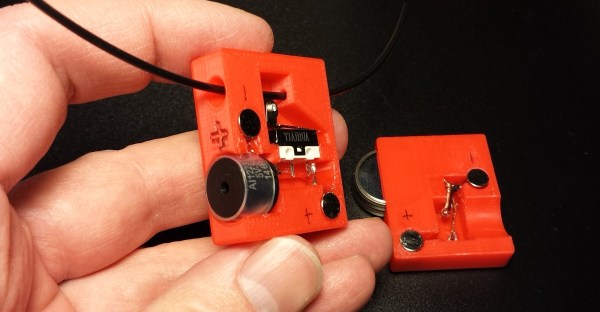
Reaching the end of a spool of filament when 3D printing is inevitable. The result ranges from minor annoyance to ruined print. Recently, I needed to print a number of large jobs that used just over half a spool of plastic each. Unwilling to start every print with a fresh spool (and shelve a 60% used one afterward), I had a problem to solve. What my 3D printer needed was filament monitor, or at least that’s what I thought.

After reviewing some projects and aftermarket options, I ended up making my own. Like most prototypes, it wasn’t an instant success, but that’s fine. One of the goals of prototyping is not only to validate that the problems you’re solving are the same ones you think exist, but also to force other problems and issues you may not have considered to the surface. Failure is only a waste if nothing is learned, and the faster and cheaper that learning happens, the better.

Sensible design steps also help minimize waste, so I started by looking at what kind of solutions already existed.

Continue reading “Let’s Prototype! This Filament End Needs 80 Decibels”

PCB Design Guidelines To Minimize RF Transmissions

There are certain design guidelines for PCBs that don’t make a lot of sense, and practices that seem excessive and unnecessary. Often these are motivated by the black magic that is RF transmission. This is either an unfortunate and unintended consequence of electronic circuits, or a magical and useful feature of them, and a lot of design time goes into reducing or removing these effects or tuning them.

You’re wondering how important this is for your projects and whether you should worry about unintentional radiated emissions. On the Baddeley scale of importance:

  • Pffffft – You’re building a one-off project that uses battery power and a single microcontroller with a few GPIO. Basically all your Arduino projects and around-the-house fun.
  • Meh – You’re building a one-off that plugs into a wall or has an intentional radio on board — a run-of-the-mill IoT thingamajig. Or you’re selling a product that is battery powered but doesn’t intentionally transmit anything.
  • Yeeeaaaaahhhhhhh – You’re selling a product that is wall powered.
  • YES – You’re selling a product that is an intentional transmitter, or has a lot of fast signals, or is manufactured in large volumes.
  • SMH – You’re the manufacturer of a neon sign that is taking out all wireless signals within a few blocks.

Continue reading “PCB Design Guidelines To Minimize RF Transmissions”

A Personal Fight Against The Modern Laptop

If you haven’t gone laptop shopping recently, you’re in for a big shock when you do. While the current generation of MacBook Pros is rightly torn to shreds for being an overpriced machine with a stupid gimmick of a Touch Bar, there are issues with laptops across the industry. No one has figured out how to take a high-res iPad screen and add a keyboard, most laptops with a display smaller than 13 inches are capped at 720 resolution, new features are introduced at the expense of old ones, binary blobs are cast into a web of BIOS whitelists and missing drivers, No, the Microsoft Surface doesn’t count, because while it’s a nice machine it’s a tablet with a keyboard, not a laptop.

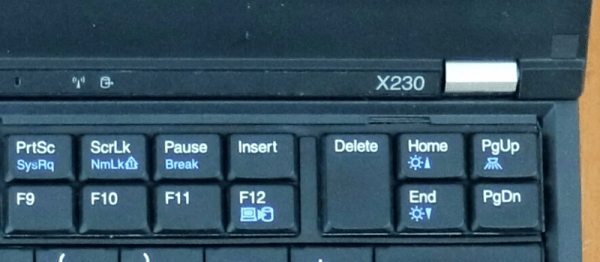
After months of searching, [Hamish Coleman] found the closest thing to a perfect laptop. It’s a Thinkpad X230 from the ancient days of yore, or 2012 depending on how you’re counting. It’s close to perfect, though: aside from an old CPU and GPU, the only real show stopper is the keyboard. Replacing that keyboard was [Hamish]’s personal fight against the modern laptop (YouTube, embedded below), and he’s making it easier for us to fight against the current crop of craptops, too.

Continue reading “A Personal Fight Against The Modern Laptop”

Fifty Shades Of Gray Code

Some years back, a museum asked me to help them with an exhibit a contractor had built for them. It was a wheel like the one on Wheel of Fortune, but smaller and mounted on the wall instead of the floor. You would spin the wheel, it would stop on some item, and a computer would play a short video about the item. Physically and mechanically, it was a beautifully built exhibit. The electronics, though, left something to be desired.

In principle, this is pretty simple computer task. Measure the position of the wheel, and when it stops moving, play a video based on the position. The problem was the folks who created the artistic mechanics didn’t think hard about the electronics behind it. Sometimes–but not often–the wheel would play the wrong video. Sometimes it wouldn’t play at all.

The Prime Suspect

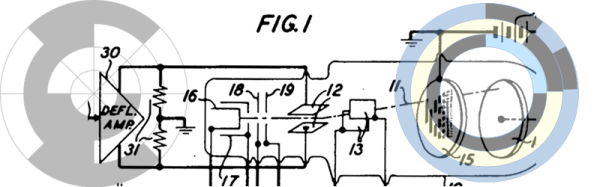
My immediate suspicion turned out to be correct. I took the wheel off its mount to discover copper foil tape on the back of it. Each pie wedge had foil in different areas and there were two brushes in each area. When the wheel stopped, two of the brushes would be shorted together and the rest were open. The way they detected that was bizarre, but that wasn’t the problem. (It involved a cannibalized PS/2 keyboard.)
Continue reading “Fifty Shades Of Gray Code”

Tesla Vs. Edison

The phrase “Tesla vs. Edison” conjures up images of battling titans, mad scientists, from a bygone age. We can easily picture the two of them facing off, backed by glowing corona with lightning bolts emitting from their hands. The reality is a little different though. Their main point of contention was Tesla’s passion for AC vs. Edison’s drive to create DC power systems to power his lights. Their personalities also differed in many ways, the most relevant one here being their vastly different approaches to research. Here, then, is the story of their rivalry.

Continue reading “Tesla Vs. Edison”

How To Sharpen Your Woodworking Tools On A Budget

Wood may seem like a soft, weak material if you’re used to working with steel, but to do good work, you’ll quickly learn you need your tools sharp. Buying and maintaining a good set of tools can be expensive for the home gamer, so [shopbuilt] put together an Instructable on how to sharpen your woodworking tools on a budget.

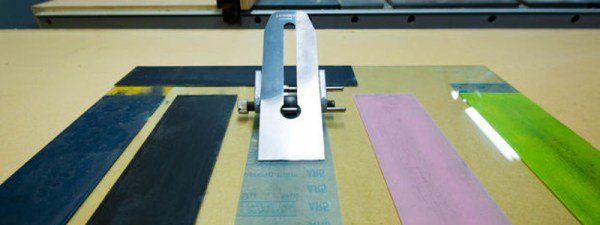
The trick is to use sandpaper. It’s a good quality abrasive material and is readily available. You’ll want a selection of different grits – low grits to get started, higher grits when finishing. The reason this is cheaper is that you can get a selection of 5-10 different sandpapers for under $20. Getting even a couple of decent sharpening stones wouldn’t be possible at that price. In the long run, they’ll last longer but this is a budget option we’re talking about.

Obviously you can’t just sharpen something with sandpaper – [shopbuilt] suggests mounting the paper to the flattest surface you can find. The use of a tempered glass panel from a fridge shelf is, in our mind, an inspired choice here. 3D printer enthusiasts have been using similar techniques for heated beds for the best part of a decade now.

We love woodworking here at Hackaday, so get your feet wet with these woodworking basics for the hardware hacker.