
Microfluidics “Frogger” Is A Game Changer For DIY Biology

xgy5x3

See those blue and green dots in the GIF? Those aren’t pixels on an LCD display. Those are actual drops of liquid moving across a special PCB. The fact that the droplets are being manipulated to play a microfluidics game of “Frogger” only makes OpenDrop v 2.0 even cooler.

Lab biology is mainly an exercise in liquid handling – transferring a little of solution X into some of solution Y with a pipette. Manual pipetting is tedious, error prone, and very low throughput, but automated liquid handling workstations run into the hundreds of thousands of dollars. This makes [Urs Gaudenz]’s “OpenDrop” microfluidics project a potential game changer for the nascent biohacking movement by offering cheap and easy desktop liquid handling.

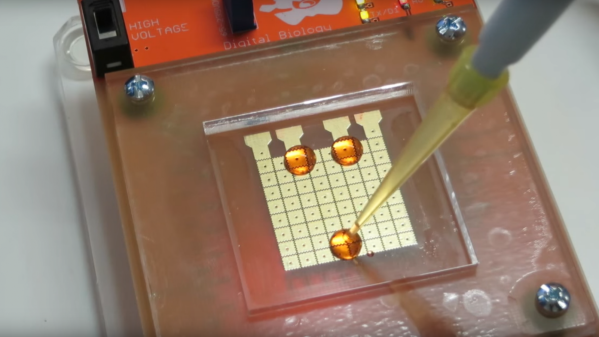
Details are scarce on the OpenDrop website as to exactly how this works, but diving into the literature cited reveals that the pads on the PCB are driven to high voltages to attract the droplets. The PCB itself is covered with a hydrophobic film – Saran wrap that has been treated with either peanut oil or Rain-X. Moving the droplets is a simple matter of controlling which pads are charged. Splitting drops is possible, as is combining them – witness the “frog” getting run over by the blue car.

There is a lot of cool work being done in microfluidics, and we’re looking forward to see what comes out of this open effort. We’ve covered other open source efforts in microfluidics before, but this one seems so approachable that it’s sure to capture someone’s imagination.

Continue reading “Microfluidics “Frogger” Is A Game Changer For DIY Biology”

Cordless Drill Uses No Electricity

There are few projects on how to make your own cordless drill, but what sets [Johnnyq90’s] amazing project apart is the fact that his power plant is a nitro engine. Not an easy task of course, but he makes it look easier than it is, and we really enjoyed the construction process.

He uses an RC Kyosho GX12 engine that was previously modified, changing the cooling head with a larger one. The engine drives a gearbox that was taken from another drill. All other parts were hand made. The clutch was carefully machined, and the cooling fan was made in a 3D printer. Other necessary parts were the frame, brass spacers to adjust the engine height and alignment, throttle arm and handle. In the end even the gearbox had to be modified for higher speed. The finished drill sure looks and sounds terrific, and seems to be perfectly capable of doing its job.

As with other mechanical projects from [Johnnyq90], the video has good timing and attention to detail. His channel is definitely worth a visit, specially if you like turbines.

Autonomous Delivery: Your Impulse Buys Will Still Be Safe

I heard a “Year in Review” program the other day on NPR with a BBC World Service panel discussion of what’s ahead for 2017. One prediction was that UAV delivery of packages would be commonplace this year, and as proof the commentator reported that Amazon had already had a successful test in the UK. But he expressed skepticism that it would ever be possible in the USA, where he said that “the first drone that goes over somebody’s property will be shot down and the goods will be taken.”

He seemed quite sincere about his comment, but we’ll give him the benefit of the doubt that he was only joking to make a point, not actually grotesquely ignorant about the limitations of firearms or being snarky about gun owners in the US. Either way, he brings up a good point: when autonomous parcel delivery is commonplace, who will make sure goods get to the intended recipient?

Continue reading “Autonomous Delivery: Your Impulse Buys Will Still Be Safe”

Raspberry Pi Launches Compute Module 3

The forgotten child of the Raspberry Pi family finally has an update. The Raspberry Pi Compute Module 3 has been launched.

The Pi 3 Compute Module was teased all the way back in July, and what we knew then is just about what we know now. The new Compute Module is based on the BCM2837 processor – the same as found in the Raspberry Pi 3 – running at 1.2 GHz with 1 gigabyte of RAM. The basic form factor SODIMM form factor remains the same between the old and new Compute Modules, although the new version is 1 mm taller.

The Compute Module 3 comes with four gigabytes of eMMC Flash and sells for $30 on element14 and RS Components. There’s also a cost-reduced version called the Compute Module 3 Light that forgoes the eMMC Flash and instead breaks out those pins to the connector, allowing platform integrators to put an SD card or Flash chip on a daughter (mother?) board. The CM3 Lite version sells for $25. Continue reading “Raspberry Pi Launches Compute Module 3”

Garage Door Opener Logs To Google Drive

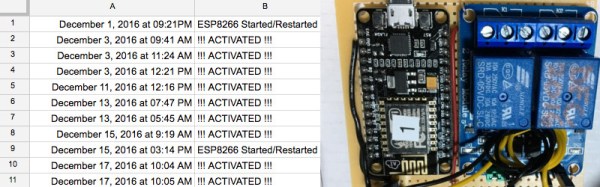
A garage door opener is a pretty classic hack around these parts. IR, Bluetooth, WiFi, smartphone controlled, web interfaces — we’ve seen it all.  But if you want to keep track of people going in and out, you need some way of logging what’s happening. You could go ahead and roll up your own SQL based solution, tied into a custom web page. But there’s an easier way; you can build a garage door opener that logs events to Google Drive.

[WhiskeyTangoHotel] was looking for an ESP8266 project, and a garage door opener seemed just the ticket. It’s simple enough to code up, and control over WiFi comes in handy. Interfacing with the garage door was simple enough — the existing opener uses a simple push button, which is easily controlled by wiring up a relay to do the job. Logging is as simple as having the ESP8266 send requests to IFTTT which is set up to make posts to a Google Sheet with status updates.

The project is fairly basic, but there’s room for expansion. By using separate Maker Channel triggers on IFTTT, different users of the garage door could be tracked. It would also be easy to add some limit switches or other sensors to detect the door’s position, so it can be determined whether the door was opened or closed.

There’s always another take on the garage door opener — check out this hack that opens the garage door in response to flashing headlights.

Smoothly Modernized Nixie Display

The renaissance of Nixie tube popularity amid the nostalgia surrounding older tech has made them almost prohibitively expensive for individual projects. Seeing an opportunity to modernize the beloved devices, [Connor Nishijima] has unleashed this new, LED edge-lit display that he has dubbed Lixie.

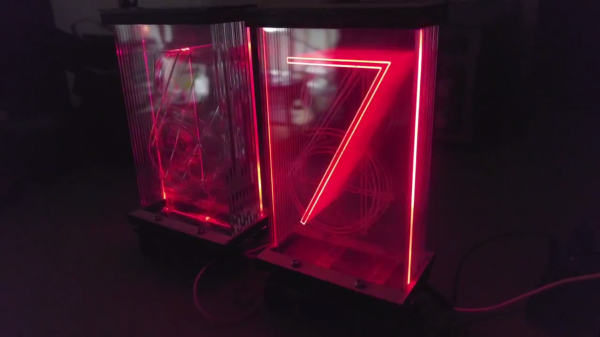
We featured his prototype a few years ago. That design used dots to make up each character but this upgrade smooths that out with sleek lines and a look one would almost expect from a professional device — or at the very least something you’d see in a cyberpunk near-future. The color-changing Neopixel LEDs — moderated by a cleverly designed filter — allow for customization to your heart’s content, and the laser-cut acrylic panes allow for larger displays to be produced with relative ease.

The image above (and the video below) show two revisions of the most recent Lixie prototypes. There is a huge improvement on the right, as the digits are now outlines instead of single strokes and engraved instead of cut completely through the acrylic. The difference if phenomenal, and in our opinion move the “back to the drawing board” effect to “ready for primetime”. [Connor] and his team are working on just that, with a Tindie preorder in place for the first production-ready digits to roll off their line.

Continue reading “Smoothly Modernized Nixie Display”

Blob-less Raspberry Pi Linux Is A Step Closer

The Raspberry Pi single board computer has been an astounding success since its launch nearly five years ago, to the extent that as of last autumn it had sold ten million units with no sign of sales abating. It has delivered an extremely affordable and pretty powerful computer into the hands of hobbyists, youngsters, hackers, engineers and thousands of other groups, and its open-source Raspbian operating system has brought a useful Linux environment to places we might once have thought impossible.

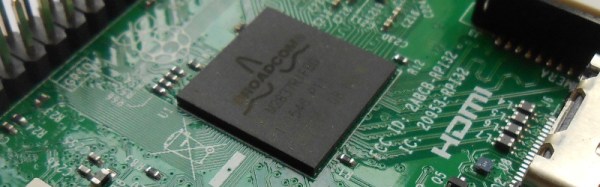
The previous paragraph, we have to admit, is almost true. The Pi has sold a lot, it’s really useful and lots of people use it, but is Raspbian open-source? Not strictly. Because the Broadcom silicon that powers the Pi has a significant amount of proprietary tech that the chipmaker has been unwilling to let us peer too closely at, each and every Raspberry Pi operating system has shipped with a precompiled binary blob containing the proprietary Broadcom code, and of course that’s the bit that isn’t open source. It hasn’t been a problem for most Pi users as it’s understood to be part of the trade-off that enabled the board’s creators to bring it to us at an affordable price back in 2012, but for open-source purists it’s been something of a thorn in the side of the little board from Cambridge.

This is not to say that all is lost on the blob-free Pi front. Aided by a partial pulling back of the curtain of secrecy by Broadcom in 2014, work has quietly been progressing, and we now have the announcement from [Kristina Brooks] that a minimal Linux kernel can boot from her latest open firmware efforts. You won’t be booting a blob-free Raspbian any time soon as there are bugs to fix and USB, DMA, and video hardware has still to receive full support, but it’s a significant step. We won’t pretend to be Broadcom firmware gurus as we’re simply reporting the work, but if it’s your specialty you can find the code in its GitHub repository. Meanwhile, we look forward to future progress on this very interesting project.

We reported on the partial Broadcom release back in 2014. At the time, the Raspberry Pi people offered a prize to the first person running a native Quake III game on their hardware, sadly though they note the competition is closed they haven’t linked to the winning entry.