Tour De Force Battery Hacking

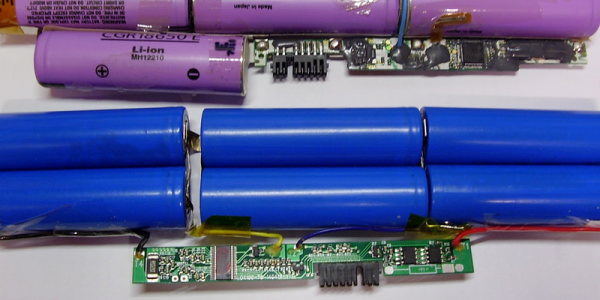
Lithium-Ion batteries are finicky little beasts. They can’t be overcharged, overdischarged, overheated, or even looked at funny without bursting into flames. Inside any laptop battery pack, a battery charge controller keeps watch over all the little cells, and prevents them from getting damaged.

Of course, any “smart” device will sometimes make the wrong choices, and then it’s up to us to dig inside its brains and fix it. When [Viktor] got a perfectly good battery pack with a controller that refused to charge the batteries, he started off on what would become an epic journey into battery controllers, and the result is not just a fixed battery, but a controller-reprogramming tool, software, and three reversed controller chips so far.
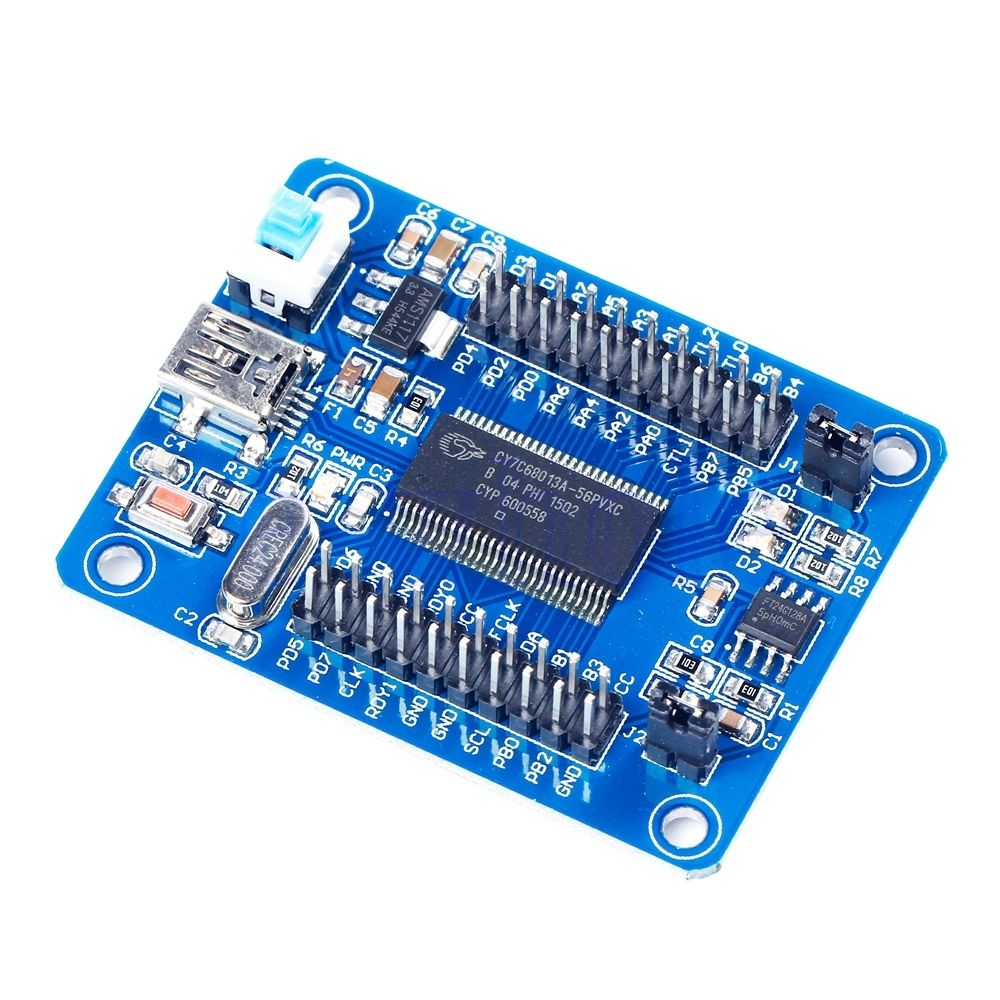
devbBattery controller chips speak SMBus, and [Viktor] started out by building a USB-SMBus tool. It’s a clever use of a cheap eBay development board for a Cypress CY7C68013A USB microcontroller. Flashed with [Viktor]’s firmware and running his software on the host computer, a SMBus scan is child’s play.

The rest of the story is good old-fashioned hacking: looking for datasheets, reading industry powerpoints, taking wild guesses, googling for passwords, and toggling the no-connect pins while booting the controllers up. We’re not going to argue with results: the bq8030, R2J240, and M37512 controllers have all given up their secrets, and tools to program them have been integrated into [Viktor]’s SMBusb tool.

In short, this is one of the nicest hard-core hacks we’ve seen in a while. Kudos [Viktor]! And thanks for the SMBus tool.

How To Use Docker To Cross Compile For Raspberry Pi (and More)

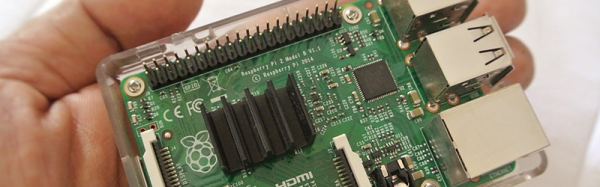
It used to be tedious to set up a cross compile environment. Sure you can compile on the Raspberry Pi itself, but sometimes you want to use your big computer — and you can use it when your Pi is not on hand like when on an airplane with a laptop. It can be tricky to set up a cross compiler for any build tools, but if you go through one simple step, it becomes super easy regardless of what your real computer looks like. That one step is to install Docker.

Docker is available for Linux, Windows, and Mac OS. It allows developers to build images that are essentially preconfigured Linux environments that run some service. Like a virtual machine, these images can run together without interfering with each other. Unlike a virtual machine, Docker containers (the running software) are lightweight because they share the same underlying kernel and hardware of the computer.

The reality is, setting up the Raspberry Pi build environment isn’t any easier. It is just that with Docker, someone else has already done the work for you and you can automatically grab their setup and keep it up to date. If you are already running Linux, your package manager probably makes the process pretty easy too (see [Rud Merriam’s] post on that process). However, the nice thing about the images is it is a complete isolated environment that can move from machine to machine and from platform to platform (the Windows and Mac platforms use a variety of techniques to run the Linux software, but it is done transparently).

Continue reading “How To Use Docker To Cross Compile For Raspberry Pi (and More)”

How The Human Brain Stores Data

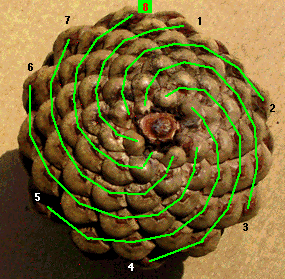
Evolution is one clever fellow. Next time you’re strolling about outdoors, pick up a pine cone and take a look at the layout of the bract scales. You’ll find an unmistakable geometric structure. In fact, this same structure can be seen in the petals of a rose, the seeds of a sunflower and even the cochlea bone in your inner ear. Look closely enough, and you’ll find this spiraling structure everywhere. It’s based on a series of integers called the Fibonacci sequence. Leonardo Bonacci discovered the sequence while trying to figure out how many rabbits he could make starting with just two. It’s quite simple — add the right most integer to the previous one to get the next one in the sequence. Starting from zero, this would give you 0-1-1-2-3-5-8-13-21 and so on. If one was to look at this sequence in the form of geometric shapes, they can create square tiles whose sides are the length of the value in the sequence. If you connect the diagonal corners of these tiles with an infinite curve, you end up with the spiral that you saw in the pine cone and other natural objects.

fib_01
Source via Geocaching

So how did mother nature discover this geometric structure? Surely it does not know math. How then can it come up with intricate and sophisticated structures? It turns out that this Fibonacci spiral is the most efficient way of squeezing the most amount of stuff in the least amount of space. And if one takes natural selection seriously, this makes perfect sense. Eons of trial and error to make the most copies of itself has stumbled upon a mathematical principle that permeates life on earth.

fb_02
Source via John Simmons

The homo sapiens brain is the product of this same evolutionary process, and has been evolving for an estimated 7 million years. It would be foolish to think that this same type of efficiency natural selection has stumbled across would not be present in the current homo sapiens brain. I want to impress upon you this idea of efficiency. Natural selection discovered the Fibonacci sequence solely because it is the most efficient way to do a particular task. If the brain has a task of storing information, it is perfectly reasonable that millions of years of evolution has honed it so that it does this in the most efficient way possible as well. In this article, we shall explore this idea of efficiency in data storage, and leave you to ponder its applications in the computer sciences.

Continue reading “How The Human Brain Stores Data”

NES Light Gun Fires Awesome Laser Effect

[Seb Lee-Delisle]’s NES lightgun gave us pause as the effect is so cool we couldn’t quite figure out how he was doing it at first. When he pulls the trigger there erupts the beam of light Sci Fi has trained us to expect, then it explodes in a precision sunburst of laserlight at the other end as smoke gently trails from the end of the barrel. This is a masterpiece of hardware and trickery.

seb-lee-delisle-nes-zapper-trick-thumb
Demo video posted by @seb_ly

The gun itself is a gutted Nintendo accessory. It looks like gun’s added bits consist of two LED strips, a laser module (cleverly centered with two round heatsinks), a vape module from an e-cigarette, a tiny blower, and a Teensy.  When he pulls the trigger a cascade happens: green light runs down the side using the LEDs and the vape module forms a cloud of smoke in a burst pushed by the motor. Finally the laser fires as the LEDs finish their travel, creating the illusion.

More impressively, a camera, computer, and 4W Laser are waiting and watching. When they see the gun fire they estimate its position and angle. Then they draw a laser sunburst on the wall where the laser hits. Very cool! [Seb] is well known for doing incredible things with high-powered lasers. He gave a fantastic talk on his work during the Hackaday Belgrade conference in April. Check that out after the break.

So what does he have planned for this laser zapper? Laser Duck Hunt anyone? He has a show in a month called Hacked On Classics where this build will be featured as part of the Brighton Digital Festival.

Continue reading “NES Light Gun Fires Awesome Laser Effect”

Working For Elon Musk

One of my favorite types of science fiction character is found in the books of Ben Bova; a business mogul who through brilliance, hard work, and the force of personality drives mankind to a whole new level in areas such as commercializing space, colonizing the stars, battling governments, and thwarting competitors.

It is possible to name a few such characters in real life — influencing the electricity industry was George Westinghouse, automobiles was Henry Ford, and more recently Steve Jobs and Elon Musk. With Elon’s drive we may all finally be driving electric cars within 20 years and spreading out into space with his cheap rockets. Due to the latter he may be the closest yet to one of Bova’s characters.

So what’s it like to work for Elon Musk at Tesla or SpaceX? Most of us have read articles about him, and much that he’s written himself, as well as watched some of his many interviews and talks. But to get some idea of what it’s like to work for him I greatly enjoyed the insight from Ashlee Vance’s biography Elon Musk – Tesla, SpaceX, and the Quest for a Fantastic Future. To write it Vance had many interviews with Musk as well as those who work with him or have in the past. Through this we get a fascinating look at a contemporary mogul of engineering.

Continue reading “Working For Elon Musk”

Amazon Dash Button Finds Your Phone

This scene replays quite often in our house: my wife has misplaced her cell phone so she asks me to call her. But where did I leave my cell phone? And the race is on! Who will find their phone first to call the other?

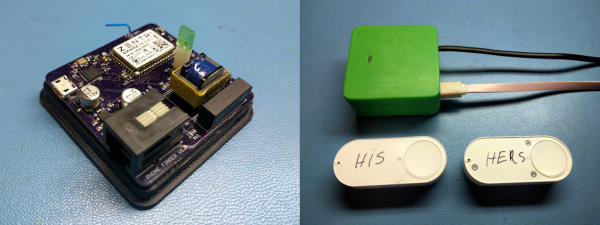
[Zapta] solves this problem with his Phone Finder. The system comes in two parts: a base station with WiFi that’s also connected to the house’s phone line, and an arbitrary number of Amazon Dash buttons that trigger dialing commands.

[Zapta] presses a Dash button, which connects over WiFi to the base station. The base station recognizes the MAC address of the button, looks up and dials the corresponding missing cell phone. This solves the need-a-phone-to-find-a-phone problem very neatly, and since Dash buttons are dirt cheap they can be scattered liberally around the house. They’re clearly marked “his” and “hers” suggesting a similar domestic dynamic.

If we were implementing the base station from scratch, we’d probably try to figure out how a single ESP8266 could do all of the heavy lifting, but browsing through [Zapta]’s GitHub and the included circuit diagram (PDF) demystifies the phone-line interface.

In the early days of cordless phones, we used to joke that a solution to losing them would be to attach a string and tie them to the wall. (Luddites!) We’re glad to see [Zapta] take this project in the opposite direction — using technological overkill to solve the unintended problems that arise from technological progress.

Tricking Duck Hunt To See A Modern LCD TV As CRT

A must-have peripheral for games consoles of the 1980s and 1990s was the light gun. A lens and photo cell mounted in a gun-like plastic case, the console could calculate where on the screen it was pointing when its trigger was pressed by flashing the screen white and sensing the timing at which the on-screen flying spot triggered the photo cell.

Unfortunately light gun games hail from the era of CRT TVs, they do not work with modern LCDs as my colleague [Will Sweatman] eloquently illustrated late last year. Whereas a CRT displayed the dot on its screen in perfect synchronization with the console output, an LCD captures a whole frame, processes it and displays it in one go. All timing is lost, and the console can no longer sense position.

[Charlie] has attacked this problem with some more recent technology and a bit of lateral thinking, and has successfully brought light gun games back to life. He senses where the gun is pointing using a Wiimote with its sensor bar on top of the TV through a Raspberry Pi, and feeds the positional information to an Arduino. He then takes the video signal from the console and strips out its sync pulses which also go to the Arduino. Knowing both position and timing, the Arduino can then flash a white LED stuck to the end of the light gun barrel at the exact moment that part of the CRT would have been lit up, and as far as the game is concerned it has received the input it is expecting.

He explains the timing problem and his solution in the video below the break. He then shows us gameplay on a wide variety of consoles from the era using the device. More information and his code can be found on his GitHub repository.

Continue reading “Tricking Duck Hunt To See A Modern LCD TV As CRT”