Virtualizing Around The FCC’s Firmware Modification Rules

Last year, the FCC introduced new regulations requiring router manufacturers to implement software security to limit the power output in specific 5GHz bands. Government regulations follow the laws of unintended consequences, and the immediate fear surrounding this new directive from the FCC was that WiFi router manufacturers would make the easiest engineering decision. These fears came true early this year when it was revealed a large router manufacturer was not following the FCC regulations to the letter by limiting the output of the radio module itself, but instead locking down the entire router.

The FCC’s rules regarding the power output of 5GHz routers was never a serious concern; the FCC is, after all, directed to keep the spectrum clean, and can force manufacturers to limit the power output of the wireless devices. The problem comes from how manufacturers implement this regulation – the easiest solution to prevent users from modifying the output of the radio module will always be preventing users from modifying the entire router. Developers don’t like it, the smart users are horrified, and even the FCC is a little flustered with the unintended consequences of its regulation.

While the easiest solution to preventing the modification of a radio module is to prevent modification to the entire router, there is another way. The folks at Imagination Technologies have come up with a virtualization scheme that allows router manufacturers to lock down the radio module per the FCC directive while still allowing the use of Open Source router firmware like OpenWrt.

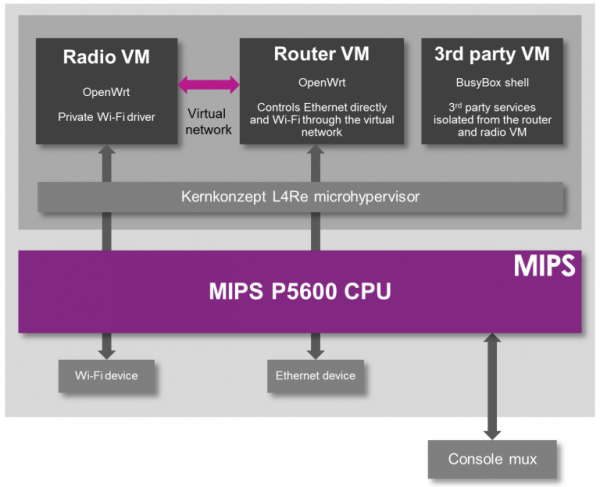
A demonstration of the capabilities of this next-generation router comes from the prpl Security Working Group and uses MIPS Warrior CPUs to create multiple trusted environments. The control of the router can be handled by one secure environment, while the rest of the router firmware – OpenWrt included – can be run in an environment more conducive to Open Source firmware.

The demo of a compartmentalized, virtualized router uses a dev kit consisting of a dual-core MIPS P5600 CPU running at 1GHz, and a Realtek RTL8192 WiFi adapter plugged into the USB port. The driver for the WiFi adapter runs under a secure hypervisor, making it secure enough to pass the FCC’s muster.

This build wouldn’t be possible without hardware virtualization in microprocessors and microcontrollers. Imagination Technologies has been working on this for a while, and only a few years ago demonstrated a PIC32 with baked in virtualization.

In the video below, Imagination Technologies demonstrates a MIPS board running three virtual machines. The first machine is running OpenWrt, the second is running a WiFi driver, and the third is running third-party applications. Crashing one machine doesn’t bring down the others, and the WiFi driver is locked away in a secure environment in accordance with the FCC regulations.

While it’s hard to imagine a router based on a MIPS board that would be cheaper than the already inexpensive router SoCs found in today’s routers, this method of secure virtualization is the best way to give consumers what they deserve: an open source option for all their devices.

Continue reading “Virtualizing Around The FCC’s Firmware Modification Rules”

Linux: Assembly Required

Sometimes you might need to use assembly sometime to reach your project objectives. Previously I’ve focused more on embedding assembly within gcc or another compiler. But just like some people want to hunt with a bow, or make bread by hand, or do many other things that are no longer absolutely necessary, some people like writing in assembly language.

In the old days of DOS, it was fairly easy to write in assembly language. Good thing, because on the restricted resources available on those machines it might have been the only way to get things to fit. These days, under Windows or Linux or even on a Raspberry Pi, it is hard to get oriented on how to get an assembly language off the ground.

Continue reading “Linux: Assembly Required”

Ikea Projection Lamp Makeover Adds LED Matrix And Raspberry Pi Zero

If you’re like us, it’s hard to walk through an Ikea without mentally hacking everything there into something else. The salad bowl? Parabolic antenna. Drawer slides? Linear motion rails. Storage containers? Etching tank. We admit that we still haven’t figured out what to do with that 1,000-pack of tea lights.

[Alain Mauer] pulled off an Ikea hack that we’ve always dreamed about. In particular, he took the Sprida projector lamp and wedged an 8×8 LED matrix and Raspberry Pi Zero into it.

The lamp in question is essentially a slide projector for kids. Before [Alain] got to it, it had an LED in the back, a mount for a slide in the middle, and a focusing lens on the front. His mod is simplicity itself: remove the LED and transparency, and place the LED matrix in the focal plane where the slide used to be. Reverse images on the LED in software to compensate for the lens, and you’re done.

The video says “Raspberry Pi Zero with WiFi” and the project title promises “IoT”, but we don’t see the WiFi in the build. We’re guessing that [Alain] will get around to it — it’s easily doable. (Doh! There’s a tiny USB WiFi dongle providing the obligatory wireless connection.) Anyway, the point is the projection, and we love it, and we’d be lying if we said it didn’t make us think about RGB matrices.

Continue reading “Ikea Projection Lamp Makeover Adds LED Matrix And Raspberry Pi Zero”

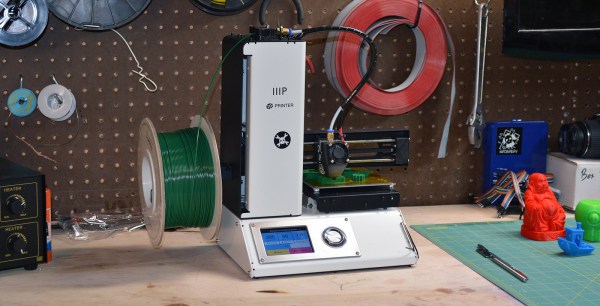
Review: Monoprice MP Select Mini 3D Printer

2016 is the year of the consumer 3D printer. Yes, the hype over 3D printing has died down since 2012. There were too many 3D printers at Maker Faire three years ago. Nevertheless, sales of 3D printers have never been stronger, the industry is growing, and the low-end machines are getting very, very good.

Printers are also getting cheap. At CES last January, Monoprice, the same company you buy Ethernet and HDMI cables from, introduced a line of 3D printers that would be released this year. While the $300 resin-based printer has been canned, Monoprice has released their MP Select Mini 3D printer for $200. This printer appeared on Monoprice late last month.

My curiosity was worth more than $200, so Hackaday readers get a review of the MP Select Mini 3D printer. The bottom line? There are some problems with this printer, but nothing that wouldn’t be found in printers that cost three times as much. This is a game-changing machine, and proof 2016 is the year of the entry-level consumer 3D printer.

Continue reading “Review: Monoprice MP Select Mini 3D Printer”

“IoT Security” Is An Empty Buzzword

As buzzwords go, the “Internet of Things” is pretty clever, and at the same time pretty loathsome, and both for the same reason. “IoT” can mean basically anything, so it’s a big-tent, inclusive trend. Every company, from Mattel to Fiat Chrysler, needs an IoT business strategy these days. But at the same time, “IoT” is vacuous — a name that applies to everything fails to clarify anything.

That’s a problem because “IoT Security” is everywhere in the news these days. Above and beyond the buzz, there are some truly good-hearted security professionals who are making valiant attempts to prevent what they see as a repeat of 1990s PC security fiascos. And I applaud them.

But I’m going to claim that a one-size-fits-all “IoT Security” policy is doomed to failure. OK, that’s a straw-man argument; any one-size-fits-all security policy is bound for the scrap heap. More seriously, I think that the term “IoT” is doing more harm than good by lumping entirely different devices and different connection modes together, and creating an implicit suggestion that they can all be treated similarly. “Internet of Things Security” is a thing, but the problem is that it’s everything, and that means that it’s useful for nothing.

What’s wrong with the phrase “Internet of Things” from a security perspective? Only two words: “Internet” and “Things”.

Continue reading ““IoT Security” Is An Empty Buzzword”

Quickie USB Keyboard Device

There are a ton of applications that we use that can benefit from keyboard shortcuts, and we use ’em religiously. Indeed, there are some tasks that we do so often that they warrant their own physical button. And the only thing cooler than custom keyboards are custom keyboards that you’ve made yourself.

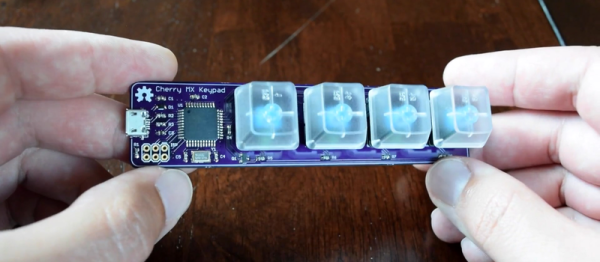
Which brings us to [Dan]’s four-button Cherry MX USB keypad. It’s not really all that much more than four keyswitch footprints and an AVR ATmega32u4, but that plus some software is all you really need. He programs the Arduino bootloader into the chip, and then he’s using the Arduino Leonardo keyboard libraries. Bam! Check out the video below.

Continue reading “Quickie USB Keyboard Device”

From Rusty Cargo Van To Mobile Studio

Looking for a more unique living experience, [Zach Both] converted a 2003 Chevy Express Van he picked up from Craigslist into a gorgeous mobile home.

The van had 200,000 miles when he bought it. The body and frame were a bit rusty, but he saw the potential. First step was gutting the entire van, and getting rid of any surface rust with an angle grinder. It was a long and tedious process, but once it was done he had a blank slate to work with. Continue reading “From Rusty Cargo Van To Mobile Studio”