Secret Listening To Elevator Music

While we don’t think this qualifies as a “fail”, it’s certainly not a triumph. But that’s what happens when you notice something funny and start to investigate: if you’re lucky, it ends with “Eureka!”, but most of the time it’s just “oh”. Still, it’s good to record the “ohs”.

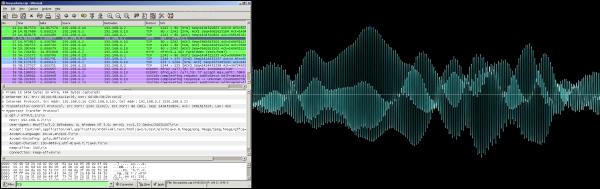
Gökberk [gkbrk] Yaltıraklı was staying in a hotel long enough that he got bored and started snooping around the network, like you do. Breaking out Wireshark, he noticed a lot of UDP traffic on a nonstandard port, so he thought he’d have a look.

Continue reading “Secret Listening To Elevator Music”

The Man Who Didn’t Invent The Personal Computer

[John Blankenbaker] did not invent the personal computer. Museums, computer historians, and authors have other realities in mind when they say [John]’s invention, the KENBAK-1, was the first electronic, commercially available computer that was not a kit, and available to the general population.

In a way, it’s almost to the KENBAK’s detriment that it is labelled the first personal computer. It was, after all, a computer from before the age of the microprocessor. It is possibly the simplest machine ever sold and an architecturally unique machine that has more in common with the ENIAC than any other machine built in the last thirty years..

The story of the creation of this ancient computer has never been told until now. [John], a surprisingly spry octogenarian, told the story of his career and the development of the first personal computer at the Vintage Computer Festival East last month. This is his story of not inventing the personal computer.

Continue reading “The Man Who Didn’t Invent The Personal Computer”

Why I Go Through So Many Arduinos

I make things for people that can’t be bought off a shelf, and in the past several years I have gone through a lot of Arduinos. More and more, they are simply the right tool for both the job and the client. This wasn’t always the case; what changed?

My clients today still include startups and other small businesses, but more and more they’re artists, hobbyists venturing into entrepreneurship, or people who make one-offs like the interactive displays you find in museums or science centers. The type of people I work for has changed, and because of this, the right tool for their job is almost always an Arduino.

Continue reading “Why I Go Through So Many Arduinos”

Identify Your Devices By Their Unintentional Radiation

RFID was supposed to revolutionize asset tracking, replacing the barcode everywhere. Or at least that was the prediction once tags got under five cents apiece. They still cost seven to fifteen cents, even in bulk, and the barcode is still sitting pretty. [Chouchang (Jack) Yang] and [Alanson Sample] of Disney Research hope to change that.

Instead of tagging every electronic device, they use whatever electromagnetic emissions the device currently produces when it’s powered up. What’s surprising is not that they can tell an iPhone from a toy lightsaber, but that they can tell the toy lightsabers apart. But apparently there’s enough manufacturing and tolerance differences from piece to piece that they appear unique most of the time.

The paper (PDF) goes through the details and procedure. The coolest bit? The sensor they use is an RTL-SDR unit with the radio-mixer front end removed and replaced with a simple transformer. This lets them feed baseband (tuning from 0 to 28.8 MHz) straight into the DAC ADC and on to the computer which does the heavy math. Sawing off the frontend of a TV tuner is a hack, for those of you out there with empty bingo cards.

If you like statistics, you’ll want to read the paper for details about how they exactly do the classification of objects, but the overview is that they first start by figuring out what type of device they’re “hearing” and then focusing on which particular one it is. The measure that they use ends up being essentially a normalized correlation.

While we’re not sure how well this will scale to thousands of devices, they get remarkably good results (around 95%) for picking one device out of five. The method won’t be robust to overclocking or underclocking of the device’s CPU, so we’re concerned about temperature and battery-voltage effects. But it’s a novel idea, and one that’s ripe for the hacker-rebuild. And for the price of an RTL-SDR, and with no additional per-tag outlay as with an RFID system, it’s pretty neat.

Thanks [Static] for the tip! Via Engadget.

Field Expedient Bandsaw Mill Deals With Leftover Logs

When a questionable tree threatened his house, [John Heisz] did the sensible thing and called in a professional to bring it down. But with a flair for homebrew tools, [John] followed up with a seemingly non-sensible act and built a quick and dirty DIY bandsaw mill to turn the resulting pile of maple logs into usable lumber.

A proper bandsaw mill is an expensive tool. Prices start in the mid-four figures for a stripped down version and can easily head into the multiple tens of thousands for the serious mills. [John] makes it clear that his mill is purpose-built to deal with his leftover logs, and so he made no attempt at essentials like a way to index the blade vertically. His intention was to shim the logs up an inch after each cut, or trim the legs to move the blade down. He also acknowledges that the 2-HP electric motor is too anemic for the hard maple logs – you can clearly see the blade bogging down in the video below. But the important point here is that [John] was able to hack a quick tool together to deal with an issue, and in the process he learned a lot about the limitations of his design and his choice of materials. That’s not to say that wood is never the right choice for tooling – get a load of all the shop-built tools and jigs in his build videos. A wooden vise? We’d like to see the build log on that.

We’ve featured a surprising number of wooden bandsaws before, from benchtop to full size. We’re pretty sure this is the first one purpose built to mill logs that we’ve featured, although there is this chainsaw mill that looks pretty handy too.

Continue reading “Field Expedient Bandsaw Mill Deals With Leftover Logs”

BeagleBone Green, Now Wireless

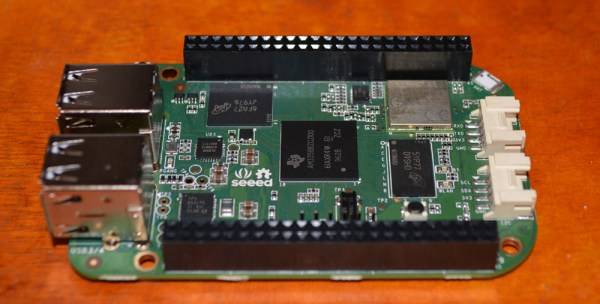
Over the past few years, the BeagleBone ecosystem has grown from the original BeagleBone White, followed two years later by the BeagleBone Black. The Black was the killer board of the BeagleBone family, and for a time wasn’t available anywhere at any price. TI has been kind to the SoC used in the BeagleBone, leading to last year’s release of the BeagleBone Green, The robotics-focused BeagleBone Blue, and the very recent announcement of a BeagleBone on a chip. All these boards have about the same capabilities, targeted towards different use cases; the BeagleBone on a Chip is a single module that can be dropped into an Eagle schematic. The BeagleBone Green is meant to be the low-cost that plays nicely with Seeed Studio’s Grove connectors. They’re all variations on a theme, and until now, wireless hasn’t been a built-in option.

This weekend at Maker Faire, Seeed Studio is showing off their latest edition of the BeagleBone Green. It’s the BeagleBone Green Wireless, and includes 802.11 b/g/n, and Bluetooth 4.1 LE.

Continue reading “BeagleBone Green, Now Wireless”

Virtually Free Rapsberry Pis

One of the nice things about the Raspberry Pi is that it runs Linux and you can do a lot of development right on the board. The converse of that is you can do a lot of development on a Linux desktop and then move things over to the Pi once you get the biggest bugs out. However, sometimes you really need to run code on the actual platform.

There is, however, an in-between solution that has the added benefit of upping your skills: emulate a Pi on your desktop. If you use Linux or Windows on your desktop, you can use QEMU to execute Raspberry Pi software virtually. This might be useful if you don’t have a Pi (or, at least, don’t have it with you). Or you just want to leverage your large computer to simplify development. Of course we would be delighted to see you build the Pi equivalent of the Tamagotchi Singularity but that’s a bit beyond the scope of this article.

Since I use Linux, I’m going to focus on that. If you insist on using Windows, you can find a ready-to-go project on Sourceforge. For the most part, you should find the process similar. The method I’ll talk about works on Kubuntu, but should also work on most other Debian-based systems, including Ubuntu.

Continue reading “Virtually Free Rapsberry Pis”