Audio Fingerprinting Skips A Show’s Intro, Reliably

Lacking a DVD drive, [jg] was watching a TV series in the form of a bunch of .avi video files. Of course, when every episode contains a full intro, it is only a matter of time before that gets too annoying to sit through.
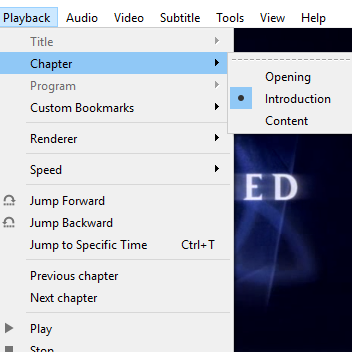
Chapter breaks reliably inserted around the intro, even when it doesn’t always occur in the same place.

The usual method of skipping the intro on a plain video file is a simple one:

  1. Manually drag the playback forward past the intro.
  2. Oops that’s too far, bring it back.
  3. Ugh reversed it too much, nudge it forward.
  4. Okay, that’s good.

[jg] was certain there was a better way, and the solution was using audio fingerprinting to insert chapter breaks. The plain video files now have a chapter breaks around the intro, allowing for easy skipping straight to content. The reason behind selecting this method is simple: the show intro is always 52 seconds long, but it isn’t always in the same place. The intro plays somewhere within the first two to five minutes of an episode, so just skipping to a specific timestamp won’t do the trick.

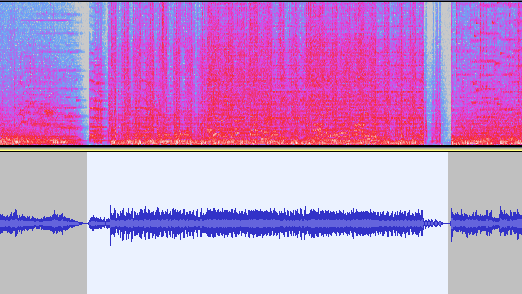
The first job is to extract the audio of an intro sequence, so that it can be used for fingerprinting. Exporting the first 15 minutes of audio with ffmpeg easily creates a wav file that can be trimmed down with an audio editor of choice. That clip gets fed into the open-source SoundFingerprinting library as a signature, then each video has its audio track exported and the signature gets identified within it. SoundFingerprinting therefore detects where (down to the second) the intro exists within each video file.

Marking out chapter breaks using that information is conceptually simple, but ends up being a bit roundabout because it seems .avi files don’t have a simple way to encode chapters. However, .mkv files are another matter. To get around this, [jg] first converts each .avi to .mkv using ffmpeg then splices in the chapter breaks with mkvmerge. One important element is that the reformatting between .avi and .mkv is done without completely re-encoding the video itself, so it’s a quick process. The result is a bunch of .mkv files with chapter breaks around the intro, wherever it may be!

The script is available here for anyone to play with, and the project page is a good learning reference because [jg] kindly provides all the command-line options used for each tool. Interested in using audio fingerprinting in your own projects? Remember to also check out Olaf, the Overly Lightweight Acoustic Fingerprinting method that can be implemented in embedded systems and web browsers.
Roll Your Own Photo Sharing, Minus The Social Networking Baggage

[Niklas Roy] rolled his own photo diary, because he found the core functionality of something like instagram attractive, but didn’t want the social network baggage that it came with. His simple system is called my own insta ;) and it consists of some javascript and PHP to create a nice progressive web app photo diary and backend that can be accessed just fine from a mobile device. It is available on GitHub for anyone interested in having their own.

This project came up because [Niklas] sometimes found himself working on small projects or experiments that aren’t destined for proper documentation, but nevertheless could benefit from being shared as a photo with a short description. This dovetails with what many social networks offer, except that those platforms also come with other aspects [Niklas] doesn’t particularly want. His online photo diary solves this by having a simple back end with which he can upload, sort, and caption photos in an easy way even from a mobile device.

Rolling one’s own solution to some small core functionality offered by a social network is one way to avoid all the extra baggage, but another method is to simply automate away all the pesky social bits with a robot.

A Computer In The Game Of Life

We often hear the term “Turing-complete” without giving much thought as to what the implications might be. Technically Microsoft PowerPoint, Portal 2, and Magic: the Gathering all are Turing-complete, what of it? Yet, each time someone embarks on an incredible quest of perseverance and creates a computer in one of these mediums, we stand back in awe.

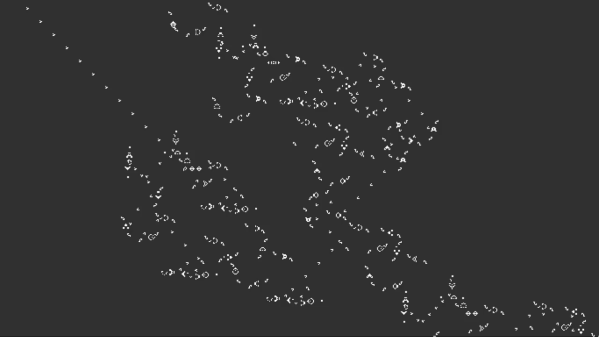
[Nicolas Loizeau] is one such individual who has created a computer in Conway’s Game of Life. Unlike electricity, the Game of Life uses gliders as signals. Because two orthogonal gliders can cancel each other out or form a glider eater if they intersect with a good phase shift, the basic logic gates can be formed from these interactions. This means the space between gates is crucial as signals need to be in phase alignment. The basic building blocks are a period-60 gun, a 90-degree glider reflector, a glider duplicator, and a glider eater.

All the Python code that generates these structures is on GitHub as the sheer size of the machine couldn’t possibly be placed by hand. The Python includes scripts to assemble the basic programs as a bank of selectable glider generators. It’s all based on Golly, which is an excellent program for simulating Conway’s Game of Life, among other things. While this isn’t the first computer in the Game of Life as [Paul Rendell] published a design in 2000 and [Adam Goucher] published a Spartan universal computer constructor in 2009, we think this is a particularly beautiful one.

The actual architecture has an 8-bit data bus, a 64-byte memory with two read ports, a ROM with 21 bits per line, and a one-hot encoded ALU supporting 8 different operations. Instructions have a 4-bit opcode which is decoding in a few different instructions. The clock is four loops, formed by the glider reflectors as the glider beams rotate. This gives the computer four stages: execution, writing, increment PC, and write PC to memory.

The Game of Life is an excellent example of Cellular Automaton (CA). There are several other types of CA’s and the history behind them is fascinating. We’ve covered this field before and delved into this beautiful fringe of computer science. Check out the video below to truly get a sense of the scale of the machine that [Nicolas] has devised.

Continue reading “A Computer In The Game Of Life” →

Procedurally Generated Trees

As the leaves fall from the trees here in the Northern Hemisphere, we are greeted with a clear view of the branches and limbs that make up the skeleton of the tree. [Nicolas McDonald] made a simple observation while looking at trees, that the sum of the cross-sectional area is conserved when a branch splits. This observation was also made by Leonardo Da Vinci (according to Pamela Taylor’s Da Vinci’s Notebooks). Inspired by the observation, [Nicolas] decided to model a tree growing for his own curiosity.

The simulation tries to approximate how trees spread nutrients. The nutrients travel from the roots to the limbs, splitting proportionally to the area. [Nicolas’] model only allows for binary splits but some plants split three ways rather than just two ways. The decision on where to split is somewhat arbitrary as [Nicolas] hasn’t found any sort of rule or method that nature uses. It ended up just being a hardcoded value that’s multiplied by an exponential decay based on the depth of the branch. The direction of the split is determined by the density of the leaves, the size of the branch, and the direction of the parent branch. To top it off, a particle cloud was attached at the end of each branch past a certain depth.

By tweaking different parameters, the model can generate different species like evergreens and bonsai-like trees. The code is hosted on GitHub and we’re impressed by how small the actual tree model code is (about 250 lines of C++). The power of making an observation and incorporating it into a project is clear here and the results are just beautiful. If you’re looking for a bit more procedurally generation in your life, check out this medieval city generator.

Turning GitHub Into A URL Shortening Service

URL shortening services like TinyURL or Bitly have long become an essential part of the modern web, and are popular enough that even Google killed off their own already. Creating your own shortener is also a fun exercise, and in its core doesn’t require much more than a nifty domain name, some form of database to map the URLs, and a bit of web technology to glue it all together. [Nelsontky] figured you don’t even have to build most of it yourself, but you could just (ab)use GitHub for it.

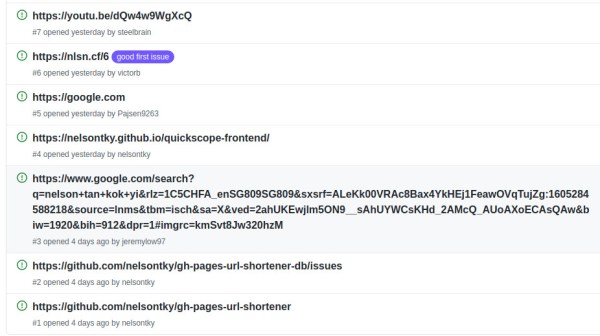
Using GitHub Pages to host the URL shortening website itself, [nelsontky] actually repurposes GitHub’s issue tracking system to map the shortened identifier to the original URL. Each redirection is simply a new issue, with the issue number serving as the shortening identifier, and the issue’s title text storing the original URL. To map the request, a bit of JavaScript extracts the issue number from the request, looks it up via GitHub API, and if a valid one was found (and API rate limits weren’t exceeded), redirects the caller accordingly. What’s especially clever about this is that GitHub Pages usually just serves static files stored in a repository, so the entire redirection logic is actually placed in the 404 error handling page, allowing requests to any arbitrary paths.

While this may not be as neat as placing your entire website content straight into the URL itself, it could be nicely combined with this rotary phone to simply dial the issue number and access your bookmarks — perfect in case you always wanted your own website phone book. And if you don’t like the thought of interacting with the GitHub UI every time you want to add a new URL, give the command line tools a try.

Custom Firmware For Cheap Bluetooth Thermometers

The Xiaomi LYWSD03MMC temperature and humidity sensor is ridiculously cheap. If you’re buying a few at a time, you can expect to pay as little as $5 USD a pop for these handy Bluetooth Low Energy environmental sensors. Unfortunately, that low price tag comes with a bit of a catch: you can only read the data with the official Xiaomi smartphone application or by linking it to one of the company’s smart home hubs. Or at least, that used to be the case.

Over the past year, [Aaron Christophel] has been working on a replacement firmware for these Xiomi sensors that unlocks the data so you can use it however you see fit. In addition, it allows the user to tweak various features and settings that were previously unavailable. For example, you can disable the little ASCII-art smiley face that usually shows on the LCD to indicate the relative comfort level of the room.

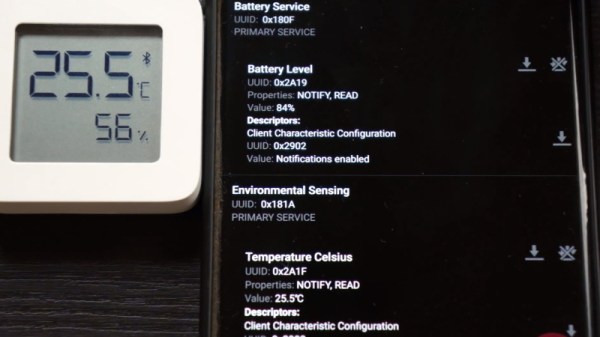
The new firmware publishes the temperature, humidity, and battery level every minute through a BLE advertisement broadcast. In other words, that means client devices can read data from the sensor without having to be paired. Scraping this data is quite simple, and the GitHub page includes a breakdown of what each byte in the broadcast message means. Avoiding direct connections not only makes it easier to quickly read the values from multiple thermometers, but should keep the device’s CR2032 battery going for longer.

But perhaps the most impressive part of this project is how you get the custom firmware installed. You don’t need to crack the case or solder up a programmer. Just load the flasher page on a computer and browser combo that supports Web Bluetooth (a smartphone is probably the best bet), point it to the MAC address of the thermometer you want to flash, and hit the button. [Aaron] is no stranger to developing user-friendly OTA installers for his firmware projects, but even for him, it’s quite impressive.

Continue reading “Custom Firmware For Cheap Bluetooth Thermometers” →

FreeCAD Debugging

Powerful software programs often have macro programming languages that you can use, and if you know how to program, you probably appreciate them. However, sometimes the program’s built-in debugging facilities are lacking or even nonexistent If it were just the language, that wouldn’t be such a problem, but you can’t just grab a, for example, VBA macro from Microsoft Word and run it in a normal Basic interpreter. Your program will depend on all sorts of facilities provided by Word and its supporting libraries. [CrazyRobMiles] was frustrated with trying to debug Python running inside FreeCAD, so he decided to do something about it.

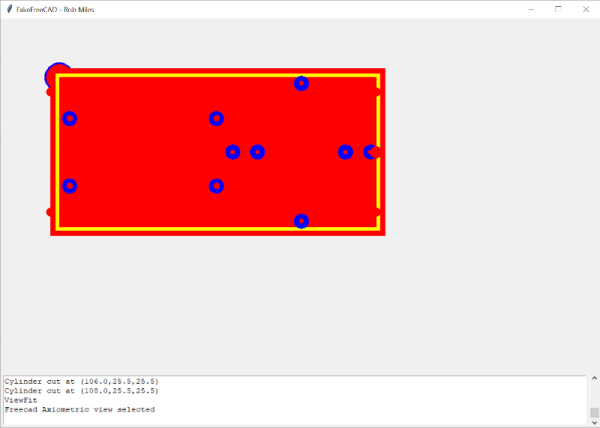
[Rob’s] simple library, FakeFreeCad, gives enough support that you can run a FreeCAD script in your normal Python development environment. It only provides a rude view of what you are drawing, but it lets you explore the flow of the macro, examine variables, and more.

Continue reading “FreeCAD Debugging” →