Trick Google Used Hides Secret Messages On LCD Screens

[Travis] didn’t get picked to go to Google I/O this year, but he did have some I/O inspired fun after the fact. His friends who did go told him about specially modified LCD screens Google had scattered around the event. The screens showed normal show information when viewed with the naked eye. When viewed through a special transparent badge included with the I/O swag though, a URL for Google’s scavenger hunt would magically appear. [Travis] was intrigued by the effect, and became hell-bent on reproducing it himself.

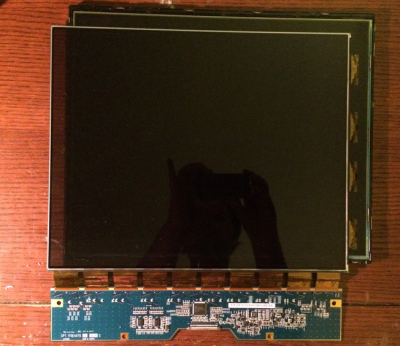
[dual-lcd-3Travis] figured out the transparent badge was actually a polarizing filter. Every standard LCD has two of them, usually bonded to the glass of the LCD itself. If you remove the filters from a LCD, you’ll get a prime view of the backlight – unless you’re wearing polarizing glasses of course. Google’s monitors didn’t have that effect though. They showed a full color display, with a second full color hidden display only visible through the polarizer

It only took a bit of three-dimensional thinking for him to figure out Google’s trick. There are actually two LCDs used in the display. The first is a standard LCD with backlight. The trick is to strip the polarizing film off a second LCD and place it in front of the first. The second LCD will be invisible to anyone – without the polarizer.

[Travis] quickly set about replicating the display using several obsolete VGA LCDs. He quickly found that the hard part was peeling the polarizing plastic from the thin glass LCD sandwich. Several LCDs gave up their lives in the effort, but in the end [Travis] was successful. He made everything fit in one case by using a thin LED backlight in a case designed for a monitor with a Cold Cathode Fluorescent Lamp (CCFL).  The result looks exactly like a standard LCD – that is, until viewed through a polarizing filter. Click past the break to see the hidden message LCD in action!

Continue reading “Trick Google Used Hides Secret Messages On LCD Screens”

Homemade Camera Stabilizer

We’ve featured quite a few camera gimbals and steady cams here, but this one stands out. For one, [Daniel Rhyoo] was in his sophomore year when he built it. His 2-axis camera gimbal uses brushless DC motors, and is made out of carbon fiber.

[Daniel] machined the carbon fiber parts on a CNC desktop mill and some hand tools. And he also had to teach himself Solid Works to design it. In his slick DIY guide, he starts off by listing the parts and where to source them from, along with the tools needed. Most gimbals use servos for axis movements, which limits the range and do not provide very smooth motion. Brushless motors overcome these limitations allowing a nice, smooth moving gimbal to be built with a wide range of movement. When [Aleksey Moskalenko] introduced the AlexMos brushless motor controller, [Daniel] ordered it out, and then waited until he could get his hands on the right kind of motors. CAD files for all of the machined parts are available for download (.zip file).

He then goes on to blog his build progress, with ample photos to describe the machining and assembly. He does a couple of nice design choices along the way – like using press-nuts to make assembly and dis-assembly easy, and dismantling one of the motors and replacing its shaft with a custom, longer one instead of using a coupler to extend it. At the end, the result is not only a nice looking, light weight rig, but one that works very well thanks to the motors and controller that he used. Check out the video below to see it in action.

Continue reading “Homemade Camera Stabilizer”

Build An Amazon EC2 Gaming Rig

PC gaming is better than console gaming. Now that we’ve said something controversial enough to meet the comment quota for this post, let’s dig into [Larry]’s Amazon EC2 gaming rig.

A while ago, [Larry] bought a MacBook Air. It’s a great machine for what it is, but it’s not exactly the laptop you want for playing modern AAA games on the go. If you have enough bandwidth and a low enough ping, you can replicated just about everything as an EC2 instance.

[Larry] is using a Windows Server 2012 AMI with a single NVIDIA GRID K520 GPU in his instance. After getting all the security, firewall, and other basic stuff configured, it’s just a matter of installing a specific driver for an NVIDIA Titan. With Steam installed and in-home streaming properly configured it’s time to game.

The performance [Larry] is getting out of this setup is pretty impressive. It’s 60fps, but because he’s streaming all his games to a MacBook Air, he’ll never get 1080p.

If you’re wondering how much this costs, it’s actually not too bad. The first version of [Larry]’s cloud-based gaming system was about $0.54 per hour. For the price of a $1000 battle station, that’s about 1900 hours of gaming, and for the price of a $400 potato, that’s 740 hours of gaming.

Battlezone Played On Vector Display With Hand-Wound Yoke

We’ve been admirers of the work [Eric] and friends have been doing over at TubeTime for years. One of the earliest we can remember is the decatron kitchen timer, and we still tell the story of [Eric] purposely leaving out button debouncing in order to make his vector flappy bird even harder.

TubeTime is back at it this year and we had the opportunity to speak with them at Bay Area Maker Faire. The group specializes in working with old tube displays and this year’s offering was spectacular in many ways. First off, the software side of things is an emulator running on an STM32 F4 Discovery board. The chips on these boards have a pair of 12-bit DACs which are driving the X and Y of the vector displays. Code to run the original ROMs was ported from existing projects, but the audio for the games was kind of a hack to get working.

This particular display is where things get really fascinating. The tube itself was originally manufactured as test equipment for television repairmen. What’s fascinating about this is that [Eric] had to rewind the deflection yokes himself to get it working again. Luckily he documented quite a bit about his initial research into this process and his experiments to remedy some distortion issues he encountered once it was working.

Make sure to head on over to TubeTime and read their overview of the Battlezone machine. After the break we’ve also embedded a few of our own pictures as well as the interview at BAMF.

Continue reading “Battlezone Played On Vector Display With Hand-Wound Yoke”

Better VGA On The STM32F4

[Cliff] is pushing VGA video out of a microcontroller at 800×600 resolution and 60 frames per second. This microcontroller has no video hardware. Before we get to the technical overview, here’s the very impressive demo.

The microcontroller in question is the STM32F4, a fairly powerful ARM that we’ve seen a lot of use in some pretty interesting applications. We’ve seen 800×600 VGA on the STM32F4 before, with a circles and text demo and the Bitbox console. [Cliff]’s build is much more capable, though; he’s running 800×600 @ 60FPS with an underclocked CPU and most (90%) of the microcontroller’s resources free.

This isn’t just a demo, though; [Cliff] is writing up a complete tutorial for generating VGA on this chip. It begins with an introduction to pushing pixels, and soon he’ll have a walkthrough on timing and his rasterization framework.

Just because [Cliff] has gone through the trouble of putting together these tutorials doesn’t mean you can’t pull out an STM Discovery board and make your own microcontroller video hacks. [Cliff] has an entire library of for graphics to allow others to build snazzy video apps.

Googly Eyes Follow You Around The Room

If you’re looking to build the next creepy Halloween decoration or simply thinking about trying out OpenCV for the first time, this next project will have you covered. [Glen] made a pair of giant googly eyes that follow you around the room using some servos and some very powerful software.

The project was documented in three parts. In Part 1, [Glen] models and builds the eyes themselves, including installing the servo motors that will eventually move them around. The second part involves an Arduino and power supply that will control the servos, and the third part goes over using OpenCV to track faces.

This part of the project is arguably the most interesting if you’re new to OpenCV; [Glen] uses this software package to recognize different faces. From there, the computer picks out the most prominent face and sends commands to the Arduino to move the eyes to the appropriate position. The project goes into great detail, from Arduino code to installing Ubuntu to running OpenCV for the first time!

We’ve featured some of [Glen]’s projects before, like his FPGA-driven LED wall, and it’s good to see he’s still making great things!

Continue reading “Googly Eyes Follow You Around The Room”

Eye-Controlled Wheelchair Advances From Talented Teenage Hackers

[Myrijam Stoetzer] and her friend [Paul Foltin], 14 and 15 years old kids from Duisburg, Germany are working on a eye movement controller wheel chair. They were inspired by the Eyewriter Project which we’ve been following for a long time. Eyewriter was built for Tony Quan a.k.a Tempt1 by his friends. In 2003, Tempt1 was diagnosed with the degenerative nerve disorder ALS  and is now fully paralyzed except for his eyes, but has been able to use the EyeWriter to continue his art.

This is their first big leap moving up from Lego Mindstorms. The eye tracker part consists of a safety glass frame, a regular webcam, and IR SMD LEDs. They removed the IR blocking filter from the webcam to make it work in all lighting conditions. The image processing is handled by an Odroid U3 – a compact, low cost ARM Quad Core SBC capable of running Ubuntu, Android, and other Linux OS systems. They initially tried the Raspberry Pi which managed to do just about 3fps, compared to 13~15fps from the Odroid. The code is written in Python and uses OpenCV libraries. They are learning Python on the go. An Arduino is used to control the motor via an H-bridge controller, and also to calibrate the eye tracker. Potentiometers connected to the Arduino’s analog ports allow adjusting the tracker to individual requirements.

The web cam video stream is filtered to obtain the pupil position, and this is compared to four presets for forward, reverse, left and right. The presets can be adjusted using the potentiometers. An enable switch, manually activated at present is used to ensure the wheel chair moves only when commanded. Their plan is to later replace this switch with tongue activation or maybe cheek muscle twitch detection.

First tests were on a small mockup robotic platform. After winning a local competition, they bought a second-hand wheel chair and started all over again. This time, they tried the Raspberry Pi 2 model B, and it was able to work at about 8~9fps. Not as well as the Odroid, but at half the cost, it seemed like a workable solution since their aim is to make it as cheap as possible. They would appreciate receiving any help to improve the performance – maybe improving their code or utilising all the four cores more efficiently. For the bigger wheelchair, they used recycled car windshield wiper motors and some relays to switch them. They also used a 3D printer to print an enclosure for the camera and wheels to help turn the wheelchair. Further details are also available on [Myrijam]’s blog. They documented their build (German, pdf) and have their sights set on the German National Science Fair. The team is working on English translation of the documentation and will release all design files and source code under a CC by NC license soon.