Presenting The Internet Of Trash Cans !

This was gonna happen – sooner or later. [matthewhallberg] built a “Smart” trash can that is connected to the Internet and can be controlled by its own Android App. We’re not sure if the world needs it, but he wanted one and so built it. He started it out on a serious note, but quickly realized the fun part of this build – check out his funny Infomercial style video after the break.

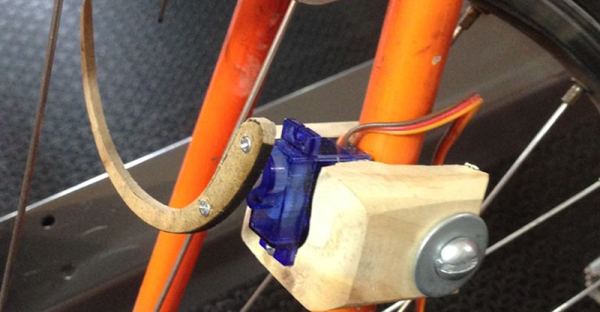
trash_can_02The build itself is uncomplicated and can be replicated with ease. A servo motor helps flip the lid open and close. This is triggered by an ultrasonic ping sensor, which responds when someone waves a hand in front of the trash can. A second ping sensor helps inform the user when it is full and needs to be emptied. A Leonardo with the Idunio Yun shield helps connect the trash can to the internet. An mp3 shield connected to a set of powered computer speakers adds voice capability to the trash can, allowing it to play back pre-recorded sound clips. Finally, a Bluetooth module lets him connect it to an Android phone and the companion app controls the trash can remotely.

For the IoT side of things, [matthewhallberg] uses a Temboo account to send an email to the user when the trash can is full. The Arduino sketch, a header file to configure the Temboo account, and the Android application can all be downloaded from his blog. If this project inspires you, try building this awesome Robotic trash can which catches anything that you throw near it  or read the barcodes off the trash being thrown out and update the grocery list.

Continue reading “Presenting The Internet Of Trash Cans !”

Laser PCB Exposer Built From CD-ROM Drives

[Neumi] has built a CNC Laser using CD-ROM drives as the X and Y motion platforms. The small 405nm laser can engrave light materials like wood and foam. The coolest use demonstrated in the video is exposing pre-coated photo-resist PCBs.

With $61 US Dollars (55 Euro) for the Arduino, stepper drivers, and a laser in the project, [Nuemi] got a pretty capable machine after adding a few parts from the junk bin. He wanted to avoid using existing software in order to learn the concepts behind a laser engraver. In the end, he has a working software package which can send raster scans to an Arduino mega. The mega then controls the sync between the stepper and laser firings. The code is available on GitHub.

The machine can do a 30x30mm PCB in 10 minutes. It’s not about to set a record, but it’s cool and not at all bad for the price. You can see the failed PCBs lined up in the video from the initial tuning, but the final one produced a board very equivalent to the toner transfer method. Video after the break.

Continue reading “Laser PCB Exposer Built From CD-ROM Drives”

Blinky LED Bike Bag

Bicycle riders can never be too visible: the more visible you are, the less chance there is someone will hit you. That’s the idea behind the Arduibag, a neat open-source project from [Michaël D’Auria] and [Stéphane De Graeve]. The project combines a joystick that mounts on the handlebars with a dot matrix LED display in a backpack. By moving the joystick, the user can indicate things such as that they are turning, stopping, say thank you or show a hazard triangle to warn of an accident.

The whole project is built from simple components, such as an Adafruit LED matrix and a Bluno (an Arduino-compatible board with built-in Bluetooth 4.0) combined with a big battery that drives the LED matrix. This connects to the joystick, which is in a 3D printed case that clips onto the handlebars for easy use. It looks like a fairly simple build, with the larger components being mounted on a board that fits into the backpack and holds everything in place. You then add a clear plastic cover to part of the backpack over the LED matrix, and you are ready to hit the road, hopefully without actually hitting the road.

Continue reading “Blinky LED Bike Bag”

Robotic Pets Test An Automatic Pet Door

Lots of people get a pet and then hack solutions that help them care for their new friend, like an automatic door to provide access to the great outdoors. Then again, some people build the pet door first and then build the pets to test it.

It’s actually not quite as weird as it sounds. [Amir Avni] and his wife attended a recent GeekCon and entered the GeekCon Pets event. GeekCon is a cooperative rather than competitive hackathon that encourages useless builds as a means to foster community and to just have some fun. [Amir] and his wife wanted to build a full-featured automatic pet door, and succeeded – with NFC and an ESP8266, the stepper-powered door worked exactly as planned. But without any actual animal companions to test the system, they had to hack up a few volunteers. They came up with a 3D-printed dog and cat perched atop wireless cars, and with NFC tags dangling from their collars, the door was able to differentiate between the wandering ersatz animals. The video below the break shows the adorable plastic pals in action.

It’s clear from all the pet doors and automatic waterers and feeders we’ve seen that hackers love their pets, but we’re pretty sure this is the first time the pet itself was replaced by a robot. That’s fine for the test environment, but we’d recommend the real thing for production.

Continue reading “Robotic Pets Test An Automatic Pet Door”

Banish Dangerous Shadows Under Kitchen Cabinets

[nebulous] has a lot of problems with his kitchen cabinets. Aside from a noted lack of micro-controllers, he was especially suspicious of the dark spaces under them. Anything could be hiding there.

The core of the project is a $10 Arduino-compatible esp8266 board from digistump. The board is powered by the five volt regulator of an L298N motor driver module hooked to a power-supply. All this controls a set-of LED strips adhered to the underside of the cabinets with the traditionally bad adhesive strips with which they come standard. We can predict an hour spent bent awkwardly cursing at them, a hot-glue gun in one hand, in [nebulous]’s future. The whole set-up is housed in a SparkFun cardboard box above the microwave. You can barely tell it’s not a commercial product.

We’re not certain if we like a future where even our cabinetry has an IP address. However, this is a good weekend project that could make all our cabinetry brighter, safer, and more connected.

App Control With Ease Using Blynk

App development is not fun for everyone, and sometimes you just want to control a device from your phone with minimal work. Blynk appears to be a fairly put-together library for not only hooking up any Arduino or esp8266 to a phone through WiFi, but also through the net if desired.

Install the app onto your iPhone or Android device. Install the libraries on your computer. Next, modify your Arduino source to either pass direct control of a pin to Blynk, or connect Blynk to a virtual pin inside your code for more advanced control. If you want to go the easy route, create an account, log into the app, and drag and drop the interface you’d like. If the idea of letting some corporation host your Arduino project sends shivers down your spine, there is also an option to host your own server. (Editorial snark: Yes, it requires a server. That’s the cost of “simplicity”.)

There have been a few times where we’ve wished we could add app control to our projects, but installing all the libraries and learning a new language just to see a button on a screen didn’t seem worth it. This is a great solution. Have any of you had experience using it?

Mein Enigma

The World War II German Enigma encoding machine is something of an icon in engineering circles not just for its mechanical ingenuity but for the work of the wartime staff at Bletchley Park in decoding its messages. Without it we would not have had Colossus, the first programmable digital electronic computer, and subsequent technological developments might have taken a slower pace towards what we take for granted today.

Sadly for the Enigma enthusiast though, real machines are now few and far between. Our grandparents’ generation saw to that through the chaos and bombing of the fight across Europe. If you want to handle one you will have to either have an outrageous amount of money, work for a museum, or maybe for the GCHQ archivist.

This has not stopped our community building Enigma replicas, and the latest one to come to our attention here at Hackaday shows some promise. [lpaseen]’s meinEnigma is an electronic Enigma driven by an Arduino Nano, with rotary encoders to represent the Enigma rotors and multi-segment alphanumeric displays standing in for the lighted letters in the original. It supports all the different variations of rotors from the original in software, has a physical plugboard, and a serial port over USB through which all machine functions can be controlled. The machine as it stands is a fully working prototype, the plan is that a final machine will resemble the original as closely as possible.

All the code used in the project can be found on GitHub, along with [lpaseen]’s Arduino library for the Holtek HT16K33 keyboard/display chip used to handle those tasks.

We’ve featured a few Enigma machines on Hackaday over the years. One was built into a wristwatch, another into a hacked child’s toy, but the closest in aim to [lpaseen]’s offering is this rather attractive replica also driven by an Arduino. It is also worth mentioning that should your travels ever take you to Buckinghamshire you can visit the Bletchley Park Museum and neighboring  National Museum of Computing, to get the Enigma and Colossus story from the source.