Castrol Virtual Drift: Hacking Code At 80MPH With A Driver In A VR Helmet

Driving a brand new 670 horsepower Roucsh stage 3 Mustang while wearing virtual reality goggles. Sounds nuts right? That’s exactly what Castrol Oil’s advertising agency came up with though. They didn’t want to just make a commercial though – they wanted to do the real thing. Enter [Adam and Glenn], the engineers who were tasked with getting data from the car into a high end gaming PC. The computer was running a custom simulation under the Unreal Engine. El Toro field provided a vast expanse of empty tarmac to drive the car without worry of hitting any real world obstacles.

The Oculus Rift was never designed to be operated inside a moving vehicle, so it presented a unique challenge for [Adam and Glenn]. Every time the car turned or spun, the Oculus’ on-board Inertial Measurement Unit (IMU) would think driver [Matt Powers] was turning his head. At one point [Matt] was trying to drive while the game engine had him sitting in the passenger seat turned sideways. The solution was to install a 9 degree of freedom IMU in the car, then subtract the movements of that IMU from the one in the Rift.

GPS data came from a Real Time Kinematic (RTK) GPS unit. Unfortunately, the GPS had a 5Hz update rate – not nearly fast enough for a car moving close to 100 MPH. The GPS was relegated to aligning the virtual and real worlds at the start of the simulation. The rest of the data came from the IMUs and the car’s own CAN bus. [Adam and Glenn] used an Arduino with a Microchip mcp2515 can bus interface  to read values such as steering angle, throttle position, brake pressure, and wheel spin. The data was then passed on to the Unreal engine. The Arduino code is up on Github, though the team had to sanitize some of Ford’s proprietary CAN message data to avoid a lawsuit. It’s worth noting that [Adam and Glenn] didn’t have any support from Ford on this, they just sniffed the CAN network to determine each message ID.

The final video has the Hollywood treatment. “In game” footage has been replaced with pre-rendered sequences, which look so good we’d think the whole thing was fake, that is if we didn’t know better.

Click past the break for the final commercial and some behind the scenes footage.

Continue reading “Castrol Virtual Drift: Hacking Code At 80MPH With A Driver In A VR Helmet”
Tracking Bitcoin With The ESP8266

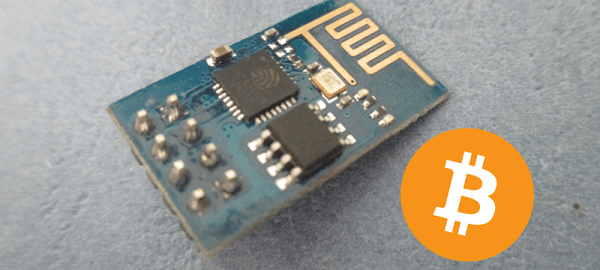
[Kendrick] was looking for something to do with an ESP8266 WiFi module, and since he loves Bitcoin and Arduino, the obvious solution was to make a Bitcoin price tracker.

The ESP8266 is a complete microcontroller with a WiFi chip and a few pins for a serial connection. It’s certainly possible to write some firmware for the ESP to get the current conversion rate of Bitcoin, but for simplicity’s sake, [Kendrick] chose to use an Arduino for this project. He’s using a 5V Arduino, and the ESP operates on 3.3V logic, but a few Zeners take care of the logic level conversion.

The code running on the Arduino checks the CoinDesk API minute, parses the JSON coming from the API, and prints the current Bitcoin price to the serial port. For tracking the current conversion rate of Bitcoin, it’s vastly overkill. This project could have a few interesting applications, from hooking up a few seven-segment displays, to an RGB LED mood lamp that keeps track of this magic Internet money.

Prevent Failed Prints With A Filament Speed Sensor

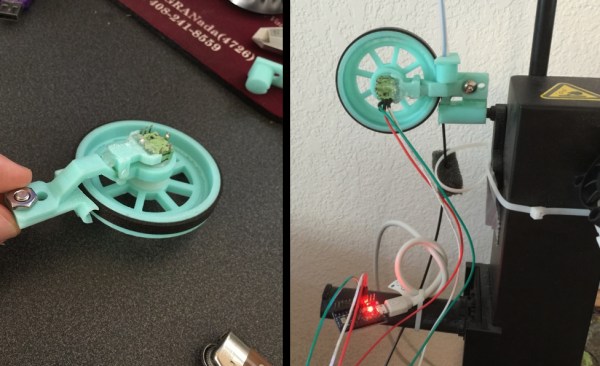
If you have used a 3D printer for any length of time, you’ve probably experienced a failed print caused by a clogged nozzle. If you’re not around to stop the print and the nozzle stays hot and full of filament for hours, the clog gets even worse. [Florian] set out to solve this issue with an encoder that measures filament speed, which acts as an early warning system for nozzle clogs.

static1.squarespace.com[Florian] designed a small assembly with a wheel and encoder that measures filament movement. The filament passes under the encoder wheel before it’s fed into the 3D printer. The encoder is hooked up to an Arduino which measures the Gray code pulses as the encoder rotates, and the encoder count is streamed over the serial port to a computer.
When the filament slows down or stops due to a nozzle clog, the Python script plays a notification sound to let you know that you should check your nozzle and that your print might fail. Once [Florian] works out some of the kinks in his setup, it would be awesome if the script could stop the print when the nozzle fails. Have any other ideas on how to detect print failures? Let us know in the comments.

Two New Dev Boards That Won’t Make Your Wallet Hurt-So-Good

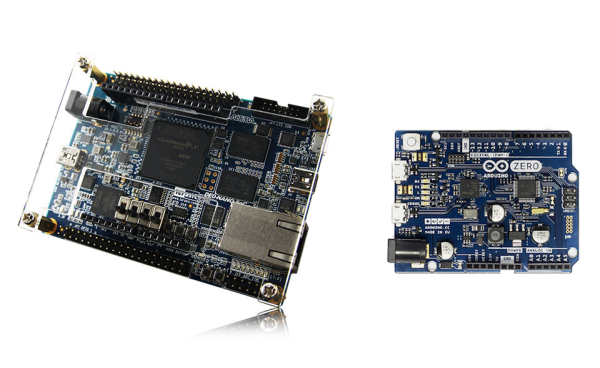
If you’ve been keeping up with the hobbyist FPGA community, you’ll recognize the DE0 Nano as “that small form-factor FPGA” with a deep history of projects from Oldland cpu cores to synthesizable Parallax Propeller processors. After more than four years in the field though, it’s about time for a reboot.

Its successor, the DE0 Nano SoC, is a complete redesign from multiples perspectives while doing it’s best to preserve the bite-size form factor and price that made the first model so appealing. First, the dev board boasts a Cyclone V with 40,000 logical elements (up from the DE0’s 22K) and an integrated dual-core Arm Cortex A9 Processor. The PCB layout also brings us  3.3V Arduino shield compatibility via female headers, 1 Gig of external DDR3 SDRAM and gigabit ethernet support via two onboard ASICs to handle the protocol. The folks at Terasic also seem to be tipping their hats towards the “Duino-Pi” hobbyist community, given that they’ve kindly provided both Linux and Arduino images to get you started a few steps above your classic finite-state machines and everyday combinational logic.

And while the new SoC model sports a slightly larger form factor at 68.59mm x 96mm (as opposed to the original’s 49mm x 75.2mm), we’d say it’s a small price to pay in footprint for a whirlwind of new possibilities on the logic level. The board hits online shelves now at a respectable $100.

Next, as a heads-up, the aforementioned Arduino Zero finally makes it’s release on June 15. If you’ve ever considered taking the leap from an 8-bit to a 32-bit processor without having to hassle through the setup of an ARM toolchain, now might be a great time to get started.

via [the Arduino Blog]

Arduino Controlled AC

Arduino Controlled Air Conditioner

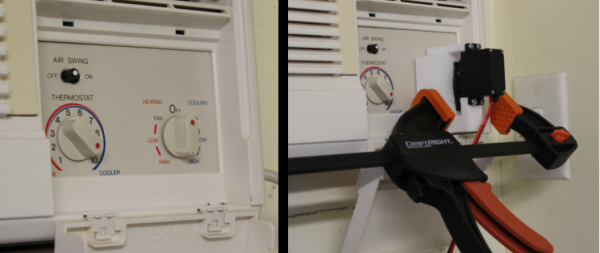
Now that summer is coming, it’s time to break out the Air Conditioners! There are some old AC units out there that still work just fine, but nowadays we are used to everything being remotely controlled and automatic. [Phil] had an old window-mounted AC unit that still worked but was installed in a not-so-convenient place. To access the AC’s controls, one would have to climb over a large desk. This is a perfect opportunity to use the plethora of widely available hobby electronics to make an automatic AC controller retrofit.

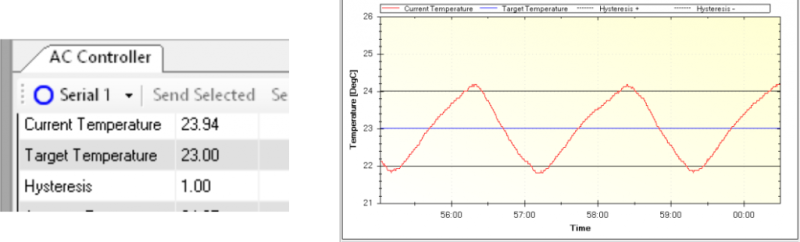
First things first, there needs to be a way to turn the current control knob on the AC. [Phil] modeled up a 3D bracket to hold an RC car servo to the AC control panel. Attached to the servo horn is a slotted cylinder sized appropriately to fit the shape of the control knob. An Arduino measures the temperature of the room via a DS18B20 temperature sensor which then has the servo turn the control knob to the appropriate position, on or off. The Arduino sends temperature data back to a PC via MegunoLink Pro which graphs past data and also displays current temperature data. Using MegunoLink Pro, the min/max temperature points can also be set without uploading a new sketch to the Arduino.

Arduino Controlled AC

From the temp vs time graph, it looks like the room temperature stays a consistent 23 +/- 1 °C. [Phil] did us summer-swelterers a favor and made all his design files available. This is a great idea but wonder if leaving the air conditioner unit switch in the ‘on’ position and turning the unit on/off via a relay connected to the 120vac line would work just as well.

Astoundingly Great $60 3D Printer Called Chimera Bests Your Printer

When most people think of 3D printing, they think of Fused Deposition Modelling (FDM) printers. These work by heating a material, squirting it out a nozzle that moves around, and letting it cool. By moving the nozzle around in the right patterns while extruding material out the end, you get a part. You’ve probably seen one of the many, many, many FDM printers out there.

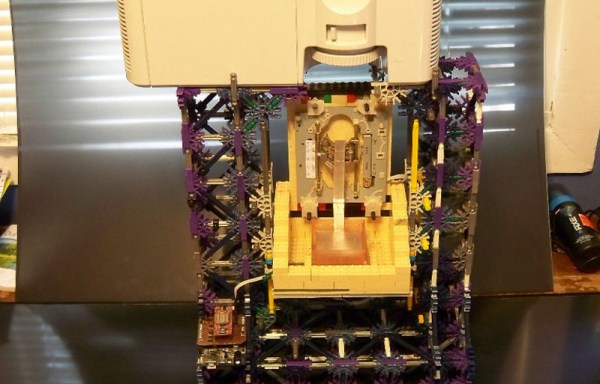
Stereolithography printing (SLA) is a different technique which uses UV light to harden a liquid resin. The Chimera printer uses this technique, and aims to do it on the cheap by using recycled parts.

First up is the UV light source. DLP projectors kick out a good amount of UV, and accept standard video inputs. The Mitsubishi XD221u can be had for about $50 off eBay. Some modifications are needed to get the focus distance set correctly, but with that complete the X and Y axes are taken care of.

For the Z axis, the build platform needs to move. This was accomplished with a stepper motor salvaged from a disk drive. An Arduino drives the motor to ensure it moves at the right rate.

Creation Workshop was chosen as the software to control the Chimera. It generates the images for the projector, and controls the Z axis. The SLA process allows for high definition printing, and the results are rather impressive for such a cheap device. This is something we were just talking about yesterday; how to lower the cost of 3D printers. Obviously this is cheating a bit because it’s banking on the availability of cheap used parts. But look at it this way: it’s based on older technology produced at scale which should help a lot with the cost of sourcing this stuff new. What do you think?

Skateboard

On Your Phone While Driving An Electric Skateboard

Skateboards are fun, but you have to do all that pesky kicking in order to get anywhere. That’s why [Nick] decided to build his own electric skateboard. Not only is the skateboard powered with an electric motor, but the whole thing can be controlled from a smart phone.

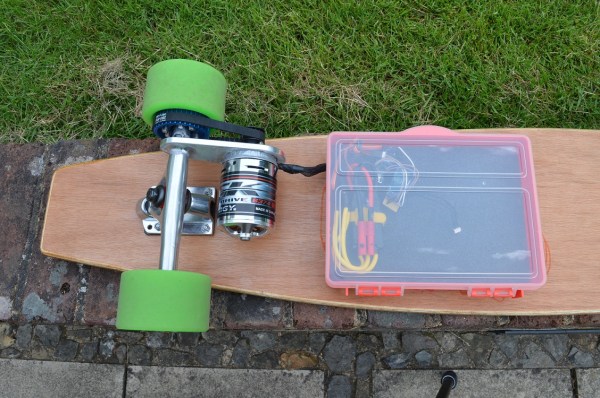
[Nick] started out with a long board deck that he had made years ago. After cleaning it up and re-finishing it, the board was ready for some wheels. [Nick] used a kit he found online that came with the trucks, wheels, and a belt. The trucks have a motor mount welded in place already. [Nick] used a Turnigy SK3 192KV electric motor to drive the wheels. He also used a Turnigy electronic speed controller to make sure he could vary the speed of the board while riding.

Next [Nick] needed some interface between a smart phone and the motor controller. He chose to use an Arduino Nano hooked up to a Bluetooth module. The Nano was able to directly drive the motor controller, and the Bluetooth module made it easy to sync up to a mobile phone. The Android app was written using MIT’s App Inventor software. It allows for basic control over the motor speed so you can cruise in style. Check out the video below for a slide show and some demonstration clips.

It’s a popular project, and eerily similar to the one we saw a couple months back.

Continue reading “On Your Phone While Driving An Electric Skateboard”