USB Keyboard Becomes An AVR Programmer

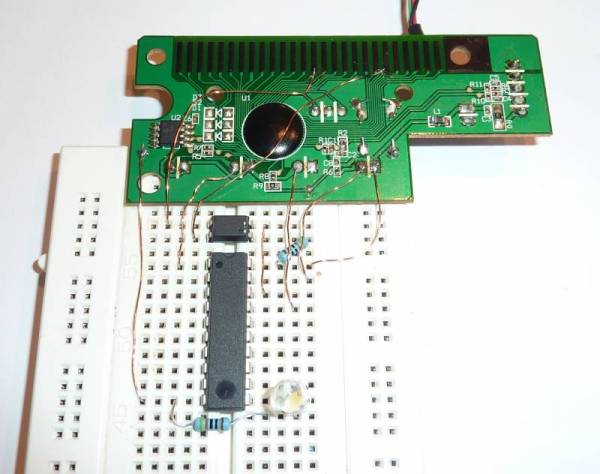
[Steve] created an AVR programmer using an old USB keyboard. We feature a bunch of AVR programmers, but this one is made from parts that many people will have lying around. There are two components: the controller PCB from a USB keyboard, and an optocoupler for emulating key presses.

In order to send data to the AVR, [Steve] used the LED outputs on the keyboard. These LEDs can easily be toggled according to the HID device specification. They provide a 5 volt output with current limiting resistors, which means they can be connected directly to the target AVR.

Reading data is a bit more complex. The optocoupler tricks the keyboard into believing that a single key has been pressed, firing off a data transfer. The MISO pin on the AVR is connected to the row and column of the shift key, which is read by the driver.

On the software side [Steve] created an avrdude interface driver. This allows the programmer to be used with avrdude, just like any other programmer. [Steve] does point out that it isn’t the fastest programmer since the keyboard tries to debounce the MISO input, greatly limiting the speed. However, since it’s made from stuff you might have in your junk bin, it’s a neat hack.

The Ultimate Low-cost Dev Board

We see a lot of microcontroller dev boards here at Hackaday, so much that we’re jokingly considering changing our name to Board a Day. These devices – from Arduinos to Arduino-compatible boards, very, very small boards, to extremely powerful ARM devices – are a great way to learn about the wonders of controlling electricity with code. There’s a problem, though: if you’re teaching a class on programming microcontrollers, giving each student a $20 board is nearly out of the question.

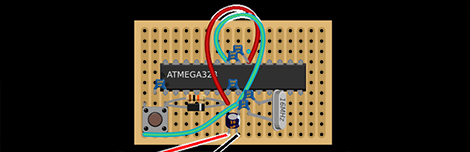
This is where the shrimp comes in. It’s a very, very minimal Arduino-compatible circuit meant to control all the pins on an ATMega328. The components only cost about £1.40 ($2.25 USD) when bought in volume, making it perfect for teaching a class or workshop on the Arduino and giving each student a circuit to take home.

The basic circuit is just an ATMega328 – the same microcontroller used in the Arduino Uno – with a few caps, resistors, and a 16 MHz crystal. It’s a very bare-bones system, but once built and programmed provides all the functionality of a $25 Arduino.

Like all microcontroller platforms, there’s the chicken-and-egg problem of actually programming the device. The Shrimp team is using a CP2102 USB to UART bridge to program each shrimp. Not an inexpensive part, but it is of course possible to only have one serial bridge for each workshop.

Giving The Arduino Deques, Vectors And Streams With The Standard Template Library

The Arduino IDE is extremely similar to C++, but judging from the sketches you can find on the Internet, you’d never know it. Simpler Arduino projects can make do with just toggling IO pins, reading values, and sending serial data between two points. More complex builds fall into the category of real software development, and this is where the standard Arduino IDE falls miserably short.

[Andy] saw this lack of proper libraries for more complicated pieces of software as a terrible situation and decided to do something about it. He ported the SGI Standard Template Library to bring all those fun algorithms and data structures to any AVR chip, including the Arduino.

Going over what’s included in [Andy]’s port reads just like a syllabus for an object-oriented programming class. Stacks, queues, and lists make the cut, as do strings and vectors. Also included is just about everything in the   and headers along with a few Arduino-oriented additions like a hardware serial and liquid crystal streams.

With all these objects floating around, [Andy] says it will make an impact on Flash and SRAM usage in an AVR. Still, with all the hullabaloo over faster and larger ARM micros, it’s nice to see the classic 8-bit microcontroller becoming a bit more refined.

Making Your Anime Papercraft Move To The Music

This anime character is dancing to the music thanks to some animatronic tricks which [Scott Harden] put together. She dances perfectly, exhibiting different arm and head movements at just the right time. The secret to the synchronization is actually in the right channel of the audio being played.

The character in question is from an Internet meme called the Leekspin song. [Scott] reproduced it on some foam board, adding a servo to one arm to do the leek spinning, and another to move the head. These are both driven by an ATtiny44. All of the movements have been preprogrammed to go along with the audio track. But he needed a way to synchronize the beginning of each action set. The solution was to re-encode the audio with one track devoted to a set of sine wave pulses. The right audio channel feeds to the AVR chip via an LM741 opamp. Each sine wave triggers the AVR to execute the next dance move in the sequence. You can see the demo video for the project after the break.

Continue reading “Making Your Anime Papercraft Move To The Music”

AVR Programmer Made Without A Programmer

[blueHash] uses this cheap development board as an AVR programmer. What’s interesting to us is that it solves the chicken-or-egg problem that is usually encountered when bootstrapping a programmer. We’ve written about this issue before. Most programmers use microcontrollers, which first need to be flashed using a programmer. But it turns out the chip on this dev board has a DFU mode which gets around that conundrum.

He grabbed a uSD dev board for about $6. It’s got a crystal, an ATmega32u4 chip, and on the other side there’s a MicroSD card slot. We looked around and found an Atmel Datasheet (PDF) which describes the Device Firmware Upgrade mechanism. The AVR devices which support DFU are factory configured to use it. This dev board is designed to use DFU so all [blueHash] needed to do is find and configure a ISP firmware package that worked with this chip.

AVR Fuse Bits Explained

Every AVR microcontroller, from the ATtiny in your thermostat to the ATMega in your Arduino, stores its configuration in a series of fuse bits. These fuse bits control settings such as the multiplier of the internal oscillator (and thus the speed of the chip), or if the reset pin can be used as a GPIO pin. [YS] just put up an awesome tutorial for understanding these fuse/lock bits, and it’s just the reference guide you’ll need when you find your AVR is running 8 times slower than you would like.

As an example, [YS] uses the ATMega48 default settings. From the factory, the ‘Mega48 ships with it’s fuse bits set to use an 8MHz internal RC oscillator with the CKDIV8 bit set. This results in the chip operating at 1MHz, a bit slow for [YS]’ liking.

By looking at the datasheet for the ATMega48, [YS] found the CKDIV8 fuse was the 7th bit in the low fuse byte. From the factory, the default value for this byte is 0b01100010. To remove the ‘divide clock by 8’ bit, [YS] needed to change the low byte to 0b11100010, or 0xE2. This is done via AVRdude by appending lfuse:w:0xE2:m to the commands entered when programming.

Fuse bits don’t need to be scary. As long as you can convert between binary and hex, can remember there are 7 bits in a byte (remember to start counting from 0), and have access to an easy to use fuse calculator, it’s possible to change all the settings on any AVR you have on hand.


Arduino Voltage Measurement Tricks

We think it’s a great learning experience to tear back the veil of abstraction and learn a bit more about the hardware found on an Arduino board. This project is a great example. [Scott Daniels] takes a look at the other voltage measurement options available to AVR chips used by Arduino.

If you’ve used the analogRead() function then you’ve already measured a voltage using the Arduino. But do you know what is going on behind the scenes to make this happen? The Analog to Digital converter on the AVR chip is being used to measure an incoming voltage by comparing it to a known voltage reference. That reference is by default the supply voltage line for the chip. This should be 5V but will only be as accurate as the regulator supplying it. [Scott] looks at the other voltage references that may be used. An external reference can be used by adding hardware, but that’s not the focus of his article. Instead he looks at using the 1.1V internal reference. He’s written some short example code that let’s you measure the incoming line voltage based on that internal reference. This is a very handy trick that can let you detect when the chips is running from a battery and how much juice is left in the cell.