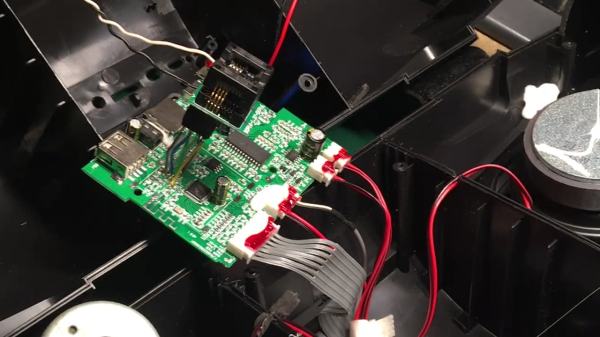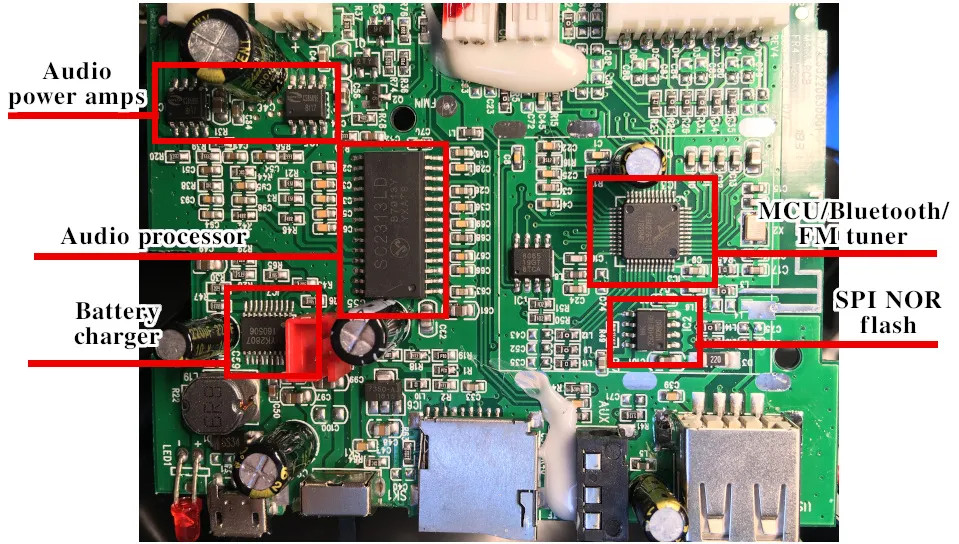
The speaker PCB inside of the speaker, with a flash chip ZIF holder soldered to the SPI flash pads on the PCB

Bluetooth Speaker Domesticated Through Firmware Mod

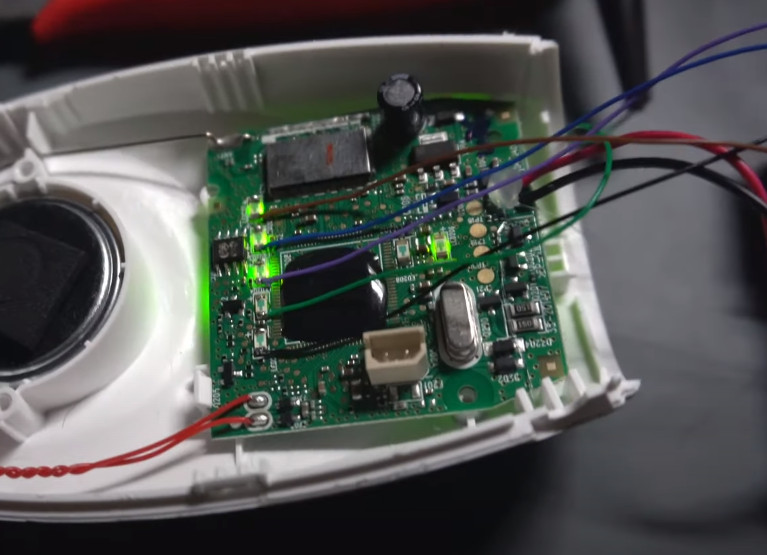
This might sound like a familiar problem – you get a Bluetooth speaker, and it sounds nice, but it also emits all kinds of weird sounds every now and then. [Oleg Kutkov] got himself a Sven PS460 speaker with FM radio functionality, but didn’t like that the “power on” sound was persistently loud with no respect for the volume setting, and the low battery notification sounds were bothersome. So, he disassembled the speaker, located a flash chip next to the processor, and started hacking.

Using a TL866 and minipro software, he dumped the firmware, and started probing it with binwalk. The default set of options didn’t show anything interesting, but he decided to look for sound file signatures specifically, and successfully found a collection of MP3 files! Proper extraction of these was a bit tricky, but he figured out how to get them out, and loaded the entire assortment into Audacity.

From there, he decided to merely make the annoying sounds quieter – negating the “no respect for the volume setting” aspect somewhat. After he exported the sound pack out of Audacity, the file became noticeably smaller, so he zero-padded it, and finally inserted it back into the firmware. Testing revealed that it worked just as intended! As a bonus, he replaced the “battery low” indicator sound with something that most of us would appreciate. Check out the demo video at the end of his write-up.

Domesticating your Bluetooth speakers tends to be called for. If you can’t do that for whatever reason, you can rebuild them into an audio receiver – or perhaps, build your own Bluetooth speakers, with aesthetics included and annoyance omitted from the start.

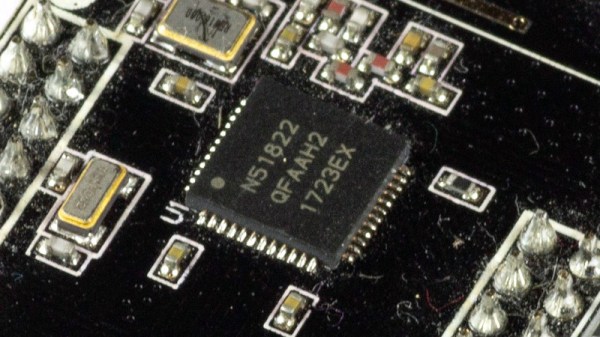
A small round NRF51822 board glued to the underside of a mailbox lid, with a small vibration sensor attached

Check Your Mailbox Using The AirTag Infrastructure

When a company creates an infrastructure of devices, we sometimes subvert this infrastructure and use it to solve tricky problems. For example, here’s a question that many a hacker has pondered – how do you detect when someone puts mail into your mailbox? Depending on the availability of power and wireless/wired connectivity options, this problem can range from “very easy” to “impractical to solve”. [dakhnod] just made this problem trivial for the vast majority of hackers, with the FakeTag project – piggybacking off the Apple’s AirTag infrastructure.

This project uses a cheap generic CR2032-powered NRF51822 board, sending the mailbox status over the FindMy system Apple has built for the AirTag devices. For the incoming mail detection, he uses a simple vibration sensor, glued to the flap lid – we imagine that, for flap-less mailboxes, an optical sensor or a different kind of mechanical sensor could be used instead. Every time someone with a FindMy-friendly iPhone passes by [dakhnod]’s mailbox, he gets an update on its status, with a counter of times the sensor has been triggered. [dakhnod] estimates that the device could run for up to a year on a single battery.

Continue reading “Check Your Mailbox Using The AirTag Infrastructure”

Summer’s Coming – Let Mowerino Cut Your Grass

In the Northern hemisphere, summer is about to hit us full bore. While we love the season, we do dislike lawn maintenance. Apparently, so does [salmec] who developed the Mowerino around an Arduino Mega 2560 board.

As you might expect, the robot uses sharp blades so, you probably want to be careful. There are sensors that allow the machine to self-navigate or you can control it via Bluetooth. This is one of those things that seems easy until you try to actually do it. Nylon trimmer string is probably safer, but it breaks and it is hard to keep it cutting. Blades are more robust but also riskier to things like rocks, fingers, and pets.

Moving around in the yard is also an issue. The Mowerino has some ordinary-looking caster wheels in the front. That might be a place for improvement since most yards are not friendly to that kind of wheel. The other thing we worried about is what happens to the grass clippings. Around here, a week of rain means your mower will choke on grass clippings. On the other hand, the Mowerino has a smaller blade so maybe that helps mitigate clipping clogging.

Overall, though, it looks like it might be a good place to start if you dream of robot groundskeepers patrolling your estate. Most of the mowers we see like this have big wheels. But, of course, not all of them.

Continue reading “Summer’s Coming – Let Mowerino Cut Your Grass”

Reverse Engineering Your Own Bluetooth Audio Module

There was a time when we would start our electronic projects with integrated circuits and other components, mounted on stripboard, or maybe on a custom PCB. This is still the case for many devices, but it has become increasingly common for an inexpensive ready-built module to be treated as a component where once it would have been a project in its own right. We’re pleased then to see the work of [ElectroBoy], who has combined something of both approaches by reverse engineering the pinout of a Chinese Bluetooth audio chip with minimal datasheet, and making his own take on an off-the-shelf Bluetooth audio module.

The JL_AC6939B comes in an SOIC16 package and requires a minimum number of components. The PCB is therefore a relatively simple proposition and indeed he’s fitted all parts and traces on one side with the other being a copper ground plane. It’s dangerous to assume that’s all there is to a board like this one though, because many an engineer has come unstuck trying to design a PCB antenna. We’d hazard a guess that the antenna here is simply a wavy PCB line rather than an antenna with a known impedance and bandwidth, at the very least it looks to have much thicker traces than the one it’s copying.

It’s possible that it’s not really worth the effort of making a module that can be bought for relative pennies ready-made, but to dismiss it is to miss the point. We make things because we can, and not merely because we should.

No Privacy: Cloning The AirTag

You’ve probably heard of the infamous rule 34, but we’d like to propose a new rule — call it rule 35: Anything that can be used for nefarious purposes will be, even if you can’t think of how at the moment. Case in point: apparently there has been an uptick in people using AirTags to do bad things. People have used them to stalk people or to tag cars so they can be found later and stolen. According to [Fabian Bräunlein], Apple’s responses to this don’t consider cases where clones or modified AirTags are in play. To prove the point, he built a clone that bypasses the current protection features and used it to track a willing experimental subject for 5 days with no notifications.

According to the post, Apple says that AirTags have serial numbers and beep when they have not been around their host Apple device for a certain period. [Fabian] points out that clone tags don’t have serial numbers and may also not have speakers. There is apparently a thriving market, too, for genuine tags that have been modified to remove their speakers. [Fabian’s] clone uses an ESP32 with no speaker and no serial number.

The other protection, according to Apple, is that if they note an AirTag moving with you over some period of time without the owner, you get a notification. In other words, if your iPhone sees your own tag repeatedly, that’s fine. It also doesn’t mind seeing someone else’s tags if they are near you. But if your phone sees a tag many times and the owner isn’t around, you get a notification. That way, you can help identify random tags, but you’ll know if someone is trying to track you. [Fabian] gets around that by cycling between 2,000 pre-loaded public keys so that the tracked person’s device doesn’t realize that it is seeing the same tag over and over. Even Apple’s Android app that scans for trackers is vulnerable to this strategy.

Even for folks who aren’t particularly privacy minded, it’s pretty clear a worldwide network of mass-market devices that allow almost anyone to be tracked is a problem. But what’s the solution? Even the better strategies employed by AirGuard won’t catch everything, as [Fabian] explains.

This isn’t the first time we’ve had a look at privacy concerns around AirTags. Of course, it is always possible to build a tracker. But it is hard to get the worldwide network of Bluetooth listeners that Apple has.

Illustrated Kristina with an IBM Model M keyboard floating between her hands.

Keebin’ With Kristina: The One With The Tri-lingual Typewriter

Isn’t it just fantastic when a project finally does what you wanted it to do in the first place? [Simon Merrett] isn’t willing to compromise when it comes to the Aerodox. His original vision for the keyboard was a wireless, ergonomic split that could easily switch between a couple of PCs. Whereas some people are more into making layout after layout, [Simon] keeps pushing forward with this same design, which is sort of a mashup between the ErgoDox and the Redox, which is itself a wireless version of the ErgoDox.

The Aerodox has three nRF51822 modules — one for the halves to communicate, one for the control half to send key presses, and a third on the receiver side. [Simon] was using two AA cells to power each one, and was having trouble with the range back to the PC.

The NRFs want 3.3 V, but will allegedly settle for 2 V when times are hard. [Simon] added a boost converter to give each a solid 3.3 V, and the Aerodox became reliable enough to be [Simon]’s daily driver. But let’s go back to the as-yet-unrealized potential part.

Continue reading “Keebin’ With Kristina: The One With The Tri-lingual Typewriter”

Smart Ruler Has Many Features

For those of us who remember old ball mice, they were a lot like modern optical mice except that they needed to be cleaned constantly. Having optical mice as a standard way of interacting with a computer is a major improvement over previous eras in computing. With extinction of the ball mouse, there are an uncountable number of cheap optical mice around now which are easy pickings for modern hacking, and this latest project from [Vipul] shows off some of the ways that optical mice can be repurposed by building a digital ruler.

The build seems straightforward on the surface. As the ruler is passed over a surface the device keeps track of exactly how far it has moved, making it an effective and very accurate ruler. To built it, the optical component of a mouse was scavenged and mated directly to a Raspberry Pi Zero W over USB. Originally he intended to use an ESP32 but could not get the USB interface to work. [Vipul] was then able to write some software which can read the information from the mouse’s PCB directly and translate it into human-readable form where it is displayed on a small screen. The entire device is housed in a custom 3D-printed enclosure to wrap everything up, but the build doesn’t stop there though. [Vipul] also leveraged the Bluetooth functionality of the Pi and wrote a smartphone app which can be used to control the ruler as well.

While the device does have some limitations in that it has to make contact with the object being measured across its entire length, there are some situations where we can imagine something like this being extremely useful especially when measuring things that aren’t a straight line. [Vipul] has also made all of the code for this project publicly available for those of us who might have other uses in mind for something like this. We’ve seen optical mice repurposed for all kinds of things in the past, too, including measuring travel distances in autonomous vehicles.

Continue reading “Smart Ruler Has Many Features”