Modern Smartphone Vs. 80s Supercomputer

One of the most common ways of comparing the processing power of some microcontroller or older smartphone in a fantastical way was to say that they had more processing power than the Apollo Guidance Computer. While this sounds impressive on the surface, the AGC was the first integrated circuit computer ever built and is predictably under-powered by almost all modern standards. A more apt comparison would be to compare a smartphone to a supercomputer from some bygone era, and someone has recently done just that.
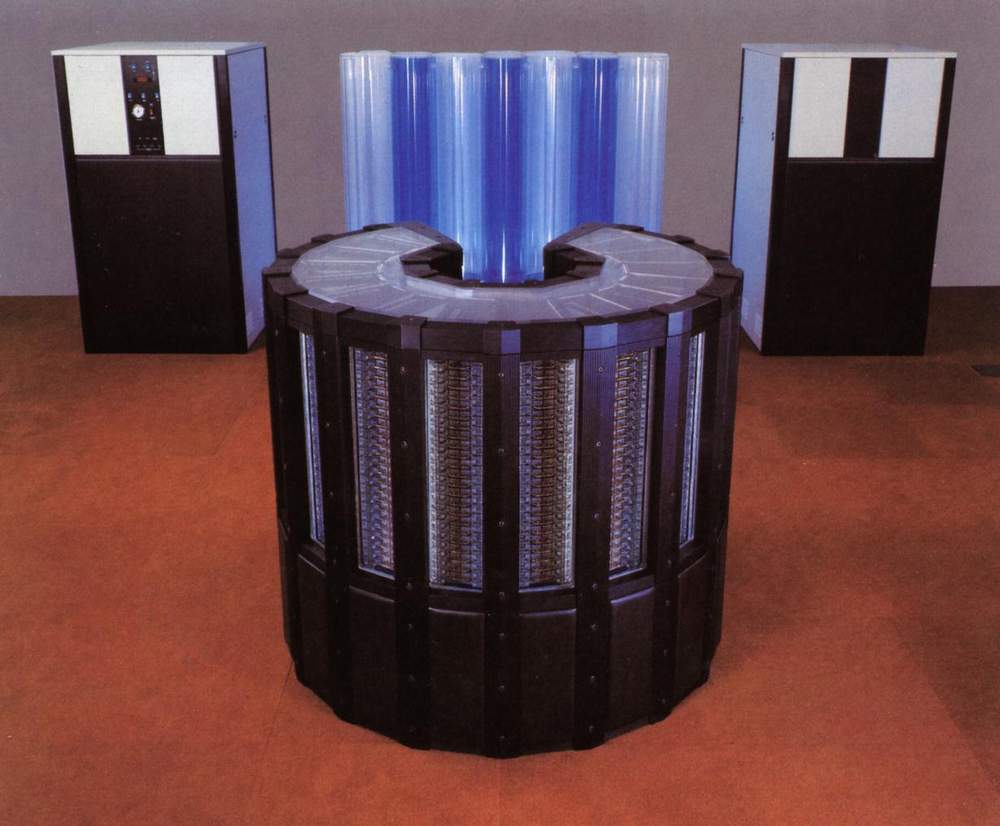
Cray 2

The linked article looks at a modern iPhone 17 compared to the Cray 2 supercomputer. When the Cray 2 was first built in the mid 80s, it was the fastest computer in the world at 1.9 GFLOPS using four vector processors. A modern iPhone is estimated to have slightly more than that, so in some ways the iPhone comes out on top.

However, the Cray 2 was built with vector processors, a specialized type of processor meant to perform rapid calculations on specific types of data sets. So the Cray 2 may have been faster at these types of tasks than the more general-purpose A19 processor, and the A19 may have the edge in other tasks.

The other major difference the article doesn’t discuss is what software runs on these computers. The Cray 2 supercomputer ran a modified version of UNIX System V, which at the time was owned by AT&T (and which ran on plenty of other computers as well). Although proprietary in some sense, it was much more open than Apple’s iOS operating system, allowing users to run whatever software they wanted to run on the supercomputers that they bought and paid for, and to modify many parts of the operating system itself. In that sense, the Cray will always maintain the edge over Apple and their walled garden.

Which Browser Should I Use In 2025?

Over the history of the Web, we have seen several major shifts in browsing software. If you’re old enough to have used NCSA Mosaic or any of the other early browsers, you probably welcomed the arrival of Netscape Navigator, and rued its decline in the face of Internet Explorer. As Mozilla and then Firefox rose from Netscape’s corpse the domination by Microsoft seemed inevitable, but then along came Safari and then Chrome.

For a glorious while there was genuine competition between browser heavyweights, but over the last decade we’ve arrived at a point where Chrome and its associated Google domination is the only game in town. Other players are small, and the people behind Firefox seem hell-bent on fleeing to the Dark Side, so where should we turn? Is there a privacy-centric open source browser that follows web standards and doesn’t come with any unfortunate baggage in the room? It’s time to find out. Continue reading “Which Browser Should I Use In 2025?”

Computer Speed Gains Erased By Modern Software

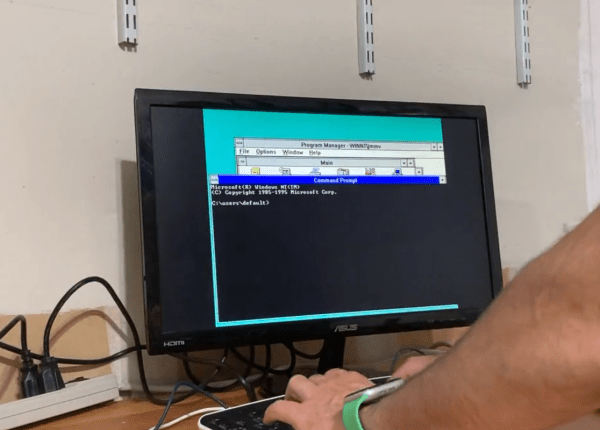
[Julio] has an older computer sitting on a desk, and recorded a quick video with it showing how fast this computer can do seemingly simple things, like open default Windows applications including the command prompt and Notepad. Compared to his modern laptop, which seems to struggle with even these basic tasks despite its impressive modern hardware, the antique machine seems like a speed demon. His videos set off a huge debate about why it seems that modern personal computers often appear slower than machines of the past.

After going through plenty of plausible scenarios for what is causing the slowdown, [Julio] seems to settle on a nuanced point regarding abstraction. Plenty of application developers are attempting to minimize the amount of development time for their programs while maximizing the number of platforms they run on, which often involves using a compatibility layer, which abstracts the software away from the hardware and increases the overhead needed to run programs. Things like this are possible thanks to the amount of computing power of modern machines, but not without a slight cost of higher latency. For applications developed natively, the response times would be expected to be quite good, but fewer applications are developed natively now including things that might seem like they otherwise would be.  Notepad, for example, is now based on UWP.

While there are plenty of plausible reasons for these slowdowns in apparent speed, it’s likely a combination of many things; death by a thousand cuts. Desktop applications built with a browser compatibility layer, software companies who are reducing their own costs by perhaps not abiding by best programming practices or simply taking advantage of modern computing power to reduce their costs, and of course the fact that modern software often needs more hardware resources to run safely and securely than equivalents from the past.

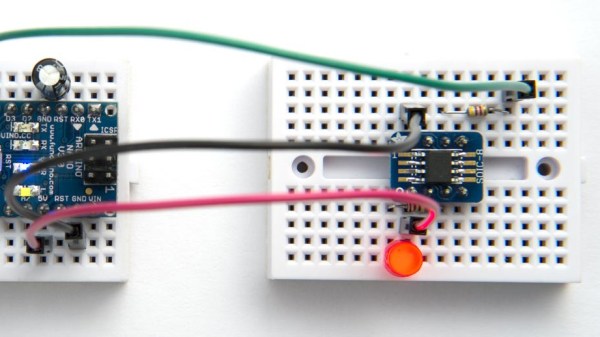
Showing a new generation ATTiny on an SMD breakout plugged into a breadboard, being programmed

Come Learn About New ATtiny Generations

As the chip shortage hit, a lot of the familiar ATtiny chips have become unavailable and overpriced, and it mostly stayed the same since then. If you ever searched for “ATtiny” on your favourite electronics component retailer website, however, you’d notice that there’s quite a few ATtiny chips in stock most of the time – just that they’re from a much newer generation than we commonly see, with incompatible pinouts, slightly different architecture and longer model numbers like 412 and 3227. [David Johnson-Davies] from [technoblogy] is here to clarify things, and provide a summary of what the new ATtiny generations have to offer.

In 2019, he posted about 0- and 1-series ATtiny chips, comparing them to the ATtiny series we knew, decyphering the part numbering scheme for us, and providing a comparison table. Now, he’s returned to tell us about the 2- series ATtiny chips, merging the comparison tables together so that you can quickly evaluate available parts by their ROM/RAM size and the SMD package used. He also describes which peripherals are available on which series, as well as nuances in peripheral operation between the three generations. In the end, he reminds us of a simple way to program all these new parts – as it stands, you only need a USB-UART adapter and a 4.7K resistor.

Over the last decades, we’ve seen plenty of inspiring ATtiny projects – squeezing out everything we could out of 5 GPIOs, or slightly more for larger-package ATtiny chips. [David] has been setting an example for us, bringing projects like this function generator, this continuity tester, or an IR receiver with an OLED screen for diagnostics – all with an ATtiny85. It’s not the just pin count that’s a constraint, but the RAM and flash amounts as well – nevertheless, people have fit machine learning and an entire graphics stack into these chips before. If you’re stuck at home unable to do anything, like many of us were during lockdowns, you can always breadboard an ATtiny and see just how much you can get done with it.

3D Printer Showdown: $350 Consumer Vs $73,000 Pro Machine

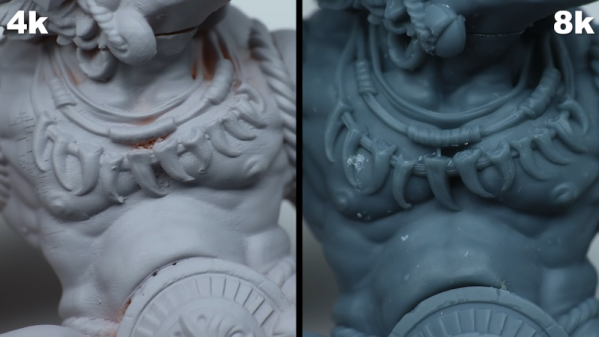
The quality of consumer-grade 3D printing has gone way up in recent years. Resin printers, in particular, can produce amazing results and they get less expensive every day. [Squidmar] took a miniature design and printed it (or had it printed) on some cheap resin printers and a 65,000 Euro DWS029. How much difference could there be? You can see for yourself in the video below.

We were surprised at the specs for the more expensive machine. It does use a solid-state laser, but for that cost, the build volume is relatively small — around 15 x 15 x 10 cm. There were actually five prints created on four printers. Three were on what we think of as normal printers, one was on the 65,000 Euro machine, and the fifth print was on a 10,000 Euro printer that didn’t look much different from the less expensive ones.

Of course, there is more to the process than just the printer. The resin you use also impacts the final object. The printers tested included a Phrozen 4K Mini, a Phrozen 8K Mini,  a Solos Pro, and the DWS 029D. The exact resins or materials used was hard to tell in each case, so that may have something to do with the comparisons, too.

Do you get what you pay for? Hard to say. The 8K and Solos were neck-and-neck with some features better on one printer and some better on the other. The DWS029D did perform better, but was it really worth the increase in price? Guess it depends on your sensitivity. The 8K printer did a very credible job for a fraction of the cost. Of course, some of that could have been a result of the materials used, too, but it does seem likely that a very expensive dental printer ought to do better than a hobby-grade machine. But it doesn’t seem to do much better.

The DWS printer uses a laser, while most hobby printers use UV light with an LCD mask. We’ve seen low-end resin printers on closeout for around $100 and you can get something pretty nice in the $200 neighborhood. In between these two extremes are printers that use Digital Light Processing (DLP).

Continue reading “3D Printer Showdown: $350 Consumer Vs $73,000 Pro Machine”

Finishing A Mini PS One: SLA Vs Extruded

One of the biggest lessons learned by first time 3D printer users is that not everything can be replicated and a printer is a machine and not a miracle worker. It has limitations in terms of what it can print as well as the quality of the output. For teeny tiny objects, the 0.8 mm nozzle will just not do and with resin printers on the rise, the question is, ‘are extruder printers obsolete?’

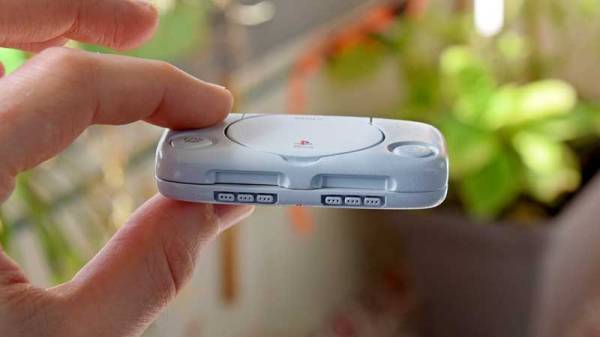
[Dorison Hugo] has made a mini version of the PS One using a Raspberry Pi which you can play games one. The kicker is that in his video, he does a comparison of an SLA printer and a cheaper extruder one for his enclosure. He goes through a laundry-list of steps to print, file, fill, repair, sand paint, sand, paint etc to try to get a good model replica of the original PS One. He then proceeds to print one with an SLA printer and finishes it to compare with the first model. The decals are printed on an inkjet for those who are wondering, and there is a custom cut heatsink in there as well that was salvaged from an old PC.

Spoiler alert! The SLA wins but in our view, just slightly. The idea is that with enough elbow grease and patience, you can get pretty close to making mini models with a cheaper machine. The SLA print needs work too but it is relatively less and for detailed models, it is a much better choice. We really enjoyed watching the process from start to finish including the Dremel work, since it is something that is forgotten when we see a 3D print. Creating something of beauty takes time and effort which stems from a passion to make.

Take a look at the video below of the time lapse and for  SLA printer fans, have a look at the DIY SLA printer which is a Hackaday Prize Entry this year. Continue reading “Finishing A Mini PS One: SLA Vs Extruded”

Humidity Sensor Shootout

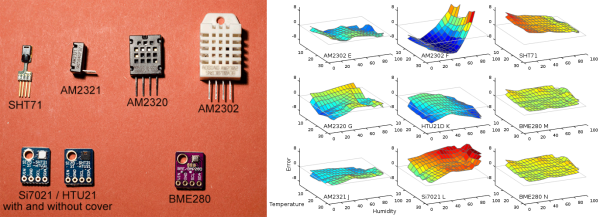
If you want to measure humidity (and temperature, and maybe even barometric pressure) in a device that you’re building, have a look at this comprehensive test of seven different options. We’re going to summarize the results here, but you’ll really want to read up on the testing methodology — it’s great science hacking. Did you know about using saturated salt solutions to produce constant humidity levels for calibration? We didn’t.

The eBay hacker favorite, the so-called DHT22 module, doesn’t fare all that well, with one of six that [Robert] tested being basically horrible, and three of them breaking within two years of use. The one that works well, however, is pretty good. Feeling lucky?

The Bosch BME280 looks great. It costs a bit more as a bare part, and a few times more than that when it is mounted on a friendly module, but it seems to be very reliable. And you get a barometer thrown in for the extra work. Indeed, it performed so well that Hackaday contributor [Nava Whiteford] put the part under a scanning electron microscope to figure out what’s going on.

The other sensors were fine, with the HTU21D and SHT71 being standouts for their ultra-fast response. For the full details, go click on that link at the top. Having just installed a sextet of DHT22s in our house last year, we’re left with that sinking feeling that we may have gotten what we paid for, which wasn’t much. At least they’re all still running.

Thanks to [Dodutils] and [mac012345] via comments in another thread.