Ferrofluid Drum Synth Dances To The Beat

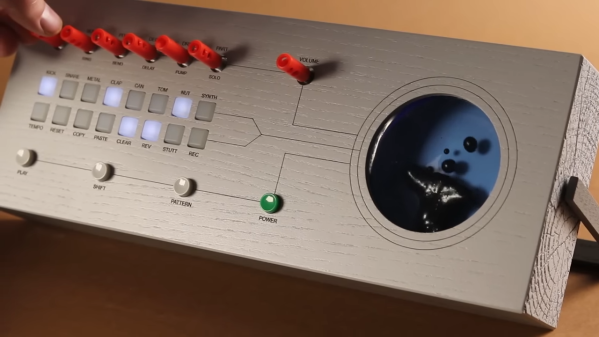
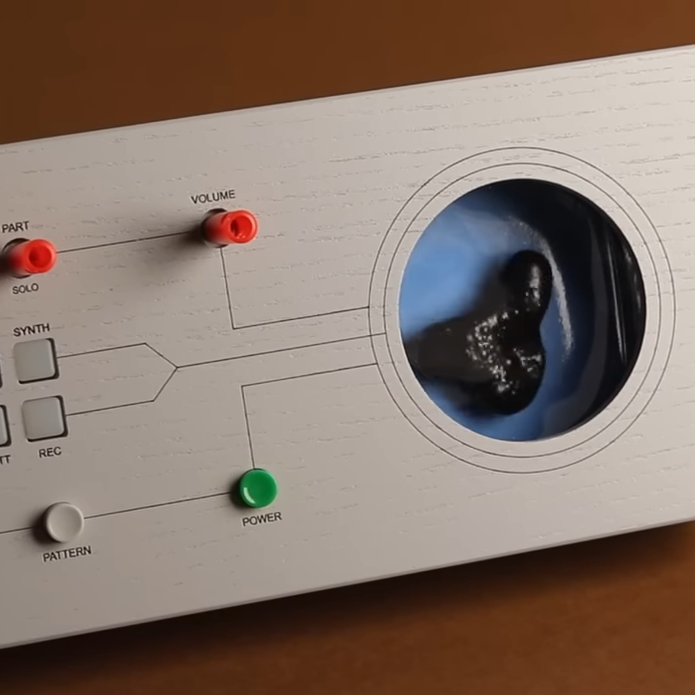
[Love Hultén]’s work often incorporates reactive sound elements, and his Ferrofluid drum synth is no exception. Sadly there are no real build details but have no fear: we’ve gathered plenty of DIY insights when it comes to ferrofluid-based projects.

Ferrofluid isn’t easy to work with, but there are plenty of DIY resources to make things easier.

First of all, ferrofluid is shockingly expensive stuff. But if you can get your hands on some old VHS tapes and acetone, you can make your own. Second, working with ferrofluid to make reactive elements is harder than it may look. Particularly, making the stuff dance to sound beats isn’t as simple as putting a container of the stuff in front of a speaker coil, but people have discovered a few ways that work more reliably than others.

[Love Hultén]’s drum synth was inspired by this custom Bluetooth speaker with dancing ferrofluid by [Dakd Jung], which drives an electromagnetic coil with frequencies selected from the audio with an MSGEQ7 equalizer. That way, only frequencies that work best for moving the fluid in interesting ways get used for the visualization. The MSGEQ7 spectrum analyzer chip is very useful for music-driven projects, as demonstrated by these sound-reactive LED shades which illustrate the audio element nicely.

The coils that create the electromagnetic field causing ferrofluid to move can take different forms, but two very interesting ones are this 12-layer PCB coil and for more intricate displays, there’s a 12×21 coil array that creates a dot-matrix-like display.

We have one last tip to share about enclosures. Some readers may have noticed that this drum synth project is housed in what looks like a piece of painted lumber. Wood is certainly a versatile material for making custom shapes, and for lettering and labels it turns out that toner transfer works just as well on wood as it does for making custom PCBs.

Continue reading “Ferrofluid Drum Synth Dances To The Beat”

Using An Old Smartphone In Place Of A Raspberry Pi

The Raspberry Pi was a fairly revolutionary computing device when it came on the scene around a decade ago. Enough processing power to run a full Linux desktop and plenty of GPIO meant almost certain success. In the past year, though, they’ve run into some issues with their chip supplier and it’s been difficult to find new Pis, which has led to some looking for alternatives to these handy devices. [David] was hoping to build a music streaming server and built it on an old smartphone instead of the ubiquitous single-board computer.

Most smartphones are single-board computers though, and at least the Android devices are fully capable of running Linux just like the Pi. The only problem tends to be getting around the carrier or manufacturer restrictions like a locked bootloader or lack of root access. For [David]’s first try getting this to work, he tried to install Navidrome on a Samsung phone but had difficulties with the lack of memory and had to build the software somewhere else and then load it on the phone. It did work, but the stock operating system kept killing the process for consuming too much memory.

Without root access, [David] decided to try LineageOS, a version of Android which, among other benefits, is typically much more configurable than the stock version of Android that is shipped with smartphones. This allowed him to disable or uninstall anything not needed for his music server to free up enough memory. After some issues with transcoding the actual music files he planned on streaming, his music server was successfully up and running on a phone that would have otherwise been relegated to the junk drawer. The specific steps he took to get this working can be found on his GitHub page as well.

[David] also mentioned looking at PostmarketOS for this job which is certainly a viable option for some, but the Linux distribution for phones is only supported on a few devices. Another viable alternative for a project like this if no Raspberry Pis are available might be any of a number of Pine64 devices that might also be sitting around gathering dust, like the versatile Linux-based Pinephone.

ISD1700 Based Lo-Fi Sampler

Custom music instruments here at Hackaday range from wacky to poignant. OpnBeat by [Hiro Akihabara] focuses on something different: simplicity.

There are few buttons, the design and code are optimized to be straightforward and easy to modify, and the interface is slick. Eight musical keys complement three interface keys and a knob. An Arduino Nano powers the main brains of the system but the music generation comes from eight Nuvoton ISD1700s controlled over SPI by the Nano. The beautifully laid-out PCB is 110mm by 180mm (4.33″ by 7″), so cases can easily be printed on smaller FDM printers. All the switches are Cherry MX switches for the beautiful tactile feedback.

The code, PCB, and 3D case files are all available on GitHub. We love the thought that went into the design and the focus on making it easy to recreate. It might be quite as cute and simplified as this twelve-button musical macro pad, but the two together could make quite the band.

Continue reading “ISD1700 Based Lo-Fi Sampler”

Compose Any Song With Twelve Buttons

Limitations placed on any creative process often paradoxically create an environment in which creativity flourishes. A simple overview of modern pop, rock, or country music illustrates this principle quite readily. A bulk of these songs are built around a very small subset of music theory, often varying no more than the key or the lyrics. Somehow, almost all modern popular music exists within this tiny realm. [DeckerEgo] may have had this idea in mind when he created this tiny MIDI device which allows the creation of complex musical scores using a keyboard with only 12 buttons.

The instrument is based around the Adafruit MacroPad, which is itself built on the RP2040 chip. As a MIDI device, it needs to be connected to a computer running software which can support MIDI instruments, but once its assembled and given its firmware, it’s ready to rock. A musician can select one of any number of musical scales to operate within, and the 12 keys on the pad are mapped to the 12 chromatic notes within that scale. It can also be used to generate drum tracks or other backing tracks to loop before being used to create melodies as well.

[DeckerEgo] took a bit of inspiration from an even simpler macro pad we featured before which is based around the idea that a shockingly high number of songs use the same four chords. His macro pad includes creation of chord progressions as well, but expands on that idea to make more complete compositions possible. And, for those looking to build their own or expand on this project, he has also made all of the source code available on his GitHub page.

Continue reading “Compose Any Song With Twelve Buttons”

Mechanical Keyboard As Travel Saxophone

Those who play larger musical instruments, things like drums, piano, harp, tuba, upright bass, or Zeusaphone, know well the challenges of simply transporting their chosen instrument to band practice, a symphony hall, or local watering hole. Even those playing more manageably-sized instruments may have similar troubles at some point especially when traveling where luggage space is at a premium like on an airplane. That’s why [jcard0na] built this electronic saxophone, designed to be as small as possible.

Known as the “haxophone”, the musical instrument eschews the vibrating column of air typical of woodwind instruments in favor of an electronic substitute. Based around the Raspberry Pi, the device consists of a custom HAT with a number of mechanical keyboard switches arrayed in a way close enough to the layout of a standard saxophone that saxophonists will be able to intuitively and easily play. Two pieces of software run on the Pi to replicate the musical instrument, one that detects the player’s breaths and key presses, and another that synthesizes this information into sound.

While [jcard0na] notes that this will never replicate the depth and feel of a real instrument, it does accomplish its design goal of being much more easily transportable than all but the most soprano of true saxophones. As a musical project it’s an excellent example of good design as well, much like this set of electronic drums with a similar design goal of portability.

A Better Playlist Shuffle Algorithm Is Possible

When listening to music, most of us reach for the shuffle button on the regular. This is then followed by a bunch of frustrating skips as we hear the same four or five tracks that have been regularly replayed for the last few days. [Ron Miller] wants to fix unsatisfying shuffles, and he’s developed the Miller Shuffle algorithm to do so.

[Ron] realized that many big name streaming services use incredibly simple algorithms to choose shuffled songs. This can often be as simple as songIndex=random(NumOfSongs). The problem with this is that even with a good random number source, you’ll get a lot of premature repetitions. If your music service doesn’t keep track of your shuffle-point between sessions, you’ll often get annoying repeats if you’re listening on a day-to-day basis.

To fix this, the Miller Shuffle algorithm aims to offer good randomness and no repeats without the excess resource usage of the commonly-cited Fisher-Yates algorithm. [Ron] explains it like this: “The way the algorithm works its magic is by utilizing multiple computations which are ‘symmetrical’, in that the range of values which go in are the same values which come out albeit in a different order.” Since its a deterministic fixed list, there’s no need to keep track of what songs have already been played to avoid repeats. Instead, the player must simply step through the index in order, one track after another. As long as a referenced index point is maintained, along with an ID of the shuffle order being used, no repeats should come up.

If you’re implementing a shuffle algorithm for your own music, you might want to give [Ron’s] work a look. He’s taken into account details like resource usage and small and large list sizes, to account for implementation issues for even very large streaming services. If you’re more interested in shuffling cards than songs, though, we can help there too!

A radio with a white front grate and wood edges sits on a grey surface. Next to the radio are small white disks with colorful edges reminicient of microdisc-sized records. A yellow-ringed disk sits on the radio. The handwritten title says, "Summer of 2011; Holidays in Barcelona"

Spotify Player Brings Back Physical Media

Digital music has made keeping all your tunes with you a lot more convenient, but have we lost something with dematerialization? [Jordi Parra] felt that there was something lacking with the digital music experience and designed a Spotify player with a tactile interface.

Specific playlists are selected via small RFID tags that look like a cross between a MiniDisc and a vinyl record. As this is a prototype, an Arduino reads the RFID tag, but needs a computer to actually play the Spotify playlist. Future iterations could include an integrated speaker and run libspotify to create a self-contained device.

While there is still work to do for a fully seamless experience, we love the details in the industrial design of this project. Clean simple lines and a combination of wood and more modern materials make this feel like a timeless piece of tech. Definitely check out the full photo gallery including shots of the really impressive packaging.

Want more digital music with a tactile interface? Check out this MP3 Player Shelf or a Simple Internet Radio Transplant.