Optical Character Recognition (OCR) forms the bridge between the analog world of paper and the world of machines. The modern-day expectation is that when we point a smartphone camera at some characters it will flawlessly recognize and read them, but OCR technology predates such consumer technology by a considerable amount, with IBM producing OCR systems as early as the 1950s. In a 1960s promotional video on the always delightful Periscope Film channel on YouTube we can get an idea of how this worked back then, in particular the challenge of variable quality input.
What drove OCR was the need to process more paper-based data faster, as the amount of such data increased and computers got more capable. This led to the design of paper forms that made the recognition much easier, as can still be seen today on for example tax forms and on archaic paper payment methods like checks in countries that still use it. This means a paper form optimized for reflectivity, with clearly designated sections and lines, thus limiting the variability of the input forms to be OCR-ed. After that it’s just a matter of writing with clear block letters into the marked boxes, or using a typewriter with a nice fresh ink ribbon.
These days optical scanners are a lot more capable, of course, making many of such considerations no longer as relevant, even if human handwriting remains a challenge for OCR and human brains alike.
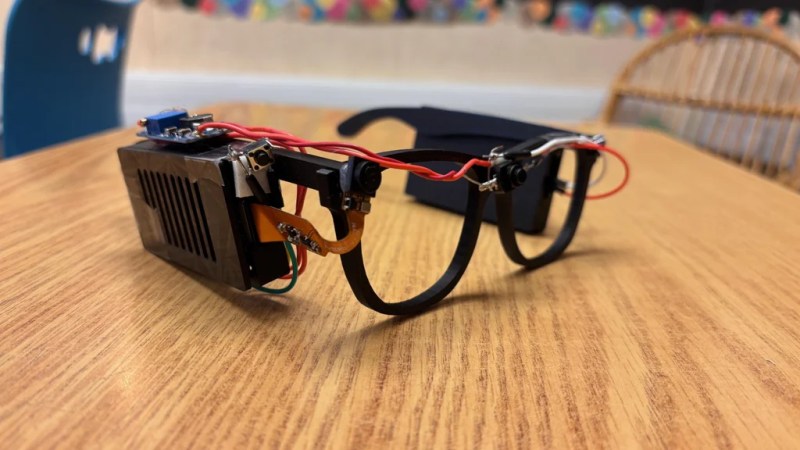
Glasses for the blind might sound like an odd idea, given the traditional purpose of glasses and the issue of vision impairment. However, eighth-grade student [Akhil Nagori] built these glasses with an alternate purpose in mind. They’re not really for seeing. Instead, they’re outfitted with hardware to capture text and read it aloud.
Yes, we’re talking about real-time text-to-audio transcription, built into a head-worn format. The hardware is pretty straightforward: a Raspberry Pi Zero 2W runs off a battery and is outfitted with the usual first-party camera. The camera is mounted on a set of eyeglass frames so that it points at whatever the wearer might be “looking” at. At the push of a button, the camera captures an image, and then passes it to an API which does the optical character recognition. The text can then be passed to a speech synthesizer so it can be read aloud to the wearer.
It’s funny to think about how advanced this project really is. Jump back to the dawn of the microcomputer era, and such a device would have been a total flight of fancy—something a researcher might make a PhD and career out of. Indeed, OCR and speech synthesis alone were challenge enough. Today, you can stand on the shoulders of giants and include such mighty capability in a homebrewed device that cost less than $50 to assemble. It’s a neat project, too, and one that we’re sure taught [Akhil] many valuable skills along the way.
It’s one of those things that certainly sounds simple enough: take a picture of a receipt, run it through optical character recognition (OCR), and send the resulting information to whatever expense-tracking website or software you wish. There are companies that offer such a service, so it can’t be too difficult to replicate on your own…right?
That’s what [Marcel Robitaille] thought when he set out to create his homebrew “Receipt Ingestion” system, anyway. But in reality it took so much time to troubleshoot and implement that he says it would have been faster to just enter in all his receipts by hand. We’re happy he stuck with it though, otherwise you wouldn’t be reading about it on Hackaday, and we wouldn’t be able to learn anything from the detailed account he’s provided.
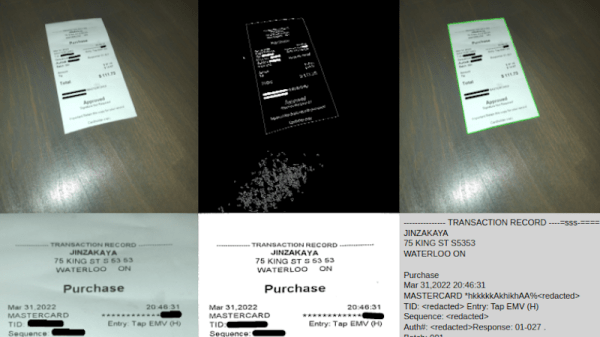
It only took an evening to hack together a rough demo, and the initial results were very promising. The code could detect the edges of the receipt, rotate the captured image appropriately, and then pull out the critical information such as date, total amount, business name, etc. He was then able to decipher the API for Splitwise, an online service for splitting bills, by capturing the data sent by his browser while adding a new bill. With this information, writing up some Python code to push his captured data into the service was trivial. So far, so good.
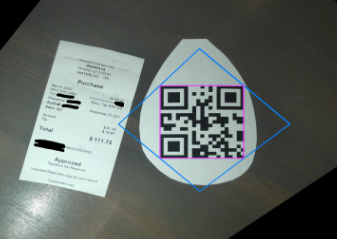
Using a QR code as reference point.
But like so many horror films that begin with a happy family starting a new life in a beautiful home, there was a monster lurking in the shadows. It’s one thing to capture data from perfectly clean and flat receipts, but quite another to get any useful info out of one that spent half the day crumpled up in your back pocket. The promising proof of concept that worked a treat under controlled conditions failed completely in the real-world, with [Marcel] reporting that only 1 in 5 receipts he tried to scan actually went through.
In the end, [Marcel] realized that the best way to handle the unreliable condition of the receipts was to focus on a different object in the image. He came up with a QR code marker that he could put on the table with the receipt to be scanned, which his software can use as a known point of reference. This greatly improves the reliability of the image rotation and transformation, which in turn makes the OCR more reliable. It also makes it much easier to tell which images need to be scanned — if there’s no QR code found, the software just skips that shot and keeps looking.
The unique challenges of digitizing large amounts of printed content using OCR makes for some fascinating problem solving, and we’re glad [Marcel] shared this particular story with us. While there’s still some edge cases that need chasing down, he’s using the software on a nearly daily basis, and has posted it up on GitHub for anyone who might wish to build on his efforts.
Plenty of people don’t bother to read the current newspaper, let alone editions that were published over 100 years ago. But there’s a wealth of important historical information buried in these dusty old publications, assuming you can find a way to reliably digitize and index it all. You might think the solution is as simple as running images of the paper through optical character recognition (OCR) software, but as [John Scancella] explains, the problem is a bit more complicated than that.
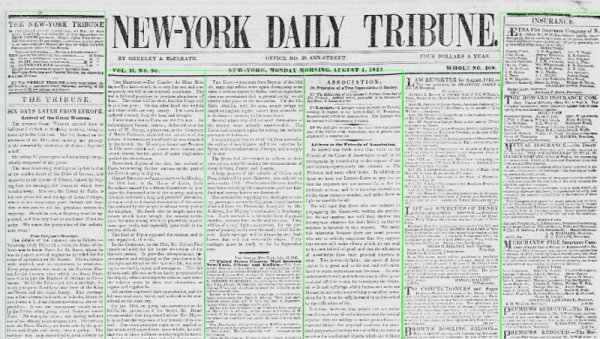
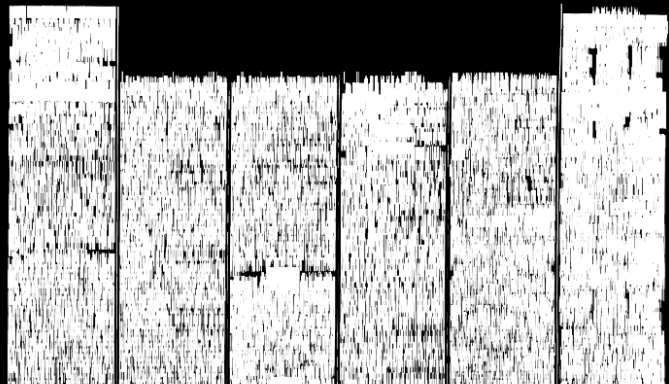
Stretching the text vertically highlights the columns.
Ultimately, the issue largely comes down to formatting. The OCR software reasonably assumes all the text is in orderly horizontal lines, because in the vast majority of cases, it would be. That’s how you’re reading these words now. But as anyone who’s seen an old time newspaper knows, that’s not how things were necessarily written back then. Pages consisted of multiple narrow columns of stories separated by vertical lines; if the OCR tries to read the page from left to right, the resulting text is a mishmash of several unrelated topics.
The answer is to break all those articles into their own images, but doing that manually at any sort of scale simply isn’t an option. So [John] has been working on a system that uses OpenCV to identify the columns of text and isolate them. He details the multi-step process down in his write-up, and even provides the Python code should you want to give it a spin. But the short version is that the image is converted to grayscale and the OpenCV dilate function is used to stretch the text in the Y dimension. This produces big blobs of white that can easily be picked out with findContours() and snipped into individual images.
It’s not a perfect solution, and there are still a few pitfalls. For one, the name of the paper needs to be removed from the front page before the stretching operation happens. But it’s clearly a step in the right direction, and the results certainly look very promising. Anything that makes OCR more accurate or easier to implement is a win in our book, so we’re excited to see where [John] takes this concept.
Working on embedded systems used to be easier. You had a microcontroller and maybe a few pieces of analog or digital I/O, and perhaps communications might be a serial port. Today, you have systems with networks and cameras and a host of I/O. Cameras are strange because sometimes you just want an image and sometimes you want to understand the image in some way. If understanding the image involves reading text in the picture, you will want to check out EasyOCR.
The Python library leverages other open source libraries and supports 42 different languages. As the name implies, using it is pretty easy. Here’s the setup:
The results include four points that define the bounding box of each piece of text, the text, and a confidence level. The code takes advantage of the GPU, but you can run it in a CPU-only mode if you prefer. There are a few other options, including setting the algorithm’s scanning behavior, how it handles multiple processors, and how it converts the image to grayscale. The results look impressive.
According to the project’s repository, they incorporated several existing neural network algorithms and conventional algorithms, so if you want to dig into details, there are links provided to both code and white papers. If you need some inspiration for what to do with OCR, maybe this past project will give you some ideas. Or you could cheat at games.
Hackaday Editors Mike Szczys and Elliot Williams get caught up on the most interesting hacks of the past week. On this episode we take a deep dive into radiation-monitor projects, both Geiger tube and scintillator based, as well as LED cube projects that pack pixels onto six PCBs with parts counts reaching into the tens of thousands. In the 3D printing world we want non-planar printing to be the next big thing. Padauk microcontrollers are small, cheap, and do things in really interesting ways if you don’t mind embracing the ecosystem. And what’s the best way to read a water meter with a microcontroller?
Take a look at the links below if you want to follow along, and as always tell us what you think about this episode in the comments!
Take a look at the links below if you want to follow along, and as always, tell us what you think about this episode in the comments!
In our info-obsessed culture, hackers are increasingly interested in ways to quantify the world around them. One popular project is to collect data about their home energy or water consumption to try and identify any trends or potential inefficiencies. For safety and potentially legal reasons, this usually has to be done in a minimally invasive way that doesn’t compromise the metering done by the utility provider. As you might expect, that often leads to some creative methods of data collection.
Of course, the ESP8266 is not a platform we generally see performing optical character recognition. Some clever programming was required to get the Wemos D1 Mini Lite to reliably read the numbers from the meter without having to push the task to a more computationally powerful device such as a Raspberry Pi. The process starts with a 160×120 JPEG image provided by a VC0706 camera module, which is then processed with the JPEGDecoder library. The top and bottom of the image are discarded, and the center band is isolated into blocks that correspond with the position of each digit on the display.
Within each block, the code checks an array of predetermined points to see if the corresponding pixel is black or not. In theory this allows detecting all the digits between 0 and 9, though [Keilin] says there were still the occasional false readings due to inherent instabilities in the camera and mounting. But with a few iterations to the code and the aid of a Python testing program that allowed him to validate the impact of changes to the algorithm, he was able to greatly improve the detection accuracy. He says it also helps that the nature of the data allows for some basic sanity checks; for example the number only ever goes up, and only by a relatively small amount each time.