SparkFun Kegerator Goes To Eleven

sparkfun-kegerator

It started with a simple need: keep tabs on SparkFun Electronics’ in-house kegerator so the beer won’t run out at inopportune times. But of course SparkFun and “simple need” make strange bedfellows…throw beer in the mix, and you know this can’t end well. The result, as you might imagine, reads like a who’s-who of electronics hackery buzzwords.

Arduino? Check. Custom PCB? Check. Web interface? Check. Twitter feed? Check.

They’ve assembled a nice build tutorial on how this all went together, including code, example circuits, an explanation of some of the sensors used, and links to other tutorials for such things as Twittering and persistent storage in EEPROM using Arduino. Not to mention the eye candy: a custom Arduino shield (solder mask and all), custom acrylic tap handle, custom SparkFun pint glasses. They never do anything halfway, do they?

Direct-to-PCB Inkjet Printing

inkjet-pcb

Full Spectrum Engineering has offered up a tutorial for their inkjet direct PCB kits that repurpose direct-to-CD capable inkjet printers (such as the Epson R280) to print etch-resistant ink straight onto copper clad board. This is easier and less error prone than some iron-on methods, especially for two-sided boards. Just print (no need to reverse the design), dry on a hot plate or in a toaster oven for a couple minutes, and your board’s ready for etching!

Homebrew methods exist for all of this, but for those who would rather move ahead with their design than spend time scrounging for the required bits, the kits offer a pretty good value. They can also meet you halfway…say if you’re only lacking access to a laser cutter and just want the CD stencil…all of the parts are available individually or as a complete set: the resist ink cartridge, the stainless steel board-holding stencil, and a supply of double-sided copper clad boards precisely sized for the stencil (3.5 by 2.5 inches). The small board size is well within the limits of the freeware Eagle Light Edition software.

Concerned about gunking up your nice inkjet with non-OEM ink? You can dedicate hardware to the job without breaking the bank. Many of the compatible printers are of the “free printer after rebate” bundle variety that can now be found inexpensively on Craigslist or eBay.

Fritzing, Go From Prototype To Product

fritzing

Fritzing is an open source project designed to help you move from a prototype to a finished project. Aimed at those basing their projects around Arduino, you start by building your physical prototype, then recreate it with Fritzing software’s graphical editor. From there you can generate a schematic, PCB artwork, and PCB production files.

[thanks CH]

PCB Toner Transfer With Dowel

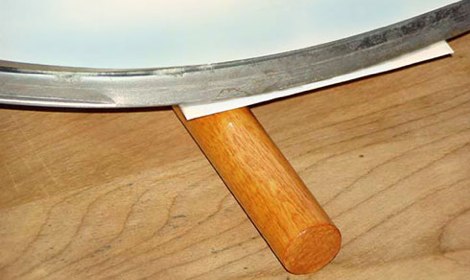
Pulsar Professional FX has a neat tip on their site for getting a really even toner transfer when making your own PCBs. First, the PCB is cut to size, and the paper is tacked to the board. Then, the PCB is placed paper up onto a dowel and rolled back and forth with the iron. Since the board bends slightly over the dowel the toner sticks evenly to the copper. After that, just remove the paper as usual and etch with your preferred method.

Etch PCBs With Ferric Chloride And A Sponge

F7Z9JTTFX23V5VV

Etching a printed circuit board generally takes a bit of time and uses a lot of etchant. [TechShopJim] posted a method that uses a sponge to reduce the amount of etchant used while speeding up the entire process. First, a resist is applied using either a sharpie or the toner transfer method. Using gloves to handle everything, he soaked a sponge in ferric chloride and continually wiped a copper-clad board until all the exposed copper was removed. This technique moves the etchant around more, keeping “fresh” etchant closer to the copper. If you can’t procure ferric chloride, you can also use our method that uses 2 household chemicals: hydrogen peroxide and hydrochloric acid.

Making Cool Looking PCBs

pretty_pcb

[Mike] has posted an instructable on making cool looking PCBs. He does it a little differently than we do. He uses soda cans for the stencils and combines the solder mas and silk screen steps. Also, a bit of extra cooking gives him this cool gradient of color. He has managed to get some really fine etching. It isn’t as fine as a laser etching, but this should be able to handle the smallest stuff you can throw at it. We’re a bit curious what exactly he’s building. There’s a color picture after the break to show you what we mean.

Continue reading “Making Cool Looking PCBs”

Bounty On Bus Pirate Features, Get A Free V2 PCB

bpv2

We’re putting a bounty on two high-priority Bus Pirate features. You can get a free PCB for the upcoming Bus Pirate V2 by writing a bit of code. Hack a Day has a varied and talented group of readers, and we know someone out there has the experience to make these changes with minimal difficulty.

  • The latest code integrates the PIC24F bootloader for easy updates without a programmer. We’d like to add a protocol snooper, but that requires interrupts. With the bootloader, however, interrupts are relocated and we’ve yet to fully grasp how that works. We’ll send a PCB and PIC 24F to the first person who modifies the code to demonstrate UART, SPI, or change notification interrupts with the boot loader. Microchip’s 24F bootloader app note is available here. Complete.
  • The current frequency measurement feature is a hack that uses a counter and a timer. Be the first to implement the input capture peripheral instead, and get a free PCB. See the function bpFreq(void) in base.c. Complete.

The latest Bus Pirate code and compiled firmware can be checked-out from Google Code SVN. Submit your code via the comments below or buspirate@hackaday.com.

UPDATE: Both issues were resolved. Thanks for your suggestions.