A BlackBerry Classic-sized device with a BlackBerry keyboard and an e-ink screen. It sits next to an e-ink smartwatch with a grey bezel that matches the 3d printed enclosure of the messaging device.

Beepberry Brings Memory LCD And A Physical Keyboard To Your Pi

As the 2020s are seeing the return of the flip phone, could we see a rebirth of other device form factors from before the slab era? [Eric Migicovsky] and [SQFMI] are working on a new physical keyboard device with the Beepberry.

Featuring a high contrast Sharp Memory LCD and the tried-and-true reliability of a BlackBerry keyboard, the device is designed for messaging all your contacts over WiFi without the distractions of a smartphone. As this is a collaboration with the Matrix-based chat service Beeper, the device is designed around the CLI version of their client.

If you want to eschew the distraction-free nature of the device, since it’s Pi-powered it can run any ARM Linux programs you might want as well being a playground for hardware mods. Add a DSP and headphone jack and this could be a neat little pianobar player. [Migicovsky] stresses this is currently a dev board and by no means should be assumed to be an off-the-shelf piece of kit.

If this looks like a familiar reuse of a BlackBerry keyboard, you might be remembering [arturo182]’s Keyboard Featherwing or this LoRa Messenger.

Continue reading “Beepberry Brings Memory LCD And A Physical Keyboard To Your Pi”

UAV Flight Controller Saves Weight

When building autonomous airborne vehicles like drones or UAVs, saving a little bit of weight goes a long way, literally. Every gram saved means less energy needed to keep the aircraft aloft and ultimately more time in the air, but unmanned vehicles often need to compromise some on weight in order to carry increased computing abilities. Thankfully this one carries a dizzying quantity of computer power for an absolute minimum of weight, and has some clever design considerations to improve its performance as well.

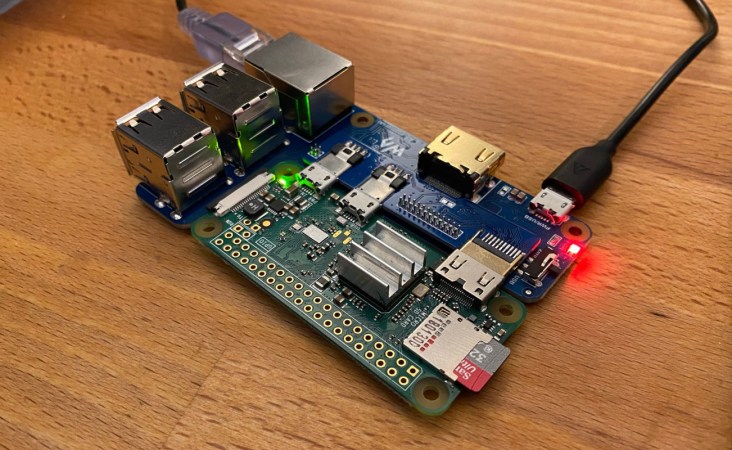
The advantage of this board compared to other similar offerings is that it is built to host a Raspberry Pi Compute Module 4, while the rest of the flight controllers are separated out onto a single circuit board. This means that the Pi is completely sandboxed from the flight control code, freeing up computing power on the Pi and allowing it to run a UAV-specific OS like OpenHD or RubyFPV. These have a number of valuable tools available for unmanned flight, such as setting up a long range telemetry and camera links. The system itself supports dual HD camera input as well as additional support for other USB devices, and also includes an electronic speed controller mezzanine which has support for quadcopters and fixed wing crafts.

Separating non-critical tasks like cameras and telemetry from the more important flight controls has a number of benefits as well, including improved reliability and simpler software and program design. And with a weight of only 30 grams, it won’t take too much cargo space on most UAVs. While the flight computer is fairly capable of controlling various autonomous aircraft, whether it’s a multi-rotor like a quadcopter or a fixed wing device, you might need a little more computing power if you want to build something more complicated.

Hackaday Prize 2023: A DIY Voice-Control Module

If science fiction taught us anything, it’s that voice control was going to be the human-machine interface of the future. [Dennis] has now whipped up a tutorial that lets you add a voice control module to any of your own projects.

The voice control module uses a Raspberry Pi 4 as the brains of the operation, paired with a Seeed Studio ReSpeaker 4-microphone array. The Pi provides a good amount of processing power to crunch through the audio, while the mic array captures high-quality audio from any direction, which is key to reliable performance. Rhasspy is used as the software element, which is responsible for processing audio in a variety of languages to determine what the user is asking for. Based on the voice commands received, Rhasspy can then run just about anything you could possibly require, from sending MQTT smart home commands to running external programs.

If you’ve always dreamed of whipping up your own version of Jarvis from Iron Man, or you just want a non-cloud solution to turn your lights on and off, [Dennis’s] tutorial is a great place to start. Video after the break.

Continue reading “Hackaday Prize 2023: A DIY Voice-Control Module”

Hackaday Prize 2023: The NEOKlacker Pocket Computer

Science fiction always promised us pocket computers. These days, we’re spoiled for choice. [Spider Jerusalem] eschewed a simple smartphone or tablet, though, instead building a custom pocket computer of their own design. 

Like so many other DIY cyberdecks and handheld computers, this one relies on a Raspberry Pi. In this case, it’s built using a Pi 4 with 8GB of RAM, which offers a snappy experience that wasn’t available on the earliest boards. [Spider] paired it with a nifty 720×720 LCD screen and a full QWERTY button pad, wrapped up in a tidy 3D-printed case. Like any good pocket computer, it’s well-connected, thanks to a 4G LTE cellular data connection.

It might seem to be a build without a purpose in this era, but that’s not necessarily the case. When it comes to running barebones Linux utilities at a real command line, a Raspberry Pi offers some utility that the average smartphone doesn’t have out of the box. It’s a useful tool if you need to interface with a server on the go or do some low-level network diagnostics without carrying a whole laptop around. Video after the break.

Continue reading “Hackaday Prize 2023: The NEOKlacker Pocket Computer”

Tiny Bitcoin Miner Plays The Lottery

Usually when we think of Bitcoin miners, we imagine huge facilities of server racks doing nothing but essentially wasting energy, all for the chance that one of those computers amongst the rows will stumble upon the correct set of numbers to get rewarded with imaginary money. The idea being that the more computers, the more chances to win. But just buying one lottery ticket is the only thing technically required to win, at least in theory. And [Data Slayer] is putting this theory to the test with this Bitcoin miner built around a single Raspberry Pi.

This tiny Raspberry Pi Zero does get a little bit of support from an Ant Miner, a USB peripheral which is optimized to run the SHA256 hashing algorithm and solve the complex mathematical operations needed to “win” the round of Bitcoin mining. Typically a large number of these would be arrayed together to provide more chances at winning (or “earning”, to use the term generously) Bitcoin but there’s no reason other than extreme statistical improbability that a single one can’t work on its own. The only other thing needed to get this setup working is to give the Pi all of the configuration information it needs such as wallet information and pool information.

This type of miner isn’t novel by any means, and in fact it’s a style of mining cryptocurrency called “lottery mining” where contributing to a pool is omitted in favor of attempting to solve the entire block by pure random chance alone in the hopes that if it’s solved, the entire reward will be claimed by that device alone. In the case of this device, the current hash rate calculated when it was contributing to a pool means that when lottery mining, it has about a one-in-two-billion chance of winning. That’s essentially zero, which is basically the same chance of winning a lottery that pays out actual usable currency.

Continue reading “Tiny Bitcoin Miner Plays The Lottery”

Machine Vision Automates Trainspotting With Unique Full-Length Portraits

As hobbies go, trainspotting is just as valid a choice as any — we don’t judge. But it does present certain logistical challenges, such as having to be in visual range of a train to be able to spot it. There’s also the fact that trains are very large objects, and they tend to move very fast. What’s a railfan to do?

If you’re also technically minded, you might try building an automatic trainspotting bot like [jo-m] has. It looks like the hardware end of “Trainbot” is pretty simple since it has been tested on both x86 and Raspberry Pi, and supports both video4linux and Pi cam. The magic is in the software, which is able to detect a train entering the frame, record images, and then stitch them together into one long image. The whole thing is coded in Go and has some interesting bits, like a custom image patch mapping package.

Trainbot gives an unusual view of a train, one that most of us accustomed to watching a train pass at a crossing have never seen. By stitching small chunks of the train as it passes, Trainbot is able to show the entire train in a single image, which would be impossible to do except for being very, very far away from the track. [jo-m] also built a web interface for Trainbot where you can check out the comings and goings yourself. Each passing train’s image is accompanied by data like its velocity and acceleration, length of the train, and time of passage. There’s also a GIF of the original source video, which is pretty cool.

Here in the States, we don’t have a lot of passenger trains to spot, but we do have some really long freight trains. It’d be interesting to see how this works with a train that’s over a mile long; that would be quite an image. Looks like someone at least has the hardware in place to give it a try.

A small speaker with an LCD showing chatbot responses

AI-Powered Speaker Is A Chatbot You Can Actually Chat With

AI-powered chatbots are pretty cool, but most still require you to type your question on a keyboard and read an answer from a screen. It doesn’t have to be like that, of course: with a few standard tools, you can turn a chatbot into a machine that literally chats, as [Hoani Bryson] did. He decided to make a standalone voice-operated ChatGPT client that you can actually sit next to and have a conversation with.

The base of the project is a USB speaker, to which [Hoani] added a Raspberry Pi, a Teensy, a two-line LCD and a big red button. When you press the button, the Pi listens to your speech and converts it to text using the OpenAI voice transcription feature. It then sends the resulting text to ChatGPT through its API and waits for its response, which it turns into sound again through the eSpeak speech synthesizer. The LCD, driven by the Teensy, shows the current status of the machine and also provides live subtitles while the machine is talking.

To spice up the AI box’s appearance, [Hoani] also added an LED ring which shows a spectrogram of the audio being generated. This small addition really makes the thing come alive, turning it into what looks like a classic Sci-Fi movie prop. Except that this one’s real, of course – we are actually living in the future, with human-like AI all around us.

All code, mostly written in Go, is freely available on [Hoani]’s GitHub page. It also includes a separate audio processing library called toot that [Hoani] wrote to help him interface with the micophone and do spectral analysis. Anyone with basic electronic skills can now build their own AI companion and talk to it – something that ham radio operators have been doing for a while.

Continue reading “AI-Powered Speaker Is A Chatbot You Can Actually Chat With”