Pumpkin OS running on x86

Palm OS: Reincarnate

[pmig96] loves PalmOS and has set about on the arduous task of reimplementing PalmOS from scratch, dubbing it Pumpkin OS. Pumpkin OS can run on x86 and ARM at native speed as it is not an emulator. System calls are trapped and intercepted by Pumpkin OS. Because it doesn’t emulate, Palm apps currently need to be recompiled for x86, though it’s hoped to support apps that use ARMlets soon. Since there are over 800 different system traps in PalmOS, he hasn’t implemented them all yet.

Generally speaking, his saving grace is that 80% of the apps only use 20% of the API. His starting point was a script that took the headers from the PalmOS SDK and converted them into functions with just a debug message letting him know that it isn’t implemented yet and a default return value. Additionally, [pmig96] is taking away some of the restrictions on the old PalmOS, such as being limited to only one running app at a time.

As if an x86 desktop version wasn’t enough, [pmig96] recompiled Pumpkin OS to a Raspberry Pi 4 with a ubiquitous 3.5″ 320×480 TFT SPI touch screen. Linux maps the TFT screen to a frame buffer (dev/fb0 or dev/fb1). He added a quick optimization to only draw areas that have changed so that the SPI writes could be kept small to keep the frame rate performance.

[pmig96] isn’t the only one trying to breathe some new life into PalmOS, and we hope to see more progress on PumpkinOS in the future.

Reballing And A Steady Hand Makes A Raspberry Pi 800

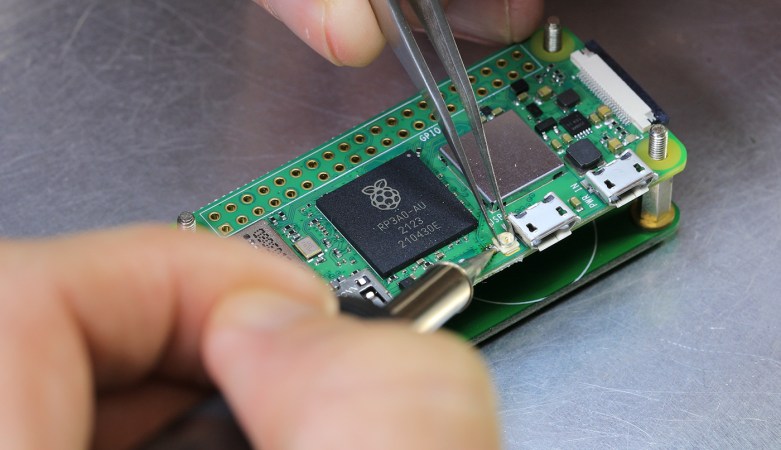
The all-in-one Raspberry Pi 400 computer is a capable device, but those seeking its maximum power may be disappointed by its 4 GB of memory. When the Pi 4 and Compute Module 4 have double that figure, surely the Pi 400 could catch up! A reddit user called [Pi800] rose to the challenge by replacing the 4 GB chip from the Pi 400 with the 8 GB chip from a Pi Compute Module, resulting in the so-called Pi 800, a working 8 GB all-in-one Pi.

As a piece of work it’s a deceptively straightforward yet extremely fiddly piece of soldering that requires a steady hand for even the most skilled of solderers. What takes it beyond the norm though is the reballing process. A ball-grid-array chip has a grid of small balls of solder on its underside that make the contacts, and these melt when it is soldered so require replacement before reworking. This is normally done with a template of carefully aligned holes to line up balls of solder in a stream of hot air, but lacking the template in this case the job was done by hand, laboriously ball by ball. A soldering task we’d hesitate to take on ourselves, so we’re impressed.

The result is an 8 GB all-in-one Pi, and it’s honestly not beyond the realms of possibility that an official version of this mod could be a future Raspberry Pi product. Perhaps we’ll wait for that, but should you be impatient then at least it’s possible to roll your own. It’s certainly not the first BGA memory swap we’ve brought you.

The Raspberry Pi CM4 Begets A Form Factor

It has become the norm for single-board computers to emerge bearing more than a passing resemblance to the Raspberry Pi, as the board from Cambridge sets the hardware standard for its many competitors. This trend has taken an interesting new turn, as a new board has emerged that doesn’t sport the familiar 40-pin connector of the Pi Model B, but the more compact from factor of the Compute Module 4. The Radxa CM3 sports a Rockchip RK3566 quad core Cortex-A55 running at 2.0 GHz, and is to be made available in a variety of memory specifications topping out at 8 GB. It is hardware compatible with the Pi CM4, and should be usable with carrier boards made for that module.

We’ve looked at the CM4 as the exciting face of the Raspberry Pi because the traditional boards have largely settled into the same-but-faster progression of models since the original B+ in 2014. The compute module offers an accessible way to spin your own take on Raspberry Pi hardware, and it seems that this new board will only serve to broaden those opportunities. Radxa are the company behind the Rock Pi series of more conventional Raspberry Pi clones, so there seems every chance that it will reach the market as promised.

Will it make sense to buy one of these as opposed to the Pi CM4? On paper it may have some hardware features to tempt developers, but like all Pi clones it will have to bridge the software gap to be a real contender. The Raspberry Pi has never been the fastest board on the market at any given time, but it has gained its position because it comes with a well-supported and properly updated operating system. For this board and others like it that will be a tough standard to match.

Curious as to what the first Raspberry Pi form factor clone was? We think it’s the SolidRun Carrier-one from 2013.

Via CNX Software.

Halloween Hack Requires Minimum Code, Produces Maximum Fun

Every year, [Conor O’Neill] hacks something together to spook and entertain trick-or-treaters who happen by his home on Halloween. He’s noticed a pattern — every year the project involves a mess of code, often slapped together using different frameworks and languages. Attempting to alleviate that, and maybe make things a bit more friendly to beginners who understandably find code-intensive project daunting, this year he set out to write as little code as possible.

Rather than take the electronics-only route, which would undoubtedly include a few 555 timers and some other classics, [Conor] elected to stick with higher-level embedded boards, including fan-favorites such as an ESP32 and a Raspberry Pi, while still trying to keep code to a minimum. Thanks to the visual languages Espruino Blockly and NODE-RED, he only needed to write a couple lines of “traditional code,” as he calls it: a simple JavaScript HTTP request. The project itself consisted of an ultrasonic sensor hooked up to an ESP32, which would detect when children approached the door. The ESP32 used Espruino visual scripting to notify a Raspberry Pi when it sensed motion. The Raspberry Pi would play some spooky sounds, and coordinate with some old conference badges to turn on some lights and trigger a fog machine. The Pi also used a service called Tines to send a door notification via Telegram.

Okay, so this is still by no means simple, but it is interesting how much can be done without writing much code (and the end result was great!). [Conor] says he’s been building similar Halloween projects every year for the last ten or so, and it shows — we wrote about another one of his haunted doorbells back in 2015. We’re looking forward to seeing what he cooks up next year, and we hope you’ll have some awesome automated Halloween decorations as well!

Continue reading “Halloween Hack Requires Minimum Code, Produces Maximum Fun”

Unique Pomodoro Timer Displays Quotes While You Work

[zorbash] came up with a great side project while designing a way to read notes and highlighted sections from e-books without having to use Good Reads or the Amazon tool: build a gadget to display a parade of quotes from favorite authors and their books. The project is called Brain because it’s built on an IoT platform called Nerves.

As a bonus, the gadget functions as a Pomodoro timer of sorts — that’s the time management method where you work for 25-minute periods and take 5-minute breaks in between, with a longer break every four Pomodoros. Brain displays a quote for 25 minutes and then flashes the screen to draw [zorbash]’s attention to the fact that time is up. We think this is a nice, unobtrusive way to do things. There are no breaks built in, but that’s just how [zorbash] rolls.

The quotes are fetched using Bookworm, a script [zorbash] wrote that’s available on GitHub. It uses a Raspberry Pi 2 B, an SD card to store the JSON’d quotes, and a Wi-Fi dongle to allow the fetching. If you’re wondering about the enclosure, it’s made of clay.

If you like your Pomodoro timers a little more physical, here’s one that starts as soon as you plug it in to a USB port.

Prepare For Wildfire Season With An Air Quality Monitor

For some reason, wildfire seasons in Australia, North America, and other places around the world seem to happen more and more frequently and with greater and greater fervor. Living in these areas requires special precautions, even for those who live far away from the fires. If you’re not sure if the wildfires are impacting your area or not, one of the tools you can build on your own is an air quality meter like [Costas Vav] shows us in this latest build.

The air quality indicator is based around an Adafruit Feather RP2040 which is in turn based on the 32-bit Cortex M0+ dual core processor. This makes for a quite capable processor in a small package, and helps accomplish one of the design goals of a rapid startup time. Another design goal was to use off-the-shelf components so that anyone could easily build one for themselves, so while the Feather is easily obtained the PMS5003 PM2.5 air quality sensor needed to be as well. From there, all of the components are wrapped up in an easily-printed enclosure and given a small (and also readily-available) OLED screen.

[Costas Vav] has made all of the files needed to build one of these available, from the bill of materials to the software running on the Pi-compatible board to the case designs. It’s a valuable piece of technology to have around even if you don’t live in fire-prone areas. Not only can wildfire smoke travel across entire continents but simple household activities such as cooking (especially with natural gas or propane) can decimate indoor air quality. You can see that for yourself with an army of ESP32-based air quality sensors.

Hardware Project Becomes Successful Product For Solo Developer

[Michael Lynch] has been a solo developer for over three years now, and has been carefully cataloguing his attempts at generating revenue for himself ever since making the jump to being self-employed. Success is not just hard work; it is partly knowing when the pull the plug on an idea, and [Micheal] has been very open about his adventures in this area. He shares the good news about a DIY project of his that ended up becoming a successful product, complete with dollar amounts and frank observations.

About a year ago, we covered a project he shared called TinyPilot, which is an effective KVM-over-IP device, accessible over the web, that could be built with about $100 worth of parts. [Micheal] found it to be a fun and useful project, and decided to see if he could sell kits. However, he admits he didn’t have high expectations, and his thoughts are probably pretty familiar to most hardware types:

I questioned whether there was a market for this. Why would anyone buy this device from me? It was just a collection of widely available hardware components.

Well, it turns out that he was onto something, and the demand for his device became immediately clear. He’s since given TinyPilot more features, an attractive case, and even provides a support plan for commercial customers. This is an excellent reminder that sometimes, what is being sold isn’t the collection of parts itself. Sometimes, what’s being sold is a solution to a problem people have, and those people are time-poor and willing to pay for something that just works.

It’s great to see [Michael] find some success as a solo developer, but his yearly wrap-up covers much more than just the success of TinyPilot as a product, so be sure to check it out if you’re at all interested in the journey of working for yourself.