Peggy Whitson, Space Scientist

When astronaut Dr. Peggy Whitson returned from space earlier this year, it was a triumphant conclusion to a lifelong career as a scientist, explorer, and leader. Whitson is a biochemist who became one of the most experienced and distinguished astronauts ever to serve. She’s got more time logged in space than any other American. There’s a reason that she’s been called the Space Ninja.

Education and Early Life

Some people find their vocation late in life, but Peggy Whitson figured it out in her senior year of high school. It was 1979 and NASA had just accepted its first class of female astronauts, including Christa McAuliffe and Judith Resnik who ultimately died aboard the Challenger.

Born on a family farm in Iowa in 1960, Whitson began working on her plan, with the stereotypical Midwestern work ethic seeming to prime her for the hard slog ahead. She earned a BS in Biology/Chemistry, Summa, from Iowa Wesleyan, before earning a Ph.D. in biochemistry from Rice in 1985. A person can write about Whitson blazing through to a doctorate in a single sentence, but the truth is that it’s just a lot of hard work, and that’s one of the aspects of her career that stands out: she worked tirelessly.

Scientist Career

After getting her doctorate, Whitson worked as a research associate at Johnson Space Center as part of a post-doctoral fellowship. She put in a couple of years as a research biochemist, working on biochemical payloads
like the Bone Cell Research Experiment in STS-47, which was run in space by fellow badass Dr. Mae Jamison. Whitson hadn’t given up on her dream of becoming an astronaut herself, and the whole time she worked at Johnson she was applying to NASA. It took ten years and five applications before she made it in.

In the meantime, however, Whitson was given a lot of very cool projects and also began to establish her credentials as a leader, serving as Project Scientist of the Shuttle-Mir Program from 1992 till 1995. For three years she helped lead Medical Sciences Division at Johnson. The two years after that she co-chaired the NASA committee on US-Russian relations. And because she still had more time to crush it, she also worked as an adjunct professor at the University of Texas Medical Branch as well as at Rice.

Then, in April of 1996, she learned that her hard work had paid off and that she had been accepted into astronaut school. Peggy Whitson was going to space.

Ad Astra
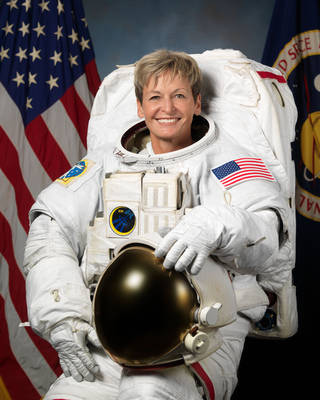
It would be eight more years before she made it to space, however. Two years of intense training was followed by ground-based technical duties, including two years spent in Russia in support of NASA crews there. However, in 2002 she got her chance, flying in a Soyuz up to the International Space Station as part of Expedition 5. There she conducted science experiments and helped install new components in the space station, logging 164 days in space.

Back on earth, Whitson continued to kick ass as a scientist, astronaut, and leader. In 2003 she commanded a 10-day underwater mission that helps trains astronauts for extended stays in space, preparing her for her signature accomplishments: two tours where she commanded the ISS.

In 2008 she led Expedition 16, in which three additional modules were added to the ISS. Because of the new construction, and despite her science focus, Whitson became one of NASA’s most prolific spacewalkers, making 10 EVAs in her career — second only to cosmonaut Anatoly Solovyev’s 16 and her cumulative EVA time of 60 hours is third best in the world.

The three years that followed she served as Chief Astronaut, before she returned to space in November 2016 as commander of Expedition 50. Compared to 16 it was much more mellow, albeit with hundreds of biochemistry experiments conducted. In April of 2017, Whitson surpassed the U.S. space endurance record, earning her a call from the President. She ended up with 665 days in space, returning September 2 as a hero.

Dr. Peggy Whitson’s brilliance and tireless drive have earned her innumerable awards and commendations. Her elementary school has a science lab named after her. This year Glamour named her one of their women of the year. She serves as an inspiration to anyone who aspires to a career in science, math, or space exploration: it won’t be easy, and it will take a really long time, but it’s the kind of work that makes the world a distinctly better place.

Photo Credit: NASA
Open Source Motor Controller Makes Smooth Moves With Anti-Cogging

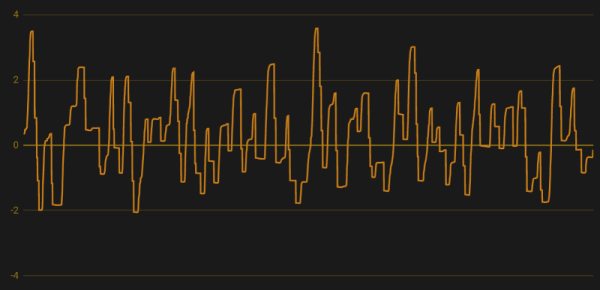
Almost two years ago, a research team showed that it was possible to get fine motor control from cheap, brushless DC motors. Normally this is not feasible because the motors are built-in such a way that the torque applied is not uniform for every position of the motor, a phenomenon known as “cogging”. This is fine for something that doesn’t need low-speed control like a fan motor, but for robotics it’s a little more important. Since that team published their results, though, we are starting to see others implement their own low-speed brushless motor controllers.

The new method of implementing anti-cogging maps out the holding torque required for any position of the motor’s shaft so this information can be used later on. Of course this requires a fair amount of calibration; [madcowswe] reports that this method requires around 5-10 minutes of calibration. [madcowswe] also did analysis of his motors to show how much harmonic content is contained in these waveforms, which helps to understand how this phenomenon arises and how to help eliminate it.

While [madcowswe] plans to add more features to this motor control algorithm such as reverse-mapping, scaling based on speed, and better memory usage, it’s a good implementation that has visible improvements over the stock motors. The original research is also worth investigating if a cheaper, better motor is something you need.

How The Integrated Circuit Came To Be

As the saying goes, hindsight is 20/20. It may surprise you that the microchip that we all know and love today was far from an obvious idea. Some of the paths that were being explored back then to cram more components into a smaller area seem odd now. But who hasn’t experienced hindsight of that sort, even on our own bench tops.

Let’s start the story of the microchip like any good engineering challenge should be started, by diving into the problem that existed at the time with the skyrocketing complexity of computing machines.

Continue reading “How The Integrated Circuit Came To Be”

Which Microcontroller Is Best Microcontroller?

Let’s say you’re working on a project, and you need a microcontroller. Which chip do you reach for? Probably the one you’re most familiar with, or at least the one whose programmer is hiding away in a corner of your desk. Choosing a microcontroller is a matter of convenience, but it doesn’t have to be this way. There are dozens of different ARM cores alone, hundreds of 8051 clones, and weirder stuff including the Cypress PSoC and TI’s MSP430. Which one is best? Which microcontroller that costs under a dollar is best? That’s the question [Jay Carlson] tried to answer, and it’s the best microcontroller shootout we’ve ever read.

[Jay] put together a monster of a review of a dozen or so microcontrollers that cost no more than a dollar. Included in this review are, from Atmel: the ATtiny1616, ATmega168PB, and the ATSAMD10. From Cypress, the PSoC 4000S. From Freescale, the KE04 and KL03. Holtek’s HT-66, and the Infineon XMC1100. From Microchip, the PIC16, PIC24, and PIC32. From Nuvoton, the N76, and M051. The NXP LPC811, Renesas RL-78, Sanyo LC87, and Silicon Labs EFM8. ST’s STM32F0 and STM8. STCMicro’s STC8, and finally TI’s MSP430. If you’re keeping score at home, most of these are either ARM or 8051-style cores, but the AVRs and PICs bump up the numbers for ‘proprietary’ core designs.

This review begins the same as all tech reviews, with a sampling of tech specs. Everything is there, including the amount of RAM to the number of PWM channels. [Jay] is going a bit further with this review and checking out the development environments, compilers, dev tools, and even the performance of different cores in three areas: blinking bits, a biquad filter, and a DMX receiver. There’s an incredible amount of work that went into this, and right now, this is the best resource we’ve seen for a throwdown of microcontrollers.

With all this data and the experience of going through a dozen different microcontroller platforms, what’s [Jay]’s takeaway? The STM32F0 is great, the Atmel/Microchip SAM D10 has great performance but you’ll be relying on some third-party libraries. The pure Microchip parts — the PIC16, PIC24, and PIC32 — have infinite product lifetimes, a wide range of packages, and a huge community but use a clunky IDE, and expensive compilers. The Cypress PSoC was just okay, and the PSoC5 or PSoC6 would be better. Surprises from this test include the Renesas RL-78 and its high performance, low cost, and the most power-efficient 5V part in the test.

With all that said, what’s the best microcontroller? That’s a dumb question, because the best microcontroller will always be the best microcontroller for that application. Or whatever you have sitting around in the parts drawer, we were never quite clear on what the answer actually is. That said, this is a new high water mark for microcontroller reviews, and we hope [Jay] will continue his research into microcontrollers that cost more than a dollar.

Go From Resin Caster To Resin Master

When it comes to resin casting, time is of the essence. It helps to gather everything you’ll need and have it within reach before starting. But if you don’t know what you don’t know, it can be difficult to anticipate needs. Luckily, [Botzen Design] has a few tricks up his sleeve that will save time, materials, and sanity for novices and old hands alike.

It may seem somewhat obvious to mix up resin in a disposable or reusable plastic cup. But not all cups are created equal. Polypropylene cups won’t outgas into your resin, but polystyrene will. If you use a silicone cup or any polypropylene food container marked #5/PP, cured resin will peel cleanly off of the cup walls.

For some reason, the giant jugs of resin [Botzen Design] uses don’t come with pumps. How do they expect someone to meter out exact amounts of resin and hardener while pouring them out of gallon jugs? Stadium-style condiment pumps at a restaurant supply store make things much simpler while avoiding costly spillage.

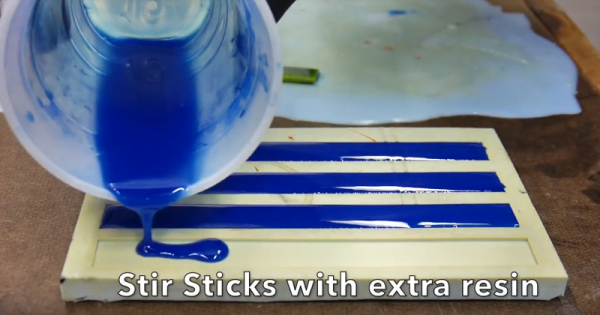
Our favorite tip (and seemingly [Botzen Design]’s as well) is the drip hammer. When air bubbles mature into craters, they can be filled easily and precisely with a drop or two of wet resin. A pipette would probably just get clogged, but an icicle of cured resin hanging from a stick makes the perfect drip applicator.

Want to get into resin casting but don’t know where to start? Hackaday’s own [Gerrit] has you more than covered.

Continue reading “Go From Resin Caster To Resin Master”

Build A Calculator, 1974 Style

Last month we touched upon the world of 1970s calculators with a teardown of a vintage Sinclair, and in the follow-up were sent an interesting link: a review of a classic Sinclair calculator kit from [John Boxall]. It’s a few years old now, from 2013, but since it passed us by at the time and there was clearly some interest in our recent teardown, it’s presented here for your interest.

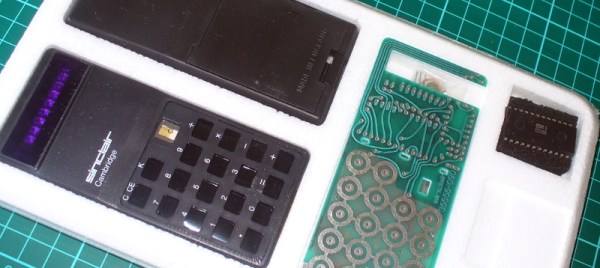
It seems odd in 2017 that a calculator might be sold as a kit, but when you consider that in the early 1970s it would have represented an extremely expensive luxury purchase it makes some sense that electronics enthusiasts who were handy with a soldering iron might consider the cost saving of self-assembly to be worthwhile. The £24.95 price tag sounds pretty reasonable but translates to nearly £245 ($320) in today’s terms so was hardly cheap. The calculator in question is a Sinclair Cambridge, the arithmetic-only predecessor to the Sinclair Scientific we tore down, and judging by the date code on its display driver chip it dates from September 1974.

As a rare eBay find that had sat in storage for so long it was clear that some of the parts had suffered a little during the intervening years. The discrete components were replaced with modern equivalents, including a missing 1N914 diode, and the display was secured in its flush-fitting well in the board with wire links. The General Instrument calculator chip differs from the Texas Instruments part used in the Scientific, but otherwise the two calculators share many similarities. A full set of the notoriously fragile Sinclair battery clips are in place, with luck they’ll resist the urge to snap. A particularly neat touch is the inclusion of a length of solder and some solder wick, what seems straightforward to eyes used to surface-mount must have been impossibly fiddly to those brought up soldering tube bases.

The build raises an interesting question: is it sacrilege to take a rare survivor like this kit, and assemble it? Would you do it? We’d hesitate, maybe. But having done so it makes for a fascinating extra look at a Sinclair Cambridge, so is definitely worth a read. If you want to see the calculator in action he’s posted a video which we’ve put below the break, and if you need more detail including full-resolution pictures of the kit manual, he’s put up a Flickr gallery.

Continue reading “Build A Calculator, 1974 Style”

Roll Your Own JBC Soldering Station

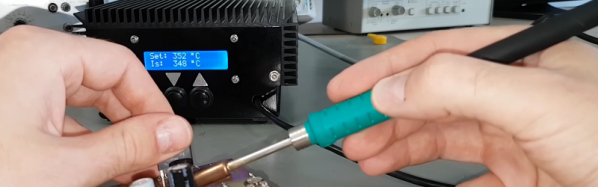
[Marco Reps] was soldering some boards with a lot of thermal mass and found his usual soldering iron was not up to the task. He noticed some professional JBC soldering stations that he liked, but he didn’t like the price. Even an entry-level JBC station is about $500 and they go up from there. He decided to build his own, but it did take awhile to complete. You can see two videos about the project, below.

How can you build your own soldering station and still claim it is a JBC? [Marco] noticed that the real performance of the iron came from the tip — what JBC calls a cartridge. In addition, the handle provides good ergonomics. You can buy the tips and handles from JBC for considerably less than a complete station. You just have to add the electronics to make it all work.

Continue reading “Roll Your Own JBC Soldering Station”