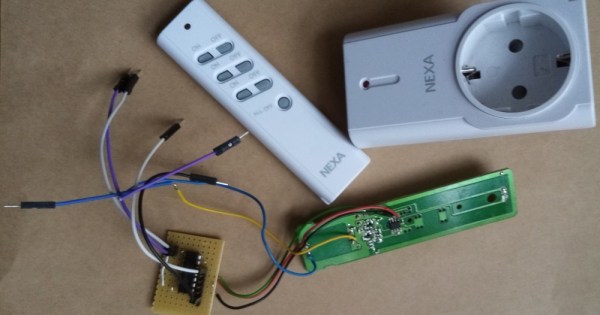
An image showing a water cooler PCB on the desk, with probes and jumper wires connected to it.

Taking Water Cooler UX Into Your Own Hands With Ghidra

Readers not aware of what Ghidra is might imagine some kind of aftermarket water cooler firmware or mainboard – a usual hacker practice with reflow ovens. What [Robbe Derks] did is no less impressive and inspiring:  A water cooler firmware mod that adds hands-free water dispensing, without requiring any hardware mods or writing an alternative firmware from scratch.

Having disassembled the cooler, [Robbe] found a PIC18F6527 on the mainboard, and surprisingly, it didn’t have firmware readback protection. Even lack of a PICkit didn’t stop him – he just used an Arduino to dump the firmware, with the dumper code shared for us to reuse, and the resulting dumps available in the same repository.

From there, he involved Ghidra to disassemble the code, while documenting the process in a way we can all learn from, and showing off the nifty tricks Ghidra has up its sleeves. Careful planning had to be done to decide which functions to hook and when, where to locate all the extra logic so that there’s no undesirable interference between it and the main firmware, and an extra step taken to decompile the freshly-patched binary to verify that it looks workable before actually flashing the cooler with it.

The end result is a water cooler that works exactly as it ought to have worked, perhaps, if the people defining its user interaction principles were allowed to make it complex enough. We could argue whether this should have been a stock function at all, but either way, it is nice to know that we the hackers still have some of the power to make our appliances friendly — even when they don’t come with an OS. Certainly, every single one of us can think of an appliance long overdue for a usability boost like this. What are your examples?

We’ve covered quite a few Ghidra-involving hacks, but it never feels like we’ve had enough. What about patching an air quality meter to use Fahrenheit? Or another highly educational write-up on cracking GBA games? Perhaps, liberating a Linux-powered 4G router to reconfigure it beyond vendor-defined boundaries? If you have your own goal in mind and are looking to start your firmware reverse-engineering journey, we can say with certainty that you can’t go wrong with our HackadayU course on Ghidra.

Picture of a monitor with a fake "ransomware" banner on it, and a PC with the ESP32 VGA devboard mounted into it in the foreground

ESP32 Pretends To Be GPU; Gives You A Ransomware Scare

Sometimes a piece of hardware meets a prank idea, and that’s how the fun Hackaday articles are born. [AnotherMaker] shows us some harmless entertainment at the expense of an IT enthusiast in your life – programming an ESP32-powered devboard with a VGA output to show an ever-feared “all your files are encrypted” screen on a monitor connected to it. The ASCII text in its 8-bit glory helps sell this prank, making it look exactly like a BIOS-hijacking piece of malware it claims to be; akin to UIs of the past that skilled hackers would whip up in x86 assembly. The devboard’s integration into a PCI card backplate is a cherry on top, a way to seamlessly integrate this into a PC case, making it look not particularly different from an old graphics card. In such a configuration, we don’t doubt that this would be a head-scratcher to a certain kind of an IT department worker.

If you already have someone in mind as a target for this prank, you’re in luck, since [AnotherMaker] has shared his source code, too, and all you need is a ESP32 with a VGA port set up. You can get the same devboard, or you can even solder it all together with an ESP32 breakout and resistors, if you’re on a time or money budget, since the schematics for the LilyGO devboard are public. Not all devboards gets such a fun application, but it’s always fun to see when someone thinks of one – a perfect prank scenario that calls for a very specific devboard.

Wondering how it’s even possible to output VGA from the ESP32? We’ve covered this in the past – like this R&D project done by [bitluni], who then went ahead and expanded on it by connecting six displays at once. If you’ve connected your ESP32 to a VGA port and ran some test sketches, a UI library will help you upgrade your idea into a ready project in no time.

Continue reading “ESP32 Pretends To Be GPU; Gives You A Ransomware Scare”

A CH341 programmer dongle with a stack of adapters on top (one for 1.8V and one for clip connection), and a test clip to the right of it

BIOS Flashing Journey Writeup Puts Tutorials To Shame

A couple of weeks ago, [Doug Brown] bought a Ryzen motherboard, advertised as “non-working” and discounted accordingly. He noticed that the seller didn’t test it with any CPUs old enough to be supported by the board’s stock BIOS revision, and decided to take a gamble with upgrading it.

Not having a supported CPU in hand either, he decided to go the “external programmer” route, which succeeded and gave this board a new life. This is not why we’re writing this up, however. The reason this article caught our eye is because [Doug]’s research leaves no stone unturned, and it’s all there to learn from. Whether through careful observation or thorough research, this article covers all the important points and more, serving as an example to follow for anyone looking to program their BIOS.

For instance, [Doug] correctly points out a design issue with these common programmers resulting in 5 V getting onto the 3.3 V data lines, and fixes it by rewiring the board. Going through all the letters in the ICs part number, something that many of us would dismiss, [Doug] notices that the flash chip is 1.8 V-only and procures a 1.8 V adapter to avoid the possibility of frying his motherboard. After finding out that the 1.8 V adapters don’t work for some people, he reverse-engineers the adapter’s schematics and confirms that it, indeed, ought to work with the specific parts on adapter he received.

Noting another letter in the part number implying the flash chip might be configured for quad-SPI operation, he adds series resistors to make sure there’s no chance of the programmer damaging the BIOS chip with its hardwired pinout. This is just an example of the insights in [Doug]’s article, there’s way more that we can’t mention for brevity, and we encourage you to check it out for yourself.

With this level of care put into the process, it’s no surprise that the modification was successful. The kind of inquisitiveness shared here is worth aspiring to, and writeups like this often surpass general-purpose tutorials in their insights and usefulness. What’s your “successfully making use of something sold as non-working” story?

If you’re looking for other insightful BIOS stories, we’ve covered someone reverse-engineering their BIOS to remove miniPCIe card whitelisting. We’ve typically covered BIOS modification stories in laptops, since there’s more incentives to modify these, but a lot of laptop BIOS articles will apply to desktop motherboards too, such as this supervisor password removal story or this LibreBoot installation journey by our own [Tom Nardi].

Thank you [Sidney] for sharing this with us!

Screenshot from the video in question, showing 12:54 of the video, demonstrating how the electrons are being exchanged when circuit is completed

Li-ion Battery Low-Level Intricacies Explained Excellently

There’s a lot of magic in Lithium-ion batteries that we typically take for granted and don’t dig deeper into. Why is the typical full charge voltage 4.2 V and not the more convenient 5 V, why is CC/CV charging needed, and what’s up with all the fires? [The Limiting Factor] released a video that explains the low-level workings of Lithium-ion batteries in a very accessible way – specifically going into ion and electron ion exchange happening between the anode and the cathode, during both the charge and the discharge cycle. The video’s great illustrative power comes from an impressively sized investment of animation, script-writing and narration work – [The Limiting Factor] describes the effort as “16 months of animation design”, and this is no typical “whiteboard sketch” explainer video.

This is 16 minutes of pay-full-attention learning material that will have you glued to your screen, and the only reason it doesn’t explain every single thing about Lithium-ion batteries is because it’s that extensive of a topic, it would require a video series when done in a professional format like this. Instead, this is an excellent intro to help you build a core of solid understanding when it comes to Li-ion battery internals, elaborating on everything that’s relevant to the level being explored – be it the SEI layer and the organic additives, or the nitty-gritty of the ion and electron exchange specifics. We can’t help but hope that more videos like this one are coming soon (or as soon as they realistically can), expanding our understanding of all the other levels of a Li-ion battery cell.

Last video from [The Limiting Factor] was an 1-hour banger breaking down all the decisions made in a Tesla Battery Day presentation in similarly impressive level of detail, and we appreciate them making a general-purpose insight video – lately, it’s become clear we need to go more in-depth on such topics. This year, we’ve covered a great comparison between supercapacitors and batteries and suitable applications for each one of those, as well as explained the automakers’ reluctance to make their own battery cells. In 2020, we did a breakdown of alternate battery chemistries that aim to replace Li-ion in some of its important applications, so if this topic catches your attention, check those articles out, too!

Continue reading “Li-ion Battery Low-Level Intricacies Explained Excellently”

the SoM module used to power a Dell Mini 1210, in an extended SODIMM form-factor

When Dell Built A Netbook With An X86 System-on-Module

Just like with pre-touchscreen cellphones having fancy innovative features that everyone’s forgotten about, there’s areas that laptop manufacturers used to venture in but no longer dare touch. On Twitter, [Kiwa] talks a fascinating attempt by Dell to make laptops with user-replaceable CPU+RAM modules. In 2008, Dell released the Inspiron Mini 1210, with its CPU, chipset and RAM soldered to a separate board in an “extended SODIMM” form-factor – not unlike the Raspberry Pi Compute Modules pre-CM4! Apparently, different versions of such “processor cards” existed for their Inspiron Mini lineup, with varying amounts of RAM and CPU horsepower. With replacement CPU+RAM modules still being sold online, that makes these Dell netbooks to be, to our knowledge, the only x86 netbooks with upgradable CPUs.

You could try and get yourself one of these laptops or replacement CPU modules nowadays, if you like tinkering with old tech – and don’t mind having a subpar experience on even Linux, thanks to the Poulsbo chipset’s notorious lack of openness. Sadly, Dell has thoroughly abandoned the concept of x86 system-on-module cards, and laptops have been getting less modular as we go – we haven’t been getting socketed CPUs since the third generation of mobile Intel boards, and even RAM is soldered to the motherboard more and more often. In theory, the “CPU daughterboard” approach could improve manufacturing yields and costs, making it possible to use a simpler large board for the motherboard and only have the CPU board be high-layer-count. However, we can only guess that this wasn’t profitable enough overall, even with all the theoretical upsides. Or, perhaps, Google-style, someone axed this project internally because of certain metrics unmet.

If you think about it, a laptop motherboard is a single-board computer; however, that’s clearly not enough for our goals of upgradability and repairability. If you’re looking to have your own way and upgrade your laptop regardless of manufacturer’s intentions, here’s an old yet impressive story about replacing the soldered-in CPU on the original Asus EEE, and a more recent story about upgrading soldered-in RAM in a Dell XPS ultrabook. And if you’re looking for retrocomputing goodness, following [Kiwa] on Twitter is a must – last seen liveblogging restoration and renovation of a Kaypro someone threw out on the curb.

PinePhone Malware Surprises Users, Raises Questions

On December 5th, someone by the IRC nickname of [ubuntu] joined the Pine64 Discord’s #pinephone channel through an IRC bridge. In the spirit of December gift-giving traditions, they have presented their fellow PinePhone users with an offering – a “Snake” game. What [ubuntu] supposedly designed had the potential to become a stock, out-of-the-box-installed application with a small but dedicated community of fans, modders and speedrunners.

Unfortunately, that would not be the alternate universe we live in, and all was not well with the package being shared along with a cheerful “hei gaiz I make snake gaem here is link www2-pinephnoe-games-com-tz replace dash with dot kthxbai”  announcement. Shockingly, it was a trojan! Beneath layers of Base64 and Bashfuscator we’d encounter shell code that could be in the “example usage” section of a modern-day thesaurus entry for the word “yeet“.

Continue reading “PinePhone Malware Surprises Users, Raises Questions”