LEDs Strips Tell You The Trains Aren’t Running

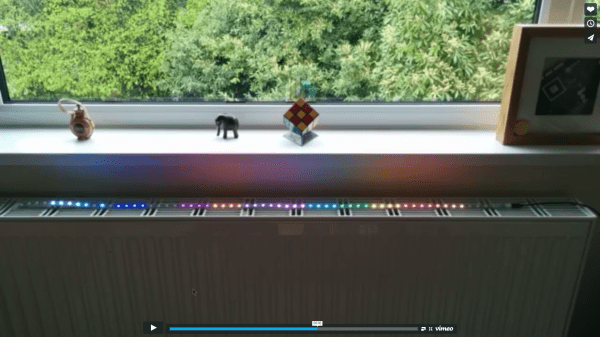
[James] is a frequent user of the London Underground, a subway system that is not immune to breakdowns and delays. He wanted a way to easily tell if any of the trains were being disrupted, and thanks to some LEDs, he now has that information available at a glance without having to check a webpage first.

Inspired by the Blinky Tape project at FT Engineering, [James] thought he could use the same strip of addressable LEDs to display information about the tube. A Raspberry Pi B+ gathers data from the London Underground’s TfL API and does a few calculations on the data. If there is a delay, the LEDs in the corresponding section of the strip will pulse, alerting the user to a problem with just a passing glance.

The project is one of many that displays data about the conditions you’ll find when you step outside the house, without having to look at a computer or smartphone. We recently featured an artistic lamp which displays weather forecasts for 12 hours into the future, and there was an umbrella stand which did the same thing. A lot is possible with LEDs and a good API!

Continue reading “LEDs Strips Tell You The Trains Aren’t Running”
Fibonacci Clock Is Hard To Read, Looks Good

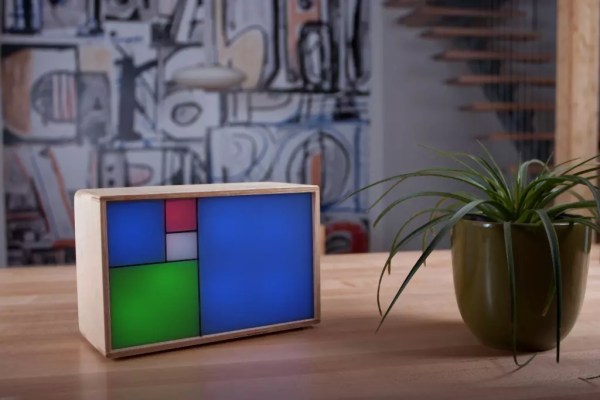
Artists have been incorporating the golden ratio in their work for many hundreds of years, and it is thought that when proportions are in line with this ratio, it tends to be more aesthetically pleasing. With that in mind, the clock that [Philippe] created must mathematically be the best looking clock we’ve ever featured, even if it is somewhat difficult to tell time from it.

The clock is made up of squares which represent the first five numbers of the Fibonacci sequence. The squares are backlit with LEDs, which will illuminate red for the hour, green for the minute, and blue representing the overlap of hours and minutes. Simply add up the red and blue squares to get the hour, and add the green and blue squares to get the minutes. The minutes are displayed in 5 minute increments since there aren’t enough blocks though, so you’ll also have to multiply. Confused yet? If not, it turns out that there are several ways to display certain times using this method, any of which can be randomly selected by the clock. [Philippe] reports that there are 16 different ways to represent 6:30, for example.

The clock is driven by an ATmega328P and is housed in a wooden case. There are schematics and code available on [Philippe]’s site if you want to build your own, there are detailed descriptions of how to tell time with this clock. You’ll probably need those. If you like getting confused by clocks, you might also like this one as well.

Continue reading “Fibonacci Clock Is Hard To Read, Looks Good”

Pinball Simulator Makes The Neighbors Happy

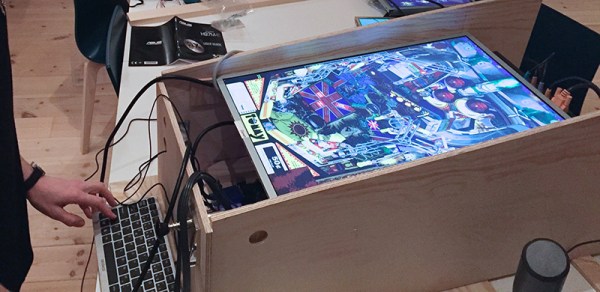
There are a lot of simulators out there if you want to try something out that would be otherwise impossible. Great examples are flight simulators for simulating the piloting of a fighter jet, or goat simulators for simulating the life of a goat who destroys a town. [Erland] wanted a pinball machine, but like planes and goats, found it was impractical to get a real one because it would probably upset his neighbors in his apartment. Instead, he set out to build a pinball simulator.

The cabinet is miniature-sized compared to a regular pinball machine so it can more easily fit in the apartment. It utilizes three monitors, a 24″ one in portrait mode for the main playing area, a 20″ one for the back screen, and a smaller one for the “dot matrix” style scoreboard. Once the woodwork was completed, a PC was put together to control everything and an Arduino was installed to handle the buttons and output USB commands to the PC.

Of course, we’ve featured many other pinball simulators before, but this one is no slouch when it comes to features either. It is very well crafted and the project is very well documented, and the miniature size sets it apart as well. However, if you want to go a step further with your pinball simulator, you might want to check out this augmented reality pinball system.

Bicycle-Powered Wimshurst Machine

A lot of great pieces of real technology were inspired (or, at least, look like) pieces of technology from science fiction of the past. Like the smartphones of today have a surreal resemblance to the Star Trek communicators of the 60s, [Steve] took inspiration from a story about a bicycle racing in space and set out to make his own.

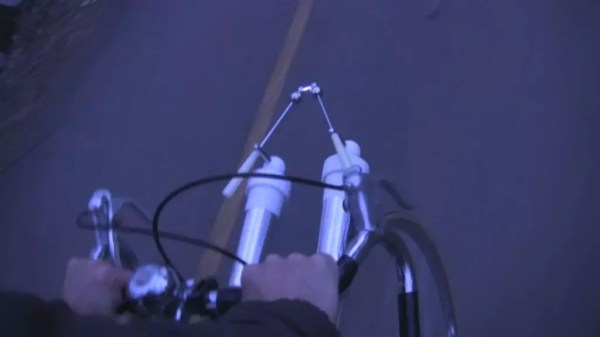
In the story, the bicycle wheels are replaced by electrostatic generators that power a type of (fictional) ion drive. Since an ion drive wouldn’t add much thrust to a bicycle operated on the Earth, [Steve] used the electrostatic generator he built to create a sparking light show. The generator is called a Wimshurst machine and has two counter-rotating discs which collect charge. The charge is dissipated across a spark gap which is placed where the bike light would normally go.

We don’t know if the sparks from the Wimshurst generator are enough for a proper headlight, but it’s definitely a cool effect. [Steve] also points out that it might also work as a bug zapper, but either way you should check out the video after the break to see it in action! While it’s not quite a tricorder it’s still a pretty impressive sci-fi-inspired build, and something that’s definitely unique in the bicycle realm.

There’s quite a collection of these Wimshurst projects beginning to come together. Here’s one made using a trio of soda bottles, and another example which used 3D printing.

Continue reading “Bicycle-Powered Wimshurst Machine”

Raspberry Pi And Kindle Together Again

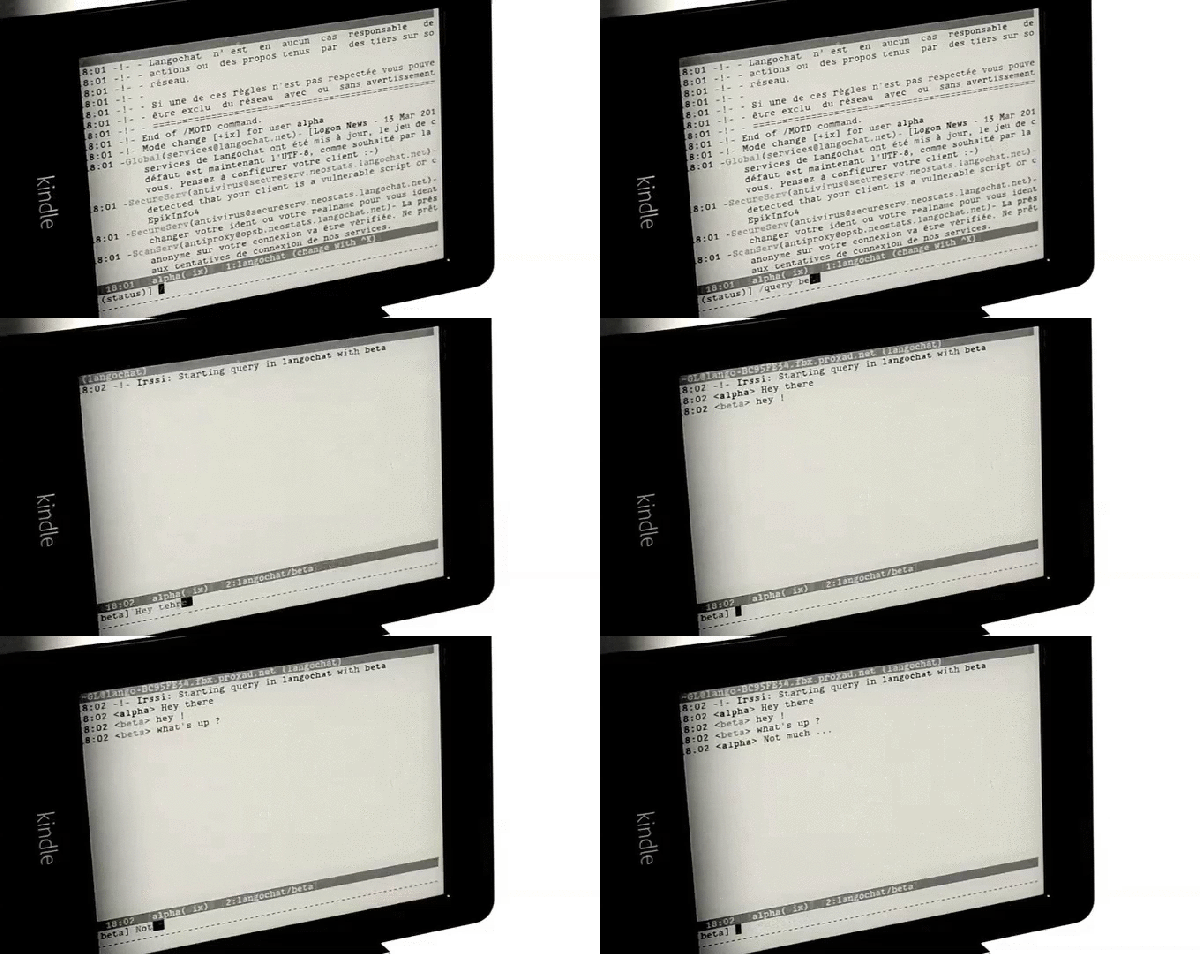
We’ve seen a lot of projects recently that take advantage of the Raspberry Pi 2’s augmented abilities. With the increased processor power and double the memory, it puts a lot more utility in the user’s hands. The latest project that takes advantage of this is the Pi-nk, which combines a Pi with a Kindle for some text-based awesomeness. [Edit: Use the Wayback Machine.]

[Guillaume] has put together this detailed how-to which, unlike other builds we’ve seen in the past, uses wireless instead of USB for almost all of the connections, including the keyboard. Granted, this isn’t a new idea, but he’s presenting the way that he did it. To that end, all of the commands you’ll need to use are extremely well documented on the project page if you want to build your own. When everything is said and done, you’ll be SSHing into the Pi from the Kindle and using the popular “screen” program to get the Pi to use the Kindle as its display.

Additionally, [Guillaume] has posted some schematics for custom enclosures for the Pi-Kindle pair if you’re more ambitious. He points out that the e-ink display is great if the Pi is being run in text or command-line mode, and we’d have to agree. This is a very clean pairing of these devices and puts the strengths of both to great use!

Use A Lamp To See Into The Future

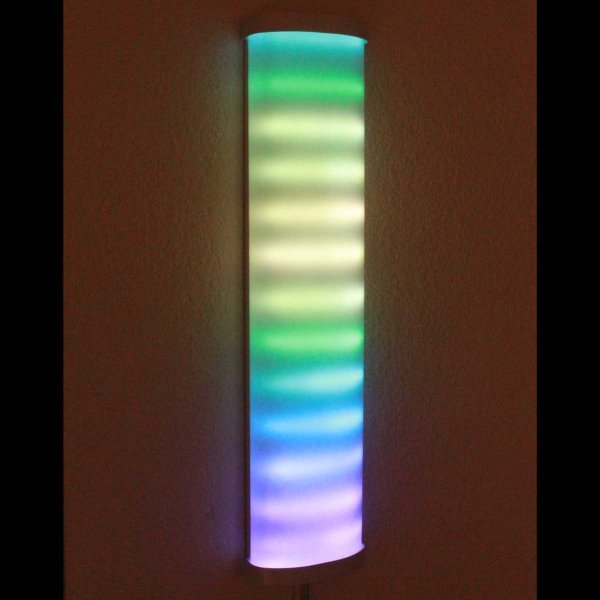
We’ve heard of magic lamps before, but this one is actually real. [Alex] has created a wall-mounted lamp that can tell you what the future will be like; at least as far as the weather is concerned. It is appropriately named “Project Aladdin” and allows you to tell a great deal about the weather at a glance as you walk out of the door.

The lamp consists of twelve LED strips arranged vertically. The bottom strip represents the current hour, and each strip above represents another hour in the future. The color of each strip indicates the temperature, and various animations of the LEDs within each strip indicate wind speed and precipitation.

The system uses a weather forecasting backend built-in Java, which is available on the project’s page. The LEDs are controlled by an application that is written in C, and the entire set of LEDs are enclosed in a translucent housing which gives it a very professional appearance. Be sure to check out the demo video after the break. Be sure to check out some other takes on weather lamps which use regular desk lamps instead of intricate scratch-made LED lamps.

Continue reading “Use A Lamp To See Into The Future”

Modern Spin On An Old Technology

It seems that the longer a technology has been around, the more likely it is that all of the ideas and uses for that technology will be fleshed out. For something that’s been around for around 5500 years it must be especially rare to teach an old dog new tricks, but [Sebastian] has built a sundial that’s different from any we’ve ever seen.

Once done with all of the math for the sundial to compute its angles and true north based on his latitude and longitude, [Sebastian] used Autodesk Inventor to create a model. From there it was 3D printed, but the interesting part here is that the 3D printer allowed for him to leave recesses for numbers in the sundial. The numbers are arranged at such angles inside the sundial so that when it’s a particular hour, the number of the hour shines through the shadow of the sundial which creates a very unique effect. This would be pretty difficult to do with any machine tools but is easily accomplished via 3D printing.

[Sebastian] wanted a way to appreciate the beauty of time, and he’s certainly accomplished that with this new take on  the sundial! He also wonders what it would be like if there was a giant one in a park. This may also be the first actual sundial build we’ve featured. What does that mean? Check out this non-pv, sun-powered clock that isn’t a sundial.

Thanks to [Todd] for the tip!