Extremely Detailed FMCW Radar Build

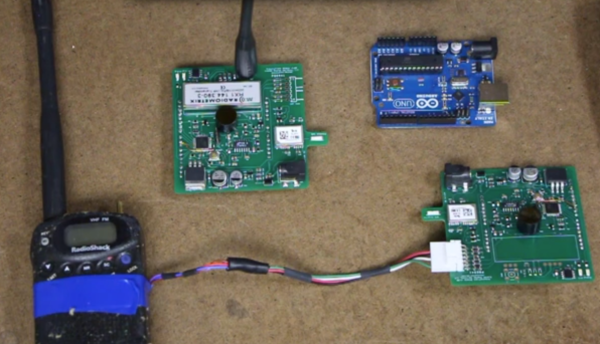
A lot of hackers take the “learn by doing” approach: take something apart, figure out how it works, and re-purpose all of the parts. [Henrik], however, has taken the opposite approach. After “some” RF design courses, he decided that he had learned enough to build his own frequency-modulated continuous wave radar system. From the level of detail on this project, we’d say that he’s learned an incredible amount.

[Henrik] was looking to keep costs down and chose to run his radar in the 6 GHz neighborhood. This puts it right in a frequency spectrum (at least in his area) where radar and WiFi overlap each other. This means cheap and readily available parts (antennas etc) and a legal spectrum in which to operate them. His design also includes frequency modulation, which means that it will be able to determine an object’s distance as well as its speed.

There are many other design considerations for a radar system that don’t enter into a normal project. For example, the PCB must have precisely controlled trace widths so that the impedance will exactly match the design. In a DC or low-frequency AC system this isn’t as important as it is in a high-frequency system like this. There is a fascinating amount of information about this impressive project on [Henrik]’s project page if you’re looking to learn a little more about radio or radar.

Too daunting for you? Check out this post on how to take on your first radar project.

Augmented Reality Pinball

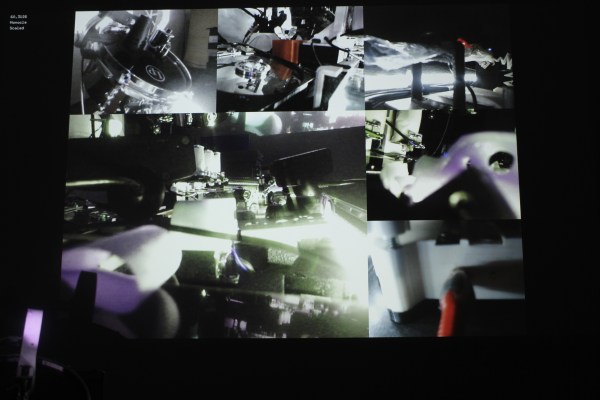
Pinball machines are fascinating pieces of mechanical and electrical engineering, and now [Yair Moshe] and his students at the Israel Institute of Technology has taken the classic game one step further.  Using computer vision and a projector, this group of engineers has created an augmented reality pinball game that takes pinball to a whole new level.

Once the laptop, webcam, and projector are set up, a course is drawn on a whiteboard which the computer “sees” to determine the rules of the game. Any course you can imagine can be drawn on the whiteboard too, with an interesting set of rules that no regular pinball game could take advantage of. Most notably, the ball can change size when it hits certain types of objects, which makes for a very interesting and unconventional style of play.

The player uses their hands to control the flippers as well, but not with buttons. The computer watches the position of the player’s hands and flips the flippers when it sees a hand in the right position. [Yair] and his students recently showed this project off at DLD Tel Aviv and even got [Shimon Perez], former President of Israel, to play some pinball at the conference!

Easy And Effective Way To Measure PWM… Without A Scope!

Sometimes when a project is coming together, you need to cobble a tool together to get it completed. Whether it’s something very involved, like building a 3D printer to fabricate custom parts, or something relatively simple, like wiring a lightbulb and a battery together to create a simple continuity checker, we’ve all had to come up with something on the fly. Despite having access to an oscilloscope, [Brian] aka [schoolie] has come up with his own method for measuring PWM period and duty cycle without a scope, just in case there’s ever a PWM emergency!

The system he has come up with is so simple it’s borderline genius. The PWM signal in question is fed through a piezo speaker in parallel with a resistor. The output from the speaker is then sent to an FFT (fast fourier transform) app for Android devices, which produces a picture of a waveform. [schoolie] then opens the picture in MS Paint and uses the coordinates of the cursor and a little arithmetic to compute the period and the duty cycle.

For not using a scope, this method is pretty accurate, and only uses two discrete circuit components (the resistor and the speaker). If you’re ever in a pinch with PWM, this is sure to help, and be a whole lot cheaper than finding an oscilloscope!

Bluetooth Boombox For That 80s Nostalgia

Sure, anyone can go buy a bluetooth speaker for their portable music needs. But for something a little more unique, at least in this decade, [Daniel] aka [speedfox] went with an 80s-style boombox and outfitted it with a bluetooth module.

The retro boombox was delivered with a few scratches and a broken radio, but the tape decks were still in decent shape so it was ready to be hacked. [speedfox] tied the Bluetooth audio output to the tape reader on one of the boombox’s tape decks, but this revealed a problem: the bass was overwhelming the rest of the sound. [speedfox] fixed this by adding a filter which worked until the power was tied in to the Bluetooth module and produced a lot of RF noise in the audio output. THIS problem was finally resolved with an audio transformer on both sides of the stereo signal. Finally!

After putting all of the new electronics in the case (and safely out of the way of the 120V AC input!) [speedfox] now has a classy stereo that’s ready to rock some Run-D.M.C. or Heavy D. He notes that the audio filter could use a little tweaking, and he’d also like to restore the functionality of the original buttons on the boombox, but it’s a great start with more functionality than he’d get from something off-the-shelf!

Super Smash Bros On A Calculator

Move over, BlockDude! There’s a new calculator game in town. [Hayleia] and a few other programmers have been hard at work on a clone of Super Smash Bros for graphing calculators that is sure to keep you busy in your next calculus class.

The game, called Smash Bros Open, is based on the Nintendo fighting game and is written specifically for monochrome z80 calculators (the TI-83 and TI-84 being the most ubiquitous of these). The game runs in 6 MHz mode with a simple background, or it can run in 15 MHz mode with a more complicated background. The programmers intend for the game to be open source, so that anyone can add anything to the games that they want, with the hopes of making the game true to its namesake.

Anyone who is looking to download a copy of this should know that Smash Bros Open is currently a work-in-progress. Right now both players need to play on the same calculator (with different keys), and Fox is the only playable character. The programmers hope to resolve the two player issue by using a second calculator as a game pad, or by linking the two calculators using Global CalcNet. As for the other characters, those can be added by others based on the existing code which is available on the project’s forum post!

Thanks to [Chris] for the tip.

ham radio

Fox Hunting With A Raspberry Pi

No, not a real fox! [KM4EFP] is a ham radio operator with a passion for fox hunting, which is an event where several radio operators attempt to find a broadcasting beacon (a “fox”) using radio direction finding techniques. [KM4EFP] has just built his own portable fox using a Raspberry Pi in a very well-built enclosure.

Since the fox could be outside for a while, the project was housed in a reasonably weatherproof ammunition case. A mount for an antenna was attached to the side, and it is hooked up to a GPIO pin on the Raspberry Pi. The entire device is powered by a 6000 mAh battery pack which allows the fox to broadcast long enough to be found.

The software running on the Raspberry Pi is very similar to the Pi FM transmitter program but it is specially made for ham radio broadcasting instead. Almost no extra hardware is needed to get the Pi broadcasting radio, as these software packages can drive the antenna directly from the GPIO pin. This is a great twist on the standard FM transmitter that ham radio enthusiasts everywhere can use to start finding those wily foxes!

Redesigned Bike Light Controller

[JP] was looking for a bicycle light to do some night biking around his home. He found a reasonably priced light that suited his needs, but when he started using it he found that the controller was a little lackluster. To solve some of its problems, he ended up building his own lighting controller from scratch.

The original controller’s main problem was that the it didn’t debounce the input from the single pushbutton. This meant that a single press of the button might cause it to cycle through two or three different modes, which was inconvenient and annoying. The new controller took care of this along with implementing several new brightness modes and a “strobe” mode for commuting to work to help alert other drivers of [JP]’s presence on his bicycle.

While [JP] notes that an Arduino would have been very easy to use in this situation, it wouldn’t have fit in the original enclosure. He went with an 8-pin ATtiny45, which was perfectly sized for what he needed. Everything fit together perfectly and is much more useful than the original. Maybe next he could pair it with a light that is even brighter than the one he’s currently using.