Solar Charge Controller Improves Efficiency Of Solar Panels

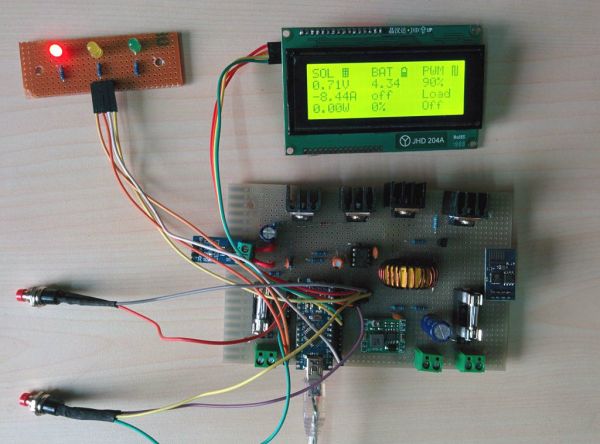
The simplest and easiest way to charge a battery with a solar panel is to connect the panel directly to the battery. Assuming the panel has a diode to prevent energy from flowing through it from the battery when there’s no sunlight. This is fairly common but not very efficient. [Debasish Dutta] has built a charge controller that addresses the inefficiencies of such a system though, and was able to implement maximum power point tracking using an Arduino.

Maximum power point tracking (MPPT) is a method that uses PWM and a special DC-DC converter to match the impedance of the solar panel to the battery. This means that more energy can be harvested from the panel than would otherwise be available. The circuit is placed in between the panel and the battery and regulates the output voltage of the panel so it matches the voltage on the battery more closely. [Debasish] reports that an efficiency gain of 30-40% can be made with this particular design.

This device has a few bells and whistles as well, including the ability to log data over WiFi, an LCD display to report the status of the panel, battery, and controller, and can charge USB devices. This would be a great addition to any solar installation, especially if you’ve built one into your truck.

This is [Debasish]’s second entry to The Hackaday Prize. We covered his first one a few days ago. That means only one thing: start a project and start documenting it on hackaday.io

Open-Source Robotic Arm Now Within Reach

For anyone looking for a capable robotic arm for automation of an industrial process, education, or just a giant helping hand for a really big soldering project, most options available can easily break the bank. [Mads Hobye] and the rest of the folks at FabLab RUC have tackled this problem, and have come up with a very capable, inexpensive, and open-source industrial arm robot that can easily be made by anyone.

The robot itself is Arduino-based and has the option to attach any end effector that might be needed for a wide range of processes. The schematics for all of the parts are available on the project site along with all of the Arduino source code. [Mads Hobye] notes that they made this robot during a three-day sprint, so it shouldn’t take very long to get your own up and running. There’s even a virtual robot that can be downloaded and used with the regular robot code, which can be used for testing or for simply getting the feel for the robot without having to build it.

This is a great project, and since it’s open source it will be great for students, small businesses, and hobbyists alike. The option to attach any end effector is also a perk, and we might suggest trying out [Yale]’s tendon-driven robotic hand. Check after the break for a video of this awesome robot in action.

Continue reading “Open-Source Robotic Arm Now Within Reach”

Spectrum Analyzer On The Cheap

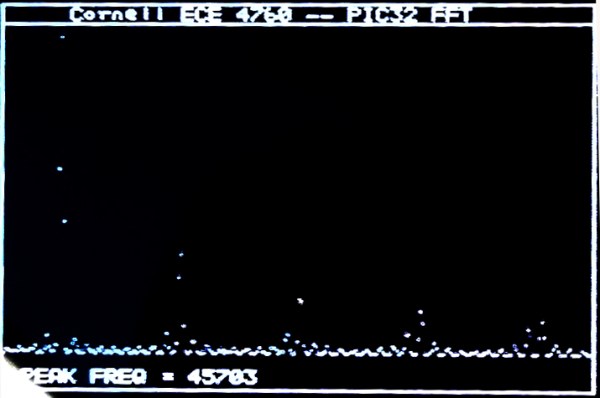
Provided you have an NTSC-compatible TV you can build yourself a really inexpensive spectrum analyzer. From there you just need one trivial piece of hardware to complete this build. [Bruce Land] has come up with a spectrum analyzer that shouldn’t cost any more than $5, if that’s what’s been keeping you from adding this tool to your workbench!

The spectrum analyzer is based on a PIC32 microcontroller which was previously proven in his Oscilloscope project. [Bruce] has managed to squeeze quite a bit out of this robust chip; the spectrum analyzer has 450 kHz bandwidth and runs a 256 Hz TV display and can output over 30 updates per second. The microcontroller runs the Fast Fourier Transform (FFT) to do calculations, with great results.

[Bruce] notes that the project was based on TV framework from another project, and that the FFT was added on top of that. Be sure to check out the source code on the project site if you’ve been on the hunt for an inexpensive spectrum analyzer, and if you need something with more processing power but only slightly more money, check out the FFT that runs on the Raspberry Pi’s GPU.

Control Anything With An Apple Remote

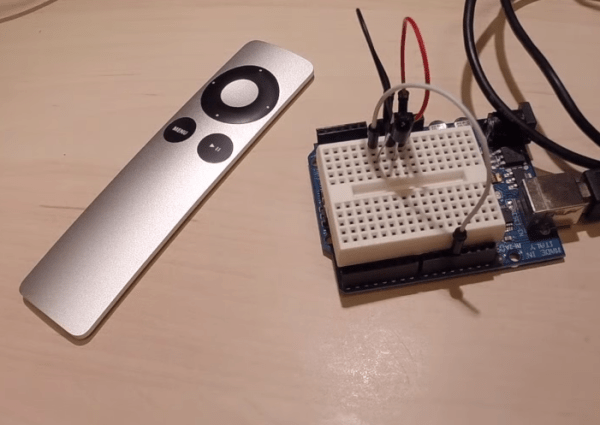
If you’re like us, you probably have more than one Apple Remote kicking around in a parts drawer, and if you’re even more like us, you’re probably really annoyed at Apple’s tendency to use proprietary hardware and software at every turn (lightning connector, anyone?). But there’s hope for the Apple Remote now: [Sourcery] has completed a project that allows an Apple Remote to control anything you wish.

The idea is fairly straightforward: A device interprets the IR signals from an Apple Remote, and then outputs another IR signal that can do something useful on a non-Apple product. [Sourcery] uses an Arduino to do the IR translation, along with a set of IR emitters and detectors, and now the Apple Remote can control anything, from stereos to TVs to anything you can imagine. It also doesn’t remove the Apple Remote’s capability to control Apple products, in case you need yours to do that as well.

[Sourcery] notes that sometimes working with RAW IR signals can be a little difficult, but the information on their project and in their 25-minute video discusses how to deal with that, so make sure to check that out after the break. Don’t have an Apple Remote? You can do a similar thing with a PS3 controller.

Continue reading “Control Anything With An Apple Remote”

TwitterPrinter Keeps Track Of 2015 Hack-A-Day Prize

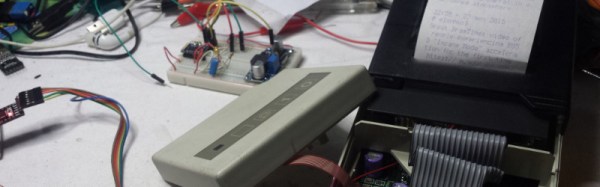
[Mastro Gippo] is getting to be somewhat of a Hackaday legend. He didn’t win the 2014 Hackaday prize but was in attendance at the event in Munich, and to make sure he keeps up with this year’s Prize, he built this old-school printer that prints all of the updates from the Hackaday Prize Twitter account.

The device uses the now-famous ESP8266 module for connecting the printer to the Internet. It doesn’t scrape data straight from Twitter though, it looks at [Mastro Gippo]’s own server to avoid getting inundated with too many tweets at once. The program splits the tweets into a format that is suitable for the printer (plain text) and then the printer can parse the data onto the paper. The rest of the design incorporates a 3.3V regulator for power and some transistors to turn the printer on and off. Be sure to check out the video of the device in action after the break!

[Mastro Gippo] notes that this eliminates the need to have a smartphone in order to keep up with the 2015 Hackaday Prize, which is ironic because his entry into the Trinket Everyday Carry Contest was a smarter-than-average phone. We’ll be expecting something that doesn’t waste quite as much paper for his official contest entry, though!

Continue reading “TwitterPrinter Keeps Track Of 2015 Hack-A-Day Prize”

Combination Lock Made Out Of Paper

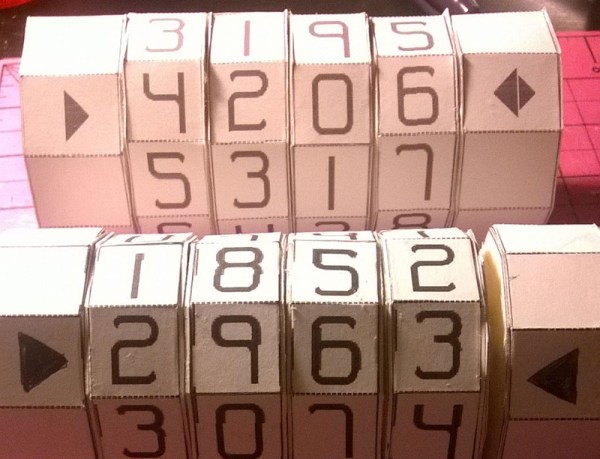
Most projects we feature are of the metal/wire/wood variety, but there is an entire community devoting to making very interesting and intricate things out of paper. Imgur user [Criand] has been hard at work on his own project made entirely out of paper, a combination lock that can hold a secret message (reddit post).

The motivation for the project was as a present for a significant other, wherein a message is hidden within a cryptex-like device and secured with a combination that is of significance to both of them. This is similar to how a combination bike lock works as well, where a series of tumblers lines up to allow a notched shaft to pass through. The only difference here is that the tiny parts that make up the lock are made out of paper instead of steel.

This project could also be used to gain a greater understanding of lock design and locksport, if you’ve ever been curious as to how this particular type of lock works, although this particular one could easily be defeated by a pair of scissors (but it could easily cover rock). If papercraft is more of your style though, we’ve also seen entire gyroscopes and strandbeests made of paper!

Fix A Broken DS By Removing A Screen

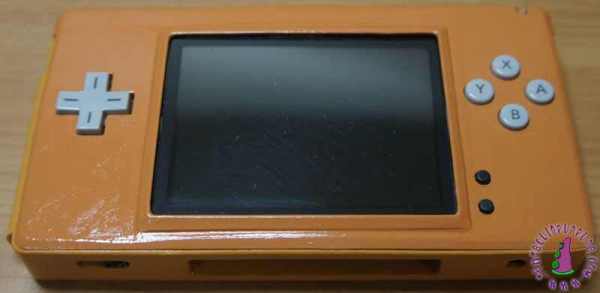
There are apparently a lot of broken Nintendo DS Lites out and about on eBay, and [Fede] has gotten his hands on one. His idea was to essentially turn one of these DS Lites into a SS (single screen?) (.es, Google translate) by modding the case, and he’s done it with pretty spectacular results.

If you’re going to do a case mod, you should go all out. To that end, [Fede] started by taking everything out of the DS and tossing the original 1000 mAh battery in favor of a 4000 mAh battery. From there he is able to shoehorn the two PCBs into the case with the speaker in between, which he notes doesn’t sound as nice as the original but works well enough.

After reshaping the plastic case in a few subtle ways and putting a few layers of paint on it, [Fede] now has a single-screen Nintendo DS for €2 plus parts and paint. While we’ve seen similar mods before, we’d be interested to see this one in action; some DS games don’t utilize the second screen as much as others, so perhaps this wouldn’t play every DS game perfectly, but for the price it can’t be beat.