Disabling Intel’s Backdoors On Modern Laptops

Despite some companies making strides with ARM, for the most part, the desktop and laptop space is still dominated by x86 machines. For all their advantages, they have a glaring flaw for anyone concerned with privacy or security in the form of a hardware backdoor that can access virtually any part of the computer even with the power off. AMD calls their system the Platform Security Processor (PSP) and Intel’s is known as the Intel Management Engine (IME).

To fully disable these co-processors a computer from before 2008 is required, but if you need more modern hardware than that which still respects your privacy and security concerns you’ll need to either buy an ARM device, or disable the IME like NovaCustom has managed to do with their NS51 series laptop.

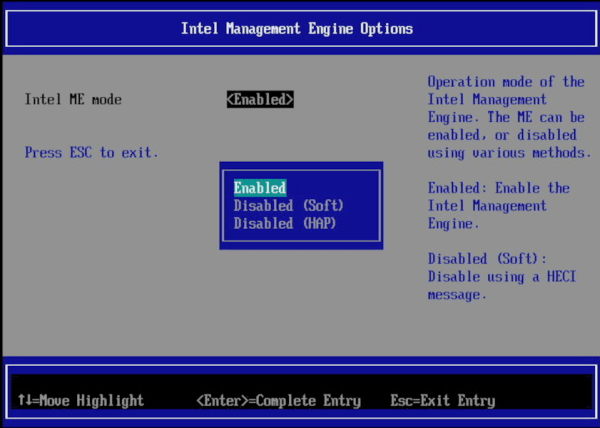
NovaCustom specializes in building custom laptops with customizations for various components and specifications to fit their needs, including options for the CPU, GPU, RAM, storage, keyboard layout, and other considerations. They favor Coreboot as a bootloader which already goes a long way to eliminating proprietary closed-source software at a fundamental level, but not all Coreboot machines have the IME completely disabled. There are two ways to do this, the HECI method which is better than nothing but not fully trusted, and the HAP bit, which completely disables the IME. NovaCustom is using the HAP bit approach to disable the IME, meaning that although it’s not completely eliminated from the computer, it is turned off in a way that’s at least good enough for computers that the NSA uses.

There are a lot of new computer manufacturers building conscientious hardware nowadays, but (with the notable exception of System76) the IME and PSP seem to be largely ignored by most computing companies we’d otherwise expect to care about an option like this. It’s certainly still an area of concern considering how much power the IME and PSP are given over their host computers, and we have seen even mainline manufacturers sometimes offer systems with the IME disabled. The only other options to solve this problem are based around specific motherboards for 8th and 9th generation Intel desktops, or you can go way back to hardware from 2008 and install libreboot to eliminate, rather than disable, the IME.

Thanks to [Maik] for the tip!

IBM Selectric Typewriters Finally Get DIY Typeballs

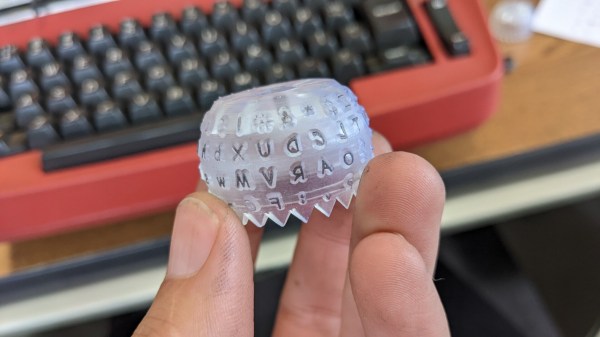
IBM’s Selectric line of typewriters were quite popular in the 1960s, thanks in part to an innovation called the typeball which allowed for easy font changes on a single machine. Unfortunately, as if often the case when specialized components are involved, it’s an idea that hasn’t aged particularly well. The Selectric typewriters are now around 60 years old and since IBM isn’t making replacement parts, those restoring these machines have had to get somewhat creative like using a 3D printer to build new typeballs.

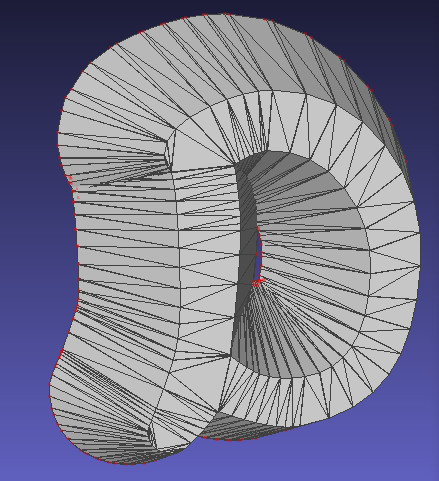
It sounds like it would be a simple, but much like the frustration caused with modern printers, interfacing automated computer systems with real-world objects like paper and ink is not often as straightforward as we would like. The main problem is getting sharp edges on the printed characters which is easy enough with metal but takes some more finesse with a printed plastic surface. For the print, each character is modelled in OpenSCAD and then an automated process generates the 3D support structure that connects the character to the typeball.

This process was easier for certain characters but got more complicated for characters with interior sections or which had a lot of sharp angles and corners. Testing the new part shows promise, although the plastic components will likely not last as long as their metal counterparts. Still, it’s better than nothing.

Regular Hackaday readers may recall that the ability to 3D print replacement Selectric typeballs has been on the community’s mind for years. When we last covered the concept in 2020 we reasoned that producing them on resin printers might be a viable option, and in the end, that does indeed seem to have been the missing element. In fact, this design is based on that same one we covered previously — it’s just taken this long for desktop resin 3D printing technology to mature enough.

Your Multimeter Might Be Lying To You

Multimeters are indispensable tools when working on electronics. It’s almost impossible to build any but the most basic of circuits without one to test and troubleshoot potential issues, and they make possible a large array of measurement capabilities that are not easily performed otherwise. But when things start getting a little more complex it’s important to know their limitations, specifically around what they will tell you about circuits designed for high frequency. [watersstanton] explains in this video while troubleshooting an antenna circuit for ham radio.

The issue that often confuses people new to radio or other high-frequency projects revolves around the continuity testing function found on most multimeters. While useful for testing wiring and making sure connections are solid, they typically only test using DC. When applying AC to the same circuits, inductors start to offer higher impedance and capacitors lower impedance, up to the point that they become open and short circuits respectively. The same happens to transformers, but can also most antennas which often look like short circuits to ground at DC but can offer just enough impedance at their designed frequency to efficiently resonate and send out radio waves.

This can give some confusing readings, such as when testing to make sure that a RF connector isn’t shorted out after soldering it to a coaxial cable for example. If an antenna is connected to the other side, it’s possible a meter will show a short at DC which might indicate a flaw in the soldering of the connector if the user isn’t mindful of this high-frequency impedance. We actually featured a unique antenna design recently that’s built entirely on a PCB that would show this DC short but behaves surprisingly well when sending out WiFi signals.

Continue reading “Your Multimeter Might Be Lying To You”

Pi Microcontroller Still Runs A Webserver

At first glance, the Raspberry Pi Pico might seem like a bit of a black sheep when compared to the other offerings from the Raspberry Pi Foundation. While most of the rest of their lineup can run Linux environments with full desktops, the Pico is largely limited to microcontroller duties in exchange for much smaller price tags and footprints. But that doesn’t mean it can’t be coerced into doing some of the things we might want a mainline Pi to do, like run a web server.

The project can run a static web page simply by providing the Pico with the project code available on the GitHub page and the HTML that you’d like the Pico to serve. It can be more than a static web page though, as it is also capable of running Python commands through the web interface as well. The server can pass commands from the web server and back as well, allowing for control of various projects though a browser interface. In theory this could be much simpler than building a physical user interface for a project instead by offloading all of this control onto the web server instead.

The project not only supports the RP2040-based Raspberry Pi Pico but can also be implemented on other WiFi-enabled microcontroller boards like the ESP8266 and ESP32. Having something like this on hand could greatly streamline smaller projects without having to reach for a more powerful (and more expensive) single-board computer like a Pi 3 or 4. We’ve seen some other builds on these boards capable of not only running HTML and CSS renderers, but supporting some image formats as well.

Continue reading “Pi Microcontroller Still Runs A Webserver”

Riding The Rails By Ebike

As most developed countries around the world continue to modernize their transportation infrastructure with passenger rail, countries in North America have been abandoning railroads for over a century now, assuming that just one more lane will finally solve their traffic problems. Essentially the only upside to the abandonment of railroads has been that it’s possible to build some unique vehicles to explore these tracks and the beautiful yet desolate areas they reach, and [Cam Engineering] is using an ebike to do that along the coast of central California.

Continue reading “Riding The Rails By Ebike”

Arbitrary Code Execution Over Radio

Computers connected to networks are constantly threatened by attackers who seek to exploit vulnerabilities wherever they can find them. This risk is particularly high for machines connected to the Internet, but any network connection can be susceptible to attacks. As highlighted by security researcher and consultant [Rick Osgood], even computers connected to nothing more than a radio can be vulnerable to attacks if they’re using certain digital modes of communication.

The vulnerability that [Rick] found involves exploiting a flaw in a piece of software called WinAPRS. APRS is a method commonly used in the amateur radio community for sending data over radio, and WinAPRS allows for this functionality on a PC. He specifically sought out this program for vulnerabilities since it is closed-source and hasn’t been updated since 2013. After some analysis, he found a memory bug which was used to manipulate the Extended Instruction Pointer (EIP) register which stores the memory address of the next instruction to be executed by the CPU. This essentially allows for arbitrary code execution on a remote machine via radio.

The exploit was found while using Windows XP because it lacks some of the more modern memory protection features of modern operating systems, but the exploit does still work with Windows 10, just not as reliably and with a bit of extra effort required. It’s a good reminder to use open-source software when possible so issues like these can get resolved, and to regularly install security updates when possible. If you’re looking to delve into the world of APRS in more modern times, take a look at this project which adds APRS to budget transceivers. Just make sure you get your license first.

Tube Amplifier Uses Low Voltage, Sips Battery

Much like vinyl records, tube amplifiers are still prized for their perceived sound qualities, even though both technologies have been largely replaced otherwise. The major drawback to designing around vacuum tubes, if you can find them at all, is often driving them with the large voltages they often require to heat them to the proper temperatures. There are a small handful of old tubes that need an impressively low voltage to work, though, and [J.G.] has put a few of them to work in this battery-powered audio tube amplifier.

The key to the build is the Russian-made 2SH27L battery tubes which are originally designed in Germany for high-frequency applications but can be made to work for audio amplification in a pinch. The power amplifier section also makes use of 2P29L tubes, which have similar characteristics as far as power draw is concerned. Normally, vacuum tubes rely on a resistive heater to eject electrons from a conductive surface, which can involve large amounts of power, but both of these types of tubes are designed to achieve this effect with only 2.2 volts provided to the heaters.

[J.G.] is powering this amplifier with a battery outputting 5V via a USB connection, and driving a fairly standard set of speakers borrowed from a computer. While there aren’t any audio files for us to hear, it certainly looks impressive. And, as it is getting harder and harder to find vacuum tubes nowadays, if you’re determined to build your own amplifier anyway take a look at this one which uses vacuum tubes built from scratch.