We love it when someone takes an idea they’ve seen on Hackaday and runs with it, taking it in a new and different direction. That’s pretty much what we’re here for, after all, and it’s pretty gratifying to see projects like this wooden ribbon microphone come to life.
Now, we’re not completely sure that [Maya Román] was inspired by our coverage of [Frank Olson]’s homage to the RCA Model 44 studio mic rendered in walnut veneer, but we’re going to pat ourselves on the back here anyway. The interesting thing with [Maya]’s build is that she chose completely different materials and design styles for her project. Where [Frank] built as much of his mic from wood as possible, [Maya] was fine with a mixed media approach — CNC-milled plywood for the case and stand, laser-cut acrylic for the ribbon motor frame, and 3D-printed pieces here and there as needed. The woven brass cloth used as a windscreen is a nice detail; while the whole thing looks — and sounds — great, we think it would be even better with a coat of dark stain to contrast against the brass, as well as a nice glossy coat of polyurethane.
The video below shows the whole design and build process, which was a final project for [Maya]’s audio production class this semester at college. Here’s hoping that it got as good a grade as we would give it.
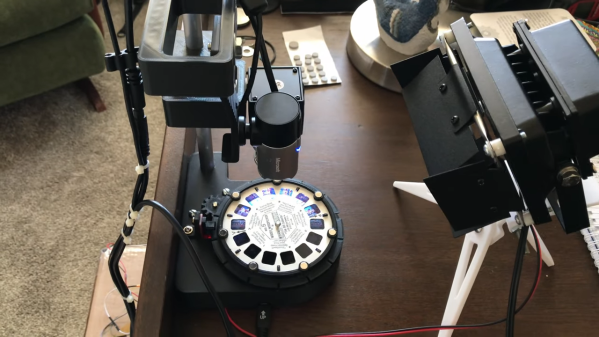
The toys of the past may have been cheesy, but you can’t deny the creativity needed to build something engaging without any electronics. One stalwart toy from this category is View-Master, the little stereoscopic slide viewer that brought the world to life in seven vibrant scenes. And digitizing these miniature works of art is the purpose of this neat View-Master reel scanner project.
If you haven’t had the pleasure of using a View-Master, the gist is that a flat cardboard disc ringed with 14 color transparencies was inserted into a plastic viewer. Binocular eyepieces showed scenes from opposing pairs of slides, which were illuminated by a frosted screen and room lighting. The scenes were photographed from slightly different angles, leading to a stereoscopic image that was actually pretty good quality.
In the video below, project creator [W. Jason Altice] describes View-Master as “the YouTube of the 1950s.” We partially agree; with only seven frames to tell a story, we’d say it’s more like TikTok than YouTube. Regardless, capturing these mini-movies requires quite a bit of complexity. All the parts for the reel carousel are 3D-printed, with a small stepper to advance the reel and an optical sensor to register its position. A ring of RGB LEDs beneath the reel illuminates the slides; being able to control the color of the light helps with color balancing for slides with faded colors. An 8-megapixel camera captures each slide, and some pretty slick software helps with organizing the image pairs, tweaking their alignment, capturing the captions from the disc, and stitching everything into a video.
There’s a whole YouTube channel devoted to View-Master captures, which are best viewed with a Google Cardboard or something similar. Even without the 3D effect, it’s still pretty cool to watch [Popeye] beat up a nuke again.
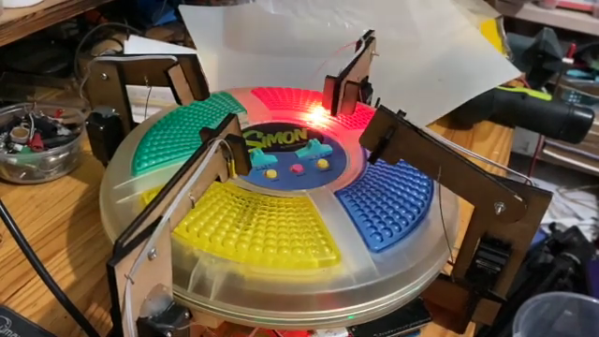
Remember Simon? We sure do. Simon — as in “Simon says…” — from the leading edge of electronic games in the 1970s, which used four buttons, colored lights, and simple tones as the basis for a memory game. Players had to remember the specific sequence of lights and replay the pattern in order to advance to the next round. It was surprisingly addictive, at least for the era.
For those who never quite got into the Simon groove, fear not — the classic game has now been fully automated. While there were plenty of approaches that could have taken to interfacing to the game, [ido roseman] went with the obvious — and best, in our opinion — technique and simulated a human player’s finger presses with servo-controlled arms. Each arm carries a light-dependent resistor that registers the light coming from the key it’s poised above; the sequence of lights is sensed and recorded by an Arduino, which then drives the servo fingers’ replay attack. The fingers aren’t exactly snappy in their response, which might cause problems — if we recall correctly, Simon is somewhat picky about the speed with which the keys are pressed, at least at higher levels of play.
On the whole, we really like this one, not least for the nostalgia factor. We’ve had a lot of recreations of Simon over the years, including a Dance Dance Revolution version, but few attempts to automate it. And a crazy idea: wouldn’t it be fun to replace the replay attack with a machine learning system that figures out how to play Simon by randomly pressing keys and observing the results?
Join us on Wednesday, May 12 at noon Pacific for the Embedded Rust Hack Chat with James Munns!
Programming languages, like fashion, are very much a matter of personal taste. Professional developers often don’t have much say in which language they’ll use for a given project, either for legacy or team reasons, but if they did have a choice, they’d probably choose the language that works best with the way they think. Some languages just “fit” different brains better than others, and when everything is in sync between language and developer, code just seems to flow effortlessly through the keyboard and onto the screen.
One language that consistently scores at the top of developers’ “most loved” lists is Rust. For a language that started as a personal project and has only existed for a little more than a decade, that’s really saying something. The emphasis Rust puts on safety and performance probably has a lot to do with that. And thanks to its safe concurrency, its memory safety, and its interoperability with C and other languages, Rust has made considerable in-roads with the embedded development community.
To learn more about Rust in embedded systems, James Munns will stop by the Hack Chat. James is an embedded systems engineer, with a history of working on software for a wide range of systems, including safety-critical avionics, and rapidly prototyped IoT systems. He’s a founding member of the Rust Embedded Working Group, as well as a founder of Ferrous Systems, a consultancy focused on systems development in Rust, with a specialty in embedded systems development. James also used to write for Hackaday, so he must be a pretty cool guy. So swing by the Hack Chat and find out where Rust might be able to help you out with your next embedded project.
Click that speech bubble to the right, and you’ll be taken directly to the Hack Chat group on Hackaday.io. You don’t have to wait until Wednesday; join whenever you want and you can see what the community is talking about. Continue reading “Embedded Rust Hack Chat”→
Well, that de-escalated quickly. It seems like no sooner than a paper was announced that purported to find photographic evidence of fungi growing on Mars, that the planetary science and exobiology community came down on it like a ton of bricks. As well they should — extraordinary claims require extraordinary evidence, and while the photos that were taken by Curiosity and Opportunity sure seem to show something that looks a lot like a terrestrial puffball fungus, there are a lot of other, more mundane ways to explain these formations. Add to the fact that the lead author of the Martian mushroom paper is a known crackpot who once sued NASA for running over fungi instead of investigating them; the putative shrooms later turned out to be rocks, of course. Luckily, we have a geobiology lab wandering around on Mars right now, so if there is or was life on Mars, we’ll probably find out about it. You know, with evidence.
If you’re a fan of dystopic visions of a future where bloodthirsty robots relentlessly hunt down the last few surviving humans, the news that the New York Police Department decided to stop using their “DigiDog” robot will be a bit of a downer. The move stems from outrage generated by politicians and citizens alike, who dreamt up all sorts of reasons why the NYPD shouldn’t be using this tool. And use it they apparently did — the original Boston Dynamics yellow showing through the many scuffs and dings in the NYPD blue paint job means this little critter has seen some stuff since it hit the streets in late 2020. And to think — that robot dog was only a few weeks away from filing its retirement papers.
Attention, Commodore fans based in Europe: the Commodore Users Europe event is coming soon. June 12, to be precise. As has become traditional, the event is virtual, but it’s free and they’re looking for presenters.
In a bid to continue the grand Big Tech tradition of knowing what’s best for everyone, Microsoft just announced that Calibri would no longer be the default font in Office products. And here’s the fun part: we all get to decide what the new default font will be, at least ostensibly. The font wonks at Microsoft have created five new fonts, and you can vote for your favorite on social media. The font designers all wax eloquent on their candidates, and there are somewhat stylized examples of each new font, but what’s lacking is a simple way to judge what each font would actually look like on a page of English text. Whatever happened to “The quick brown fox” or even a little bit of “Lorem ipsum”?
And finally, why are German ambulances — and apparently, German medics — covered in QR codes? Apparently, it’s a way to fight back against digital rubberneckers. The video below is in German, but the gist is clear: people love to stop and take pictures of accident scenes, and smartphones have made this worse, to the point that emergency personnel have trouble getting through to give aid. And that’s not to mention the invasion of privacy; very few accident victims are really at their best at that moment, and taking pictures of them is beyond rude. Oh, and it’s illegal, punishable by up to two years in jail. The idea with the QR codes is to pop up a website with a warning to the rubbernecker. Our German is a bit rusty, but we’re pretty sure that translates to, “Hey idiot, get back in your frigging car!” Feel free to correct us on that.
If there’s one thing that continues to impress us about the Hackaday community as the years roll by, it’s the willingness to share what we’ve learned with each other. Not every discovery will be news to everyone, and everything won’t be helpful or even interesting to everyone, but the mere act of sharing on the off chance that it’ll help someone else is really what sets the hardware hacking world apart.
Case in point: this in-depth analysis of laser cutter air-assist methods. Undertaken by [David Tucker], this project reads more like a lab writeup than a build log, because well, that’s pretty much what it is. For those not into laser cutters, an air assist is just a steady flow of air to blow smoke and cutting residue away from the beam path and optics of a laser cutter. It’s simple, but critical; without it, smoke can obscure and reflect the laser beam, foul lenses and mirrors, and severely degrade cut quality.
To see what air-assist methods work best, [David] looked at four different air pumps and compressors, along with a simple fan. Each of these methods was compared to a control of cuts made without air assist. The test was simple: a series of parallel lines cut into particle board with the beam focused on the surface at 80% power, with the cut speed slowly decreasing. It turned out that any air-assist was better than nothing, with the conspicuous exception of using just a fan, which made things worse. Helpfully, [David] included measurements of the noise levels of the compressors he tested, and found there’s no advantage to using an ear-splitting shop compressor over a quieter aquarium air pump. Plus, the aquarium pumps are cheap — always a bonus.
Not sure how to get up to speed with lasers? Laser Cutting 101 might be a great place to start.
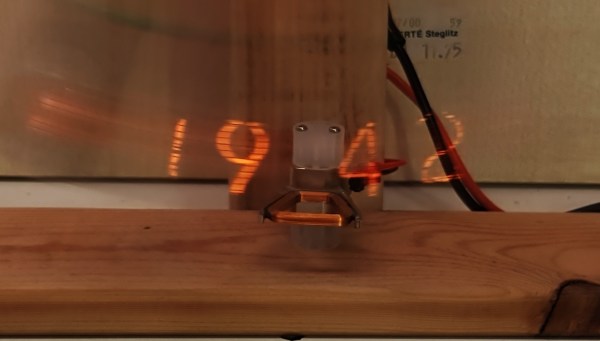
Talk about your mixed timekeeping metaphors: there are clocks, and pendulum clocks, and there are Nixie clocks, and persistence of vision clocks. But this is a Nixie pendulum POV clock, and we think it’s pretty cool.
We first spied this on Twitter and were subsequently pleased to learn that [Jayzon Oeve] has posted a more detailed build log over on Hackaday.io. Rather than a moving array of dots to create the characters to display, this uses a single IN-12b Nixie tube at the end of a pendulum. The pendulum is kept moving by a small nudge created by a pulse through a fixed hard drive voice coil acting on a magnet affixed to the bottom of the pendulum — we’ve seen a similar approach used before.
Pretty much all of the electronics are mounted on the pendulum arm, including a Nano, an RTC, and an accelerometer to figure out where in the swing the bob is and when to flash a number on the display. There’s a video below that shows it at work both at full speed and in slow-motion; as always with POV clocks, these things probably look better in person than on video. And while swinging Nixies around like that seems a little dicey, we like the way this turned out.