Gigabit Ethernet Through The Air

There are a couple of really great things about transmitting data using light as the carrier. It can be focused so that it doesn’t spill all over the neighborhood like radio signals do — giving it both some security against eavesdropping and preventing one signal from stepping on another’s toes. And while you can modulate radio signals up nearly to the carrier frequency, the few gigahertz we normally use for radio just won’t cut it for really high bit rates. Light gets you terahertz.

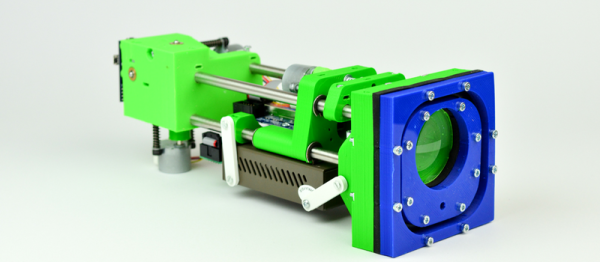
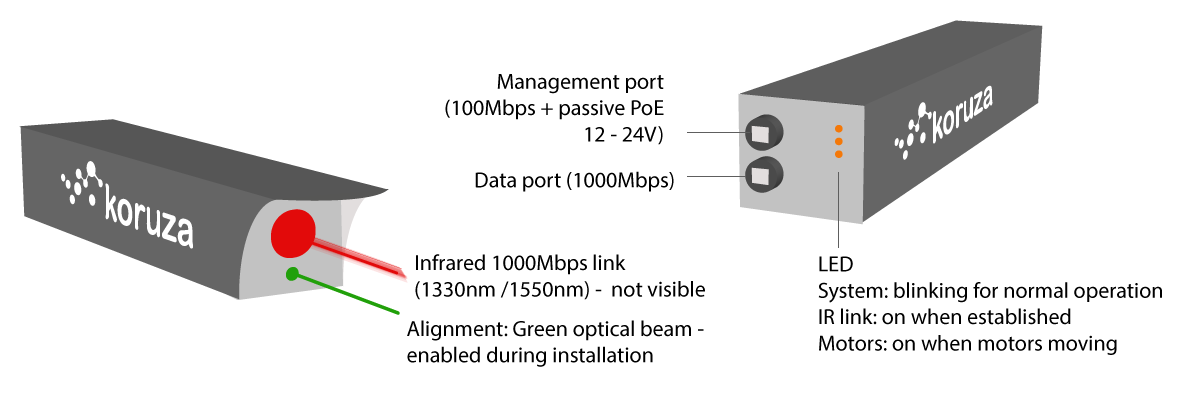
The Koruza project is an open-source, “inexpensive” system that aims to transmit 1 Gb/sec over distances around 100 meters, using modulated infrared light. The intended use-case is urban building-to-building communication at speeds that would otherwise require laying fiber-optic cables. Indeed, the system piggy-backs on existing fiber-optic equipment to get the job done, but the hard part is aligning the units to get maximum signal from point A to point B.

koruza-spec-info

Koruza does this by including motorized lenses on the 3D-printed chassis. You make a rough alignment with a visible green laser, and then fine-tune the IR beams from a web console where you get immediate feedback on how the received signal strength is changing. Both Koruza boxes have a Raspberry Pi inside and use normal networking for calibration and signal-strength statistics. It’s a really neat system, and it’s fully DIY’able except for the commodity fiber-optic bits.

We’ve always had a soft-spot in our heart for transmitting data over light beams. The Ronja project has been doing so since 2001, and over longer distances, with completely DIY hardware, if at a slower bitrate. And now that Li-Fi seems to be getting traction, we might see an unfocused equivalent running inside our homes.

Thanks [Pavel] for the tip!

Does The World Need An FPGA Arduino?

What would you get it you mashed up an FPGA and an Arduino? An FPGA development board with far too few output pins? Or a board in the form-factor of Arduino that’s impossible to program?

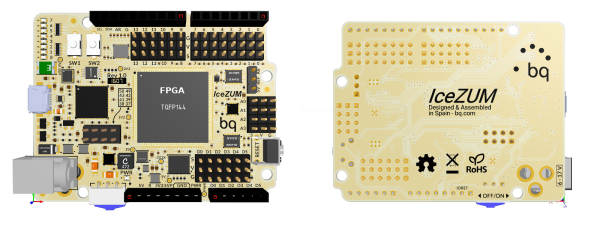
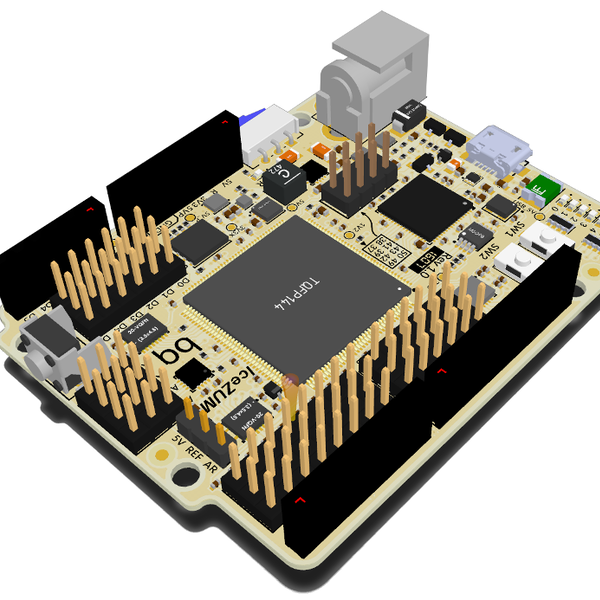
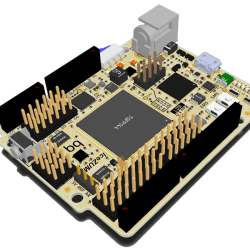
Fortunately, the ICEZUM Alhambra looks like it’s avoided these pitfalls, at least for the most part. It’s based on the Lattice iCE40 FPGA, which we’ve covered previously a number of times because of its cheap development boards and open-source development flow. Indeed, we were wondering what the BQ folks were up to when they were working on an easy-to-use GUI for the FPGA family. Now we know — it’s the support software for an FPGA “Arduino”.
Icezum-rev1-1607-img1-peq_thumbnail

The Alhambra board itself looks to be Arduino-compatible, with the horrible gap between the rows on the left-hand-side and all, so it will work with your existing shields. But they’ve also doubled them with pinheaders in a more hacker-friendly layout: SVG — signal, voltage, ground. This is great for attaching small, powered sensors using a three-wire cable like the one that you use for servos. (Hackaday.io has two Arduino clones using SVG pinouts: in SMT and DIP formats.)

The iCE40 FPGA has 144 pins, so you’re probably asking yourself where they all end up, and frankly, so are we. There are eight user LEDs on the board, plus the 28 I/O pins that end in pinheaders. That leaves around a hundred potential I/Os unaccounted-for. One of the main attractions of FPGAs in our book is the tremendous availability of fast I/Os. Still, it’s more I/O than you get on a plain-vanilla Arduino, so we’re not complaining too loudly. Sometimes simplicity is a virtue. Everything’s up on GitHub, but not yet ported to KiCad, so you can tweak the hardware if you’ve got a copy of Altium.

We’ve been seeing FPGA projects popping up all over, and with the open-source toolchains making them more accessible, we wonder if they will get mainstreamed; the lure of reconfigurable hardware is just so strong. Putting an FPGA into an Arduino-compatible form-factor and backing it with an open GUI is an interesting idea. This project is clearly in its very early stages, but we can’t wait to see how it shakes out. If anyone gets their hands on these boards, let us know, OK?

Thanks [RS] for the tip!

Game Boy Camera Cartridge Reversed, Photos Dumped

There’s something magical and nostalgic about extremely low resolution in this era of mega-megapixels on every cell phone. And the Game Boy’s big bulbous camera module just looks so cool. [Robson Couto] didn’t stop at simply using the camera — that’s been done before — but actually reversed the card’s protocol so that he could leave it entirely intact. As you can see from the banner image, it was a success.

A project like this doesn’t get done overnight, and [Robson] drew on a lot of his own previous work as well as the work of others. For instance, he’d already made a board that interfaces Game Boy Paks to his PC through an ATmega32 and a serial port. He’d also written software that understands the card header format on the PC side. So dumping the ROMs contents should be no problem. But of course, it was.

[Robson] could read one bank of memory, but not any of the others. It turns out that the camera pack uses a clock signal that not many other cards use. It took [Robson] some serious work — a lot of it false starts and dead ends — to get this particular part working.

Success!
Success!

If you’re into Game Boy hacking, give [Robson]’s writeup a good read. Also note that he’s got fantastic links to previous research in all of his posts. If you couldn’t care less about keeping the cartridge intact, you can simply interface the camera with a TI calculator, use the camera to transmit Morse code, or simply add a thermal printer for a low-res instant camera with style.

Wood Stove Runs On Arduino Power

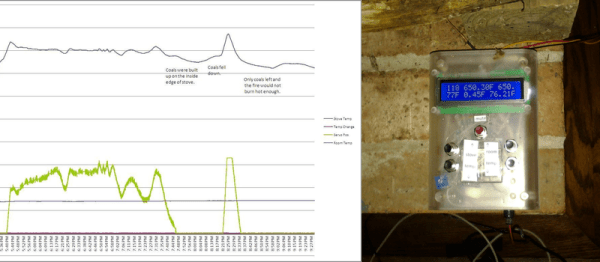
Ahh, sweet scope creep! Usually it’s the death of a nice, simple little hack. But once in a hundred times, a small hack doesn’t get buried under the extra features, but instead absorbs them in stride and blossoms into a beautiful system. [rockfishon]’s Arduino-powered wood stove controller is one of these beautiful exceptions. (OK, we’d admit that it could use a fancier faceplate.)

He started off simply enough, wanting to connect a thermocouple to an Arduino, read out the value, and issue an alarm when the temperature got too high. But who could stop there? Just one air-baffle servo away from a closed-loop heating control system? So [rockfishon] added a display and a few more buttons and has a system that will keep his wood-burning stove running at exactly the right temperature, even overnight when nobody’s around to tend it. As a bonus, everything is logged for later analysis.

The code is relatively straightforward, and can be found in this Gist. If you’d like to build your own, you’ll need an Arduino Mega and can then get the control board made for you at OSHPark. Judging from the comments on the Hackaday.io project page, a couple people have already tried this out. We’ve seen other wood-stove monitoring hacks before, but this is the first we’ve seen that closes the control loop. Very cool.

Broken Android Tablet Mini-MAME Cabinet

Everyone’s got an unused or even quasi-broken tablet lying around these days. [sairuk] has three kids, and somehow ended up with three broken tablets in short order. We’re not saying that correlation implies causality…

The digitizers were shattered, and since they were relatively cheap tablets to begin with, [sairuk] started thinking what could be done with a tablet that doesn’t have touch sensing anymore. He tried making an e-book reader for his kids, but somehow the idea of a MAME “cablet” (get it?) won out in the end. We’re not surprised: simple woodworking, gaming, and electronic hacking. What’s not to love?

This writeup goes into a lot more detail, so check that out too. He and his sons built up cardboard prototypes first (we love cardboard!) and then transferred their plans over to wood for the final “rough cut”. A PS1 controller reads out the joystick and buttons, and a PS1 -> USB adapter plus a USB-OTG cable connects that to the tablet. They also removed the batteries and built in a permanent power supply. Everything is simple and cheap, but the results are still impressive. Although they claim their build isn’t finished to the utmost, it looks pretty darn good to us.

We’re all frackers, so it’s satisfying to see a “junk” tablet put to good use. We’re wondering what [sairuk] is going to do with his other two tablets — we’ve got a suggestion for what he should do if he had twenty kids.

Continue reading “Broken Android Tablet Mini-MAME Cabinet”

Colin Furze Gets Burned

Consider this a public service announcement. [Colin Furze], besides being a raging lunatic, seems to have the nine lives of a cat. Well, he’s not always so lucky, and now that we’ve recovered from being grossed out by the results, we’re glad that [Colin] posted this “fail” video.

Basically, he’s firing up one of his jet engines, and there’s a big fireball. He wasn’t wearing any protective clothing. This is hardly a spoiler — please don’t watch the video below if you’re grossed out by people visiting the doctor’s office to get their horrible second degree burns all up and down their forearm treated. You’ve probably learned the lesson already just by looking at the preview image.

Naturally, we’ve covered [Colin]’s videos before. He’s either very lucky or a little bit more careful than he lets on. We’ve seen him play with fire and not get burned, and stick a jet engine on a go-kart. We’re not gonna tell you what to do, but if that were us, we’d be wearing at least long sleeves and a helmet.

Continue reading “Colin Furze Gets Burned”

Sage Advice For The New Ham

If you’re on the edge about getting your amateur radio license, just go do it and worry about the details later. But once you’ve done that, you’re going to need to know a little bit about the established culture and practices of the modern ham — the details.

Toward that end, [McSteve] has written up a (so far) two-part introductory series about ham radio. His first article is fairly general, and lays out many of the traditional applications of ham radio: chatting with other humans using the old-fashioned analog modes. You know, radio stuff.

The second article focuses more on using repeaters. Repeaters can be a confusing topic for new radio operators: there are two frequencies — one for transmitting and one for receiving — and funny control tones (CTCSS) etc. This article is particularly useful for the new ham, because you’re likely to have a relatively low powered radio that would gain the most from using a repeater, and because the technology and traditions of repeater usage are a bit arcane.

So if you’re thinking about getting your license, do it already. And then read through these two pages and you’re good to go. We can’t wait to see what [McSteve] writes up next.