Proper Cassettes For Your FPGA Retrocomputer

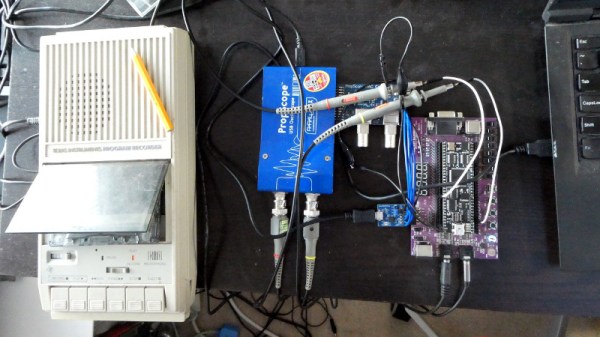
You can tell the age of someone in our community with a simple question: what were the first removable data storage media you used? Punched cards for the venerable, cassettes for the middle-aged, floppies for the thirtysomethings, Flash cards for the twentysomethings, and maybe even “What’s a removable storage medium?” for the kids brought up on cloud services.  Even with refreshed interest in retrocomputing the cassette hasn’t made a comeback, but maybe that owes something to the hardware. Createing a cassette interface for an FPGA is a task that’s often overlooked, and that’s a project [zpekic] has tackled.

Cassette data recordings are frequency shift keyed, with the 0 and 1 of the binary information represented by different tones. An expected solution to detect these might be to use a Fourier transform, but instead he opts for a simpler solution of counting zero crossings and timing their interval. The resulting stream of data is fed into a UART from which the data itself can be reconstructed. All this is implemented on a Mercury FPGA board which contains a Xilinx Spartan 3A FPGA, but it’s a technique that could be used on other devices too.

So your FPGA retrocomputer deserves an authentic cassette interface, and now it can have one. We’d be especially impressed if all this 2020s wizardry could produce a more stable chuntey field, but we guess that might take a bit more work.

As a final aside, the project is dedicated to the memory of the pioneering Yugoslavian broadcaster [Zoran Modli], whose innovative 1980s radio show featured broadcasts of tape software for the computers of the time including our Hackaday colleague [Voja Antonić]’s Galaksija. Broadcasting software over the radio? That’s a cool hack.
The Logic Chip RISC-V Project Reboots

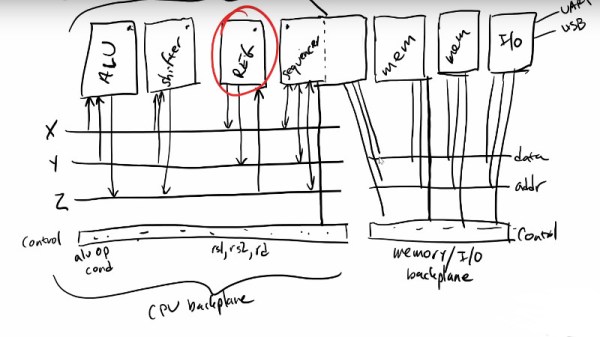
The RISC-V architecture is inexorably inching from its theoretical origins towards the mainstream, as what could once only be done on an exotic FPGA can now be seen in a few microcontrollers as well as some much more powerful processors. It’s exciting because it offers us the prospect of fully open-source hardware on which to run our open-source operating systems, but it’s more than that. RISC-V isn’t a particular processor core so much as a specification that can be implemented at any of a number of levels, and in its simplest form can even be made real using 74 logic chips. This was the aim of [Robert Baruch]’s LMARV-1 that caused a stir a year or two ago but then went on something of a hiatus. We’re pleased to note that he’s posted a video announcing a recommencement of the project, along with a significant redesign.

We’ve placed the video below the break, and it’s much more than a simple project announcement. Instead, it’s an in-depth explanation of the design decisions and the physical architecture of the processor. It amounts to a primer on processor design, and though it’s a long watch we’d say you won’t be disappointed if your interests lie in that direction.

We first covered the LMARV-1 back in early 2018, so we’re glad to see it back in progress and we look forward to seeing its continued progress.

Continue reading “The Logic Chip RISC-V Project Reboots”

From Trash PPE To New PPE

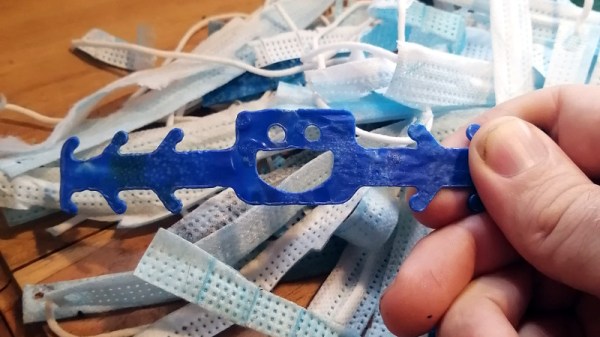
As the coronavirus pandemic circles the world, a fact of daily life for millions of people has become the wearing of a face mask. Some people sport colorful fabric masks, but for many, this means the ubiquitous Chinese disposable mask. They have become the litter of our time, which as [blorgggg] notes is something that shouldn’t have to be the case. Their plastic can be recycled and made into other useful things, for example, ear savers similar to the ones many of us were 3D printing earlier in the year.

As you might imagine diving into a pile of used masks can be a little unhygienic, so the first step is to disinfect with alcohol. Then the various layers can be separated and the outer polypropylene ones collected and stacked between baking parchment to be melted on a skillet. The result is a polypropylene sheet that can be laser cut if it is thick enough, and from this are cut the ear savers. It’s not quite as neat a cut as the acrylic sheet we may be used to, but it’s adequate for the task.

While on the subject of masks, earlier in the year we presented a series in whose first part we dissected a selection.

An Old-School Control Panel For Your Computer

For as long as computers have been in the hands of programmers, they have offered frequent mildly tedious tasks that their operators have sought to automate. Who hasn’t written a shell script or a batch file that unites a string of commands into one just to save a bit of typing?

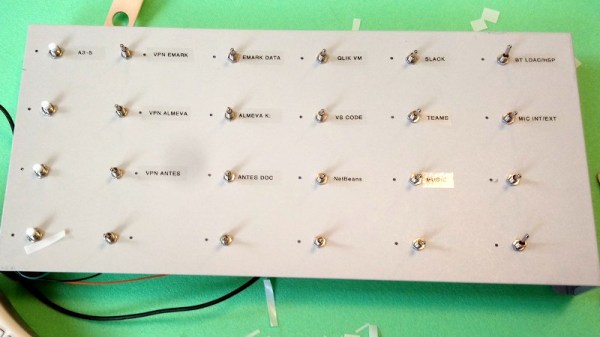
But even that effort can be reduced with a hardware add-on that ties the script to a physical control, and in this endeavor [Tomas] has created a beauty. His control panel project mimics the robust industrial panels of yesteryear with an array of metal buttons and toggle switches in a sturdy metal case sourced from an old KVM switch.

Behind the scenes are a pair of I/O extenders and a NodeMCU board, whose ESP8266 does the talking to the host computer on which a daemon awaits its call. Individual addressable LEDs next to each switch convey the state of operation, and the switches trigger useful operations such as connecting to a VPN. All the code is available in a handy GitHub repository, and you can see it in action in the video we’ve placed below the break.

We rather like the idea of a desktop control panel here at Hackaday, indeed this isn’t the first one we’ve brought you.

Continue reading “An Old-School Control Panel For Your Computer”

Raspberry PI 4 Now Supported By Risc OS In Latest Update

Students of ARM history will know that the origins of the wildly popular processor architecture lie in the British computer manufacturer Acorn (the original “A” in “ARM”). The first mass-market ARM-based products were their Archimedes line of desktop computers. A RISC-based computer in a school or home was significantly ahead of the curve in the mid 1980s and there was no off-the-shelf software, so alongside the new chips came a new operating system that would eventually bear the name Risc OS.

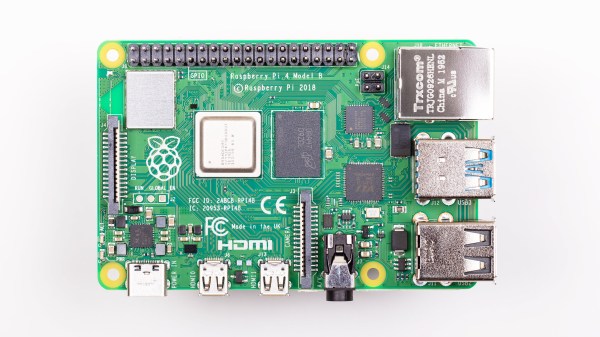
It’s since become one of those unexpected pieces of retrocomputing history that refuses to die, and remains in active development with a new version 5.28 of its open-source variant just released. Best of all, after supporting the Raspberry Pi since the earliest boards, it now runs on a Raspberry Pi 4. The original ARM operating system has very much kept up with the times, and can now benefit from the extra power of the latest hardware from Cambridge. The new release deals with a host of bugs, as well as bringing speed increases, security fixes, and other improvements. For those whose first experience of a GUI came via the Archimedes in British schools, the news that the built-in Paint package has received a thorough update will bring a smile.

The attraction of Risc OS aside from its history and speed lies in its being understandable in operation for those wishing to learn about how an OS works under the hood. It’s likely that for most of us it won’t replace our desktops any time soon, but it remains an interesting diversion to download and explore. If you’d like to read more about early ARM history then we’d like to point you at our piece on Sophie Wilson, the originator of the ARM architecture.

Ubuntu (Finally) Officially Lands On The Raspberry Pi. But Will Anyone Notice?

The Raspberry Pi has been with us for over eight years now, and during that time it has seen a myriad operating system ports. It seems that almost anything can be run on the little computer, but generally the offerings have seen minority uptake in the face of the officially supported Raspbian, or as it’s now called, Raspberry Pi OS.

Maybe that could change, with the arrival of an Ubuntu release for the platform. For those of you pointing out that this is nothing new, what makes the new version 20.10 release special is that it’s the first official full Ubuntu release, rather than an unofficial port.

So Raspberry Pi 4 owners can now install the same full-fat Ubuntu they have on their PCs, and with the same official Ubuntu support. What does this really do for them that Raspberry Pi OS doesn’t? Underneath they share Debian underpinnings, and they both benefit from a huge quantity of online resources should the user find themselves in trouble. Their repositories both contain almost every reasonable piece of software that could be imagined, so the average Pi user might be forgiven for a little confusion.

We don’t expect this news to take the Pi desktop world by storm then. Ubuntu is a powerful distribution, but it’s fair to say that it is not the least bloated among distributions, and that some of its quirks such as Snap applications leave many users underwhelmed. By contrast Raspberry Pi OS is relatively lightweight, and crucially it’s optimised for the Pi. Its entire support base online is specific to the Pi hardware, so the seeker of solutions need not worry about encountering some quirk in an explanation that pertains only to PC platforms.

It’s fair to say though, that this release is almost certainly not targeted at the casual desktop user. We’d expect that instead it will be in the Ubuntu portfolio for commercial and enterprise users, and in particular for the new Raspberry Pi 4 Compute Module in which it will no doubt form the underpinnings of many products without their owners ever realising it.

[via OMG Ubuntu]

A VGA Retro Console With Everything Generated From A Single ARM Cortex M0

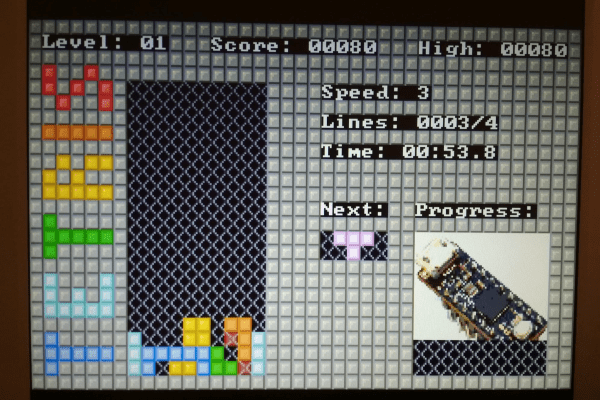
The later game consoles of the 8-bit era such as Nintendo’s NES or Sega’s Master System produced graphics that went beyond what owners of early 1980s home computers had come to expect from machines with the same processors, but they did so only with the help of powerful custom chipsets for their day that took care of the repetitive hard work of assembling frames and feeding them to the display device. Reproducing their equivalent with more modern hardware requires either some means of creating similar custom silicon, or a processor significantly more powerful such that it can do the work of those extra chips itself. But even with a modern microcontroller it’s still a significant challenge, so [Nicola Wrachien]’s uChip, a VGA console that does the whole job in software on a humble ARM Cortex M0 is a significant achievement.

If you are familiar with the home computers that used the processor to generate the display output, you’ll know that they spent most of their time working on the lines of the display and only had a few milliseconds of the frame blanking period for the device to perform any computing tasks before returning to the next frame. The 320×240 at 57 frames per second gives a line sync frequency of 30 kHz, and the computing happens while the display is sent the black space at the top and bottom of the screen. This is reckoned to be equivalent of the ATSAMD21E18 microcontroller on the uChip module the system uses running at only 10MHz rather than the 48MHz it is running at in reality, and with these resources it also runs the game logic, USB controller interfacing, reading games from the SD card, and game sound.

The result is a complete game console on a small PCB little longer on its longest side than its connectors. We may have largely seen the demise of VGA on the desktop several years after we called it, but it seems there is plenty of life in the interface yet for hardware hackers.