Satellite Tracking With Friends

If you’re in the mood to track satellites, it’s a relatively simple task to look up one of a multitude of websites that can give you a list of satellites visible from your location. However, if you’re interested in using satellites to communicate with far-flung friends, you might be interested in this multi-point satellite tracker.

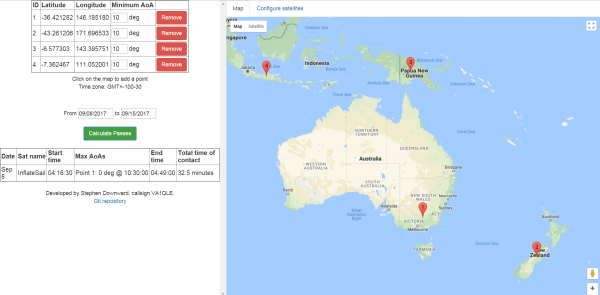
[Stephen Downward VA1QLE] developed the tracker to make it easier to figure out which satellites would be simultaneously visible to people at different locations on the Earth’s surface. This is useful for amateur radio, as signals can be passed through satellites with ham gear onboard (such as NO-44), or users can even chat over defunct military satellites.

[Stephen] claims the algorithm is inefficient, but calculations are made in a matter of a few seconds, so we’re not complaining. While it was originally designed for just two stations, it works with a near-infinite number of points. [Stephen] recommends verifying the tracks with another tool once calculated to ensure accuracy. The tool is accessible here, and the code is up on GitHub for your perusal.

Perhaps now you need a cost-effective satellite-tracking antenna? [Paul] has you covered.

Video Streaming Like Your Raspberry Pi Depended On It

The Raspberry Pi is an incredibly versatile computing platform, particularly when it comes to embedded applications. They’re used in all kinds of security and monitoring projects to take still shots over time, or record video footage for later review. It’s remarkably easy to do, and there’s a wide variety of tools available to get the job done.

However, if you need live video with as little latency as possible, things get more difficult. I was building a remotely controlled vehicle that uses the cellular data network for communication. Minimizing latency was key to making the vehicle easy to drive. Thus I set sail for the nearest search engine and begun researching my problem.

My first approach to the challenge was the venerable VLC Media Player. Initial experiments were sadly fraught with issues. Getting the software to recognize the webcam plugged into my Pi Zero took forever, and when I did get eventually get the stream up and running, it was far too laggy to be useful. Streaming over WiFi and waving my hands in front of the camera showed I had a delay of at least two or three seconds. While I could have possibly optimized it further, I decided to move on and try to find something a little more lightweight.

Continue reading “Video Streaming Like Your Raspberry Pi Depended On It”

Synthesizing Daraprim To Beat Price Gougers

Drugs are used the world over to treat disease. However, from time to time, the vagaries of market economics, or unscrupulous action, can radically increase the price of otherwise cheap pharmaceuticals far beyond the reach of the average person. This was the case with Pyrimethamine (sold as Daraprim), which is used to treat toxoplasmosis and malaria, among other users. With the price skyrocketing from $13 to $750 a tablet in the US in 2015, [NurdRage] decided to synthesize the drug on their own. (If you missed the background hubbub, search for “Martin Shkreli”.)

The video linked covers the final synthesis, though [NurdRage] has previously covered the synthesis of the required precursor chemicals. Budding chemists may grow excited, but there are significant hurdles to attempting this synthesis yourself. Chemicals involved are carcinogenic, toxic, acidic, or otherwise dangerous, and a fume hood is a necessity if working inside. Outside of this, there are immense risks in homebrewing pharmaceuticals. Performing the synthesis of an important drug is one thing, but to do so at a medical-grade level where the products are safe for human consumption is on an entirely different level.

Overall, [NurdRage] has put out a series of videos that have strong educational value, showing us what really goes into the production of a common pharmaceutical compound. There’s also something to be said about taking the production of life-saving medicines into one’s own hands in the face of prohibitive treatment costs. In a similar vein, perhaps you’ve considered producing your own insulin in an emergency?

[Thanks to jwrm22 for the tip]

Modding A Powdercoating Gun For Performance

In life, tools come in two varieties – good tools, and cheap tools. This is where the hacker steps in, to transform a cheap tool into more than the sum of its parts. [Josh] had problems with his Eastwood powdercoating gun. [Josh] decided to fix things with a couple of tasteful mods.

The problem with the gun was related to the delivery of powder to the workpiece. The stream was either too weak to coat properly, or too heavy, delivering a thick stream of powder. [Josh] surmised that with better airflow into the powder reservoir, the gun would deliver a properly mixed cloud of powder as required. By drilling a couple of small holes into the air feed into the reservoir, the powder stream was much less heavy and the gun’s performance was greatly improved.

[Josh] then decided to take things a step further, by fitting a tip from a more expensive gun to his Eastwood model. There were some challenges in getting it connected electrically, but nothing a little electrical tape couldn’t fix. While this did further improve results, it was a minor improvement compared to the air feed modifications.

Overall, [Josh] was able to take a poorly performing tool and transform it into something much more useful, just by drilling a couple of holes. Check out our Hacklet on quick tool hacks, or share your best work in the comments.

Pac Man On The Colour Computer 3

The 1980s were the heyday of the venerable Z80, a processor that found its way into innumerable home computers, industrial systems, and yes — arcade machines. However, not everyone had a Z80 based machine at home, and so sometimes porting is required. [Glen] is tackling this with a port of Pac Man to the Radio Shack Colour Computer 3.

The key to any good arcade port is authenticity – the game should feel as identical to the real thing as possible. The Atari 2600 port got this famously wrong. Porting to the Colour Computer 3 is easier in theory – with more RAM, a Motorola 6809 CPU running at a higher clock rate, and a more powerful graphics subsystem, fewer compromises need to be made to get the game to run at a playable speed.

The way [Glen] tackled the port is quite handy. [Glen] built a utility that would scrape a disassembled version of the original Pac Man Z80 code, look up the equivalent 6809 CPU instruction, and replace it, while placing the original Z80 code to the side as a comment. Having the original code sitting next to the ported instructions makes debugging much easier.

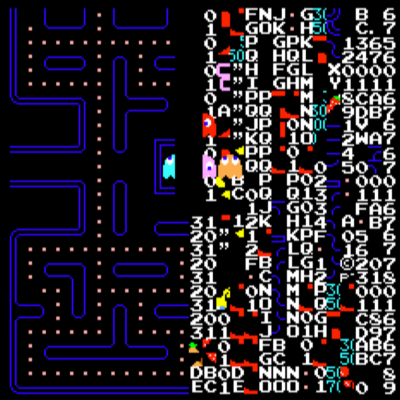
Level 256 as seen in [Glen]’s port.
There was plenty of hand tweaking to be done, and special effort was made to make sure all the data the original code was looking for was accessible at the same addresses as before. There was also a lot of work involved in creating a sprite engine that would reliably display the game video at a playable frame rate.

Overall, the port is highly faithful to the original, with the game code being identical at the CPU level. [Glen] reports that the same patterns used on the arcade machine can be used to complete the mazes on the Colour Computer 3 version, and it faithfully recreates the Level 256 bug as well. It’s an impressive piece of work to create such an authentic port on a home computer from 1986.

For another classic port, but with the temporal vectors flipped, check out Portal 2 on the Apple II.


Hacker Heroism: Building Your Way Out Of AV Hell

Many years ago, in a rainy concrete jungle on the west coast of Australia, I worked for a medium-sized enterprise doing a variety of office-based tasks. Somehow, I found myself caught up in planning a product launch event outside the official remit of my position. We got through it, but not before the audiovisual (AV) setup of the event turned into one giant hack.

The initial planning stages went remarkably smoothly until less than a month out from the big day when three weeks of frantic changes and revisions to the presentation rained down. These were some of the hardest days of my working life to date, as it seemed that we would lock in a new arrangement, only to tear it up days later as some new vital criteria came to light, throwing everything back into disarray.

Things came to a head on the night before the event. Working with two different AV teams we had planned for four projection screens and five flat screen televisions spread throughout the venue and controlled from the central AV desk. But somewhere in all those changes the televisions were set up to all display a still image, or nothing at all. I needed to show different videos on each and have the ability to black them all out.

It was at this point I realized we were screwed. The production team simply didn’t have the hardware to drive another five screens, but they could source it — for the sum of $5000. Management were furious, and were under the impression, like myself that this was what we had asked and paid for already. I was at an impasse, and beginning to wonder if I’d have a job come Monday. I wandered off to a corner to curse, and more importantly, think. After all, I’m a hacker — I can get through this.

Continue reading “Hacker Heroism: Building Your Way Out Of AV Hell”

Jenkins Given An Industrial Stack Light For Build Reporting

When working on software development in a team environment, it’s important to know the status of your build at all times. Jenkins can display build automation info on a screen but where’s the fun in that? A popular office project is to build some kind of visual display of a project’s status, and [dkt01] has done just that with this stack light build monitor.

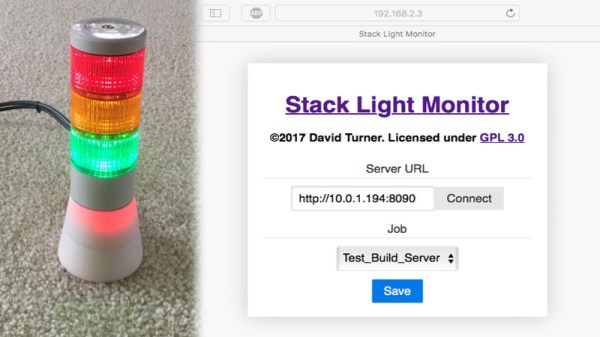
In this day and age of online shopping, random bits of industrial hardware are just an eBay away, so it’s easy to find some cool lamps or indicators for any project. [dkt01] sourced a standard 24V stack light off the shelf. With its green, red, and yellow indicators, its perfect for showing the current status of their build server.

The project uses an Arduino Pro Micro combined with an ENC28J60 Ethernet adapter. We used to see that chip all the time but in 2017 it’s somewhat of a classic setup with the great unwashed masses largely migrating to the ESP8266. However, for the purposes of this project, it was perfect for connecting to the wired office network (after all, you want to know the status of your build and not of your WiFi). [dkt01] even managed to get a web configuration to work despite the relatively meager resources of the ATmega32u4.

The build is cleanly executed, with the microcontroller and Ethernet hardware tucked into a 3D printed base for the stack light’s enclosure. It’s far more likely to become a permanent office fixture if it’s a tidy build without wires hanging out everywhere so a custom PCB ties everything together neatly. In another nice touch, the stack lights flash on initialization to indicate if the DHCP lease was successful, which makes troubleshooting easier. There’s an overview of all different light combinations and meanings in the video after the break.

Overall it’s a solid build with some off-the-shelf components that serves a genuine purpose. For a similar project built on a smaller scale, check out the Indictron. For something bigger, show us how you’ve learned to output your server status on the city’s traffic lights. Ask first, though.
Continue reading “Jenkins Given An Industrial Stack Light For Build Reporting”