DSLR Performance Measured With Audio Editing Software

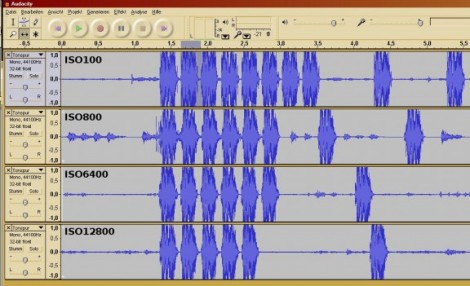
[Jaroslav’s] camera didn’t have a feature to measure the speed of its response in different modes so he figured out his own method. Using the microphone on his webcam he recorded the sound made by the mirror and shutter movements, then used Audacity to analyze the camera’s performance.

When you get right down to it, this is a fantastic idea. Audacity, the open source audio editing suite, has the ability to show each captured audio track next to each other. That makes it easy for you to precisely align the clips, and has in-build time measuring features with fantastic resolution.

He tested a whole bunch of different settings on a Canon EOS600D DSLR camera. In the image above you can see him comparing performance between different ISO settings. He also looks into different brands and sizes of SD storage cards, as well as the time difference when storing raw image data versus JPEG encoded data.
How To Add Flair To A Webpage That Shows Your Project Data

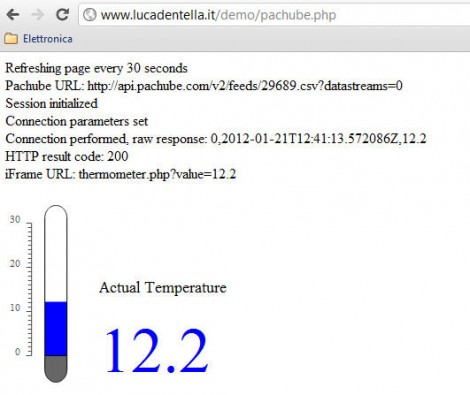
This temperature display may not knock your socks off, but it’s a simple demonstration of how you can used vector graphics as a web readout for data (translated). [Luca] wrote this four page tutorial to help others, he makes it look really easy, and the sky’s the limit on eye candy once you get he basics in place.

The first step is to create the dynamic SVG (vector graphic) file using Inkscape that will be used by the webpage. This starts with a static background, in this case the grey parts of the thermometer which will not change. Over the top the blue parts were added, with just a bit of XML editing to give those parts a hook which will be used in the next step. The demo above will have a moving blue bar and changing numeric output to match data coming in from a temperature sensor.

An SVG file is just a text file that is rendered as a graphic when loaded. [Luca] shows you how to used the identifiers set up when making the graphic to dynamically change the size and value of the blue parts with server-side PHP before sending the graphic to the browser. With that in place you just need to give the PHP file access to the data. He shows how to use the Pachube API but you could just as easily get this via serial or otherwise.

Real-time Depth Smoothing For The Kinect

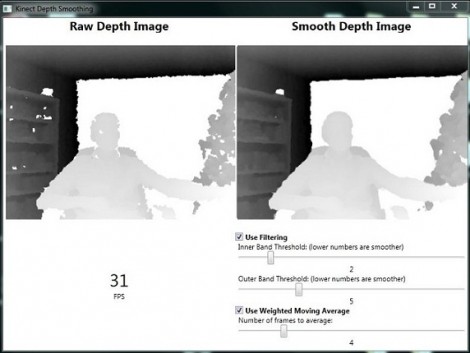
[Karl] set out to improve the depth image that the Kinect camera is able to feed into a computer. He’s come up with a pre-processing package which smooths the depth data in real-time.

There are a few problems here, one is that the Kinect has a fairly low resolution, it is also depth limited to a range of about 8 meters from the device (an issue we hadn’t considered when looking at Kinect-based mapping solutions). But the drawbacks of those shortcomings can be mitigated by improving the data that it does collect. [Karl’s] approach is twofold: pixel filtering, and averaging of movement.

The pixel filtering works with the depth data to help clarify the outlines of objects. Weighted moving average is used to help reduce the amount of flickering areas rendered from frame to frame. [Karl] included a nice GUI with the code which lets you tweak the filter settings until they’re just right. See a demo of that interface in the clip after the break and let us know what you might use this for by leaving a comment.

Continue reading “Real-time Depth Smoothing For The Kinect”

Rotary Phone-light-amp Could Be Filed Under Bizarre

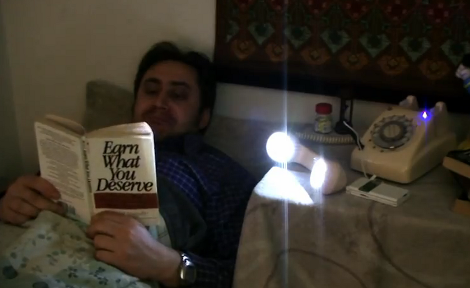
[Samimy’s] latest project is a little strange, but one man’s weird is another man’s wonderful so we’re not about to start criticizing his work. Nope, we’re here to praise the fact that his rotary phone turned reading light and audio amp is very well constructed.

He started by removing the phone housing. Those old enough to have used one of these devices will remember their bulk, and there’s a lot of unused space in both the handset and body housing. [Samimy] started by removing the speaker and microphone from the handset, and drilling a ring of holes to receive white LEDs. The circuit was wired so that lifting the handset turns on the lights.

But he didn’t stop there. A set of speakers and the audio amplifier circuitry from an old tape deck are also hiding inside the base of the phone. If you look closely in the image above you can see that he’s connected his cellphone and is listening to some tunes through the antique hardware. Take a gander at the video after the break to see construction and use of the project.

Continue reading “Rotary Phone-light-amp Could Be Filed Under Bizarre”

Very Accurate Clock Can’t Be Read Accurately

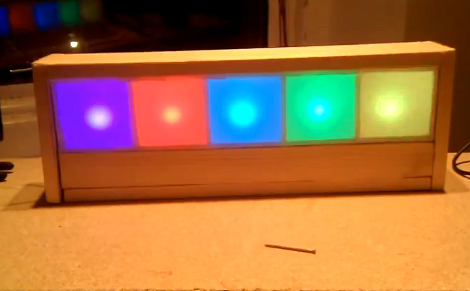
[Martijn] is showing off his new clock which he calls a Light Spectrum Clock. We like to look of it, using RGB LEDs in five squares that remind us of some of those LED coffee table builds. From left to right this shows the week, day, hour, minute, and second. Simple, right?

We had to smile a little bit when looking through his write up. He chose an Arduino nano as a controller, using a TLC5940 chip to drive the LEDs. But it is the inclusion of a DS1307 real-time clock that we find amusing. It will keep quite accurate time (not quite as well as the DS3232 but still respectable) but the fuzzy display technique makes telling the time accurately an impossibility. But like other color-based clocks, that’s part of the fun. The real reason for using an RTC chip is that they usually include battery-backed operation so that you can shut off the LEDs when you’re not around and the clock will continue to tick.

You can watch the seconds pass by as fading colors in the clip after the break.

Continue reading “Very Accurate Clock Can’t Be Read Accurately”

Modular Controllers You Can’t Wait To Show Off To Your Friends

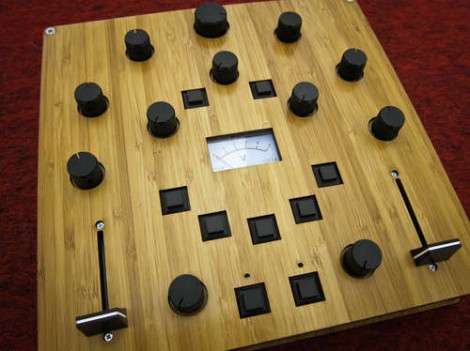
Let’s get this straight, [Alex] is going to show us how to make controllers like this one? Where do we sign up? Even without seeing it in action we want one, but the urge to build is even greater after he shows it off (check the clip after the break). He’s a design student who made an open source project aimed at making it easier to build hardware controllers that pair with just about any software application.

The need for external controllers is on the rise, starting with music-based applications like DJ tools, and Midi controllers for musicians (we’re thinking Monome clones). But anything that can take input from a USB HID can be controlled with something like this. That’s because [Alex] is using the Teensy controller board as an interface. Just select the input types you want – sliders, potentiometers, buttons, switches – then wire them up to the microcontroller pins. If you start to run out of inputs he also discusses some add-on chips to use as port expanders.

Of course there’s a lot to be said for the physical appearance as well. Even though he used point-to-point connections for all of the controls, that wiring is hidden behind the aesthetically pleasing laser-cut dashboard. Follow his advice for layout and find a friend with access to a sweet laser cutter and you’re in business. Continue reading “Modular Controllers You Can’t Wait To Show Off To Your Friends”

Challenge: Figure Out How This Logic-based Chaser Works

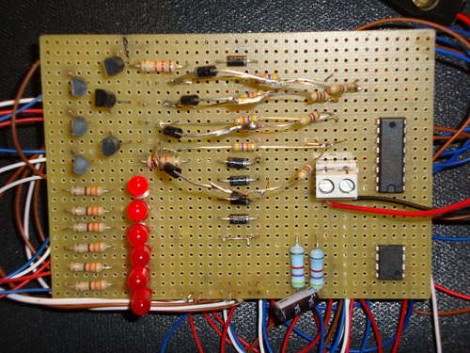
[Andrea] built this LED chaser using one logic chip. It illuminates all but one of the six LEDs, with the dim bit moving back and forth along the row in a chase sequence. This is something like an inverse Larson Scanner without the fading tail. But doing it with a logic chip instead of a microcontroller is a fun challenge.

Which brings us to the point of this feature. [Andrea] didn’t really post an explanation of how the circuit works. Usually missing details mean that we archive the tip and move on to the next one, but we think this provides a fun activity. Can you figure out how the circuit works? We already know that it’s using a CD4017 decade counter/divider chip. This gets its clock signal from a 555 timer circuit. [Andrea’s] schematic is a bit hard to read, but grab a copy, blow it up a bit (or use your browser zoom) and study the CD4017 datasheet (PDF) if you need to.

Want proof that it does actually work? It’s embedded after the break.

Continue reading “Challenge: Figure Out How This Logic-based Chaser Works”