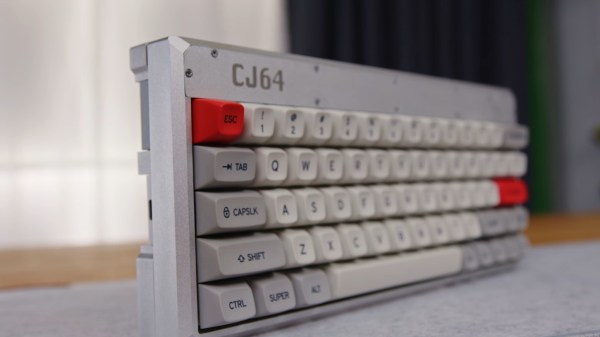
A grey keyboard with orange and dark grey accents is angled away from the camera. The keys nearby are clearly distinguishable in the foreground but blurry toward the back/right. The keyboard is quite thick as it also contains a computer motherboard.

Mechanical Keyboard With A Framework Inside

Like the Commodore 64 and other keyboard computers of yore, the [Elevated Systems]’s CJ64 fits all of its processing and I/O into a single keyboard-shaped package.

This iteration of the project takes it to the next level with an enclosure milled out of aluminum instead of the mere 3D printed enclosure of the previous versions. With a Framework mainboard, the ports are configurable via the Framework expansion card system giving you even more options to customize this build. To round it out, this keyboard PC doesn’t scrimp on the keyboard part either with mechanical switches and MT3 profile keycaps.

If you’d like to build one of these for yourself, [Elevated Systems] has uploaded the 3D printed enclosure files to his GitHub repository. The files for machining are available as well, but only to patrons.

For some more Framework-based mods, check out this Framework Tablet, the Framedeck, or this other retro-inspired Framework build. If you want an all-in-keyboard slabtop, then maybe check out Are Slabtops the Future of Computing?

Continue reading “Mechanical Keyboard With A Framework Inside”

The bottom half of a MacBook Air on a purple and pink background has severed wires drawn out of its back to indicate its lack of a screen.

Are Slabtops The Future Of Computing?

The most popular computer ever was the Commodore 64 with its computer-in-a-keyboard form factor. If you have a longing for a keyboard computer with more modern internals, one of the easiest solutions today is to pull the screen off a laptop.

[Umar Shakir] wanted to see what the fuss was about regarding a recent Apple patent and took the top lid off of his M1 Macbook Air and turned it into a “slabtop.” The computer works great wired to a monitor but can also be used wirelessly via AirPlay. The approach doesn’t come without its downsides, of course. Newer MacBooks can’t access recovery mode without the built-in screen, and some older models had their WiFi antennas in the top lid, so making one into a slabtop will leave you desk-bound.

While [Shakir] focuses on MacBooks, this approach should work with any laptop. Apparently, it’s a cottage industry in China already. Back in the day, my own daily driver was a Pentium-powered laptop with its broken LCD (and lid) removed. It worked great with whatever CRT was nearby.

If you’re looking for an off-the-shelf keyboard computer of your own, you might want to check out the Raspberry Pi 400.

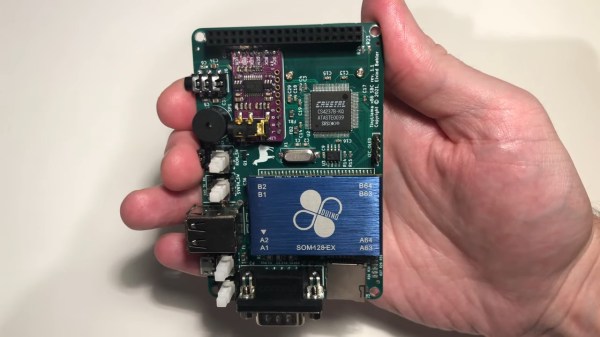
A smartphone-sized PCB is in a person's hand. A large blue chip package houses a 486 and the board has a SoundBlaster card and a 40 PIN Raspberry Pi Connector along one edge for attaching a Raspberry Pi Zero.

TinyLlama Is A 486 In Your Pocket

We love retrocomputing and tiny computers here at Hackaday, so it’s always nice to see projects that combine the two. [Eivind]’s TinyLlama lets you play DOS games on a board that fits in your hand.

Using the 486 SOM from the 86Duino, the TinyLlama adds an integrated Crystal Semiconductor audio chip for AdLib and SoundBlaster support. If you populate the 40 PIN Raspberry Pi connector, you can also use a Pi Zero 2 to give the system MIDI capabilities when coupled with a GY-PCM5102 I²S DAC module.

Audio has been one of the trickier things to get running on these small 486s, so its nice to see a simple, integrated solution available. [Eivind] shows the machine running DOOM (in the video below the break) and starts up Monkey Island at the end. There is a breakout board for serial and PS/2 mouse/keyboard, but he says that USB peripherals work well if you don’t want to drag your Model M out of the closet.

Looking for more projects using the 86Duino? Checkout ISA Sound Cards on 86Duino or Using an 86Duino with a Graphics Card.

Continue reading “TinyLlama Is A 486 In Your Pocket”

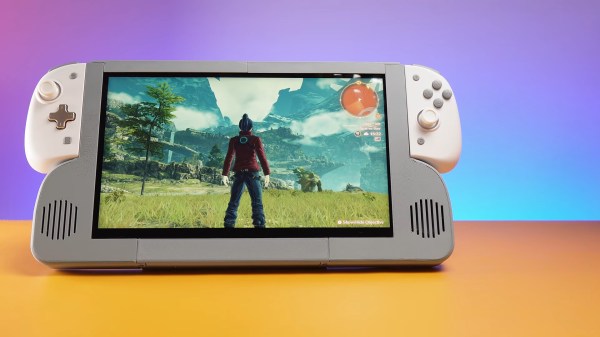
A 12" LCD screen sits between speakers (on lower half of bezel) and joycon controllers are attached on the upper half of the bezel.

Portable Monitor Extension For Nintendo Switch

Handheld consoles are always a tradeoff between portability and screen real estate. [Pavlo Khmel] felt that the Nintendo Switch erred too much on the side of portability, and built an extension to embiggen his Switch. (YouTube)

[Khmel] repurposed a Dell XPS 12 LCD panel for the heart of this hack and attached it to an LCD controller board to serve as an external monitor for the Switch. A 3D printed enclosure envelops the screen and also contains a battery, speakers, and a dock for the console. Along the top edges, metal rails let you slide in the official Joy-Cons or any number of third party controllers, even those that require a power connection from the Switch.

Since the Switch sees this as being docked, it allows the console to run faster and at higher resolution than if it were in handheld mode. The extension lasts about 5 hours on battery power, and the Switch inside will still be fully charged if you don’t mind being constrained to its small screen while you charge it’s bigger-screened exoskeleton.

Need more portable goodness? Be sure to check out our other handheld and Nintendo Switch hacks.

Continue reading “Portable Monitor Extension For Nintendo Switch”

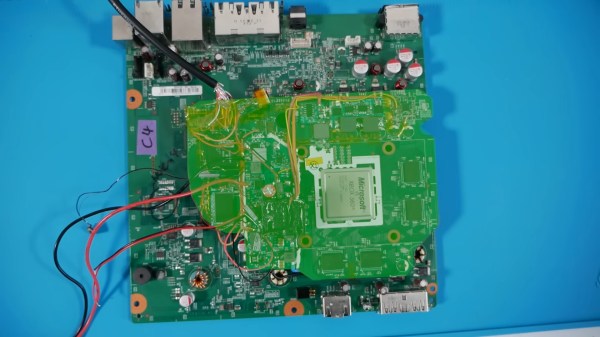
A green highlight emphasizes a cut-down XBox 360 motherboard on top of an intact board. The cut-down board is less than half the size of the intact one.

Shrinking The XBox 360

One of the coolest things in the retro gaming scene is making desktop consoles into portables. [Millomaker] is building an XBox 360 handheld, and the first step is shrinking the console’s motherboard.

Most 360 portables up to this point have been laptop-shaped instead of something handheld, but that hasn’t stopped people from trying to miniaturize the console further. [Millomaker]’s cut seems to be the most successful so far, shrinking the device’s motherboard down to the size of its old competitor, the Wii.

In the video (in French with available auto-translation) below the break, you can get the full harrowing journey during which several 360s sacrificed their motherboards for the cause despite [Millomaker]’s meticulous testing between component removals. This is truly an awesome mod, and we’re glad that the video shows not only the successes, but also the missteps on the way. It wouldn’t really be a hack if it was smooth sailing, would it?

For more fun with handhelds, check out the Sprig Open Source Handheld, a Portable PS2, or this Handheld Linux Computer.

Continue reading “Shrinking The XBox 360”

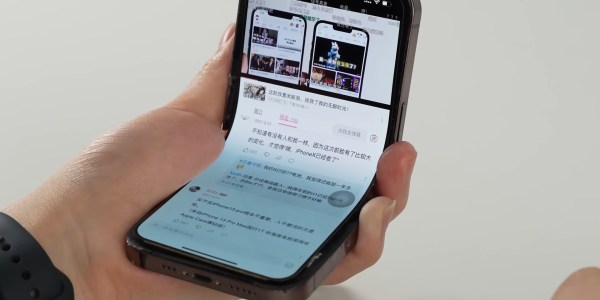
An iPhone sits in a users hand open to the YouTube app. What is unusual is that the iPhone is bent in an L shape and is still functioning properly.

First Folding IPhone Doesn’t Come From Apple

Folding phones are all the rage these days, with many of the major smartphone manufacturer’s having something in this form factor. Apple has been conspicuously absent in this market segment, so [KJMX] decided to take matters into their own hands with the “iPhone V.” (YouTube – Chinese w/subtitles via MacRumors).

Instead of trying to interface an existing folding phone’s screen with the iPhone, these makers delaminated an actual iPhone X screen to use in the mod. It took 37 attempts before they had a screen with layers that properly separated to be both flexible and functional. Several different folding phones were disassembled, and [KJMX] found a Motorola Razr folding mechanism would work best with the iPhone X screen. Unfortunately, since the iPhone screen isn’t designed to fold, it still will fail after a relatively small number of folds.

Other sacrifices were made, like the removal of the Taptic Engine and a smaller battery to fit everything into the desired form factor. The “iPhone V” boasts the worst battery life of any iPhone to date. After nearly a year of work though, [KJMX] can truly claim to have made what Apple hasn’t.

Curious about other hacks to let an iPhone do more than Apple intended? Check out how to add USB-C to an iPhone, try to charge it faster, or give one a big memory upgrade.

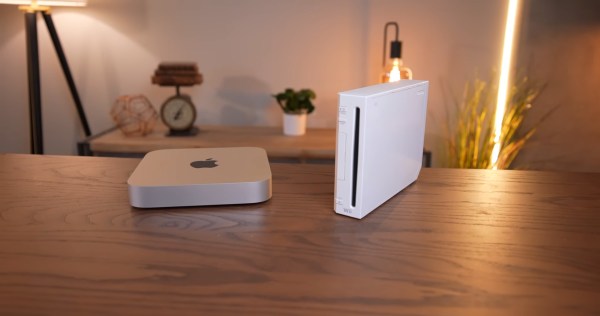
An M1 Mac mini sits next to a white Wii on a wooden table. In the background are various Edison-style LED light fixtures with an incadescent-like light profile.

This Wii Has An Apple M1 Inside

The conveniently tiny logic board of the M1 Mac mini has lead to it giving the Mini ITX format a run for its money in case mods. The latest example of this is [Luke Miani]’s M1 Wii. (Youtube via 9to5Mac)

[Miani] chose the Wii as a new enclosure for this Mac mini given its similar form factor and the convenient set of doors in the top to maintain access to the computer’s I/O, something he wasn’t able to do with one of his previous M1 casemods. The completed build is a great stealth way to have a Mac mini in your entertainment center. [Miani] even spends the last several minutes of the video showing the M1 Wii running Wii, GameCube, and PS2 games to really bring it full circle.

A Microsoft Surface power brick was spliced into the original Wii power cable since the Wii PSU didn’t have enough wattage to supply the Mac mini without significant throttling. On the inside, the power runs through a buck converter before making its way to the logic board. While the Mini’s original fan was too big to fit inside the Wii enclosure, a small 12V fan was able to keep performance similar to OEM and much higher than running the M1 fanless without a heat spreader.

If you’d like to see some more M1 casemods, check out this Lampshade iMac or the Mac Mini Mini.

Continue reading “This Wii Has An Apple M1 Inside”