An Arcade Cabinet With Displays To Spare

We’ve all got a pretty good mental image of what an arcade cabinet looks like, so you probably don’t need to be reminded that traditionally they are single-screen affairs. But that idea dates back to when they were built around big and bulky CRT displays. Now that we have modern LCD, LED, and OLED panels, who says you have to follow the old rules?

That’s precisely the sort of out of the box thinking that lead [Al Linke] to build this unique multi-display arcade cabinet. The game itself is still played on a single screen, but several smaller sub-displays are dotted all around the cabinet to indicate various bits of ancillary information. Are they necessary? Hardly. But we can’t deny it’s a clever idea, and we wouldn’t be surprised if we start seeing something similar in other DIY cabinets.

The build started with a commercially available cabinet from Arcade1Up, which at this point are popular enough that some of the Big Box retailers have them in stock. All of the electronics except for the display were stripped out, and replaced with a Dell OptiPlex 9020 computer and high-quality joysticks and buttons. [Al] then installed his various displays all over the cabinet, including a gorgeous LED marquee that we’ve featured previously.

So what do all these little screens do? [Al] explains them in the video after the break, but the general idea is that they provide contextual information about the game you currently have loaded up. A two-color OLED display shows the name of the game and what it’s rated, while a seven segment LED display shows the year the game was released. The displays are located both by the controls and where you’d expect the coin slot to be, so whether you’re actively playing or across the room, you can see all the information.

We’re always amazed to see how builders find ways to make their own personal arcade cabinets stand out. While it’s an idea that at this point we’ve seen quite a lot of, no two projects have ever been quite the same.

Continue reading “An Arcade Cabinet With Displays To Spare”

Poking Around The Wide World Of Bluetooth

Bluetooth is a technology with a very interesting history. When it first came around in the late 1990s, it promised to replace the mess of wires that was tucked behind every desk of the day. Unfortunately, the capabilities of early Bluetooth didn’t live up to the hype, and it never quite took off. It wasn’t until the rise of the smartphone more than a decade later that Bluetooth, now several versions more advanced, really started to make sense.

As [Larry Bank] explains in a recent blog post, that means there’s a whole lot to learn if you want to really understand Bluetooth hacking. For example, the Bluetooth versions that were used in the 1990s and 2000s are actually a completely different protocol from that which most modern devices are using. But the original protocol, now referred to as “Classic”, is still supported and in use.

That means to really get your head wrapped around working with Bluetooth, you need to learn about the different versions and all the tools and tricks associated with them. To that end, [Larry] does a great job of breaking down the primary versions of Bluetooth and the sort of tools you might find yourself using. That includes microcontrollers such as the ESP32 or Arduino Nano 33 BLE.

But the post isn’t just theory. [Larry] also goes over a few real-world projects of his that utilize Bluetooth, such as getting a portable printer working with his Arduino, or figuring out how to use those tiny mobile phone game controllers for his own purposes. Even if you don’t have these same devices, there’s a good chance that the methods used and lessons learned will apply to whatever Bluetooth gadgets you’ve got your eye on.

Readers may recall [Larry] from our previous coverage of his exploits, such as his efforts to increase the frame rate of the SSD1306 OLED display or his wireless bootloader for the SMART Response XE. Whenever we see his name pop up in the Tip Line, we know a fascinating hardware deep dive isn’t far behind.

The Spitzer Space Telescope Ends Its Incredible Journey

Today, after 16 years of exemplary service, NASA will officially deactivate the Spitzer Space Telescope. Operating for over a decade beyond its designed service lifetime, the infrared observatory worked in tandem with the Hubble Space Telescope to reveal previously hidden details of known cosmic objects and helped expand our understanding of the universe. In later years, despite never being designed for the task, it became an invaluable tool in the study of planets outside our own solar system.

While there’s been no cataclysmic failure aboard the spacecraft, currently more than 260 million kilometers away from Earth, the years have certainly taken their toll on Spitzer. The craft’s various technical issues, combined with its ever-increasing distance, has made its continued operation cumbersome. Rather than running it to the point of outright failure, ground controllers have decided to quit while they still have the option to command the vehicle to go into hibernation mode. At its distance from the Earth there’s no danger of it becoming “space junk” in the traditional sense, but a rogue spacecraft transmitting randomly in deep space could become a nuisance for future observations.

From mapping weather patterns on a planet 190 light-years away in the constellation Ursa Major to providing the first images of Saturn’s largest ring, it’s difficult to overstate the breadth of Spitzer’s discoveries. But these accomplishments are all the more impressive when you consider the mission’s storied history, from its tumultuous conception to the unique technical challenges of long-duration spaceflight.

Continue reading “The Spitzer Space Telescope Ends Its Incredible Journey”

Unique Clock Finally Unites Hackers And Sequins

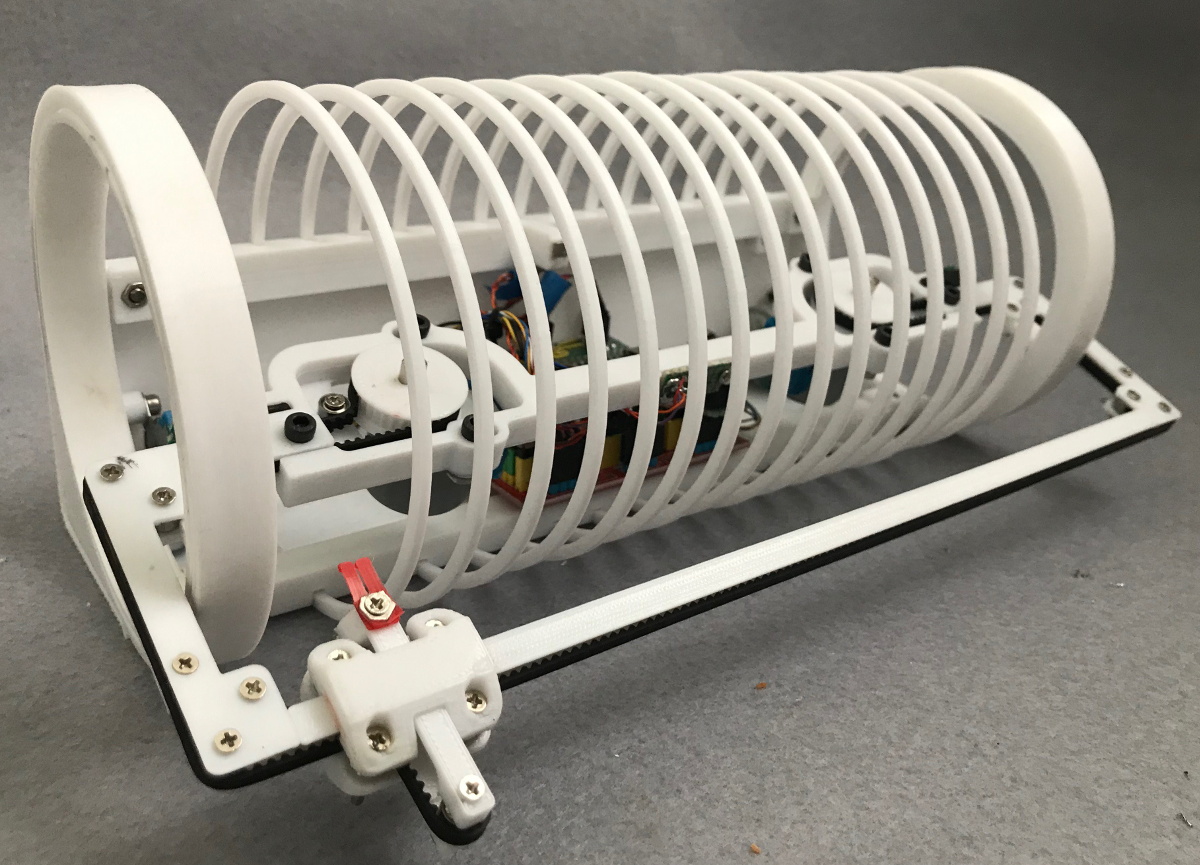
We’ve all seen the two-color sequin fabrics you can “draw” on by dragging your finger over so the pieces flip to the other color. It’s fun stuff to play with, and very popular with the kids right now, but if you asked us if the material had any practical application we’d have said no. But that was before we saw this clever clock created by [Ekaggrat Singh Kalsi] that he calls Sequino.

Since a clock (at least one that only shows hours and minutes) doesn’t need to refresh very quickly, [Ekaggrat] thought that the sequin material could work as a display. Of course the tricky part is figuring out how to actually draw on it reliably. It can’t be done from the back, and since the sequins are plastic, you can’t use a magnet. The only way to do it is with a robotic “finger” and some very slick kinematics.

The most obvious feature of the Sequino is the belt drive that goes the length of its cylindrical shape. When the two motors connected to the belt are turning in the same direction, the pointer is moved left or right. But when the motors turn in opposite directions, the tension on the belt forces the pointer to extend and contact the sequins. It’s like an H-bot , but with the shortest ever Y axis. The front bar is moved up and down with rotating rings inside of the device. It will probably make a lot more sense once you watch the video of it in operation after the break.

[Ekaggrat] says this project was developed as part of his quest to build “doodle clocks” that draw out the time continuously. The advantage of using the sequin fabric is that it shouldn’t be damaged by repetitive use, an issue he’s tried to solve via photonic means in the past.

Continue reading “Unique Clock Finally Unites Hackers And Sequins”

Building (And Testing) A DIY Air Purifier

Whether it’s the usual pollution of the city, or the fact that your corner of the globe happens to be on fire currently, poor air quality is a part of daily life for many people. One way of combating this issue is with a high quality HEPA filter in your home, but unfortunately that’s not something that everyone can afford to even has access to.

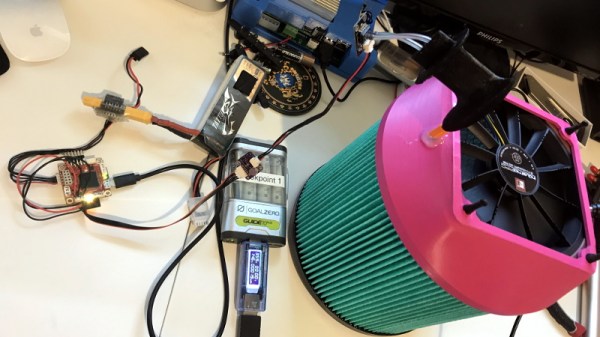
Which is why [Adam Kelly] decided to design this DIY HEPA air purifier that can be built for less than $100. That might still sound like a lot of money, but compared to the $500 sticker price he was seeing for the models recommended by health officials, it’s certainly a step in the right direction. Of course, it’s only a deal if it actually works, so a big part of the project has also been verifying the design’s ability to filter particles out of the air in a timely manner.

To build his purifier, [Adam] found a HEPA H13 rated replacement filter that was cheap and readily available, and started designing a low-cost way to pulling air through it. He eventually went with a 120 mm computer case fan coupled with a step-up converter that can produce 12 V from a standard USB port. Then he just needed to design a 3D printed “lid” which would position the fan so it draws air through the center of the filter.

In terms of testing, [Adam] wasn’t worried about the purifier’s ability to actually filter out smoke particles; unless the manufacturer lied about the capabilities of the filter itself, that part is a given. But he was curious about how effective the fan would be in terms of circulating air through a room.

By installing a pitot tube from one of his drones into the lid of the purifier, he determined the airflow in the center of the filter to be approximately 160 CFM. By his calculations, that means it should be able to circulate all the air in his 25 cubic meter office around 10 times per hour. That’s a promising start, but [Adam] says he’d still be interested in a more detailed analysis of the design’s performance by anyone who might have the equipment to do so.

As he lives in Australia, this project is more than just a passing fancy for [Adam]. He only has to look out the window to see that the air he’s breathing is filled with smoke from the raging bushfires. They say that necessity is the mother of invention, and breathable air is pretty high up on the list of human necessities. Our hat’s off to anyone who sees their fellow citizens suffering and tries to use their skills to come up with a solution.

Stylish Thermometer Is DIY Hardware Perfection

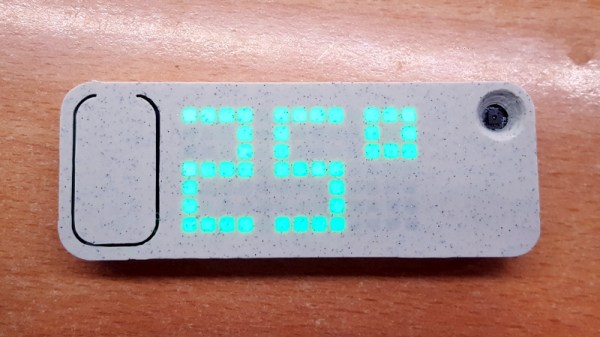
Over the last few years, we’ve seen a steady improvement in the sort of custom hardware a dedicated individual can produce. With affordable desktop 3D printers and PCB fabrication services, the line between store bought and home built can get very blurry. This slick MQTT-connected thermometer created by [Martin Cerny] is a perfect example.

The case for the device, which [Martin] calls Temper, is printed in a stone-look PLA filament and has been carefully designed so that LEDs shining behind it illuminate perfect square “pixels” on the front. There’s a living hinge button on the left side, and on the right, an opening for the SHT30 temperature and humidity sensor. Some may say that the look of the sensor aperture could be improved with a printed grille, but there was likely a concern about reduced airflow.

Inside the case is a 13×7 array of SMD LEDs, a few 74HC595 shift registers, a TP4054 charging chip to keep the internal 250 mAh battery topped off via USB, and some passives to round out the party. The ESP-12E module that brings it all together and the battery are on the flip side of the PCB. At a press of the button, the display fires up for 5 seconds and Temper publishes temperature, humidity and battery percentage through MQTT. If you’re looking for more granular data, it can also be configured to publish regular updates at the cost of increased energy consumption.

The physical product is gorgeous on its own, but we’re happy to report that the firmware and documentation have been handled with a similar attention to detail. The project’s GitHub repo has a Wiki to help others build and configure their very own Temper, and the device’s web configuration portal is easily just as nice as anything you’d find in a piece of modern consumer electronics (if not moreso).

We’ve seen plenty of ESP8266-based environmental monitoring devices here at Hackaday, but we think this one really pushes the state-of-the-art forward. This is a device that wouldn’t be out of place on the shelf at a Big Box electronics retailer, and while [Martin] says he has no interest in building and selling them himself, we don’t doubt that folks out there will be spinning up their own Temper clones before too long.

Flicker Detector Lets You Hear What You Can’t See

Have you ever looked at modern LED lighting and noticed, perhaps on the very edge of your perception, that they seemed to be flickering? Well, that’s because they probably are. As are the LEDs in your computer monitor, or your phone’s screen. Pulse width modulation (PWM) is used extensively with LEDs to provide brightness control, and if it’s not done well, it can lead to headaches and eyestrain.

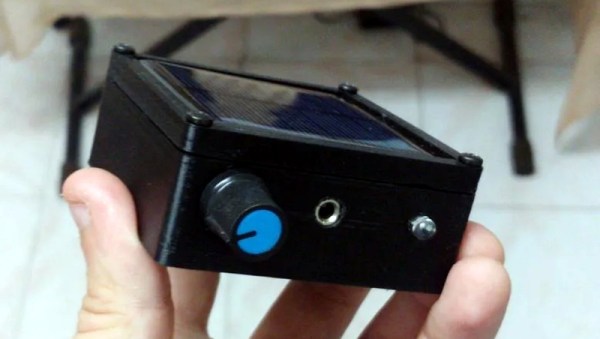
Looking to quantify just how much flashing light we’re being exposed to, [Faransky] has created a simple little gadget that essentially converts flashing light into an audio tone the human ear can pick up. Those LEDs might be blinking on and off fast enough to fool our eyes, but your ears can hear frequencies much higher than those used in common PWM solutions. In the video after the break, you can see what various LED light sources sound like when using the device.

The electronics here are exceptionally simple. Just connect a small solar panel to an audio amplifier, in this case the PAM8403, and listen to the output. To make it a bit more convenient to use, there’s an internal battery, charger circuit and USB-C port; but you could just as easily run the thing off of a 9 V alkaline if you wanted to build one from what’s already in the parts bin.

Who knows? If you carry this thing around long enough, you might even hear the far less common binary code modulation in action (but probably not).

Continue reading “Flicker Detector Lets You Hear What You Can’t See”