A Raspberry Pi Terminal That’s Always Within Reach

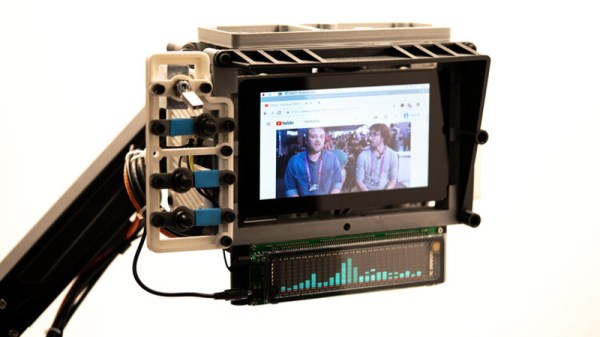
Inspired by films such as The Matrix, where hackers are surrounded by displays and keyboards on articulated arms, [Jay Doscher] created this cyberpunk “floating” terminal so your favorite Linux single board computer is always close at hand. Do you actually need such a thing mounted to the wall next to the workbench? Probably not. But when has that ever stopped a Hackaday reader?

[Jay] has come up with a modular design for the “A.R.M. Terminal” that allows the user to easily augment it with additional hardware. The 3D printed frame of the terminal has hardpoints to bolt on new modules, which thanks to threaded metal inserts, will have no problem surviving multiple configurations.

This initial version features a panel on the left side that holds various buttons and switches attached to the Pi’s GPIO pins. With a bit of code, it’s easy to pick up the status of these controls and use them to fire off whatever tasks your imagination can come up with. On the bottom [Jay] has mounted a stand-alone VFD audio spectrum display that’s hooked up to the Pi’s 3.5 mm jack. It’s totally unnecessary and costs as much as the Raspberry Pi itself, but it sure is pretty.

If there’s a downside to the design, it’s that the only display currently supported is the official Raspberry Pi touchscreen which is only 800×480 and a bit pricey compared to more modern panels. On the other hand, there’s something to be said for the standardized bolt pattern on the back of the official screen; so if you want to use a higher resolution display, be prepared to design your own mounting bracket. Extra points if you share your changes with the rest of the class.

For anyone who likes the look of the A.R.M. Terminal but isn’t too keen on being tethered to the wall, you’re in luck. [Jay] previously created the Raspberry Pi Recovery Kit which shares many of the same design principles but puts them into a ruggedized case that’s ready for life in the field.

A Battery Sipping Cellular Mailbox Notifier

Like many of us, [Zak Kemble] has an indeterminate number of tiny packages coming his way from all over the globe at any given time. Unfortunately, the somewhat unpredictable nature of the postal service where he lives meant he found himself making a lot of wasted trips out to the mailbox to see if any overseas treasures had arrived for him. To solve the problem, he decided to build an Internet-connected mailbox notification system that could work within some fairly specific parameters.

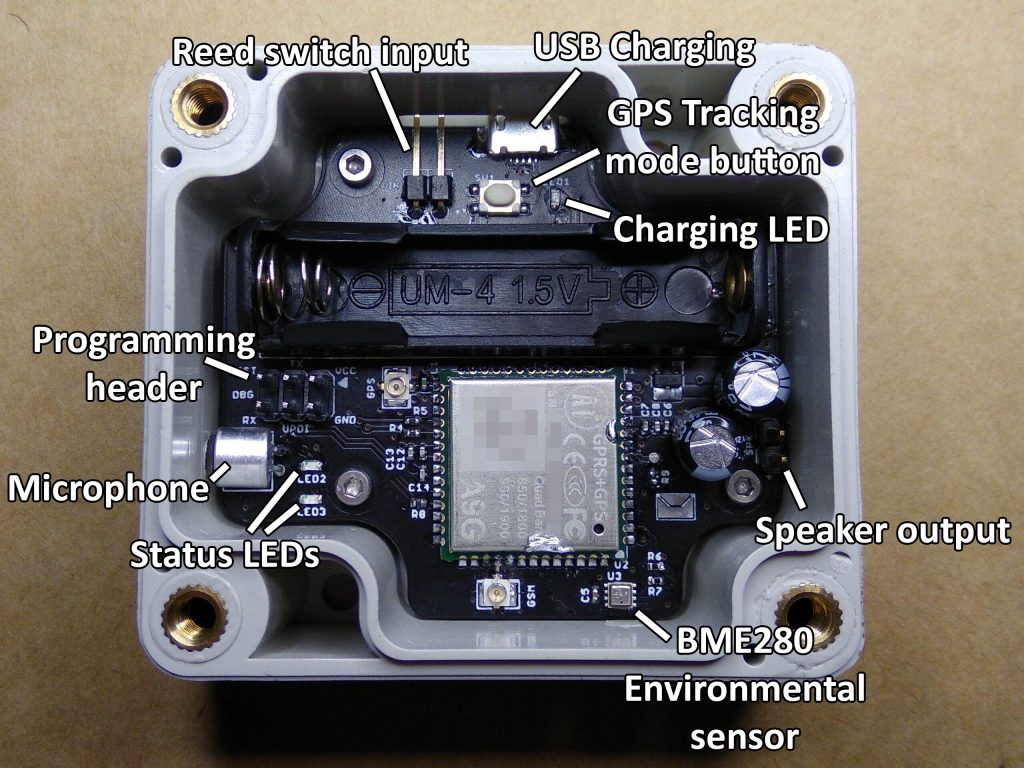
For one thing, the mailbox is too distant to connect directly to it over WiFi. [Zak] mentions that 433 MHz might have been an option, but he decided to skip that entirely and just connect it to the cellular network with an A9G GPRS/GSM module from A.I. Thinker. This device actually has its own SDK that allows you to create a custom firmware for it, but unfortunately the high energy consumption of the radio meant it would chew through batteries too quickly unless it had a little extra help.

Not wanting to have to change the batteries every couple months, [Zak] added a ATtiny402 to handle the notifier’s power management needs. By using a P-MOSFET to completely cut power to the A9G, the notifier can save an incredible amount of energy by only activating the cellular connection once it actually needs to send a notification; which in this case takes the form of an HTTP request that eventually works its way to a Telegram group chat.

To cut a long story short, testing seems to indicate that the notifier can fire off approximately 800 requests before needing its 10440 lithium battery recharged. Given how often [Zak] usually receives mail, he says that should last him around five years.

The A9G module, the ATtiny402, a BME280 environmental sensor (because, why not?), the battery, and all the ancillary support hardware are on a very professional looking PCB. That goes into a relatively rugged enclosure that’s designed to keep the electronics from shorting out on the mailbox’s metal case as well as keeping any particularly weighty parcels from crushing it.

If you’ve got the freedom so mount whatever you want outside, then you can certainly build a more technically impressive mailbox. But considering the limitations [Zak] had to work around, we think he did an excellent job.

A Retro Touch Pad You Can Use On Modern Computers

As [Jan Derogee] explains in the faux-retro video after the break, drawing on classic 8-bit computers was something of a pain. The rudimentary light pens and joysticks of the 1980s allowed for free-form input, but were clumsy and awkward to use. Which is why he set out to create an ideal drawing device for the C64 using modern electronics. For the sake of completion, he also gave it a USB HID mode so it would work on somewhat more modern computers.

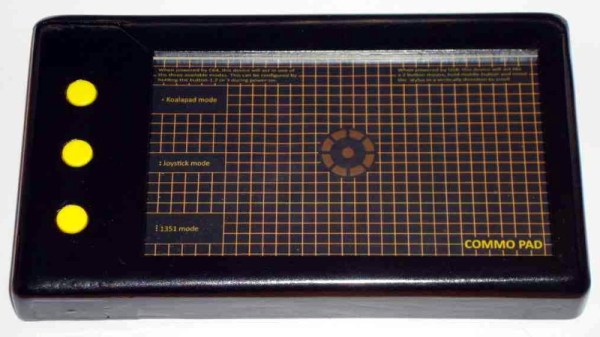
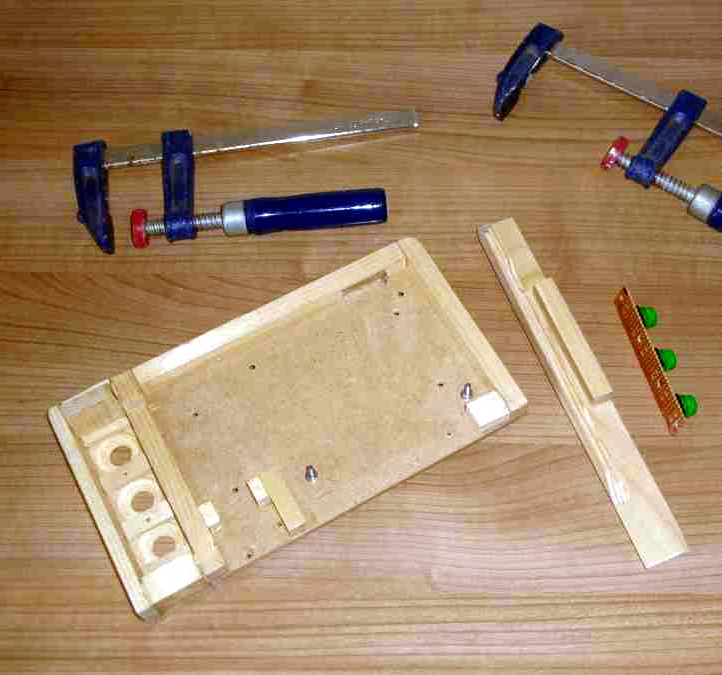
His device, which he’s calling the Commo Pad, looks like it could have been transported here directly from the 1980s, but it’s built from entirely new hardware. The case is actually made of wood that [Jan] sanded and painted to give it that chunky plastic aesthetic that we all know and love, and the retro artwork on the touch panel really goes a long way to sell the vintage vibe.

Speaking of which, the touch panel is perhaps the most interesting component of the entire build. It’s actually a resistive panel that was meant for mounting to an LCD that [Jan] has connected to an Arduino. All he had to do was provide a stable frame for it and print out some art work to slide in behind it.

The Arduino and associated electronics allow the Commo Pad to be picked up by the C64 as either a joystick or mouse, which means it doesn’t need any custom software on the computer side to function. Similarly, it can also mimic a USB mouse if you want to plug it into something made a bit later than 1982. Should you be so inclined to make it wireless, the addition of a Bluetooth seems like it would be relatively trivial.

If the Commo Pad doesn’t have enough of a retro-futuristic vibe for your tastes, we recently covered a custom optical touch panel that looked like it could double as a prop from Blade Runner which might do the trick.

Continue reading “A Retro Touch Pad You Can Use On Modern Computers”

Reverse Engineering Yokis Home Automation Devices

These days, it’s hard to keep track of all the companies that are trying to break into the home automation market. Whether they’re rebrands of somebody else’s product or completely new creations, it seems like every company has at least a few “smart” gadgets for you to choose from. We hadn’t heard of the Yokis devices that [Nicolas Maupu] has been working on before today, but thanks to his efforts to reverse engineer their protocol, we think they might become more popular with the hacking crowd.

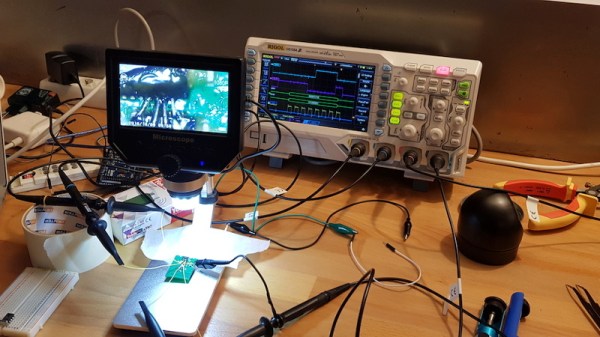
Even if you don’t have a Yokis MTV500ER dimmer or MTR2000ER switch of your own, we think the detailed account of how [Nicolas] figured out how to talk to these devices is worth a read. His first step was to connect his oscilloscope directly to the SPI lines on the remote to see what it was sending out. With an idea of what he was looking for, he then used an nRF24L01+ radio connected to an ESP8266 to pull packets out of the air so he could analyze their structure. This might seem like a very specialized process, but in reality most of the techniques demonstrated could be applicable for any unknown communications protocol of which you’ve got a hex dump.

On the other hand, if you do have some of these devices (or plan to get them), then the software [Nicolas] has put together looks very compelling. Essentially it’s an interactive firmware for the ESP8266 that allows it to serve as a bridge between the proprietary Yokis wireless protocol and a standard MQTT home automation system. When the microcontroller is connected to the computer you get a basic terminal interface that allows you to scan and pair for devices as well as toggle them on and off.

This bridge could be used to allow controlling your Yokis hardware with a custom handheld remote, or you could follow the example of our very own [Mike Szczys], and pull everything together with a bit of Node-RED.

Teardown: BilBot Bluetooth Robot

Historically, the subject of our January teardown has been a piece of high-tech holiday lighting from the clearance rack; after all, they can usually be picked up for pocket change once the trucks full of Valentine’s Day merchandise start pulling up around the back of your local Big Box retailer. But this year, we’ve got something a little different.

Today we’re looking at the BilBot Bluetooth robot, which over the holidays was being sold at Five Below for (you guessed it) just $5 USD. These were clearly something the company hoped to sell a lot of, with stacks of the little two-wheeled bots in your choice of white and yellow livery right by the front door. With wireless control from your iOS or Android device, and intriguing features like voice command, I’d be willing to bet they managed to move quite a few of these at such a low price.

For folks like us, it can be hard to wrap our minds around a product like this. It must have a Bluetooth radio, some kind of motor controller, and of course the motors and gears themselves. Yet they can sell it for the price of a budget hamburger and still turn a profit. If you wanted to pick up barebones robotics platform, with just a couple gear motors and some wheels, it would cost more than that. The economies of scale are a hell of a thing.

Which made me wonder, could hackers take advantage of this ultra-cheap robot for our own purposes? It’s pretty much a given that the software for this robot will be terrible, and that whatever control electronics live inside it will be marginal at best. But what if we write those off and just look at the BilBot as a two-wheeled platform to carry our own electronics? It’s certainly worth $5 to find out.

Continue reading “Teardown: BilBot Bluetooth Robot”

Bask In The Glory Of This 336 LED Digit Display

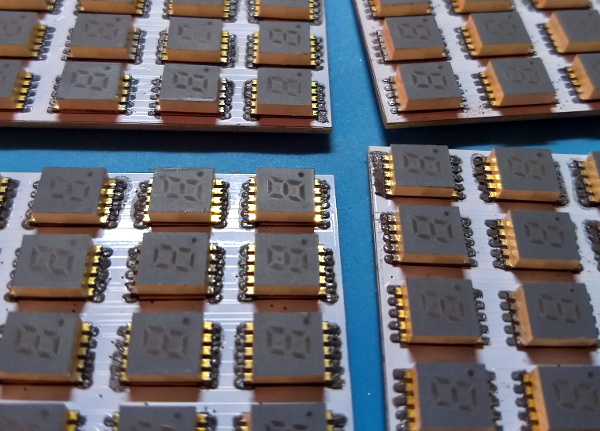
[Chris Combs] recently took the wraps off of an incredible art piece that he calls Road Ahead which uses 336 seven segment LED digits to create an absolutely gorgeous display. With a piece of smoked acrylic to slightly diffuse the orange glow of the LEDs, the end result has a distinctively retro look that we’d gladly spend all day staring at.

For those looking to dig a bit deeper, [Chris] has put together some very impressive documentation over on Hackaday.io that goes into plenty of detail on how he designed and built this beauty. From the design of the PCBs that carry all of the 0.3″ SMD displays to the custom software running on the Raspberry Pi 3 that powers it, there’s no technical stone left unturned.

According to the build log, this is the second version of the display. The first one was housed in a rather attractive wooden enclosure, but as [Chris] explains, that was precisely the problem. He wanted something that looked cold and unfeeling as the nearly 340 digits flashed away with potentially ominous intent. So he ditched the wooden case for a powder coated steel one that looks more like the front panel of a mainframe than something you’d pick up at the craft store.

Another interesting point explained in the write-up is how the Python software is designed to treat the hardware as a contiguous graphical display rather than just an array of independent digits. Grayscale images can be reproduced on the by using PWM to adjust the brightness of each segment’s corresponding “pixel”; though admittedly it takes a bit of imagination to see the intended image with a resolution this low.

This project reminds us of the incredible LED hexdump display we saw not that long ago, down to the PWM trickery for squeezing “graphics” out of these exceptionally non-graphical elements. With any luck, perhaps these are the opening shots in an arms race to see who can build the largest array of multi-segment LED displays.

Jen Costillo Explains Why Hackers Thrive In A Recession

If you haven’t noticed, this is an absolutely fantastic time to be a hacker. The components are cheap, the software is usually free, and there’s so much information floating around online about how to pull it all together that even beginners can produce incredible projects their first time out of the gate. It’s no exaggeration to say that we’re seeing projects today which would have been all but impossible for an individual to pull off ten years ago.

But how did we get here, and perhaps more importantly, where are we going next? While we might arguably be in the Golden Age of DIY, creative folks putting together their own hardware and software is certainly nothing new. As for looking ahead, the hacker and maker movement is showing no signs of slowing down. If anything, we’re just getting started. With a wider array of ever more powerful tools at our disposal, the future is very literally whatever we decide it is.

In her talk at the 2019 Hackaday Superconference, The Future is Us: Why the Open Source And Hobbyist Community Drive Consumer Products, Jen Costillo not only presents us with an overview of hacker history thus far, but throws out a few predictions for how the DIY movement will impact the mainstream going forward. It’s always hard to see subtle changes over time, and it’s made even more difficult by the fact that most of us have our noses to the proverbial grindstone most of the time. Her presentation is an excellent way for those of us in the hacking community to take a big step back and look at the paradigm shifts that put such incredible power in the hands of so many.

Continue reading “Jen Costillo Explains Why Hackers Thrive In A Recession”