The Raspberry Pi Cluster From Outer Space

We see a lot of weird and esoteric stuff here at Hackaday, but even by our standards, Bell Lab’s Plan 9 operating system is an oddball. Named after the science fiction film Plan 9 from Outer Space, it was designed to extend the UNIX “everything is a file” mentality to the network. It envisioned a future where utilizing the resources of another computer would be as easy as copying a file. But as desktop computers got more powerful the idea seemed less appealing, and ultimately traditional operating systems won out. Of course, that doesn’t mean you still can’t play around with it.
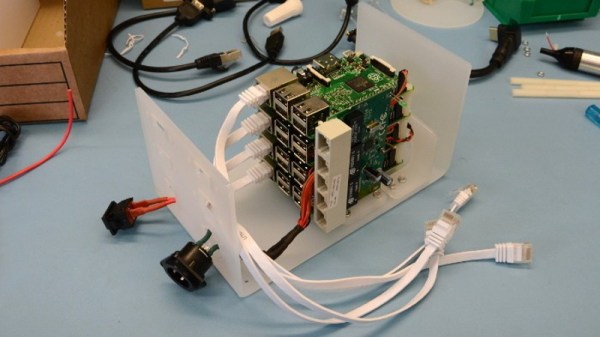
Logically to make use of a distributed operating system you really need something to distribute it on, but as [Andrew Back] shows, today that’s not nearly the challenge it would have been back then. Using the Raspberry Pi, he builds a four-node Plan 9 cluster that’s not only an excellent way to explore this experimental operating system, but looks cool sitting on your desk. Even if you’re not interested in drinking the Bell Lab’s Kool-Aid circa 1992, his slick desktop cluster design would work just as well for getting your feet wet with modern-day distributed software stacks.

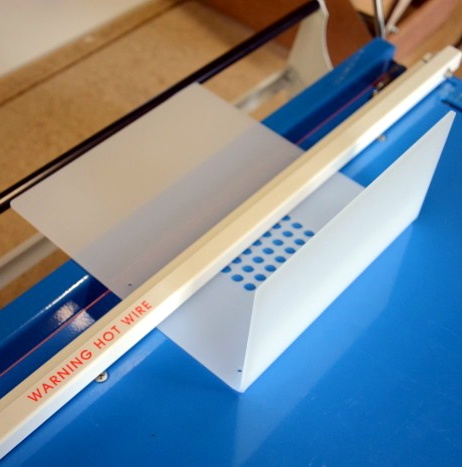
The enclosure for the cluster is built from laser cut acrylic panels which are then folded into shape with a hot wire bending machine. That might seem like a tall order for the home hacker, but we’ve covered DIY acrylic benders in the past, and the process is surprisingly simple. Granted you’ll still need to get access to a beefy laser cutter, but that’s not too hard anymore if you’ve got a hackerspace nearby.

[Andrew] uses short extension cables and female panel mount connectors to keep everything tidy, and with the addition of some internal LED lighting the final product really does look like a desktop computer from a far more fashionable future. Combined with the minimalist keyboard, the whole setup wouldn’t look out of place on the set of a science fiction movie. Perhaps that’s fitting, giving Bell Lab’s futuristic goals for Plan 9.

Its been the better part of a decade since we first brought you word that Plan 9 was available for the Raspberry Pi, and yet in all that time we’ve never really seen it put to use. Hopefully builds like this will inspire others to play around with this fascinating piece of computing history.

[Thanks to Dave for the tip.]
Downdraft Table Inhales Dust, Not Cash

We always look forward to the builds [MakerMan] sends in, and it’s not just because we dig his choices in royalty free music (though it helps). He always manages to put together his projects with a minimum of fuss, and perhaps more importantly, a minimum of funds. His builds use salvaged components, easily sourced materials, and common tools. Watching him work invariably makes us realize that we tend to overthink our own projects.

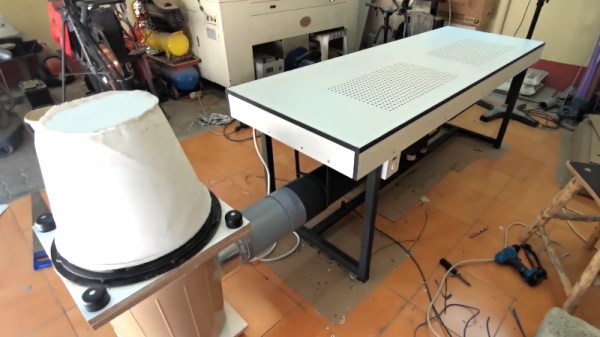
In his latest video, [MakerMan] was tasked with building a downdraft table for a local factory that makes jewelry boxes. By sucking air through a series of holes in the table’s surface, sawdust created while the workers are building the boxes will automatically be removed from the workspace. Even if you aren’t in the jewelry box making business, any task which produces fine particles (such as sanding) could benefit from such a setup. You probably won’t need a downdraft table quite as large as the one he builds, but the principles will be the same if you get inspired to build a somewhat smaller version.

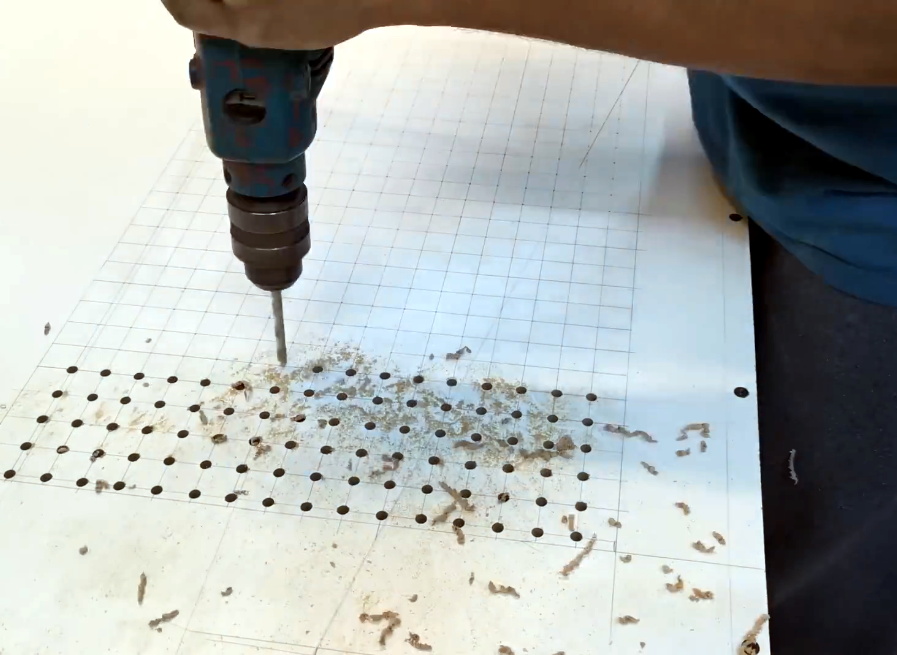
The build starts with sheets of MDF, which get cut, glued, and screwed together to make the basic tabletop shape. To this, [MakerMan] attaches a welded steel frame which will give it the strength MDF itself lacks. With careful measurement, lines are plotted across the top of the MDF sheet and all the holes are drilled with a simple hand drill; no fancy CNC here.

With the table doing its best colander impression, [MakerMan] adds an air box to the bottom which is similarly made of thin MDF sheets. All of the joints are sealed up with caulk, because at this point you want things to be as air tight as possible. A large blower is attached to the bottom, which gets piped to a dust collection system that’s made of a garbage can and…you guessed it, more MDF.

Watching [MakerMan] turn what’s often literal trash into a functional build never gets old. We’ve seen him create everything from a gorgeous origami chandelier to a very impressive diode laser cutter using little more than scrap parts and hand tools, and we can’t wait to see what he comes up with next.

Continue reading “Downdraft Table Inhales Dust, Not Cash”

MCAS And The 737: When Small Changes Have Huge Consequences

When the first 737 MAX entered service in May of 2017, it was considered a major milestone for Boeing. For nearly a decade, the aerospace giant had been working on a more fuel efficient iteration of the classic 737 that first took to the skies in 1967. Powered by cutting-edge CFM International LEAP engines, and sporting modern aerodynamic improvements such as unique split wingtips, Boeing built the new 737 to have an operating cost that was competitive with the latest designs from Airbus. With over 5,000 orders placed between the different 737 MAX variants, the aircraft was an instant success.

But now, in response to a pair of accidents which claimed 346 lives, the entire Boeing 737 MAX global fleet is grounded. While the investigations into these tragedies are still ongoing, the preliminary findings are too similar to ignore. In both cases, it appears the aircraft put itself into a dive despite the efforts of the crew to maintain altitude. While the Federal Aviation Administration initially hesitated to suspend operations of the Boeing 737 MAX, they eventually agreed with government regulatory bodies all over the world to call for a temporary ban on operating the planes until the cause of these accidents can be identified and resolved.

For their part, Boeing maintains their aircraft is safe. They say that grounding the fleet was done out of an “abundance of caution”, rather than in direct response to a particular deficiency of the aircraft:

Boeing continues to have full confidence in the safety of the 737 MAX.  However, after consultation with the U.S. Federal Aviation Administration (FAA), the U.S. National Transportation Safety Board (NTSB), and aviation authorities and its customers around the world, Boeing has determined — out of an abundance of caution and in order to reassure the flying public of the aircraft’s safety — to recommend to the FAA the temporary suspension of operations of the entire global fleet of 371 737 MAX aircraft.

Until both accident investigations are completed, nobody can say with complete certainty what caused the loss of the aircraft and their passengers. But with the available information about what changes were made during the 737 redesign, along with Boeing’s own recommendations to operators, industry insiders have started to point towards a fault in the plane’s new Maneuvering Characteristics Augmentation System (MCAS) as a likely culprit in both accidents.

Despite the billions of dollars spent developing these incredibly complex aircraft, and the exceptionally stringent standards their operation is held to, there’s now a strong indication that the Boeing 737 MAX could be plagued with two common issues that we’ve likely all experienced in the past: a software glitch and poor documentation.

Continue reading “MCAS And The 737: When Small Changes Have Huge Consequences”

Google+ Communities Won’t Go Down Without A Fight

Google+ is dead. Granted people have been saying that much for years now, but this time it’s really true. As of April, Google’s social media experiment will officially go the way of Reader, Buzz, Wave, Notebook, and all the other products that the search giant decided they were no longer interested in maintaining. Unfortunately in the case of Google+, the shutdown means losing a lot of valuable content that was buried in the “Communities” section of the service. Or at least that’s what we all thought.

Thanks to the efforts of [Michael Johnson], many of those Google+ communities now have a second chance at life. After taking a deep dive into the data from his own personal Google+ account, he realized it should be possible to write some code that would allow pulling the content out of Google’s service and transplanting it into a Discourse instance. With some more work, he was even able to figure out how to preserve the ownership of the comments and posts. This is no simple web archive; you can actually log into Discourse with your Google account and have all of your old content attributed to you. Continue reading “Google+ Communities Won’t Go Down Without A Fight”

Old Meets New In 3D Printed Telegraph

We often think of 3D printing as a way to create specific components in our builds, everything from some hard-to-find little sprocket to a custom enclosure. More and more of the projects that grace the pages of Hackaday utilize at least a few 3D printed parts, even if the overall build itself is not something we’d necessarily consider a “printed” project. It’s the natural progression of a technology which at one time was expensive and complex becoming increasingly available to the maker and hacker.

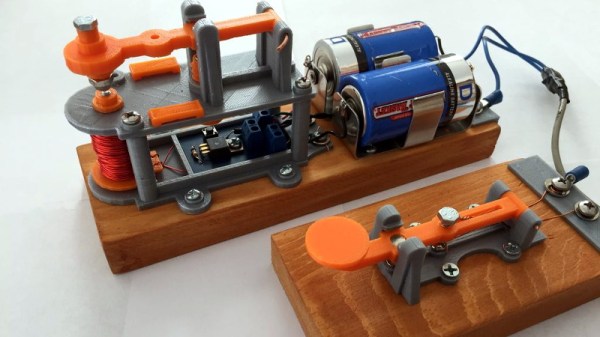
But occasionally we see 3D printing used not to create new devices, but recreate old ones. A perfect example is the almost entirely 3D printed telegraph system created by [Matt]. Projects like this help bring antiquated technology back to a modern audience, and can be an excellent educational tool. Showing someone a diagram of how the telegraph worked is one thing, but being able to run off a copy on your 3D printer and putting a working model in their hands is quite another.

[Matt] acknowledges that he’s hardly the first person to 3D print a telegraph key, but says that he’d never seen the complete system done before. The key is perhaps the component most people are familiar with from film and old images, but alone it’s really nothing more than a momentary switch. To actually put it to use, you need a telegraph sounder on the receiving end to “play” the messages.

The sounder is a somewhat more complex device than the key, and uses an electromagnet to pull down a lever and produce an audible clicking noise. In the most basic case, the coil is directly connected to the key, but in a modern twist [Matt] has added a MOSFET into the circuit so the electromagnet is triggered locally within the sounder. This prevents sparks from eroding the contacts in the key, and alleviates problems associated with current loss over long wire runs.

We’ve previously seen 3D printing used to revive vintage games which are no longer available such as “The Amazing Dr. Nim”, and how modern techniques such as additive manufacturing can help put World War II aircraft back in the air. While there was never much question that 3D printing would be a big part of our future, it would seem to be taking a fairly active role in preserving our past as well.

No, Your 3D Printer Doesn’t Have A Fingerprint

Hackers and makers see the desktop 3D printer as something close to a dream come true, a device that enables automated small-scale manufacturing for a few hundred dollars. But it’s not unreasonable to say that most of us are idealists; we see the rise of 3D printing as a positive development because we have positive intentions for the technology. But what of those who would use 3D printers to produce objects of more questionable intent?

We’ve already seen 3D printed credit card skimmers in the wild, and if you have a clear enough picture of a key its been demonstrated that you can print a functional copy. Following this logic, it’s reasonable to conclude that the forensic identification of 3D printed objects could one day become a valuable tool for law enforcement. If a printed credit card skimmer is recovered by authorities, being able to tell how and when it was printed could provide valuable clues as to who put it there.

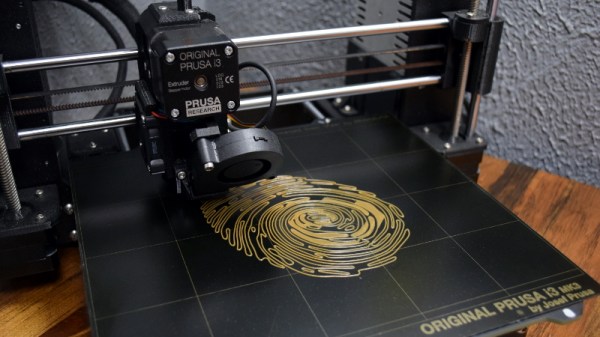
This precise line of thinking is how the paper “PrinTracker: Fingerprinting 3D Printers using Commodity Scanners” (PDF link) came to be. This research, led by the University at Buffalo, aims to develop a system which would allow investigators to scan a 3D printed object recovered from a crime scene and identify which printer was used to produce it. The document claims that microscopic inconsistencies in the object are distinctive enough that they’re analogous to the human fingerprint.

But like many of you, I had considerable doubts about this proposal when it was recently featured here on Hackaday. Those of us who use 3D printers on a regular basis know how many variables are involved in getting consistent prints, and how introducing even the smallest change can have a huge impact on the final product. The idea that a visual inspection could make any useful identification with all of these parameters in play was exceptionally difficult to believe.

In light of my own doubts, and some of the excellent points brought up by reader comments, I thought a closer examination of the PrinTracker concept was in order. How exactly is this identification system supposed to work? How well does it adapt to the highly dynamic nature of 3D printing? But perhaps most importantly, could these techniques really be trusted in a criminal investigation?

Continue reading “No, Your 3D Printer Doesn’t Have A Fingerprint”

ESP8266 Gets Its Game On With Open Source Engine

This is likely not to come as much of a shock to you, but the ESP8266 is pretty popular. At this point, we’re more surprised when a project that hits the tip line doesn’t utilize this incredibly cheap WiFi-enabled microcontroller. If you’re making a gadget that needs to connect to the Internet, there’s a good chance some member of the ESP family is going to be a good choice. But is it a one-trick MCU?

ESP Little Game Engine Logo

Well, judging by software frameworks like the “Little Game Engine” created by [Igor], it looks like the ESP is expanding its reach into offline projects as well. While it might not turn the ESP8266 into a next-gen gaming powerhouse, we’ve got to admit that the demos shown off so far are pretty impressive. When paired with a couple of buttons and a TFT display such as the ILI9341, the ESP could make for a particularly pocket-friendly game system.

The game engine that [Igor] has developed provides the programmer with a virtual screen resolution of 128×128, a background layer, and 32 sprites which offer built-in tricks like collision detection and rotation. All while running at a respectable 20 frames per second. This environment is ideal for the sort of 2D scrolling games that dominated the 8 and 16-bit era of gaming, and as seen in the video after the break, it can even pull off a fairly decent clone of “Flappy Bird”.

In addition, [Igor] created an online emulator and compiler which allows you to develop games using his engine right in your web browser. You can load up a selection of example programs and execute them to see what the engine is capable of, then try your hand at developing your own game before ever having to put the hardware together. Incidentally, the performance of this online development environment is fantastic; with even the fairly complex “Flappy Bird” example code compiling and starting in the emulator nearly instantaneously.

This isn’t the first handheld game we’ve seen powered by the ESP8266, but it would be fair to say this one is a generational leap over its predecessors. Of course, if you really want to start throwing around some pixels, you might want to make the leap to the ESP32; which is the heart of the incredibly awesome (and tiny) PocketSprite.

Continue reading “ESP8266 Gets Its Game On With Open Source Engine”