Curing A Parrot’s Amnesia With BLEAH

[Dandu] recently wrote in to tell us how he managed to revive his Parrot Flower Power after the manufacturer told him it couldn’t be repaired. To save you the trouble of opening Google in another tab, the Parrot Flower Power is a Bluetooth Low Energy (BLE) “smart” device for your flower pot. Because of course that’s a thing.

A healthy Flower Power connected

When [Dandu] noticed his Flower Power was no longer being detected by his iOS devices, he contacted support who told him that sadly this was a hardware failure and that he should just throw it away. But he had his doubts about this diagnosis as other devices such as his Raspberry Pi could still communicate with it. Upon closer inspection, he realized that the Flower Power didn’t have a name, and could only be contacted by its MAC address directly. Reasoning the lack of a name might be upsetting the “It Just Works” sensibility of his iGadget, [Dandu] started researching if there was some way to get the device to take a new name remotely.

Luckily for our hero, BLE is kind of broken. Searching for a solution to his problem brought him to a blog post by the creator of BLEAH which demonstrated exactly what [Dandu] was looking to do. Following along, it took only a single command to push a new name to the Flower Power’s BLE configuration. With that, his “broken” device was brought back to life. Why the device lost its name, or how to prevent it from happening in the future are questions for another day. [Dandu] will take the win.

If you’re interested in the popular new technology that’s compromising our security in the name of convenience and improved battery life, the rabbit hole starts here.

Celebrating The Olympics With Flaming Windmills

Like many of us, [Gustav Evertsson] was looking for an excuse to set stuff on fire and spin it around really fast to see what would happen. Luckily for him (and us) the Winter Olympics have started, which ended up being the perfect guise for this particular experiment. With some motors from eBay and some flaming steel wool, he created a particularly terrifying version of the Olympic’s iconic linked rings logo. Even if you won’t be tuning in for the commercials Winter Games, you should at least set aside 6 minutes to watch this build video.

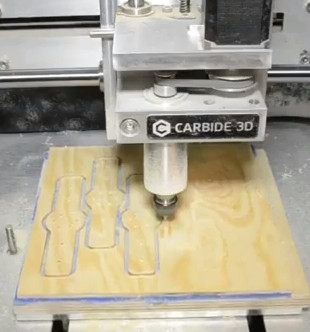
The beginning of the build starts with some mounting brackets getting designed in Fusion 360, and you would be forgiven if you thought some 3D printed parts were coming up next. But [Gustav] actually loads the design up on a Carbide 3D CNC and cuts them out of wood.

A metal hub is attached to each bracket, and then the two pieces are screwed onto a length of thin wood. This assembly is then mounted up to the spindle of a geared motor rated for 300 RPM. The end result looks like a large flat airplane propeller. Five of these “propellers” are created, one for each ring of the Olympic’s logo.

Once the sun sets, [Gustav] takes his collection of spinners outside and lines them up like windmills. At the end of each arm is a small ball of fine-grade steel wool, which will emit sparks for a few seconds when lighted. All you’ve got to do is get the 10 pieces of steel wool alight at the same time, spin up the motors, and let persistence of vision do the rest. If you can manage the timing, you’ll be treated with a spinning and sparking version of the Olympic rings that wouldn’t look out of place in a new Mad Max movie.

Generally speaking, we don’t see much overlap between the hacker community and the Olympics. You’d have to go all the way back to 2012 to find another project celebrating this particular display of athleticism. We would strongly caution you not to combine both of these Olympic hacks at the same time, incidentally.

Continue reading “Celebrating The Olympics With Flaming Windmills”

ESP8266 Broadcasts Memorial WiFi Spam

John Perry Barlow, founding member of the Electronic Frontier Foundation and Freedom of the Press Foundation, died on February 7th, 2018. To say that he left his mark on the Internet, and by extension modern culture, is something of an understatement. He may not be a household name, but between this activism (online and off), lectures, written work, and various entrepreneurial projects, his 70 years of life were surely not wasted. Barlow was once quoted as saying “I want to be a good ancestor”, and by pretty much any metric it would seem he made good on that goal.

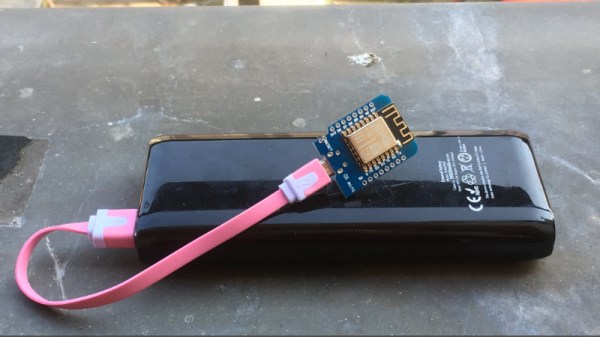
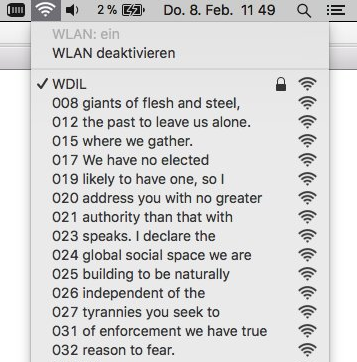
To mark his passing, [Moritz Metz] came up with a rather unusual memorial. Using a bit of code on an ESP8266 board, he created a device that would broadcast out Barlow’s “A Declaration of the Independence of Cyberspaceline-by-line in the form of 228 WiFi SSIDs. Perhaps not the most effective way to get Barlow’s words out to the people, but we’ll give him extra points for style.

The code itself is based on FakeBeaconESP8266, which as the name implies, allows the user to create fake WiFi networks. to broadcast the manifesto of your choosing, you need only add in the appropriate sendBeacon() lines at the bottom of the code. It would appear that prefixing each line with a number is required to make devices scanning for networks show the lines of text in proper sequence. At least on the devices demoed, anyway.

Just to be clear: you should definitely not do this. Jamming up the local environment with a bunch of fake networks is a pretty terrible idea. But as a memorial for a man who occasionally claimed to be an anarchist, you could do worse. Plus we have to admit “Giants of Flesh and Steel” is an awesome name for a network.

Continue reading “ESP8266 Broadcasts Memorial WiFi Spam”

Count Your Fans With This Stylish ESP8266 Display

Continuous self-affirmation is a vital component to the modern lifestyle. Of course you know the world loves you, but exactly how much do they love you? Checking your phone every few minutes to see if you’ve gained any followers is gauche, and perhaps more to the point, doesn’t let you show off when you’ve got visitors over. In the modern era, the up-and-coming social media star needs a stylish way to display just how popular they are for the world to see.

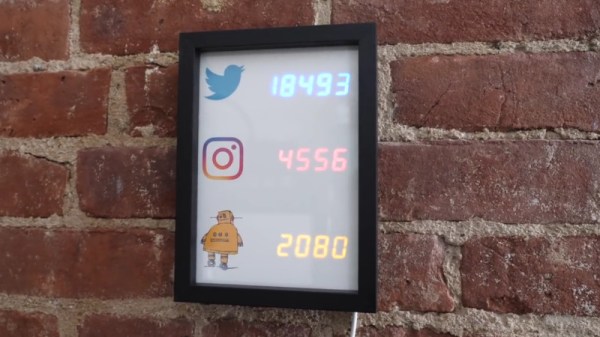
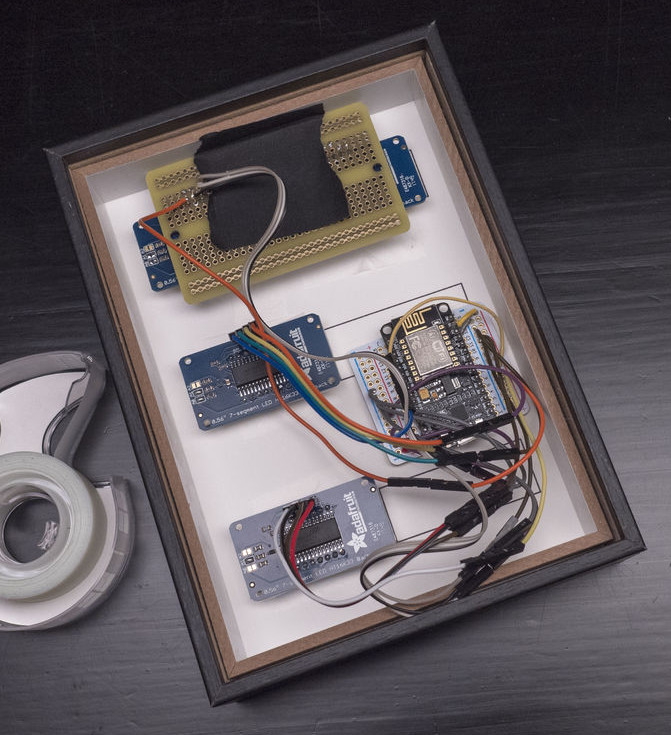
That’s the idea behind this very slick social media counter created by [Becky Stern]. Built into a standard shadow box frame and using LED displays glowing through a printed piece of paper, the finished product looks more like modern art than the usual hacker fare.

The counter is powered by a NodeMCU, but you could drop in your favorite variant of the ESP8266 and things would work more or less the same. For the displays, [Becky] is using four Adafruit 7-Segment LED modules, which are easily controlled via I2C which keeps the wiring to a minimum.

It’s interesting to note that since her follower count on Twitter has already hit five digits, two of the display modules are used next to each other for that particular service. Her Instructables and Instagram counters only have one display each however, limiting her counts on those services to 9,999 each. There’s probably something to be learned here in terms of the relative follower counts you can expect on the different social networks if you’re targeting your content to the hacker and maker crowd, but we’ll leave the analysis to those with a better handle on such matters.

Hardware aside, [Becky] spends a lot of time in the video talking about the code she’s come up with to pull her stats from the various services and push them out to the LED displays at a regular interval. It’s nice to see so much attention and explanation given to the software side of a project like this, as more often than not you’re left to your own to figure out what the source code is doing.

This project is quite similar to the YouTube Play Button hack we covered a few months back, but the addition of multiple social networks in one device is a nice improvement over the basic concept.

Continue reading “Count Your Fans With This Stylish ESP8266 Display”

Injection Molding IPhone Cases From Trash

We imagine you’ve heard this already, but waste plastic is a problem for the environment. We wrap nearly everything we buy, eat, or drink in plastic packaging, and yet very little of it ends up getting recycled. Worse, it doesn’t take a huge industrial process to melt down a lot of this plastic and reuse it, you can do it at home if you were so inclined. So why aren’t there more localized projects to turn all this plastic trash into usable items?

That the question that [Precious Plastic] asks, and by providing a centralized resource for individuals and communities looking to get into the plastic recycling game, they hope to put a dent in the worldwide plastic crisis. One of their latest projects is showing how plastic trash can be turned into functional iPhone cases with small-scale injection molding.

Pushing plastic into the mold

The video after the break goes into intricate detail about the process involved in creating the 3D CAD files necessary to make the injection molds. Even if you don’t plan on recycling milk jugs at home, the information and tips covered in the video are extremely helpful if you’ve ever contemplated having something injection molded. The video even demonstrates a neat feature in SolidWorks that lets you simulate how molten plastic will move through your mold to help check for problem areas.

Once you’ve designed your mold on the computer, you need to turn it into a physical object. If you’ve got a CNC capable of milling aluminum then you’re all set, but if not, you’ll need to outsource it. [Precious Plastic] found somebody to mill the molds through 3DHubs, though they mention in the video that asking around at local machine shops isn’t a bad idea either.

With the mold completed, all that’s left is to bolt the two sides together and inject the liquid plastic. Here [Precious Plastic] shows off a rather interesting approach where they attach the mold to a contraption that allows them to inject plastic with human power. Probably not something you’d want to do if you’re trying to make thousands of these cases, but it does show that you don’t necessarily need a high tech production facility to make good-looking injection molded parts.

This project reminds us of the tiles made of HDPE plastic with nothing more exotic than what you’d find in the average kitchen. Projects like these really drive home the idea that with the right hardware individuals can turn trash into usable products.

Continue reading “Injection Molding IPhone Cases From Trash”

Locally Sourced: PLA Adhesive

When I first started getting into 3D printed projects that would require final assembly from multiple parts, I wanted to make sure I had an adhesive that would really hold up. I couldn’t imagine anything worse than spending 10’s of hours printing and assembling something, only to have it fall apart because my adhesive wasn’t up to the task. So I spent a lot of time trolling 3D printing message boards and communities trying to find the best way of gluing PLA. It should come as no surprise that, like everything else in the world, there are a ridiculous number of opinions on the subject.

If you’re printing with ABS, the general wisdom is that solvent welding with acetone is the best bet. You put some acetone on the printed parts, rub them together, and the plastic fuses together. This happens because the ABS melts slightly when exposed to the acetone, so they end up essentially melding into one piece. This sounded like exactly what I wanted, but unfortunately, acetone doesn’t have this same effect on PLA.

After some more research I found people suggesting Weld-On #16, an acrylic adhesive that will actually melt PLA. A little of this applied to the parts, they said, and you can solvent weld PLA just like acetone on ABS. Sure enough, the stuff works great and I’ve used it to put together nearly everything I’ve printed in PLA over the last few years. Only problem is, this stuff is a bit nasty, takes 24 hours to fully cure, and nobody has it locally.

So as an experiment I thought I’d take a look at a few adhesives sold at the local big box retailer and see if I couldn’t find something comparable. Do I need to keep ordering this nasty goop online every time, or can I pick something up off the shelf? More to the point, is solvent welding PLA really any better than just gluing it?

Continue reading “Locally Sourced: PLA Adhesive”

Debugging An Arduino With An Arduino

As every Hackaday reader knows, and tells us at every opportunity in the comments, adding an Arduino to your project instantly makes it twice as cool. But what if, in the course of adding an Arduino to your project, you run into a problem and need to debug the code? What if you could use a second Arduino to debug the first? That would bring your project up to two Arduinos, instantly making it four times as awesome as before you started! Who could say no to such exponential gains?

Debugging an ATTiny85

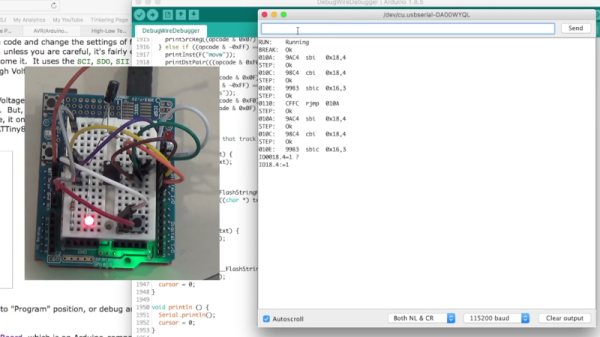
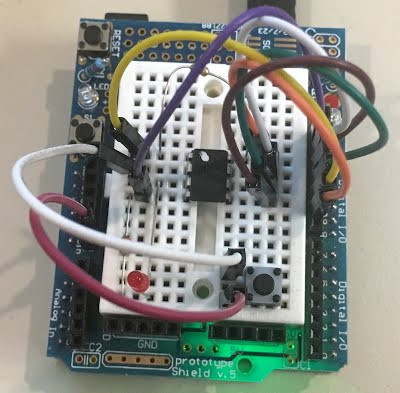
Not [Wayne Holder], that’s for sure. He writes in to let us know about a project he’s been working on for a while that allows you to debug the execution of code on an Arduino with a second Arduino. In fact, the target chip could even be another AVR series microcontroller such as a the ATTiny85. With his software you can single-step through the code, view and modify values in memory, set breakpoints, and even disassemble the code. Not everything is working fully yet, but what he has so far is very impressive.

The trick is exploiting a feature known as “debugWIRE” that’s included in many AVR microcontrollers. Unfortunately documentation on this feature is hard to come by, but with some work [Wayne] has managed to figure out how most of it works and create an Arduino Sketch that lets the user interact with the target chip using a simple menu system over the serial monitor, similar to the Bus Pirate.

[Wayne] goes into plenty of detail on his site and in the video included after the break, showing many of the functions he’s got working so far in his software against an ATTiny85. If you spend a lot of time working on AVR projects, this looks like something you might want to keep installed on an Arduino in your tool bag for the future.

Debugging microcontroller projects can be a huge time saver when your code starts running on real hardware, but often takes some hacking to get working.

Continue reading “Debugging An Arduino With An Arduino”