Game Like It Is 1983

The first computer I ever physically saw — I think — was an IBM System/3. You might not remember them. They were business computers for businesses that couldn’t justify a big mainframe. They were “midrange.” Nevermind that the thing probably had the memory and processing speed of the CPU inside my mouse. Time progressed and IBM moved on to the System/3x (for example, the System/32). Next up was the AS/400 and finally the IBM i, which is still in production. Here’s a secret, though, most of the code I’ve seen running on an IBM i dates back to at least the System/3 days and maybe even before that.

If you are interested in history, or midrange computers (which are mainframe-like in their operation), you might want to actually play with a real machine. A quick glance at eBay tells me that you might be able to get something workable for about $1000. Maybe. That’s a bit much. What if you could get time on one for free? Turns out, you can.

The Cloud Option

Head over to PUB400.com and register for an account. This won’t be instant — mine took a day or two. The system is for educational purposes, so be nice and don’t use it for commercial purposes. You get 150MB of storage (actually, some of the documentation says 250MB, and I have not tested it). While you are waiting for your account, you’ll need to grab a 5250 terminal emulator and adjust your thinking, unless you are a dyed-in-the-wool IBM guy.

Even though the IBM i looks like an old 1970’s midrange, the hardware is quite modern with a 64-bit CPU (and the architecture can handle 128 bits) and well-known stability. However, the interface is, well, nostalgic.

Ready…

Depending on your host computer, there are several IBM 5250 terminal programs available. They recommend tn5250 or tn5250j which use Java. However, I installed Mochasoft’s emulator into my Chrome browser. It is a 30-day free trial, but I figure in 30 days I’ll be over it, anyway.

Continue reading “Game Like It Is 1983”

JPEG Decoding, Arduino Style

When you think of image processing, you probably don’t think of the Arduino. [Jan Gromes] did, though. Using a camera and an Arduino Mega, [Jan] was able to decode input from an Arduino-connected camera into raw image data. We aren’t sure about [Jan’s] use case, but we can think of lots of reasons you might want to know what is hiding inside a compressed JPEG from the camera.

The Mega is key, because–as you might expect–you need plenty of memory to deal with photos. There is also an SD card for auxiliary storage. The camera code is straightforward and saves the image to the SD card. The interesting part is the decoding.

Continue reading “JPEG Decoding, Arduino Style”

Tinkercad Does Arduino

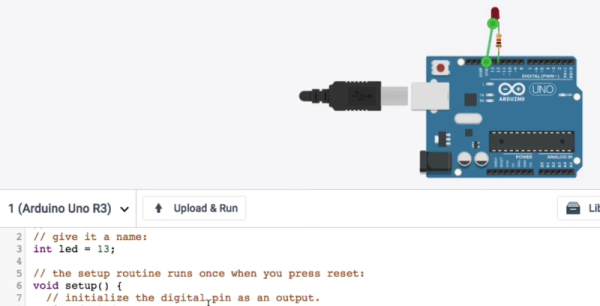
If you’ve done 3D printing, you’ve probably at least heard of Tinkercad. This popular CAD package runs in your browser and was rescued from oblivion by Autodesk a few years ago. [Chuck] recently did a video about a new Tinkercad feature: building and simulating virtual Arduino circuits. You can watch it below.

There are a variety of components you can add to your design. You’ll find an integrated code editor and a debugger. You can even get to the serial monitor, all in your browser with no actual Arduino hardware. You can also build simple circuits that don’t use an Arduino, although the component selection is somewhat limited.

Continue reading “Tinkercad Does Arduino”

Digitool Helps Debugging

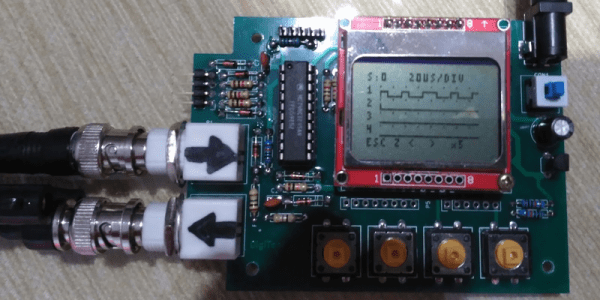
Logic analyzers used to be large boxes full of high-speed logic and a display monitor. Today, they are more likely to be a small box with a USB port that feeds data to a PC application. [Juan Antonio Rubia Mena] wanted something more self-contained, so he built Digitool. Built around a PIC18F2525, the device can measure frequency up to 10 MHz and inject square waves up to 1 MHz into the circuit under test. Oh yeah. It also has a simple four-channel logic analyzer that displays on a tiny LCD.

The 500,000 sample per second rate and the 1024 sample buffer isn’t going to put any logic analyzer vendors out of business, but it is still enough to help you figure out why that SPI or I2C logic is messed up. It looks like a fun project that could have some usefulness.

Continue reading “Digitool Helps Debugging”

Robot: Do My Bidding!

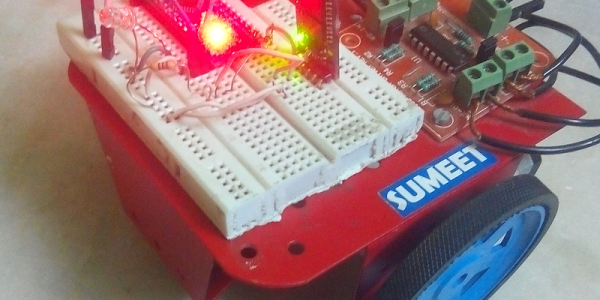
Remote control robots are nothing new. Using Bluetooth isn’t all that unusual, either. What [SayantanM4] did was make a Bluetooth robot that accepts voice commands via his phone. The robot itself isn’t very remarkable. An Arduino and an HC05 module make up most of the electronics. A standard motor driver runs the two wheels.

The Arduino doesn’t usually do much voice processing, and the trick is–of course–in the phone application. BT Voice Control for Arduino is a free download that simply sends strings to a host computer via Bluetooth. If you say “Hello” into your phone, the robot receives *Hello# and that string could be processed by any computer that can receive Bluetooth data.

Continue reading “Robot: Do My Bidding!”

COSMAC Elf Calculator Gets New Firmware

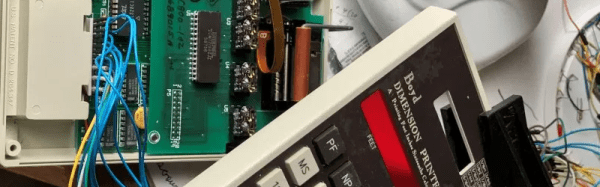
Everyone remembers their first. Their first CPU, that is. For many of us, it was the RCA 1802 thanks to the COSMAC Elf articles that ran in Popular Electronics. The later versions of the chip family were much better but were never as popular, but the 1805 did find its way into a printing calculator for dimensions from a company named Boyd. Some of these recently showed up on the surplus market and–of course–were subsequently hacked.

[Bill Rowe] is active in the groups that still work with the 1802. Because of some specialized uses you can still get the chips readily, some four decades after they were new. Other computers at the time were difficult to build and relatively expensive, while for $100 almost anyone could wire wrap a simple 1802-based computer together in a weekend or less.

Continue reading “COSMAC Elf Calculator Gets New Firmware”

Robot Solves Sudoku On Paper

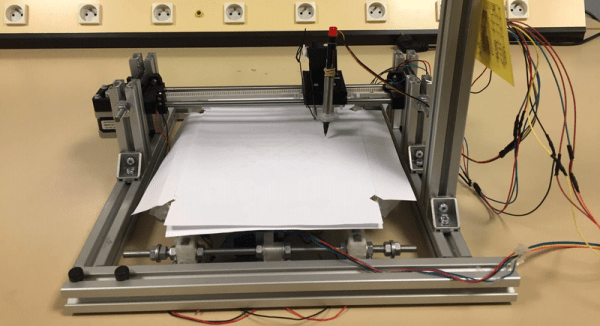
Sudoku is a great way to pass some time, especially on a long flight. However, we don’t think the airlines will let [Sanahm] board with his sudoku-solving robot. The basic machine looks like a 2D plotter made with aluminum extrusion, with the addition of a Raspberry Pi and a camera. The machine can read a sudoku puzzle, solve it, and then fill in the puzzle with a pen. Unlike humans, it should never need to erase its work.

The software uses OpenCV to process the camera data, find the grid, and the cells provided by the puzzle. TensorFlow recognizes the numbers. From there, it is all just math to solve the puzzle. Once solved, the plotter part of the robot takes over and fills in the blanks. After all that, this seems like the easy part.

Continue reading “Robot Solves Sudoku On Paper”