PS/2 Keyboard For Raspberry Pi

A lot of people can bake a cake. Sort of. Most of us can bake a cake if we have a cake mix. Making a cake from scratch is a different proposition. Sure, you know it is possible, but in real life, most of us just get a box of cake mix. The Raspberry Pi isn’t a cake (or even a pie), but you could make the same observation about it. You know the Raspberry Pi is just an ARM computer, you could program it without running an available operating system, but realistically you won’t. This is what makes it fun to watch those that are taking on this challenge.

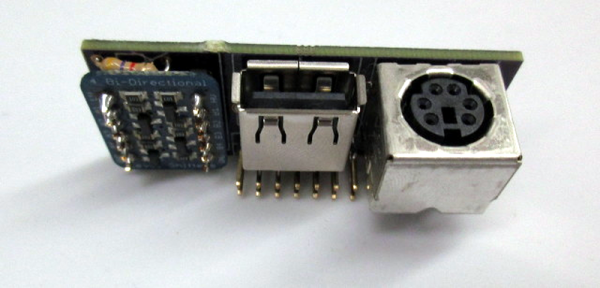
[Deater] is writing his own Pi operating system and he faced a daunting problem: keyboard input. Usually, you plug a USB keyboard into the Pi (or a hub connected to the Pi). But this only works because of the Linux USB stack and drivers exist. That’s a lot of code to get working just to get simple keyboard input working for testing and debugging. That’s why [Deater] created a PS/2 keyboard interface for the Pi.

Even if you aren’t writing your own OS, you might find it useful to use a PS/2 keyboard to free up a USB port, or maybe you want to connect that beautiful Model-M keyboard without a USB adapter. The PS/2 keyboard uses a relatively simple clock and data protocol that is well-understood. The only real issue is converting the 5V PS/2 signals to 3.3V for the Pi (and vice versa, of course).

Continue reading “PS/2 Keyboard For Raspberry Pi”

Cheap Smartwatch Teardown

A proper smartwatch can cost quite a bit of money. However, there are some cheap Bluetooth-connected watches that offer basic functions like show your incoming calls, dial numbers and display the state of your phone battery. Not much, but these watches often sell for under $20, so you shouldn’t expect too much.

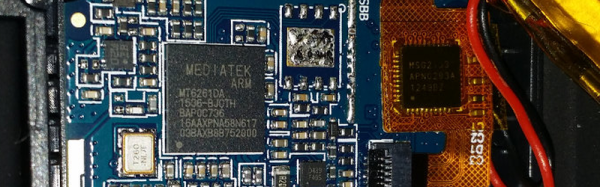
Because they’re so cheap, [Lee] bought one of these (a U8Plus) and within an hour he had the case opened up and his camera ready. As you might expect, the biggest piece within was the rechargeable battery. A MediaTek MT6261 system on a chip provides the smart part of the watch.

Continue reading “Cheap Smartwatch Teardown”

Nanotech Makes Safer Lithium Batteries

Lithium-ion batteries typically contain two electrodes and an electrolyte. Shorting or overcharging the battery makes it generate heat. If the temperature reaches about 300 degrees Fahrenheit (150 degrees Celsius), the electrolyte can catch fire and explode.

spikesThere have been several attempts to make safer lithium-ion cells, but often these safety measures render them unusable after overheating. Stanford University researchers have a new method to protect from overheating cells that uses–what else–nanotechnology graphene. The trick is a thin film of polyethylene that contains tiny nickel spikes coated with graphene (see electron micrograph to the right).

Continue reading “Nanotech Makes Safer Lithium Batteries”

Hacking Online Reviews

For this post, I want to return the word hacking to its nefarious definition. We prefer the kinder definition of a hacker as someone who creates or modifies things to fit some purpose or to improve its function. But a hacker can also be someone who breaks into computer systems or steals phone service or breaks encryption.

There are some “hacker battlefields” that are very visible. Protecting credit card numbers from hackers is a good example. But there are some subtle ones that many people don’t notice. For example, the battle for online reviews. You know, like on Amazon when you rate the soldering iron you bought and leave a note about how it works. That might seem like a strange place for hacking until you stop and think about why people do bad hacking.

Continue reading “Hacking Online Reviews”

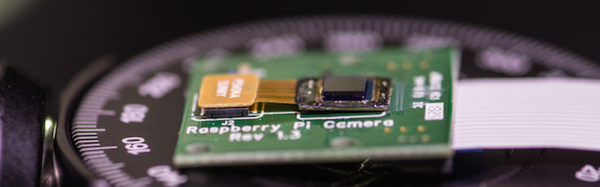
Flat Camera Uses No Lens

Early cameras and modern cameras work pretty much the same way. A lens (or a pinhole acting as a lens) focuses an image onto a sensor. Of course, sensor, in this case, is a broad term and could include a piece of film that–after all–does sense light via a chemical reaction. Sure, lenses and sensors get better or, at least, different, but the basic design has remained the same since the Chinese built the camera obscura around 400BC (and the Greeks not long after that).

Of course, the lens/sensor arrangement works well, but it does limit how thin you can make a camera. Cell phone cameras are pretty skinny, but there are applications where even they are too thick. That’s why researchers at Rice University are working on a new concept design for a flat camera that uses no lens. You can see a video about the new type of camera below.

Continue reading “Flat Camera Uses No Lens”

PIC32 Smart Watch For Less Than A Benjamin

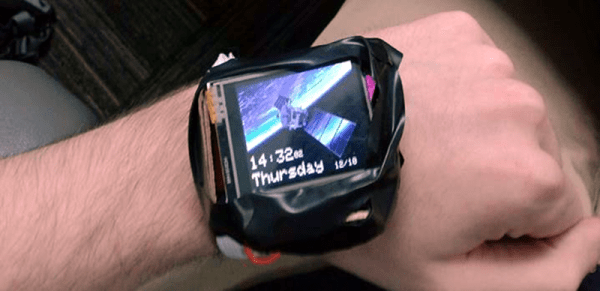
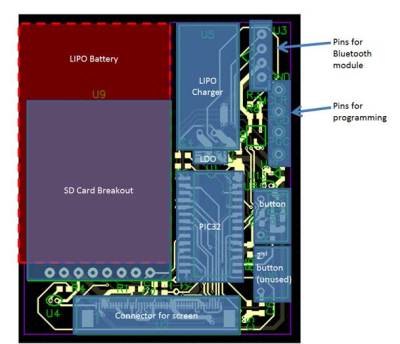
[Matthew Filipek] likes smart watches, but wanted to build one for under $100, so he did. The watch has a 1.7 inch LCD touchscreen, a rechargeable LiPo battery, an SD card, and Bluetooth. The watch is a little large since [Matthew] had only a month to complete the project that drove him to use some pre-made modules image004and meant one shot at getting his custom PCB right.

The watch sports three applications: a settings app, a simple game, and a sketch program (you can see a demo in the video below). Power management is a primary goal, of course, although the clock rate is held high enough to make the game playable. To simplify the software, [Matthew] uses protothreads–a lightweight thread abstraction for embedded systems.

We’ve seen several DIY smartwatches in the past including one entry for the Hackaday Prize. It is hard to roll your own watch that has the same small size and style as a commercial offering. However, there is something to be said for having a homebrew watch for boosting your hacker cred.

Continue reading “PIC32 Smart Watch For Less Than A Benjamin”

Zedboard Multiport Ethernet

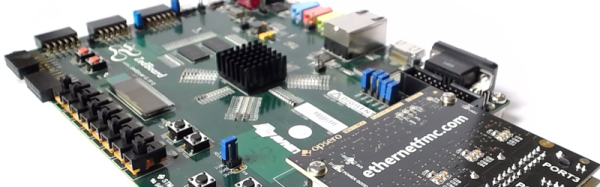
The Zedboard uses Xilinx’s Zynq, which is a combination ARM CPU and FPGA. [Jeff Johnson] recently posted an excellent two-part tutorial covering using a Zedboard with multiple Ethernet ports. The lwIP (light-weight Internet Protocol) stack takes care of the software end.

Vivado is Xilinx’s software for configuring the Zynq (among other chips), and the tutorial shows you how to use it. The Ethernet PHY is an FPGA Mezzanine Card (FMC) with four ports that is commercially available. The project uses VHDL, but there is no VHDL coding involved, just the use of canned components.

The real issue when using an FPGA and a CPU is the interface between the processor and the FPGA circuitry. In this case, the ARM standard AXI bus does this task, and the Ethernet component properly interfaces to that bus. The IP application in the second part of the post is an echo server.

We’ve seen the Zynq used in flying machines and also in a music synthesizer. Although this project doesn’t use any Verilog or VHDL that you create, it is still a great example of configuring using Vivado and using common components in a design.