Teach Yourself Verilog With This Tiny CPU Design

You probably couldn’t write a decent novel if you’d never read a novel. Learning to do something often involves studying what other people did before you. One problem with trying to learn new technology is finding something simple enough to start your studies.

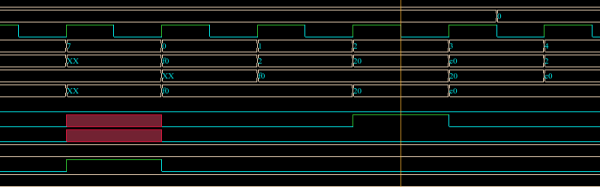
[InfiniteNOP] wanted to get his feet wet writing CPUs and developed a simple 8-bit architecture that would be a good start for a classroom or self-study. It is a work in progress, so there may be a few bugs in it still to squash, but squashing bugs might be educational too. You can read the documentation in the HACKING file for details on the architecture. Briefly, the instruction’s top four bits encode the operation, while the last four bits select the register operands (there are four registers).

[InfiniteNOP] used the Xilinx tools to simulate and synthesize the CPU, but we thought it might be a good excuse to play with EDAPlayground. You can find a testbench that works with EDAPlayground, although you’ll probably want to update the CPU files to match the latest version.

Continue reading “Teach Yourself Verilog With This Tiny CPU Design”

Build Your Own CPU? That’s The Easy Part!

You want to build your own CPU? That’s great fun, but you might find it isn’t as hard as you think. I’ve done several CPUs over the years, and there’s no shortage of other custom CPUs out there ranging from pretty serious attempts to computers made out of discrete chips to computers made with relays. Not to trivialize the attempt, but the real problem isn’t the CPU. It is the infrastructure.

What Kind of Infrastructure?

I suppose the holy grail would be to bootstrap your custom CPU into a full-blown Linux system. That’s a big enough job that I haven’t done it. Although you might be more productive than I am, you probably need a certain amount of sleep, and so you may want to consider if you can really get it all done in a reasonable time. Many custom CPUs, for example, don’t run interactive operating systems (or any operating system, for that matter). In extreme cases, custom CPUs don’t have any infrastructure and you program them in straight machine code.

Machine code is error prone so, you really need an assembler. If you are working on a big machine, you might even want a linker. Assembly language coding gets tedious after a while, so maybe you want a C compiler (or some other language). A debugger? What about an operating system?

Each one of those things is a pretty serious project all by itself (on top of the project of making a fairly capable CPU). Unless you have a lot of free time on your hands or a big team, you are going to have to consider how to hack some shortcuts.

Continue reading “Build Your Own CPU? That’s The Easy Part!”

Open Source FPGA Toolchain Builds CPU

When you develop software, you need some kind of toolchain. For example, to develop for an ARM processor, you need a suitable C compiler, a linker, a library, and a programmer. FPGAs use a similar set of tools. However, instead of converting source code to machine language, these tools map the intent of your source code into configuration of FPGA elements and the connections between them.

There’s some variation, but the basic flow in an FPGA build is to use a synthesizer to convert Verilog or VHDL to a physical design. Then a mapper maps that design to the physical elements available on a particular FPGA. Finally, a place and route step determines how to put those elements in a way that they can be interconnected. The final step is to generate a bitstream the chip understands and somehow loading it to the chip (usually via JTAG or by programming a chip or an external EEPROM).

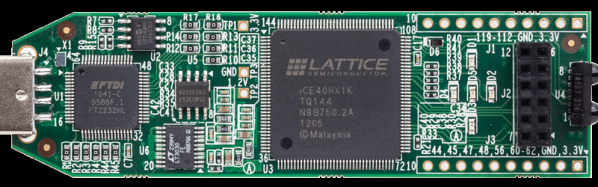
One problem with making your own tools is that the manufacturers typically hold the bitstream format and other essential details close to their chest. Of course, anything can be reverse engineered (with difficulty) and [James Bowman] was able to build a minimal CPU using  an open source Lattice toolchain. The project relies on several open source projects, including  IceStorm, which provides configuration tools for Lattice iCE40 FPGAs (there is a very inexpensive development platform available for this device).

We’ve covered IceStorm before. The IceStorm project provides three tools: one to produce the chip’s binary format from an ASCII representation (and the reverse conversion), a programmer for the iCEstick and HX8K development boards, and database that tells other open source tools about the device.

Those tools blend with other open source tools to form a complete toolchain–a great example of open source collaboration. Yosys does the synthesis (one of the tools available on the EDAPlayground site). The place and route is done by Arachne. The combined tools are now sufficient to build the J1A CPU and can even run a simple version of Forth. If you’ve ever wanted to play with an FPGA-based CPU design, you now have a $22 hardware option and free tools.

Continue reading “Open Source FPGA Toolchain Builds CPU”

3D Mouse Drives Robot Arm

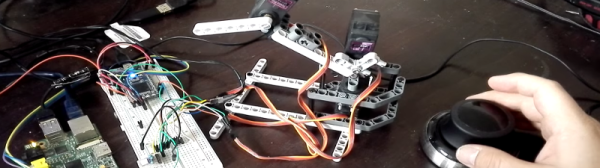
You’ve built the perfect robotic arm. How do you drive it? If you are [angrymop] you interface a 3D mouse from 3DConnexion via a few microcontroller boards. The Spacenavigator mouse is a staple anywhere professional CAD people are working, and it looks like it is a natural fit for a robot arm.

According to [angrymop], the Raspberry Pi can read the mouse’s commands via /dev/hidraw (that’s the raw human interface device). Each motion generates two lines of output. Each line has a unique identifying byte and values corresponding to the axis positions.

The Raspberry Pi then uses an SPI interface to talk to an ARM microcontroller and that drives the servos. The arm (the robot arm, not the processor) itself is well done, made from Lego Technic parts and common RC servos. Not that this is the most amazing thing we’ve ever seen built from Technic, but it is still pretty impressive.

You have to wonder if other 3D controllers might be useful for controlling robot arms or how the Spacenavigator would do controlling a bigger, more capable arm. Then again, maybe this arm would be the right size to build something inspired by Escher.

Continue reading “3D Mouse Drives Robot Arm”

Simple One-Chip Regenerative Receiver

Crystal radios may be the simplest kind to make, but regenerative receivers are more practical and only a little more complicated. A recent design by [Selenium] is super simple because it uses a single LM386 audio amplifier IC.

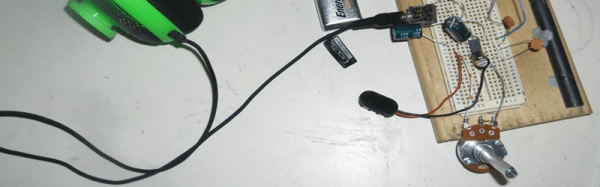
You might be surprised that you can convert an audio amplifier to a receiver using just a handful of components (a variable capacitor, a coil, a handful of capacitors, and a speaker). However, [Selenium] realized he could subvert the gain and bypass pins to cause regeneration and wound up with a very simple receiver.

If you haven’t looked at regenerative receivers before, the principle is simple (and dates back to 1912). An oscillator is an amplifier that gets (theoretically) an infinite amount of gain at one particular frequency. A regenerative receiver is just an amplifier that is almost (but not quite) at the point of oscillation. This gives it very high frequency-specific gain and a measure of selectivity. You can also nudge the receiver just into oscillation to receive CW or SSB signals.

[Selenium] built his prototype on an old receiver chassis because it had the IC and the variable capacitor already in place. However, others have built successful copies on breadboards ([Austin Heller] created several good looking breadboard versions) and on PCB material. [Selenium] also released some other unique LM386-based designs that use more parts (and, probably, have better performance). Looks like a simple way to build a practical receiver.

The Three Dollar Frequency Standard

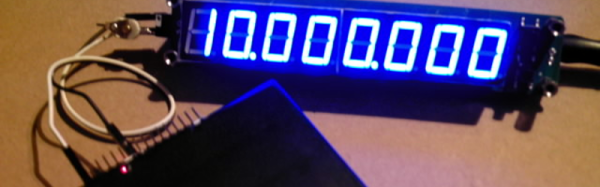
[Paulie] over on the EEVBlog forums picked up an inexpensive frequency counter on eBay and realized it was just a little bit off. As a result, he decided to build a frequency standard. His build wound up costing him about $3 and he shared the design and the software for it.

The hardware design is very simple: a TCXO (also from eBay), an ATMega8, a pushbutton, and a AA battery with DC to DC converter to power the whole thing. The software does all the work, providing frequencies from 10MHz down to a few hundred hertz (including some common audio test frequencies).

If you haven’t worked with a TCXO before, it is a crystal oscillator that includes a temperature compensation circuit to pull the crystal frequency up or down depending on temperature. Although crystal oscillators are pretty accurate already, adding this temperature compensation improves accuracy over the design temperature dramatically (typically, 10 to 40 times better than a naked crystal oscillator). If you want to learn more about TCXOs, here’s a good write-up.
A TCXO isn’t as good as an OCXO (where the first O stands for Oven). However, OCXOs cost more, are larger, and drain batteries (after all, it is running an oven). You can even hack your own OCXO, but it is going to cost more than $3.

If you want to see the real guts of one TCXO, check out the video.

Continue reading “The Three Dollar Frequency Standard”

Retro TO-3 Switching Voltage Regulator

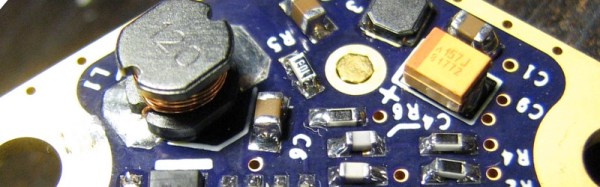
Restoring old gear often means replacing unavailable parts with modern equivalents. [Alex Eisenhut] needed to replace some old TO-3 voltage regulators and decided to make an authentic-looking switching power supply replacement. These three pin metal cans were very common, especially the LM340 5V regulator which was, of course, a linear regulator. Today, you are more likely to see a 7805 in a TO-220 case or something surface mount for a comparable linear regulator.

As you might expect, the board uses surface mount components. [Alex] used Mill Max machine pins to match the original regulator footprint and calls the regulator Ton3y. He plans to cover it up with a 3D printed lid, but it seems a shame to hide the fine PCB work.

In the pictures, you can see that the machine pins are a tight fit. [Alex] used a hammer to lightly tap them into place. Of course, the original TO-3 regulators were linear and would generate a lot of heat. The Ton3y, as you’d expect from a switching power supply, runs cool (according to the scientific measurement made with [Alex]’s pinky finger) and surely has a wider input voltage range and more output current capacity.

We’ve seen replacement switching regulators before, but this one is really a work of art.