VFD Clock Runs On A Single AA

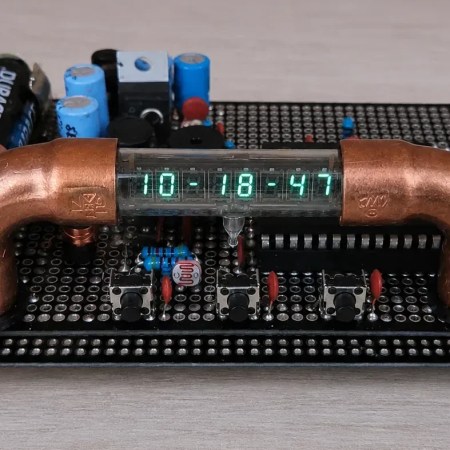
There are lots of different ways to build a clock. [Sciter_] came into the possession of some old calculator parts, and decided to reuse them for just such a project.

The heart of the build is an ATmega328P microcontroller, running off of a 32.768 kHz crystal. This allows the chip’s counters to neatly divide down the frequency to get a steady 1 Hz pulse for accurate timekeeping. Time is displayed on a vacuum fluorescent display (VFD) harvested from an old calculator. These displays need rather high voltages to run, which in this case are produced by a HV5812 driver chip and supporting circuitry. The display itself is neatly cradled in a pair of copper pipe elbows for a stylish look, with some addressable RGB LEDs present to provide some charming underglow.

Power for the device comes from a single AA battery, using a transformer-based low voltage converter. Alternatively, it can run off a USB 5 V power supply, which also charges the NiMH AA cell while available with the aid of an LM2576-ADJ buck converter.

Overall, it’s a neat homebrew clock that taught [Sciter_] plenty during its construction, and not the first time we’ve seen somebody put together a clock with second-hand VFDs. If you’re finding fun ways to reuse old display tech, don’t hesitate to let us know on the tipsline.


The Trains With Rubber Tires

The train was one of the game-changing inventions that defined the Industrial Age. No more would humanity rely on tempestuous animals to haul goods and passengers great distances across the land. Fire and steam came along to rapidly increase the speed of travel and transformed the very fabric of society itself.

To this day, the vast majority of train networks rely on the same basic principle—heavy locomotives and carriages running steel wheels on steel tracks. Yet, there is a curious alternative twist on this concept that sees trains of carriages riding on tires instead. But what would possess anyone to build a rubber tired train?

Continue reading “The Trains With Rubber Tires” →

A T9 Keyboard For Your Smartphone

These days, most of us are fortunate enough to use smartphones with decent touchscreen keyboard capabilities. However, once upon a time, if you wanted to type something on a phone, you had to tap it out on the number keys instead. [Jarrett] is bringing that back with a custom T9 keyboard for modern phones. 

The build is designed around the keypad of the Nokia E52, a Symbian smartphone released in 2009—two years after Apple changed the game with the first iPhone. The phone keypad itself is laid over a custom PCB with Alps SKRK tactile switches corresponding to each individual key. Each is wired with a diode and the switches are scanned as a row/column array as is typical for keyboards. Reading the matrix is an ESP32-C6 microcontroller, which counts the keypresses and spits out the right letters over its Bluetooth connection to an attached smartphone or other device. Power is via a small lithium-ion battery, looked after by a TP4200 charger chip.

Overall, the keyboard works as you’d expect, allowing T9-style input to any compatible device that works with Bluetooth keyboards. [Jarrett] does have one regret, with the 0.98 N actuation force switches used leaving he keypad feeling a little mushy. The firmer 1.57 N switches were suspected to give a more satisfying response under thumb, which was a nice upgrade in the second revision build.

We’ve seen other builds in this vein before, too, albeit with bigger keys. If you’re coming up with your own esoteric input methods, don’t hesitate to notify the tipsline.

Tricking A Bike Counter

Some municipalities implement bike counters on cycling routes in order to monitor traffic. [nullpxl] recently investigated how these counters work, and explored methods that can be used to trick the counter into thinking a bike passed over it.

A great many of these devices are built using inductive loop sensors. This involves passing a current through a loop of wire embedded in the ground. When a conductive item such as the metal wheel of a bike passes through the electric field, eddy currents are generated in the item, creating their own magnetic field which reacts with the loop’s field itself. This creates a change in inductance which can be measured, and thus used to log the number of times a conductive item has passed over the sensor. By looking at the signature of the inductance change, a system can be tuned to detect specific objects—for example, two bicycle wheels passing over a sensor will create a signal that varies over time in a characteristic way.

[nullpxl] first tried to recreate a “bike” signal for the inductive loop by running over the area holding two metal pans. This wasn’t close enough, so a new idea was needed. Experiments with a scrap bike then indicated that there was a speed gate involved, and that wheeling one wheel over the sensor and back again could trick the sensor into thinking a bike had passed by. Eventually, [nullpxl] distilled all this learning down to create “the BIKE BASKET.” It’s simply a bag with a bike wheel in it, and swinging it over the sensor twice makes the counter tick up.

Is there any money in tricking the average municipal bike counter in your local city? We doubt it, unless Big Bike is getting increasingly filthy in its lobbying efforts. In any case, we love to see weird sensor hacks around these parts. Continue reading “Tricking A Bike Counter” →

Making Old Computers Count To A Million

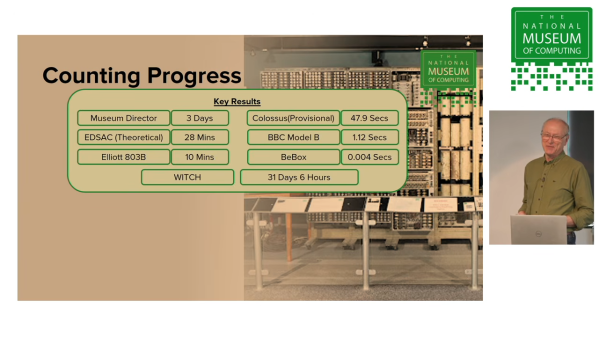
How fast can you count to a million? It would probably take you a while. A computer could certainly do it faster. Indeed, the The National Museum of Computing figured it could actually prove to be a simple but useful benchmark for comparing computers over many eras and architectures. Thus was born the Million Measure.

The intention was to develop a benchmark that could run on just about anything considered a “computer.” As explained in a recent talk, the Million Measure can be run quite simply on anything from an ancient World War II computer like Colossus, to a modern Raspberry Pi. There are no complicated algorithms that need optimization, nor architecture-specific code required to do the job. The museum also found it to be a useful way to figure out which computers in their collection were actually working at any given time. Early computers from the mid-20th century reported benchmark times in minutes, while a 1995 BeBox is the fastest machine tested so far at 0.004 seconds.

It’s not a particularly useful measure for modern machines, which are so fast as to make the test difficult to parse in an intuitive way. But if you’re working with today’s hardware, there are other techniques you can use. Video after the break.

Continue reading “Making Old Computers Count To A Million” →

Epson HX-20 Gets A Drive Upgrade

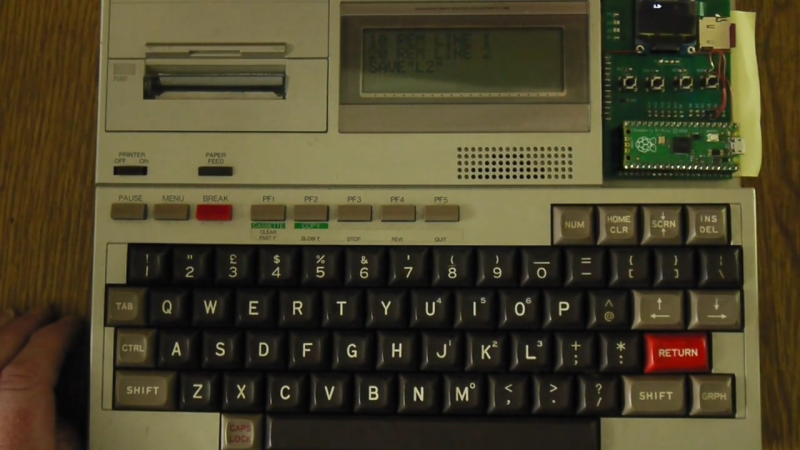
The Epson HX-20 is sometimes referred to as an early laptop computer. It’s a little odd in its form factor, and in its storage, relying on a microcassette drive to store data. It can be problematic to keep these tapes and drives going after so many decades, so [Andrew Menadue] has been tinkering with a more modern solution.

The replacement drive uses a Raspberry Pi Pico to emulate the original tape drive. The Pico uses a microSD card to store data instead of the magnetic media of old. The device has a small screen for showing status information and four buttons for navigation, allowing the faux drive to be controlled as to what “tape” it’s pretending to be. It’s also possible to use the device to emulate ROM cartridges that could be used with the HX-20 in place of its original tape deck storage solution.

We’ve seen some other old hardware get similar drive upgrades before, too. No surprise, because mechanical drives and media simply don’t last forever. Sometimes you need to build a replacement that’s viable today. Video after the break.

Continue reading “Epson HX-20 Gets A Drive Upgrade” →

Making An Ultra Minimal Cyberdeck

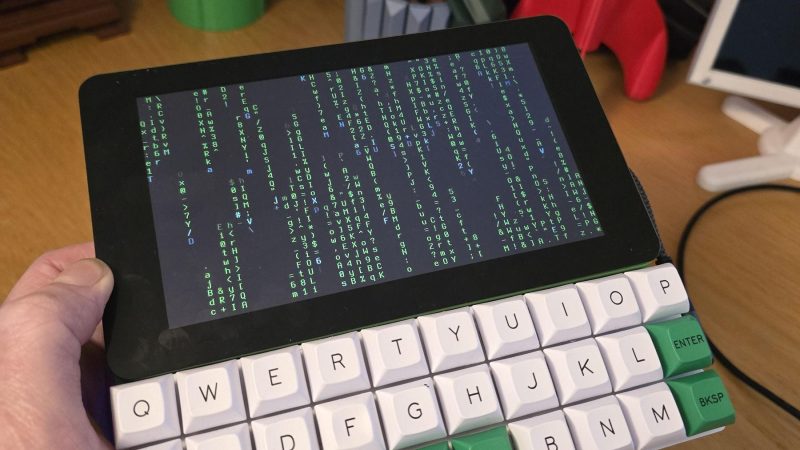
The cool thing about cyberdecks is that you get to design them to suit your personal tastes. [NickZero] wanted an ultra-minimal build, and set about putting together just that.

The build is based around a Raspberry Pi Zero 2W, which has a lighter power draw than the full-fat models at the trade-off of some processing power. Since it’s a W model, it has the benefit of wireless connectivity baked in from the factory. The Pi is paired with a Gherkin 30% layout keyboard kit, which neatly matches the 7″ Waveshare touch display in width. Power is courtesy of a juicy 4000 mAh lithium-ion cell, which is taken care of by an Adafruit Powerboost 1000 charger module. Everything is then laced up together inside a nifty 3D printed case.

It’s a simple cyberdeck, and one that’s probably quite satisfying to use when you get used to the fact that there are no number or modifier keys on the ultra-cut-down keyboard. It’s also a great example of how a bunch of off-the-shelf gear can nonetheless be assembled into quite a cohesive whole. In much the opposite way, we’ve seen some maximalist cyberdeck builds lately, too.

Continue reading “Making An Ultra Minimal Cyberdeck” →