Tricking A Bike Counter

Some municipalities implement bike counters on cycling routes in order to monitor traffic. [nullpxl] recently investigated how these counters work, and explored methods that can be used to trick the counter into thinking a bike passed over it.

A great many of these devices are built using inductive loop sensors. This involves passing a current through a loop of wire embedded in the ground. When a conductive item such as the metal wheel of a bike passes through the electric field, eddy currents are generated in the item, creating their own magnetic field which reacts with the loop’s field itself. This creates a change in inductance which can be measured, and thus used to log the number of times a conductive item has passed over the sensor. By looking at the signature of the inductance change, a system can be tuned to detect specific objects—for example, two bicycle wheels passing over a sensor will create a signal that varies over time in a characteristic way.

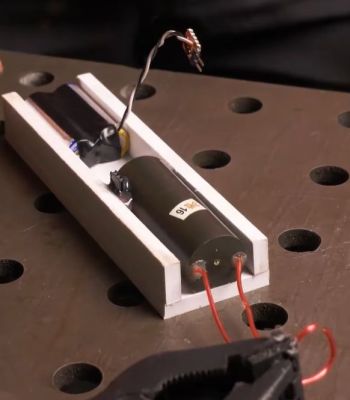
[nullpxl] first tried to recreate a “bike” signal for the inductive loop by running over the area holding two metal pans. This wasn’t close enough, so a new idea was needed. Experiments with a scrap bike then indicated that there was a speed gate involved, and that wheeling one wheel over the sensor and back again could trick the sensor into thinking a bike had passed by. Eventually, [nullpxl] distilled all this learning down to create “the BIKE BASKET.” It’s simply a bag with a bike wheel in it, and swinging it over the sensor twice makes the counter tick up.

Is there any money in tricking the average municipal bike counter in your local city? We doubt it, unless Big Bike is getting increasingly filthy in its lobbying efforts. In any case, we love to see weird sensor hacks around these parts. Continue reading “Tricking A Bike Counter”

Home Automation: Simple Vs Easy

We’ve been talking a bunch of home automation on the Podcast lately, and this week, in the Mailbag segment, a reader asked us about our setups. Neither Kristina nor I are poster children for the home automation movement: she has absolutely no smart anything because she didn’t want her data up in “the cloud”, and I have an entirely local system that’s really nothing more than a bunch of ad-hoc scripts that talk to an MQTT broker, everything fully DIY but held together with metaphorical duct tape. Neither of us are doing it right, but we’re doing it wrong in interestingly different ways.

Kristina thought, probably because of the range of commercial devices out there that tie you into using their remote data storage services, that giving up control of her data was necessary to use it. And it might be, if you insist that setting up the system be as easy as possible. But the tradeoff for this ease is a drastic reduction in simplicity. You shouldn’t need a remote server in some foreign country to turn your lights on and off. Adding “the cloud” into the mix brings a lot of complexity, mostly in the form of servers that have to be paid for somehow by whatever company is providing the service. It needs to be secure. You might even have to create accounts, remember passwords, and manage that whole deal. Sure, that’s easy enough, but it’s a lot of moving parts, and you can’t blame her for rejecting that complexity.

My system is hosted on a now-ancient OrangePi in the corner, and the network in question is an old WiFi router that it sits on. Nothing needs to leave my four walls, but actually some of it does – I bridge some of the MQTT topics out to an external server for my own amusement. There is no protocol, and no real “system” frankly. Each device in the network has its own topic, and I’m responsible for knowing what it means. The thermometer in the basement has an ESP8266 that transmits on the home/basement/temperature topic, and it puts out its temperature in degrees Celsius. It was the simplest system I could think of, but I have to write whatever software I want to log, display, or act on the data. Of course, that’s simple if you can write some four-liner scripts on the OrangePi broker, but it’s not easy enough that my wife wants to hack on it.

So if the full-buy-in commercial systems are easy but overly complex, and my DIY network is transparently simple but requires a level of hands-on that isn’t easy for “normies”, is there a middle ground? I know half of you are already screaming Home Assistant or Domoticz, and you’re also thinking of which client device libraries you like the most for all your DIY applications: ESPHome vs Tasmota, for instance. And you’re all right!

We are living the in the golden age of the home automation projects. Open-source software and firmware, combined with an abundance of online tutorials and worked examples, have made huge strides toward bridging the gap between simplicity and ease of use. You can set up a hub for everything on a single-board computer, upload the software of your choice, and you don’t need the complexity or loss-of-support liability of a cloud provider. At the same time, setup is easy enough if you’re willing to roll up your sleeves a little bit, and when it’s not, chances are good that someone else has already figured it out for you. These days, interoperability with popular commercial products is shockingly easy to boot.

I need to spend some time and rationalize my system: given the state of the art, it’s simply too simple, and taking a step into an open-source solution would make it easier to use for the rest of the family, without overly complexifying things, adding sketchy dependencies, or losing our data sovereignty. I haven’t finished exploring my options yet, but from what I can see, the community has converged on some goldilocks setups: not too simple or too easy, but rather just right. Thanks, y’all!

The Repair Nightmare That Are Smart Rings

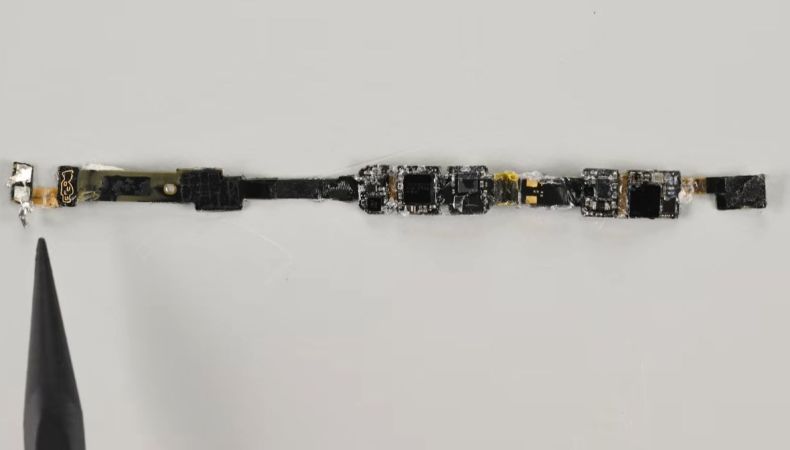
In the quest to make every wearable device ‘smart’, a lot of electronics along have to be crammed in very small spaces, along with ways to make them resistant to environments that our bodies do not mind, like getting hit by a rainstorm or simply washing our hands. These two factors combined make especially devices like smart rings an interesting case study for repairability, with [iFixit] recently taking apart a modern Oura smart ring to assess its e-waste factor after the built-in battery dies.

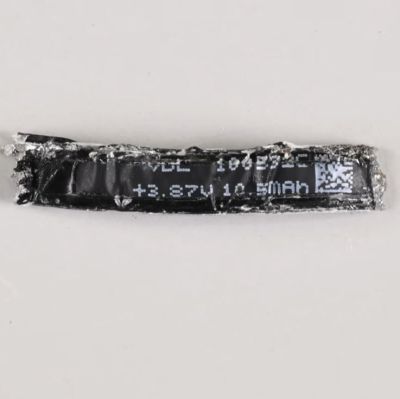
The tiny 10.5 mAh Lipo cell in the Oura Ring 5. (Credit: iFixit)

The subject of the teardown video is the Oura Ring 5, a $400 smart ring that’s designed to track your vitals much like a wrist-worn fitness tracker — just in a much smaller package. This metal-and-epoxy sandwich can definitely survive a good rain shower and washing of hands, but to get to the internals rather forceful methods were needed, unlike previous Oura and Samsung smart rings where some applied heat was enough.

In the Ring 5’s case even more heat was needed to make the inner ring start to slide out, but by that point the Li-ion battery inside had already popped from the heat. The inner ring then got stuck and more violence was required to continue the disassembly and get to the super-tiny, 10.5 mAh battery. Of course, at this point the smart ring really won’t be getting back together, never mind still work or be waterproof, which is a central issue with these smart rings.

With the EU’s February 2027 deadline for user-replaceable batteries looming on the horizon, it’ll be interesting to see whether devices like this can squeeze into an exception category, or whether manufacturers will have to massively redesign or stop selling these devices to this rather large market. So far this particular regulation has already forced Nintendo to make a special Switch 2 console for the EU.

Continue reading “The Repair Nightmare That Are Smart Rings”

A General Purpose Pi Zero Device For IoT

By now we’re all used to single board computers such as the Raspberry Pi Zero, but it’s likely we’ve all been frustrated at times by the number of support components required to use one. This becomes ever more annoying out in the field away from a handy HDMI, USB desktop, and power supply.

The Edgeberry Zero is an attempt to tackle this by mating a Raspberry Pi Zero with a PCB holding a robust power supply and interface connector, all together in a case. better still it comes with Edgeberry Hub, a software management interface.

It appears to be a commercially available product, but it’s Open Source Hardware Association (OSHWA) certified and everything is available in a GitHub repository. Looking at it from a Hackaday perspective it’s hardly the first power supply support board we’ve seen for a Pi, but its approach of making its own expansion module format is an interesting choice. To us they are reminiscent of Game Boy cartridges in the way they slide into a slot in the case.

We like the general idea behind the Edgeberry Zero, but whether it offers enough differentiation from packaging up a Zero with cables and duct tape is up to you.