Programmer’s Macro Pad Bangs Out Whole Functions

Macro pads are handy for opening up your favorite programs or executing commonly used keyboard shortcuts. But why stop there?

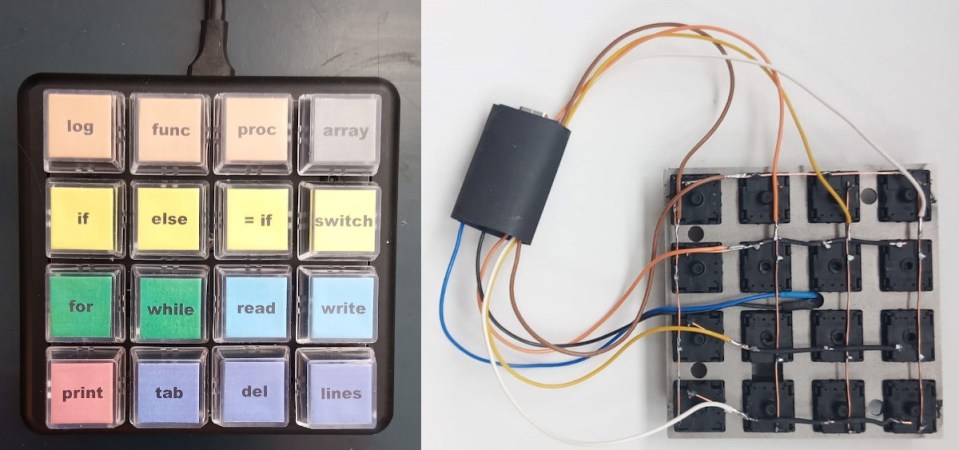
That’s what [Jeroen Brinkman] must have been thinking while creating the Programmer’s Macro Pad. Based on the Arduino Pro Micro, this hand-wired pad is unique in that a single press of any of its 16 keys can virtually “type” out multiple lines of text. In this case, it’s a capability that’s being used to prevent the user from having to manually enter in commonly used functions, declarations, and conditional statements.

For example, in the current firmware, pressing the “func” key will type out a boilerplate C function:

int () { //
;
return 0;
}; // f 

It will also enter in the appropriate commands to put the cursor where it needs to be so you can actually enter in the function name. The other keys such as “array” and “if” work the same way, saving the user from having to enter (and potentially, even remember) the correct syntax.

The firmware is kept as simple as possible, meaning that the functionality of each key is currently hardcoded. Some kind of tool that would let you add or change macros without having to manually edit the source code and flash it back to the Arduino would be nice…but hey, it is a Programmers Macro Pad, after all.

Looking to speed up your own day-to-day computer usage? We’ve covered a lot of macro pads over the years, we’re confident at least a few of them should catch your eye.
Open Source Universal ROM Programmer Grows Up

When we first looked at [Anders Nielsen’s] EEPROM programmer project, it was nice but needed some software and manual intervention and had some limitations on the parts you could program. But through the magic of Open-Source collaboration, revision 2 of the project overcomes all of these limitations and—as you can see in the video below—looks very polished.

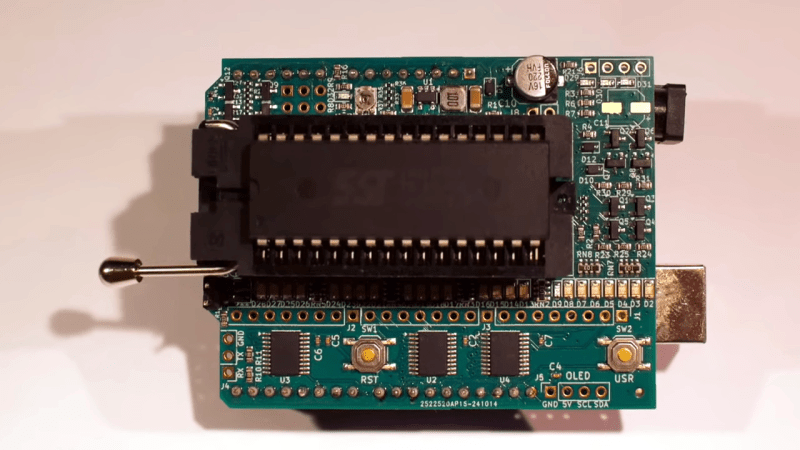
If you recall, the programmer is in a “shield” format that can plug into an Arduino or — if you prefer a retrocomputer — a 6502uno. Along with hardware improvements from the community, [Henrik Olsson] wrote Python software to handle the programming (see the second video below).

Continue reading “Open Source Universal ROM Programmer Grows Up”

Go Forth With This Portable Programmer

When choosing a low-level language, it’s hard to beat the efficiency of Forth while also maintaining some amount of readability. There are open source options for the language which makes it accessible, and it maintains its prevalence in astronomical and other embedded systems for its direct hardware control and streamlined use of limited resources even though the language started over 50 years ago. Unlike 50 years ago, though, you can now take your own self-contained Forth programmer on the go with you.

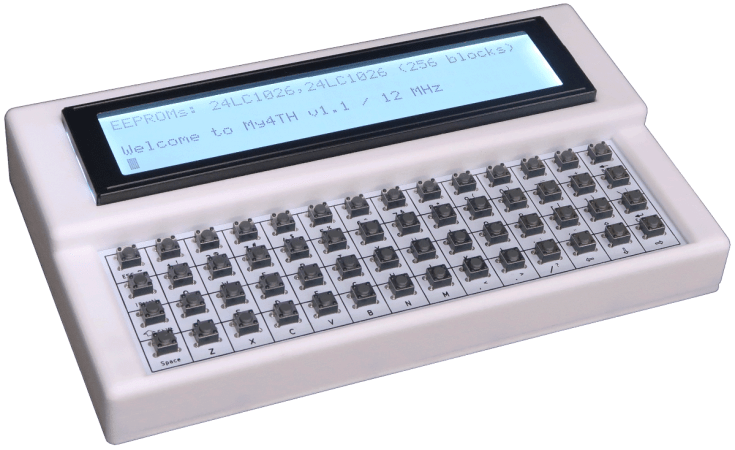
The small computer is built on a design that [Dennis] built a while back called my4TH which has its own dedicated 8-bit CPU and can store data in a 256 kB EEPROM chip. Everything else needed for the computer is built in as well but that original design didn’t include a few features that this one adds, most notably a small 40×4 character LCD and a keyboard. The build also adds a case to tie everything together, with ports on the back for I2C and power plus an RS232 port. An optional battery circuit lets the computer power up without an external power supply as well.

Continue reading “Go Forth With This Portable Programmer”

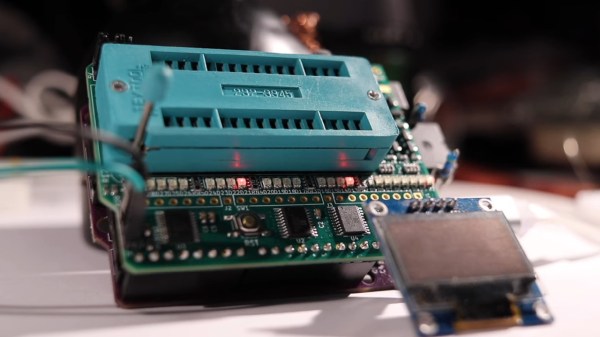
The ROM programmer on display, with an OLED screen attached

Relatively Universal ROM Programmer Makes Retro Tech Hacking Accessible

There’s treasures hidden in old technology, and you deserve to be able to revive it. Whether it’s old personal computer platforms, vending machines, robot arms, or educational kits based on retro platforms, you will need to work with parallel EEPROM chips at some point. [Anders Nielsen] was about to do just that, when he found out that a TL866, a commonly used programmer kit for such ROMs, would cost entire $70 – significantly raising the budget of any parallel ROM-involving hacking. After months of work, he is happy to bring us a project – the Relatively Universal ROM Programmer, an open-source parallel ROM programmer board that you can easily assemble or buy.

Designed in the Arduino shield format, there’s a lot of care and love put into making this board as universal as reasonably possible, so that it fits any of the old flash chips you might want to flash – whether it’s an old UV-erasable ROM that wants a voltage up to 30 V to be written, or the newer 5 V-friendly chips. You can use ICs with pin count from 24 to 32 pins, it’s straightforward to use a ZIF socket with this board, there’s LED indication and silkscreen markings so that you can see and tweak the programming process, and it’s masterfully optimized for automated assembly.

You can breadboard this programmer platform as we’ve previously covered, you can assemble our own boards using the open-source files, and if you don’t want to do either, you can buy the assembled boards from [Anders Nielsen] too! The software is currently work in progress, since that’s part of the secret sauce that makes the $70 programmers tick. You do need to adjust the programming voltage manually, but that can be later improved with a small hardware fix. In total, if you just want to program a few ROM chips, this board saves you a fair bit of money.

Continue reading “Relatively Universal ROM Programmer Makes Retro Tech Hacking Accessible”

A Low-Cost ROM Programmer With An AI Twist

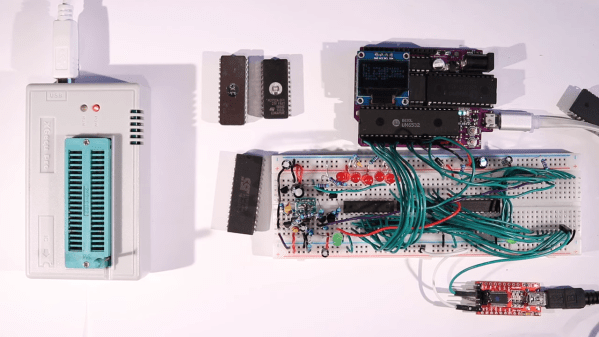
There are 0x10 ways to look at ROM programmers: they’re either relatively low-cost tools that let you quickly get about the business of programming vintage ROMs and get back to your retrocomputing activities, or they’re egregiously overpriced on a per-use basis. [Anders Nielsen] seems to land in the latter camp, firmly enough that he not only designed a dedicated ROM programmer for his 65uino ecosystem, but also suffered the indignities of enlisting ChatGPT to “help” him program the thing.

We’ll explain. [Anders]’ 65uino project has been going on for a while, with low-cost ROM programming only the latest effort. To his way of thinking, a $60 or $70 programmer might just be a significant barrier to those trying to break into retrocomputing, and besides, he seems to be more about the journey than the destination. He recently tackled the problem of generating the right programming voltages; here he turns his attention to putting that to work programming vintage ROMs like the W27C512.

Doing so with a 6502-based Arduino-compatible microcontroller requires some silicon calisthenics, including a trio of shift registers to do the addressing using a minimum of GPIO. As for the ChatGPT part, [Anders] thought asking the chatbot to help write some of the code would be a great way to increase his productivity. We thought so too, at least once, and like us, [Anders] concluded that while perhaps helpful in a broad sense, the amount of work you put into checking a chatbot’s work probably exceeds the work saved. But no matter, because in the end the code and the hardware came together to create a prototype ROM programmer for only about $10 worth of parts.

True, the resulting circuit is a bit complex, at least on a breadboard. It should clean up nicely for an eventual PCB version, though, one that plugs right into the 65uino board or even other microcontrollers. Either way, it could make creating custom ROMs for the 65uino a little more accessible.

Continue reading “A Low-Cost ROM Programmer With An AI Twist”

Saving PIC Microcontrollers With DIY Programmer

When working on a project, plenty of us will reach for an Atmel microcontroller because of the widespread prevalence of the Arduino platform. A few hackers would opt for a bit more modern part like an ESP32. But these Arduino-compatible platforms are far from the only microcontrollers available. The flash-based PIC family of microcontrollers is another popular choice. Since they aren’t quite as beginner or user-friendly, setting up a programmer for them is not as straightforward. [Tahmid] needed to program some old PIC microcontrollers and found the Pi Pico to be an ideal programmer.

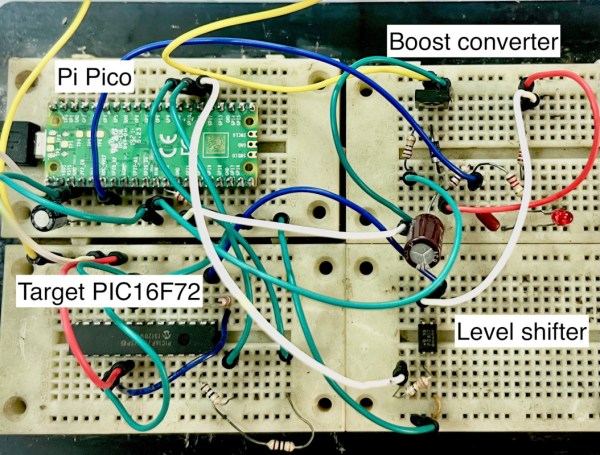
The reason for reaching for the Pico in the first place was that [Tahmid] had rediscovered these decade-old microcontrollers in a parts bin but couldn’t find the original programmer. Thanks to advances in technology in the last ten years, including the advent of micropython, the Pico turned out to be the ideal programmer. Micropython also enables a fairly simple drag-and-drop way of sending the .hex file to the PIC, so the only thing the software has to do is detect the PIC, erase it, and flash the .hex file. The only physical limitation is that the voltages needed for the PIC are much higher than the Pico can offer, but this problem is easily solved with a boost converter (controlled by the Pico) and a level shifter.

[Tahmid] notes that there’s plenty of room for speed and performance optimization, since this project optimized development time instead. He also notes that since the software side is relatively simple, it could be used for other microcontrollers as well. To this end, he made the code available on his GitHub page. Even if you’re more familiar with the Arduino platform, though, there’s more than one way to program a microcontroller like this project which uses the Scratch language to program an ESP32.

Switching Converter For EEPROM Programmer Taxes Solderless Breadboard

We all know that solderless breadboards have their limitations. All that stray capacitance can play hell with circuits, especially high-speed stuff, but they’re so darn useful that avoiding them in favor of some other prototyping method can be really hard. So we often just forge ahead, plugging in our parts and hoping for the best

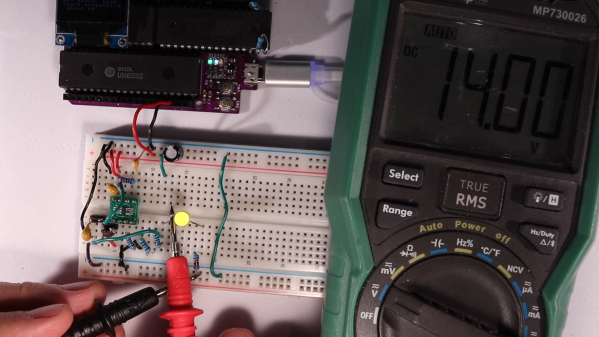
A recent veteran of the breadboard battle is [Anders Nielsen], who kicked off a new project by prototyping this high-voltage boost converter on a breadboard, with mixed results. The project is a scratch-built programmer for old-school ROM chips, a task normally farmed out to a dedicated programmer, but where’s the sport in that? Besides, this is the future, and generating the 12 to 14 volts needed should be a snap. And it would be, except for the fact that his chosen chip, a MIC2288 switching boost regulator, is only available in an SMD package. Getting the chip and a few other SMD support components onto breadboard-compatible breakouts proved to be challenging, and getting it working once it was there was even more work.

A lot of the trouble was down to simple breadboarding errors, but the big problem was the input capacitance, which [Anders] had to fiddle with quite a bit to get the converter to 14 volts. The current maxes out at about 25 mA before the voltage starts dropping, which just might be enough to burn those old chips, so we’ll call this a provisional win and see what happens when he builds the rest of the programmer.

[Anders]’ experience here raises a good question: what’s the best way to prototype using fussy SMD components? PCBs are cheap enough that it’s tempting to go straight to one, but swapping parts in and out like he had to do here to get everything just right would be much harder that way. We’re not sure we know the answer, but we’re pretty sure we’ll hear your thoughts on that in the comments section.

Continue reading “Switching Converter For EEPROM Programmer Taxes Solderless Breadboard”