Tiny Websites Have No Server

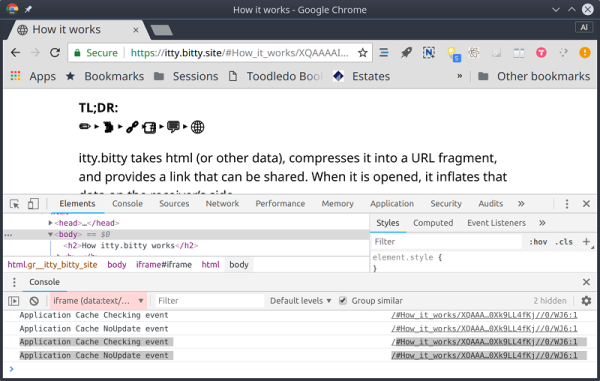
A big trend in web services right now is the so-called serverless computing, such as Amazon’s Lambda service. The idea is you don’t have a dedicated server waiting for requests for a specific purpose. Instead, you have one server (such as Amazon’s) listening for lots of requests and on demand, you spin up an environment to process that request. Conceptually, it lets you run a bit of Javascript or some other language “in the cloud” with no dedicated server.  https://itty.bitty.site takes this one step farther. The site creates self-contained websites where the content is encoded in the URL itself.

Probably the best example is to simply go to the site and click on “About itty bitty.” That page is itself encoded in its own URL. If you then click on the App link, you’ll see a calculator, showing that this isn’t just for snippets of text. While this does depend on the itty.bitty.site web host to provide the decoding framework, the decoding is done totally in your browser and the code is open source. What that means is you could host it on your own server, if you wanted to.

At first, this seems like a novelty until you start thinking about it. A small computer with an Internet connection could easily formulate these URLs to create web pages. A bigger computer could even host the itty.bitty server. Then there’s the privacy issue. At first, we were thinking that a page like this would be hard to censor since there is no centralized server with the content. But you still need the decoding framework. However, that wouldn’t stop a sophisticated user from “redirecting” to another — maybe private — decoding website and reading the page regardless of anyone’s disapproval of the content.


Continue reading “Tiny Websites Have No Server”

Keep It Close: A Private Git Server Crash Course

At this point, everyone has already heard that Microsoft is buying GitHub. Acquisitions of this scale take time, but most expect everything to be official by 2019. The general opinion online seems to be one of unease, and rightfully so. Even if we ignore Microsoft’s history of shady practices, there’s always an element of unease when somebody new takes over something you love. Sometimes it ends up being beneficial, the beginning of a new and better era. But sometimes…

Let’s not dwell on what might become of GitHub. While GitHub is the most popular web-based interface for Git, it’s not the only one. For example GitLab, a fully open source competitor to GitHub, is reporting record numbers of new repositories being created after word of the Microsoft buyout was confirmed. But even GitLab, while certainly worth checking out in these uncertain times, might be more than you strictly need.

Let’s be realistic. Most of the software projects hackers work on don’t need even half the features that GitHub/GitLab offer. Whether you’ve simply got a private project you want to maintain revisions of, or you’re working with a small group collaboratively in a hackerspace setting, you don’t need anything that isn’t already provided by the core Git software.

Let’s take a look at how quickly and easily you can setup a private Git server for you and your colleagues without having to worry about Microsoft (or anyone else) having their fingers around your code.

Continue reading “Keep It Close: A Private Git Server Crash Course”

Memcached Servers Abused For DDoS Attacks

Cloudflare announced recently that they are seeing an increase in amplification attacks using memcached servers, and that this exploit has the potential to be a big problem because memcached is capable of amplifying an attack significantly. This takes DDoS attacks to a new level, but the good news is that the problem is confined to a few thousand misconfigured servers, and the solution is to put the servers behind a tighter firewall and to disable UDP. What’s interesting is how the fundamental workings of the Internet are exploited to create and direct a massive amount of traffic.

We start with a botnet. This is when a bunch of Internet-connected devices are compromised and controlled by a malicious user. This could be a set of specific brand of web camera or printer or computer with unsecured firmware. Once the device is compromised, the malicious user can control the botnet and have it execute code. This code could mine cryptocurrency, upload sensitive data, or create a lot of web traffic directed at a particular server, flooding it with requests and creating a distributed denial of service (DDoS) attack that takes down the server. Since the server can’t distinguish regular traffic from malicious traffic, it can’t filter it out and becomes unresponsive.

This DDoS attack is limited to the size of the botnet’s bandwidth, though. If all the web cameras in the botnet are pounding a server as fast as they can, the botnet has reached its max. The next trick is called an amplification attack, and it exploits UDP. UDP (as opposed to TCP) is like the early post office; you send mail and hope it gets there, and if it doesn’t then oh well. There’s no handshaking between communicating computers. When a device sends a UDP packet to a server, it includes the return address so that the server can send the response back. If the device sends a carefully crafted fake request with a different return address, then the server will send the response to that spoofed return address.

So if the web camera sends a request to Server A and the response is sent to Server B, then Server A is unintentionally attacking Server B. If the request is the same size as the response, then there’s no benefit to this attack. If the request is smaller than the response, and Server A sends Server B a bunch of unrequested data for every request from the camera, then you have a successful amplification attack. In the case of memcached, traffic can be amplified by more than 50,000 times, meaning that a small botnet can have a huge effect.

Memcached is a memory caching system whose primary use is to help large websites by caching data that would otherwise be stored in a database or API, so it really shouldn’t be publicly accessible anyway.  And the solution is to turn off public-facing memcached over UDP, but the larger solution is to think about what things you are making available to the Internet, and how they can be used maliciously.

Sound Isolated Server Rack

Servers are most often found in climate controlled data centers. This means they aren’t exactly built for creature comforts like quiet operation. Quite the contrary — many server chassis include fans which absolutely scream when the machine is under load. [Whiskykilo] needed to set up a 12 U rack in his basement for working from home. He knew the sound would get on anyone’s nerves, but especially on those of his wife.

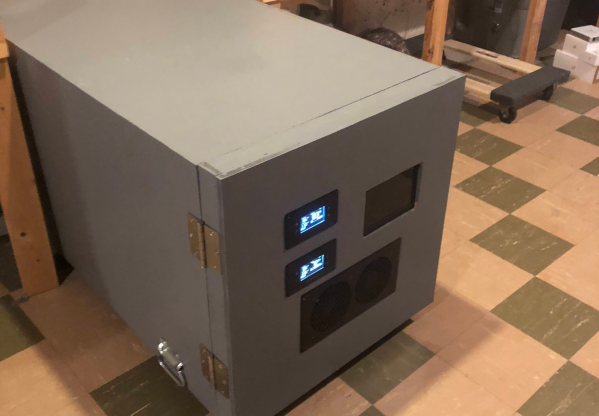
To solve this problem, he built a sound isolated rack. The build started with a standard 12 U metal rack frame. This is wrapped in 1/2″ MDF coated with automotive sound deadening material. An outer frame built of 1×4 lumber and another layer of 1/2″ MDF. Isolating the inner and outer boxes made the biggest contribution to quieting down the noisy servers.

Computers need to breathe, so the front and back doors of the rack enclosure include banks of intake and exhaust fans to keep air flowing through the servers. Two AC Infinity controllers keep the fans operating and monitor temperature. These machines do generate some heat – so 64 °F (18C) intake and 81 °F (27C) exhaust is not unheard of. The servers don’t seem to mind running at these temperatures. A Raspberry Pi 3 keeps an eye on UPS operation and displays the data on a 7″ HDMI LCD.

Interested in running a server at home? You don’t have to go to the lumberyard – check out this server made with Ikea components, or this server built from 96 MacBook Pros.

Home Server Has AMD CPU And IKEA Case

Readers who took part in the glory days of custom PC building will no doubt remember the stress of having to pick a case for their carefully-curated build. You may have wanted to lower the total cost a bit by getting a cheap case, but then you’d be stuck looking at some econo-box day in and day out. Plus, how do you post pictures online to boast about your latest build if there are no transparent windows and a lighting kit?

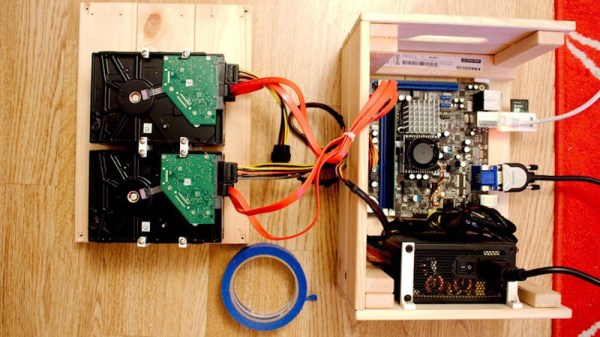
While some may have spent more time choosing their lighted case fans than their optical drive, [Miroslav Prašil] was surely not one of them. When he decided to build a new NAS for his home network, [Miroslav] decided he wanted to put all his money into the device’s internals, and house his build in a wooden storage crate from IKEA. While the low cost was certainly a major factor in the decision, it turns out the crate actually offers a decent amount of room for hardware components. As an added bonus, it doesn’t look completely terrible sitting out in the living room.

In a detailed series of posts on his blog, [Miroslav] walks us through the entire process of building what he has come to call the “NAScrate”. Wanting gigabit Ethernet and a real SATA controller, [Miroslav] went for the ASRock C70M1, a Mini-ITX board with integrated dual-core AMD processor. While not exactly a powerhouse, it will certainly wipe the floor with the fruit-inspired single board computers that so often dominate these types of builds.

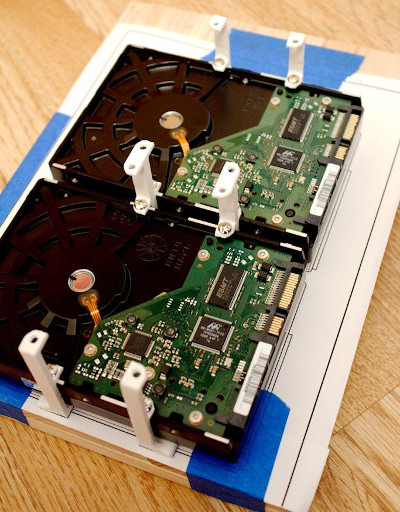
To get his clearances worked out, [Miroslav] rendered the entire build in OnShape, which gave him enough confidence in his design to move on to actual construction. The build involves several 3D printed parts, most notably some clever hard drive mounting brackets which allow the drives to be stacked into a space-saving arrangement while still leaving room for airflow between them.

[Miroslav] deftly avoids any religious debates by leaving off his particular choice for software and operating system on his newly constructed NAS, but he does mention that something like FreeNAS would be a logical choice.

While this may be the first wooden one we’ve covered so far, home servers in general are a favorite project for hackers, from budget-friendly scratch builds all the way up to re-purposed enterprise hardware.

Repurposing Moving Coil Meters To Monitor Server Performance

Snazzy analog meters can lend a retro flair to almost any project, but these days they often seem to be retasked as indicators for completely different purposes than originally intended. That’s true for these Vu meters repurposed as gauges for a Raspberry Pi server, and we think the build log is as informative as the finished product is good-looking.

As [MrWunderbar] admits, the dancing needles of moving-coil meters lend hipster cred to a project, but getting his Vu meters to cooperate and display network utilization and disk I/O on his Raspberry Pi NAS server was no mean feat. His build log is full of nice details on how to measure the internal resistance of the meter and determine a proper series resistor. He also has a lengthy discussion of the relative merits of driving the meters using a PWM signal or using a DAC; in the end, [MrWunderbar] chose to go the DAC route, and the video below shows the desired rapid but smooth swings as disk and network usage change. He also goes into great depth on pulling usage parameters from psutil and parsing the results for display on the meters.

Looking for more analog meter goodness? We saw a similar CPU load meter a few months back, and there was this mash-up of Nixies and old meters for a solar energy CEO’s desk.

Continue reading “Repurposing Moving Coil Meters To Monitor Server Performance”

An Android Phone Makes A Better Server Than You’d Think

There was a time a few years ago when the first Android phones made it to market, that they seemed full of promise as general purpose computers. Android is sort of Linux, right, or so the story went, so of course you must be able to run Linux on an Android phone and do all sorts of cool stuff with it.

As anyone who tried to root an Android phone from 2010 will tell you, it was a painful and unrewarding process. There was normally a convoluted rooting process followed by somehow squeezing your own Linux filesystem tree onto the device, then chroot-ing into it. You’d then have to set up a VNC server and VNC into it, and eventually you’d feel immensely proud of your very slow tiny-screen Linux desktop that you’d slaved over creating. It was one of those things that’s simple in theory, but extremely convoluted in practice.

But six years have passed since those days, phones have gotten much faster and so has the software for tasks such as rooting, so maybe it’s time to return to the topic of Linux on an Android device. [Pete Scargill] gave it a try when a friend gave him a Chinese quad-core Android phone with a broken screen. He proceeded to put a Debian installation on it, upon which he runs his collection of server processes.

Rooting the phone was straightforward process using the KingRoot app, a sideloaded version as it seems there’s a bogus copy on the Play Store. Then bringing a Linux system to it could be achieved with the LinuxDeploy app. The result is surprisingly useful, after some installation steps upon which he goes into detail.

You might ask what would be the point of this exercise, given that you can do the same thing much more easily with a single board computer such as a Raspberry Pi. But to buy a Pi, SD card, screen, and UPS, as he points out you’d have to spend a lot more than you would for a second-hand phone from eBay — or a free, slightly broken, one from friends or family.

If getting more from your Android phone is your thing, perhaps you’d like to know about installing Busybox on it. We’ve also advocated for using old Android phones for ARM dev.