Art of 3D printer in the middle of printing a Hackaday Jolly Wrencher logo

3D Printering: The Things Printers (Don’t) Do

3D printers are amazing things, but if one judges solely by the successes that get showcased online, it can look as through anything at all is possible. Yet in many ways, 3D printers are actually quite limited. Because success looks easy and no one showcases failure, people can end up with lopsided ideas of what is realistic. This isn’t surprising; behind every shining 3D print that pushes the boundaries of the technology, there are misprints and test pieces piled just out of sight.

If you have ever considered getting into 3D printing, or are wondering what kinds of expectations are realistic, read on because I am going to explain where objects come from, and how to recognize whether something is a good (or bad) fit for 3D printing. The important thing to understand is that printers have limitations, and to get a working idea of what those limitations are. The result will be a better understanding of what they can do, and what problems they can reliably solve.

3D Printers Have Limits

I recently had a talk with someone who wanted to know if a 3D printer could help with a problem they had. As I listened to them describe their needs, I realized I had in a way heard it all before many times.

My colleague actually had a fairly good idea of what printers could do, in theory. But they had very little grasp of what printers did not do, and that disconnect left them a bit adrift when it came to practical applications. To help address this gap, here are some tips that can give anyone a working understanding of the things 3D printers do not do well. Continue reading “3D Printering: The Things Printers (Don’t) Do”

Automatic Winder Takes The Drudgery Out Of Tesla Coil Builds

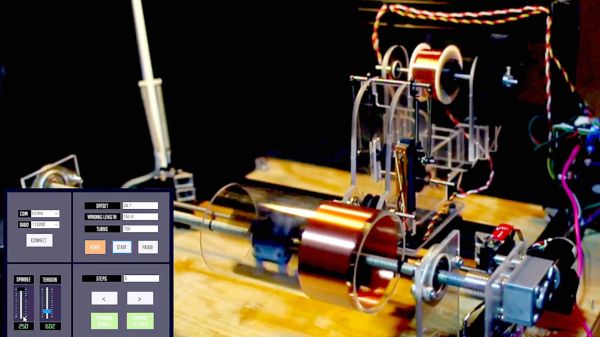
What is it about coil winding automation projects that’s just so captivating? Maybe it’s knowing what a labor saver they can be once you’ve got a few manually wound coils under your belt. Or perhaps it’s just the generally satisfying nature of any machine that does an exacting task smoothly and precisely. Whatever it is, this automatic Tesla coil winder has it in abundance.

According to [aa-epilectrik]’s account, the back story of this build is that while musical Tesla coils are a big part of the performance of musical group ArcAttack, they’re also cool enough in their own right to offer DIY kits for sale. This rig takes on the job of producing the coils, which at least takes some of the drudgery out of the build. There’s no build log, but there are enough details on reddit and Instagram to work out the basics. The main spindle is driven by a gearmotor while the winding carriage translates along a linear slide thanks to a stepper-driven lead screw. The spool holding the fine magnet wire needs to hold proper tension to prevent tangling; this is achieved through by applying some torque to the spool with a small DC motor.

There are some great design elements in this one, not least being the way tension is controlled by measuring the movement of an idler pulley using a linear pot. At top speed, the machine looks like it complete a coil in just about three minutes, which seems pretty reasonable with such neat results. Another interesting point: ArcAttack numbers [Anouk Wipprecht], whom we’ve featured a couple of times on these pages, among its collaborators. Small world.

Continue reading “Automatic Winder Takes The Drudgery Out Of Tesla Coil Builds”

Vectron Adds Basic And Christmas Tree Control

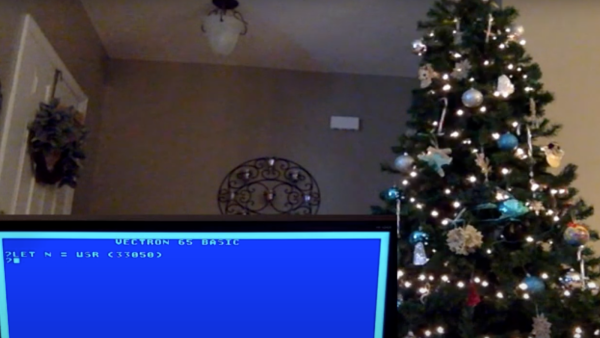
Not content to leave things alone, [Nick Bild] has updated his nearly practical breadboard 6502 Vectron project once again by adding Tiny Basic and home tree automation. Instead of using an LCD module like last time, or his custom-built VGA output using 7400-series logic, [Nick] chose to go modern this time and implemented a VGA output using a TinyFPGA BX.

Tiny Basic was one of the first versions of Basic released after Bill Gates famous open letter to hobbyists in 1976. While Altair Basic was selling for $150, Tom Pittman wrote Tiny Basic for the 6800 and sold it for only $5 (don’t worry, Tom has since made it free to use). We got a kick out of browsing the Tiny Basic manual and learning that our serial number can be found on the paper tape leader, and that a Teletype will generally receive one more character, at least, after getting the X-OFF control signal.

In the video, you can see [Nick] running a short Basic program and operating his Christmas tree lights from the Vectron, although it’s only on-off control. He suggests that a PCB version is in the works, but he’s having trouble deciding when to quit adding features.  That’s a conundrum we know all too well.

Continue reading “Vectron Adds Basic And Christmas Tree Control”

Gyroscope Level Is Digital

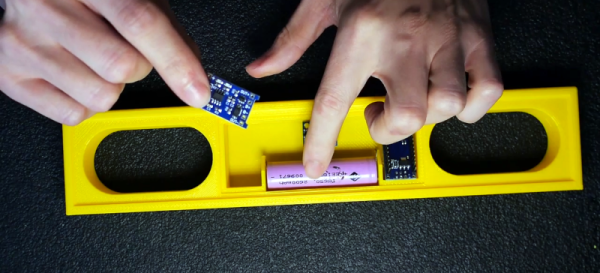
A spirit level, you know the kind of level with a little bubble in a tube of fluid, is a basic construction tool. [DesignBuildDestroy] took an Arduino, a gyroscope chip, and an OLED, and made a 3D printed level with no bubble, but it does have a nice digital display.

It is funny when you realize that at one time a gyroscope was a high tech item reserved for missiles and aircraft. Now you can grab a six-axis sensor for pennies. Even, better, the code used in the project can offload the Arduino for a lot of processing.

Continue reading “Gyroscope Level Is Digital”

DIY High Voltage Kirlian Photography Rig

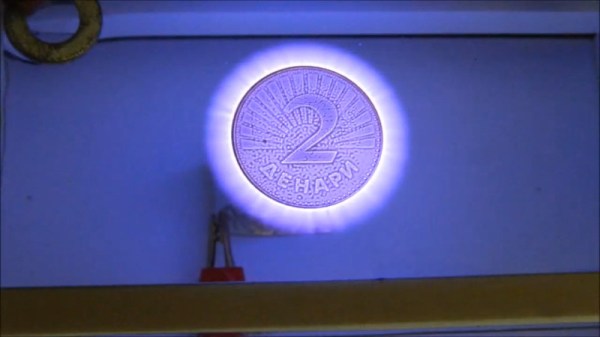
High voltage is a fun, if dangerous, thing to play with. [Mirko] is an enthusiast in this space, and built a high-voltage Kirlian photography device that’s capable of creating some stunning images.

The construction of the device itself is basic. High-frequency, high-voltage electricity is connected to a metal object placed on one side of a glass plate. On the other side, salt water is pooled, and connected to a second electrode. This creates a transparent window through which the electrical discharge can be viewed either by eye or with a digital camera. Historically, this was done with photographic film in place of the transparent window, but the principle is the same.

Popular in the paranormal and alternative medicine spaces, the actual scientific application of Kirlian photography is minimal. Rather, it’s an interesting way to explore high voltages that creates some pretty results! If you find yourself becoming a fan of high voltage, you might also consider your own Tesla coil build, too. Video after the break.

Continue reading “DIY High Voltage Kirlian Photography Rig”

Hackaday Links Column Banner

Hackaday Links: November 15, 2020

Now that we drive around cars that are more like mobile data centers than simple transportation, there’s a wealth of data to be harvested when the inevitable crashes occur. After a recent Tesla crash on a California highway, a security researcher got a hold of the car’s “black box” and extracted some terrifying insights into just how bad a car crash can be. The interesting bit is the view of the crash from the Tesla’s forward-facing cameras with object detection overlays. Putting aside the fact that the driver of this car was accelerating up to the moment it rear-ended the hapless Honda with a closing speed of 63 MPH (101 km/h), the update speeds on the bounding boxes and lane sensing are incredible. The author of the article uses this as an object lesson in why Level 2 self-driving is a bad idea, and while I agree with that premise, the fact that self-driving had been disabled 40 seconds before the driver plowed into the Honda seems to make that argument moot. Tech or not, someone this unskilled or impaired was going to have an accident eventually, and it was just bad luck for the other driver.

Last week I shared a link to Scan the World, an effort to 3D-scan and preserve culturally significant artifacts and create a virtual museum. Shortly after the article ran we got an email from Elisa at Scan the World announcing their “Unlocking Lockdown” competition, which encourages people to scan cultural artifacts and treasures directly from their home. You may not have a Ming Dynasty vase or a Grecian urn on display in your parlor, but you’ve probably got family heirlooms, knick-knacks, and other tchotchkes that should be preserved. Take a look around and scan something for posterity. And I want to thank Elisa for the link to the Pompeiian bread that I mentioned.

The Defense Advanced Research Projects Agency (DARPA)has been running an interesting challenge for the last couple of years: The Subterranean (SubT) Challenge. The goal is to discover new ways to operate autonomously below the surface of the Earth, whether for mining, search and rescue, or warfare applications. They’ve been running different circuits to simulate various underground environments, with the most recent circuit being a cave course back in October. On Tuesday November 17, DARPA will webcast the competition, which features 16 teams and their autonomous search for artifacts in a virtual cave. It could make for interesting viewing.

If underground adventures don’t do it for you, how about going upstairs? LeoLabs, a California-based company that specializes in providing information about satellites, has a fascinating visualization of the planet’s satellite constellation. It’s sort of Google Earth but with the details focused on low-earth orbit. You can fly around the planet and watch the satellites whiz by or even pick out the hundreds of spent upper-stage rockets still up there. You can lock onto a specific satellite, watch for near-misses, or even turn on a layer for space debris, which honestly just turns the display into a purple miasma of orbiting junk. The best bit, though, is the easily discerned samba-lines of newly launched Starlink satellites.

A doorbell used to be a pretty simple device, but like many things, they’ve taken on added complexity. And danger, it appears, as Amazon Ring doorbell users are reporting their new gadgets going up in flame upon installation. The problem stems from installers confusing the screws supplied with the unit. The longer wood screws are intended to mount the device to the wall, while a shorter security screw secures the battery cover. Mix the two up for whatever reason, and the sharp point of the mounting screw can find the LiPo battery within, with predictable results.

And finally, it may be the shittiest of shitty robots: a monstrous robotic wolf intended to scare away wild bears. It seems the Japanese town of Takikawa has been having a problem with bears lately, so they deployed a pair of these improbable looking creatures to protect themselves. It’s hard to say what’s the best feature: the flashing LED eyes, the strobe light tail, the fact that the whole thing floats in the air atop a pole. Whatever it is, it seems to work on bears, which is probably good enough. Take a look in the video below the break.

Continue reading “Hackaday Links: November 15, 2020”

A Microwave Repair Even Mechanical Keyboard Fans Will Love

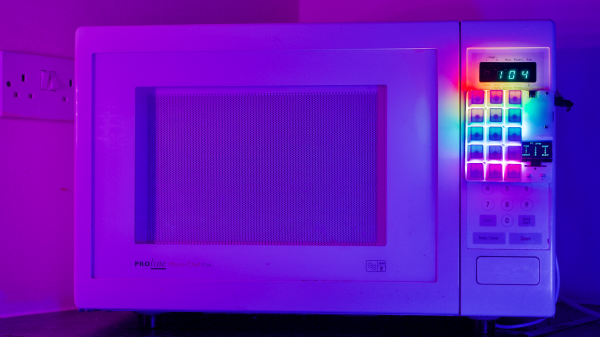
Microwave oven design and manufacturing have been optimized to the point where the once-expensive appliances are now nearly disposable. Despite the economics, though, some people can’t resist fixing stuff, especially when you get a chance to do it in style. Thus we present this microwave repair with its wholly unnecessary yet fabulous adornments.

The beginning of the end for [dekuNukem]’s dirt cheap second-hand microwave started where many of the appliances begin to fail first — the membrane keyboard. Unable to press the buttons reliably anymore, [dekuNukem] worked out the original keypad’s matrix wiring arrangement and whipped up a little keypad from some pushbutton switches and a scrap of perfboard. Wired into the main PCB, it was an effective and cheap solution, if a bit on the artless side.

To perk things up a bit, [dekuNukem] turned to duckyPad, a hot-swappable macropad with mechanical switches and, of course, RGB LEDs. Things got interesting from here; since duckyPad outputs serial data, an adapater was needed inside the microwave. An STM32 microcontroller and a pair of ADG714 analog switches did the trick, with power pulled from the original PCB.

The finished repair is pretty flashy, and [dekuNukem] now has the only microwave in the world with a clicky keypad. And what’s more, it works.

Continue reading “A Microwave Repair Even Mechanical Keyboard Fans Will Love”