Global Radio Direction Finding In Your Browser

Radio direction finding is one of those things that most Hackaday readers are likely to be familiar with at least on a conceptual level, but probably without much first-hand experience. After all it’s not everyday that you need to track down a rogue signal, let alone have access to the infrastructure necessary to triangulate its position. But thanks to the wonders of the Internet, at least the latter excuse is now a bit less valid.

Triangulated location of “The Buzzer”

The RTL-SDR Blog has run a very interesting article wherein they describe how the global network of Internet-connected KiwiSDR radios can be used for worldwide radio direction finding. If you’ve got a target in mind, and the time to fiddle around with the web-based SDR user interface, you now have access to the kind of technology that’s usually reserved for world superpowers. Indeed, the blog post claims this is the first time such capability has been put in the hands of the unwashed masses. Let’s try not to mess this up.

To start with, you should have a rough idea of where the signal is originating from. It doesn’t have to be exact, but you want to at least know which country to look in. Then you pick one of the nearby public KiwiSDR stations and tune the frequency you’re after. Repeat the process for a few more stations. In theory the more stations you have the better, but technically three should be enough to get you pretty close.

With your receiving stations selected, the system will then start Time Difference of Arrival (TDoA) sampling. This technique compares the time the signal arrives at each station in relation to the KiwiSDR’s GPS synchronized clock. With enough of this data from multiple stations, it can estimate the origin of the signal based on how long it takes to reach different parts of the globe.

It’s not perfect, but it’s pretty impressive for a community run project. The blog post goes on to give examples of both known and unknown signals they were able to triangulate with surprising accuracy: from the US Navy’s VLF submarine transmitter in Seattle, Washington to the mysterious “Buzzer” number station hidden somewhere in Russia.

We’ve covered small-scale triangulation using Wi-Fi, and even a project that aimed to use drones to home in on rescue beacons, but the scale of the KiwiSDR TDoA system is really on a whole new level. Use it wisely.
Replace Old Electrolytics? Not So Fast… Maybe

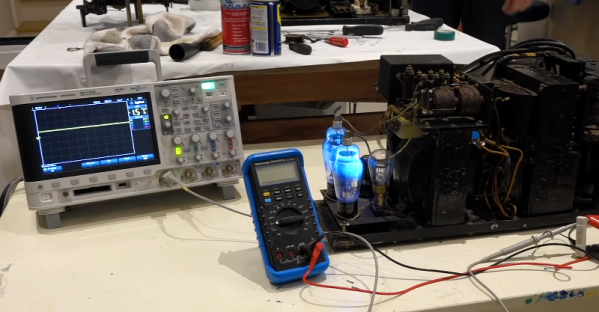
[CuriousMarc] was restoring an old Model 19 TeleType. The design for these dates back to the 1930s, and they are built like tanks (well, except for the ones built during the war with parts using cheaper metals like zinc). Along the way, he restored a hefty tube-based power supply that had two very large electrolytic capacitors. These dated from the 1950s, and common wisdom says you should always replace old electrolytics because they don’t age well and could damage the assembly if powered up. [Marc] didn’t agree with common wisdom, and he made a video to defend his assertion which you can see below.

If you look at the construction of electrolytic capacitors, one plate of the capacitor is actually a thin layer that is formed electrically. In some cases, a capacitor with this plate is damaged can be reformed either by deliberate application of a constant current or possibly even just in normal operation.

Continue reading “Replace Old Electrolytics? Not So Fast… Maybe”

3D Printer Guardian Watches For Worst-case Failures

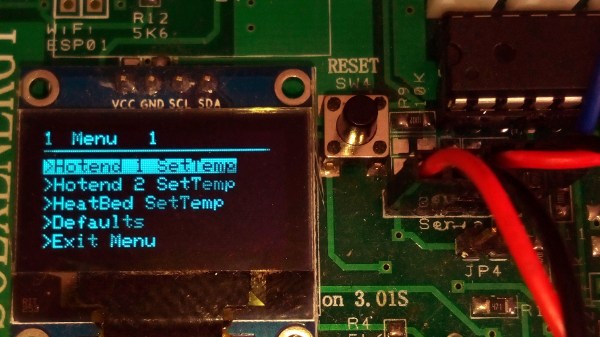
Some devices have one job to do, but that job can have many facets. To [jmcservv], an example of this is the job of protecting against worst-case failures in a 3D printer, and it led him to develop the 3D Printer Watchdog Guardian. When it comes to fire, secondary protection is the name of the game because it’s one thing to detect thermal runaway and turn off a heater, but what if that isn’t enough? The MOSFET controlling the heater could have failed closed and can no longer be turned off in a normal sense. In such cases, some kind of backup is needed. Of course, a protection system should also notify an operator of any serious problem, but what’s the best way to do that? These are the kinds of issues that [jmcservv] is working to address with his watchdog, which not only keeps a careful eye on any heating elements in the system, but can take a variety of actions as a result.

Some outcomes (like fire) are bad enough that it’s worth the extra work and cost of additional protection, and that’s the thinking that has led [jmcservv] to submit his watchdog system for The Hackaday Prize.

Review: SMD Tweezer Meter Or Tweezer Probes For Your Multimeter?

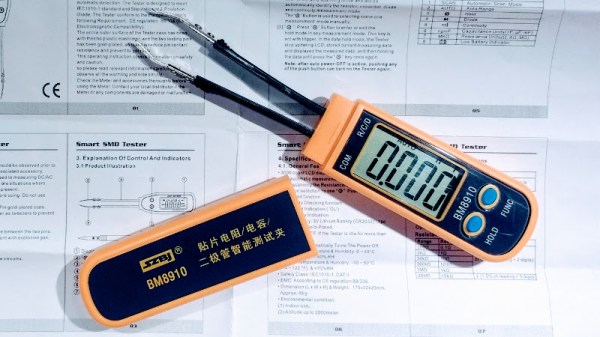
It’s remarkable how tiny electronics have become. Heaven knows what an old-timer whose experience started with tubes must think, to go from solder tags to SMD in a lifetime is some journey. Even  the generation that started with discrete transistors has lived through an incredible shift. But it’s true, SMD components are tiny, and that presents a challenge aside from the one you’ll face when soldering them. Identifying and measuring the value of a chip component too small to have any writing upon it becomes almost impossible with a pair of standard test probes.

Happily the test equipment manufacturers have risen to the challenge, and produced all sorts of meters designed for SMD work that have a pair of tweezers instead of test prods. When I was looking for one I did my usual thing when it comes to Hackaday reviews. I looked at the budget end of the market, and bought an inexpensive Chinese model for about £16($21). And since I was browsing tweezers I couldn’t resist adding another purchase to my order. I found a pair of tweezer test probes for my multimeter which cost me just over a pound ($1.30) and would provide a useful comparison. For working with SMD components in situ, do you even need the special meter?

Continue reading “Review: SMD Tweezer Meter Or Tweezer Probes For Your Multimeter?”

Human-Computer Interface Challenge: Change How We Interact With Computers, Win Prizes

Pay no attention to the man behind the curtain. It’s a quote from the Wizard of Oz but also an interesting way to look at our interactions with electronics. The most natural interactions free us from thinking about the ones and zeros behind them. Your next challenge is to build an innovative interface for humans to talk to machines and machines to talk to humans. This is the Human-Computer Interface Challenge!

The Next Gen of HCI

A Human-Computer Interface (or HCI) is what we use to control computers and what they use to control us get information to us. HCIs have been evolving since the beginning. The most recent breakthroughs include touchscreens and natural-language voice interaction. But HCI goes beyond the obvious. The Nest thermostat used a novel approach to learning your habits by observing times and days that people are near it, and when the temperature setting is changed. This sort of behavior feels more like the future than having to program specific times for temperature control adjustments. But of course we need to go much further.
You don’t need to start from scratch. There are all kinds of great technologies out there offering APIs that let you harness voice commands, recognize gestures, and build on existing data sets. There are chips that make touch sensing a breeze, and open source software suites that let you get up and running with computer vision. The important thing is the idea: find something that should feel more intuitive, more fun, and more natural.

The Best Interfaces Have Yet to Be Dreamed Up

No HCI is too simple; a subtle cue that makes sure you don’t miss garbage collection day can make your day. Of course no idea is too complex; who among you will work on a well-spoken personal assistant that puts Jarvis to shame? We just saw that computers sound just like people if you only tell them to make random pauses while speaking. There’s a ton of low-hanging fruit in this field waiting to be discovered.

An HCI can be in an unexpected place, or leverage interactions not yet widely used like olfactory or galvanic responses.  A good example of this is the Medium Machine which is pictured above. It stimulates the muscles in your forearm, causing your finger to press the button. The application is up to you, and we really like it that Peter mentions that Medium Machine reaches for something that wouldn’t normally come to mind when you think about these interfaces; something that hasn’t been dreamed up yet. Get creative, get silly, have some fun, and show us how technology can be a copilot and not a dimwitted sidekick.

You have until August 27th to put your entry up on Hackaday.io. The top twenty entries will each get $1,000 and go on to the finals where cash prizes of $50,000, $20,000, $15,000, $10,000, and $5,000 await.

A Microwave Erector Set

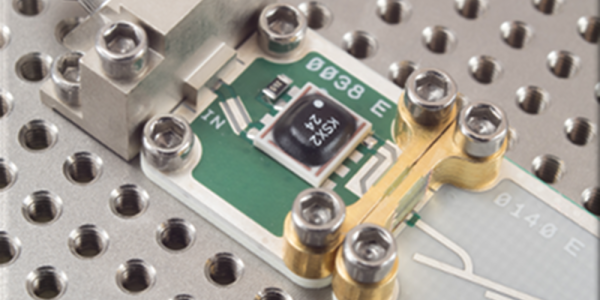
RF design isn’t always easy, especially at higher frequencies. Despite improvements in simulation tools, there’s still no substitute for prototyping and trying out different things. That wasn’t so bad when that meant nailing some nails in a piece of wood and wiring up discrete components. But at today’s microwave frequencies and with today’s IC packaging that simply doesn’t work. Solving this problem is what drives a company called X-Microwave. They have a standard grid pattern PCB for a wide range of RF circuits and accessories to tie them all together. Probably the best way to get a feel for the system is to watch the simple video below. There’s also a free simulator tool worth taking note of that you’ll see in a bit.

Before you get too excited, we’ll warn you that while this stuff is cheap if you need it, it isn’t an impulse buy. The baseboards and probes (the connectors) run from $150 to $300. You can get kits, too, but a bare-bones two-port system is going to start at about $550, which is about $100 off the component parts and includes some extras. Then you need less expensive parts to make the boxes around things if you need them. Oh. Then you also need the PCBs which are not cheap, either. Their prices vary widely as you’d expect, but — for example — we saw amplifiers as low as $80 and as high as nearly $1000. So a complete system could get pretty pricey.

Continue reading “A Microwave Erector Set”

Getting The Lead Out Of Lithium Battery Recycling

When that fateful morning comes that your car no longer roars to life with a quick twist of the key, but rather groans its displeasure at the sad state of your ride’s electrical system, your course is clear: you need a new battery. Whether you do it yourself or – perish the thought – farm out the job to someone else, the end result is the same. You get a spanking new lead-acid battery, and the old one is whisked away to be ground up and turned into a new battery in a nearly perfect closed loop system.

Contrast this to what happens to the battery in your laptop when it finally gives up the ghost. Some of us will pop the pack open, find the likely one bad cell, and either fix the pack or repurpose the good cells. But most dead lithium-based battery packs are dropped in the regular trash, or placed in blue recycling bins with the best of intentions but generally end up in the landfill anyway.

Why the difference between lead and lithium batteries? What about these two seemingly similar technologies dictates why one battery can have 98% of its material recycled, while the other is cheaper to just toss? And what are the implications down the road, when battery packs from electric vehicles start to enter the waste stream in bulk?

Continue reading “Getting The Lead Out Of Lithium Battery Recycling”